Latest KeePass plugin not compatible with current KeePass version 2.57
Latest KeePass plugin not compatible with current KeePass version 2.57

Hi,
after updating RDM to 2024.3.12.0 it told me that the KeePass-Plugin was outdated. I updated the files by extracting the "Devolutions.KeePassPlugin.2024.7.31.zip" file from C:\Program Files\Devolutions\Remote Desktop Manager\Applications to C:\Program Files\KeePass Password Safe 2\Plugins.
Now, KeePass 2.57 is displaying this error message when starting: 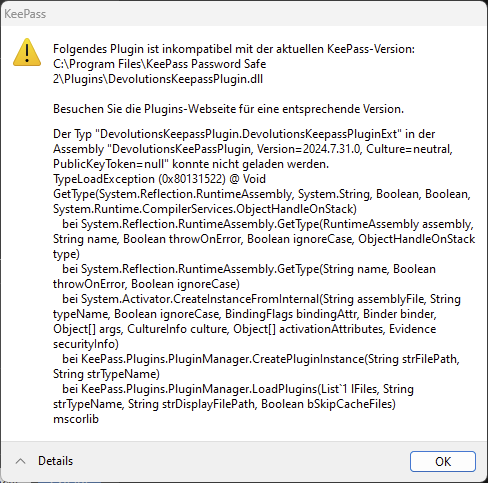
I already had a look into https://docs.devolutions.net/rdm/kb/rdm-windows/troubleshooting-articles/keepass/
The files mentioned in solution 2 are not existing in the KeePass plugins directory.
KeePass is working normally, KeePass-integration in RDM is not working. RDM tries to access it forever.
Any ideas, what's wrong?
Klaus
grafik.png
All Comments (4)
Hi klausondrich,
This issue is caused by our renaming of the main plugin file from "Keepass" to "KeePass". Keepass relies on the file name to look up information in the plugin file and this operation is case sensitive. We added a special case for this update specifically when you go through the Extensions Manager (Tools > Extensions Manager > KeePass Extension)
Unpacking the files manually instead of using RDM to update the plugin will most likely not update the casing of the file because the Windows file system is technically not case sensitive. You have 3 options here:
- Rename the file manually from "DevolutionsKeepassPlugin.dll" to "DevolutionsKeePassPlugin.dll"
- Delete the file and unpack it again if you can't use RDM to update
- Use the Extensions Manager to force update/install the plugin. This method will actually delete the file first, then unpack the plugin files.
I hope this helps. Please reach out again if this doesn't fix your issue.
Regards,
Philippe Paré
Hi Philippe,
Thank you for this hint. I just renamed "DevolutionsKeepassPlugin.dll" to "DevolutionsKeePassPlugin.dll" and everything was fine again.
And yes, I just extracted the new plugin files over the existing ones without deleting the existing ones.
Hi klausondrich,
Thank you for the clarification. I'm glad this worked for you. Is it possible for you to tell me the reason you unpack the plugin files manually? Is there something RDM could do better?
Regards,
Philippe Paré
I tried it once but it didn't work. Probably because we don't have admin permissions on our devices. Then, RDM is not allowed to install the plugin in KeePass' plugins directory.
So I did it manually when receiving the local admin password (temporary only).
It would be good if RDM and KeePass did not require admin permissions, but both install to C:\Program Files which is under control of UAC.