
Max
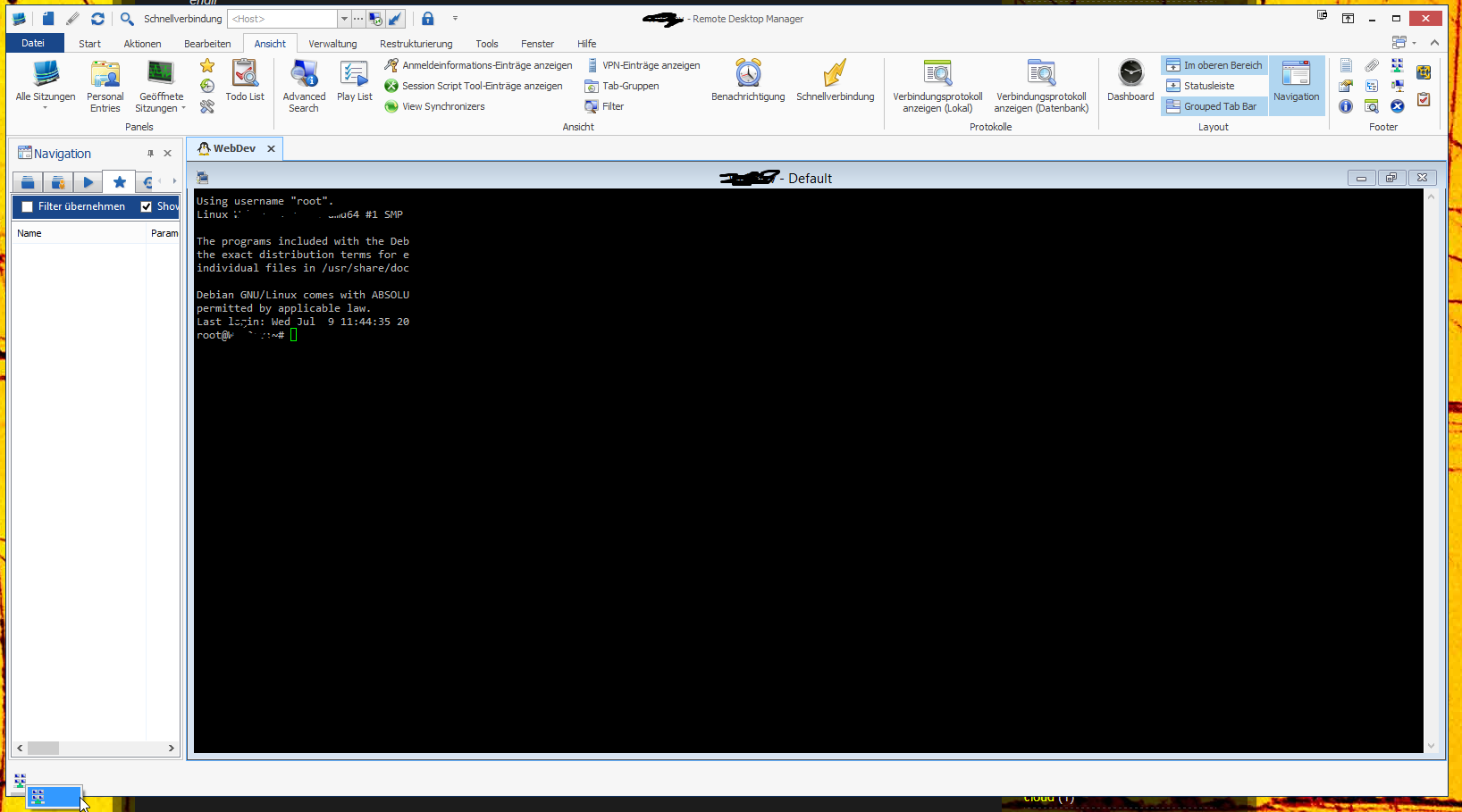
Terminal-Window-Frame Visible even i close is
Could you try the Reset Layout in Windows?
sadly not, i fixed it via the written text. but if i am able to produce it again i will test.
If you have the time to: It was a fresh installation and i clicked all those little frames away with the x in the upper right and the bug happend.
Terminal-Window-Frame Visible even i close is
i was able to close it :)
- Clicked on the highlighted right click menu item
- empty frame opens
- clicked in the icon that is now in that empty frame
- clicked "close"
useless emtpy frame is gone! :)
Terminal-Window-Frame Visible even i close is
Hi,
after a broken update (my fault - didn't close RDM properly) i had to redo my config. Usually i close all those little frames becourse i don't need them. After i closed every there is still some part open, it seems like an zombie of the "Terminal"-Frame. I cannot close it, expand it or do anything else with this icon. It just stays there and steals ~50px of my desktop :(
Greetings
(9.4.9.0)
edited by Max on 7/9/2014
German text "Seriennummer" is too long
Hi,
picture shows it all ;)

edited by Max on 7/9/2014
Restore last opened connection - $PARENT_NAME$
Hi,
as a picture shows more than words ;)

Greetings
Max
edited by Max on 3/26/2014
edited by Max on 3/26/2014
error when trying to delete role
Hello Stéfane,
this solved it! :)
Do you think this will solve more issues with long running queries? I tried the feature that warns me if a connection is already opened, but it took about 15s for each connection to be opened. Maybe there is also an index missing?
Greetings - max
error when trying to delete role
Can you try deleting the role manually using SSMS (SQL Server Management Studio)?
You made a little mistake in your statement, so here is the correct one:
-- list your roles
select * from UserInfo where UserType = 1
-- delete a role
delete from UserInfo where ID = 'PASTE-ID-HERE'
I was able to delete the rule via statement, not via "edit first 200 rows" gui. The delete via statement took 1min8s which seems a little bit to long for just a delete statement.
I took a look at the running plans for the delete statement and i see that there is a lot happening there. Some index will be scanned and some other things i don't have any clue about (maybe i should read these SQL-Server-2012 books from my shelf some day...).
A thing i recognized is that my ConnectionLog contains about 500.000 entries and is about 500MB. Maybe there is the problem based?
Greetings
Max
error when trying to delete role
Could you create a new role and check if you can delete it. Is it only this one?
Now i have 2 roles that i can not delete :(
error when trying to delete role
Hi
For me its instantaneous, is there something relevant in Help-View Application Logs?
Not really, thats all:
[27.02.2014 11:55:06 - 9.1.3.0]ERROR System.Data.SqlClient.SqlException: Timeout expired. The timeout period elapsed prior to completion of the operation or the server is not responding.
Die Anweisung wurde beendet.
at System.Data.SqlClient.SqlConnection.OnError(SqlException exception, Boolean breakConnection)
at System.Data.SqlClient.SqlInternalConnection.OnError(SqlException exception, Boolean breakConnection)
at System.Data.SqlClient.TdsParser.ThrowExceptionAndWarning(TdsParserStateObject stateObj)
at System.Data.SqlClient.TdsParser.Run(RunBehavior runBehavior, SqlCommand cmdHandler, SqlDataReader dataStream, BulkCopySimpleResultSet bulkCopyHandler, TdsParserStateObject stateObj)
at System.Data.SqlClient.SqlCommand.FinishExecuteReader(SqlDataReader ds, RunBehavior runBehavior, String resetOptionsString)
at System.Data.SqlClient.SqlCommand.RunExecuteReaderTds(CommandBehavior cmdBehavior, RunBehavior runBehavior, Boolean returnStream, Boolean async)
at System.Data.SqlClient.SqlCommand.RunExecuteReader(CommandBehavior cmdBehavior, RunBehavior runBehavior, Boolean returnStream, String method, DbAsyncResult result)
at System.Data.SqlClient.SqlCommand.InternalExecuteNonQuery(DbAsyncResult result, String methodName, Boolean sendToPipe)
at System.Data.SqlClient.SqlCommand.ExecuteNonQuery()
at Devolutions.RemoteDesktopManager.Business.DataSources.DatabaseConnectionDataSource.ExecuteNonQuery(String sql, IDbTransaction dbTransaction, IDbDataParameter[] parameters)
at Devolutions.RemoteDesktopManager.Business.DataSources.SQLServerSecuritySubDataSource.DeleteRoleInfo(Guid roleInfoId)
****************************** SqlError ******************************
Message:Timeout expired. The timeout period elapsed prior to completion of the operation or the server is not responding.
****************************** SqlError ******************************
Message:Die Anweisung wurde beendet.
Could you try to remove the role to your users before deleting it?
I checked every user, but no one is assigned to that role.
By the way, an option to see all linked users to a role would be nice :)
Edit: After some searching i found that the query is in "suspended"-mode on the mssql server. i took a look into dbo.UserInfo but the role seems to be like any other role there.
Spid ecid start_time Age Seconds nt_username status wait_type Individual Query Parent Query program_name Hostname nt_domain
57 0 2014-02-27 12:10:41.353 7 Max suspended PAGEIOLATCH_SH DELETE FROM UserInfo WHERE ID = @ID (@ID uniqueidentifier)DELETE FROM UserInfo WHERE ID = @ID .Net SqlClient Data Provider MAX-myPC myDomain
Greetings
Max
edited by Max on 2/27/2014
edited by Max on 2/27/2014
error when trying to delete role
Hi,
i am working with the role management. i created a role that i do not need anymore, but i am not able to delete it. It freez and after a few seconds I get:
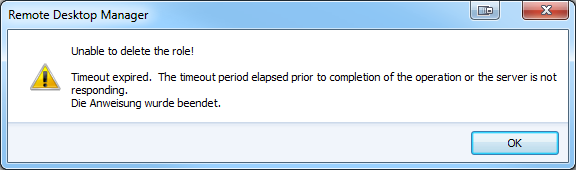
It seems like my Database is freezing completly becourse others are not able to use RDM while i am waiting for the error/timeout.
Let me know how i can provide you some debugging infos :)
RDM Enterprise 9.1.2.0 with MSSQL
Greetings
Max
Non-Administrators have no Privat Vault?
i see. There is a difference in the rights you can give.
The user needed the rights (ADD|EDIT|DELETE) in himself. The rights where not inheritat from the role who he is in.
I hope this will explain more:
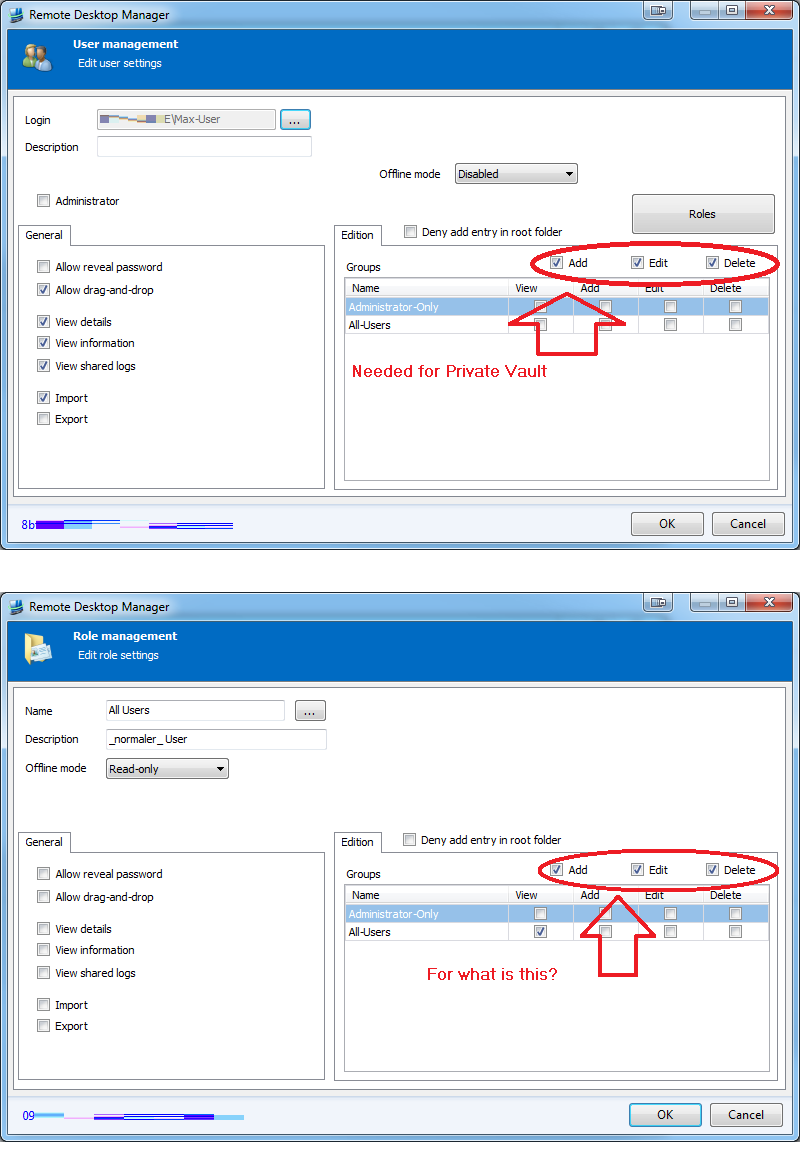
- To me it is not clear for what the (ADD|EDIT|DELETE) in an role is?
- The Tab name "Edition" doesn't make sense to me. Maybe this should be "Roles"?
Non-Administrators have no Privat Vault?
Hello,
currently i am deploying RDM to my colleagues but i am stuck on an issue.
I use a simple rights structure:
- There are administrators who can do everything
- There are users who can connect to some of the sessions, in my case just a few groups.
Here are some pictures to show how i do it:
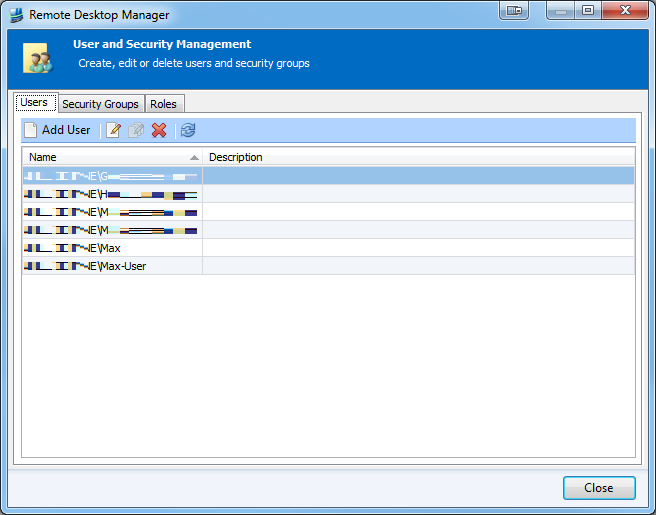
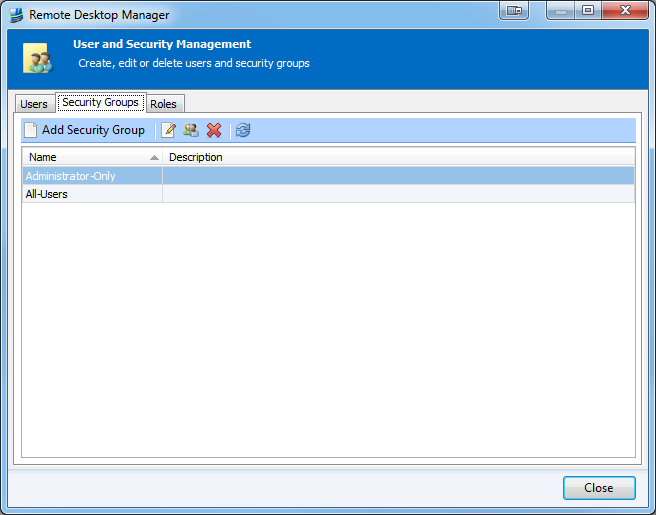
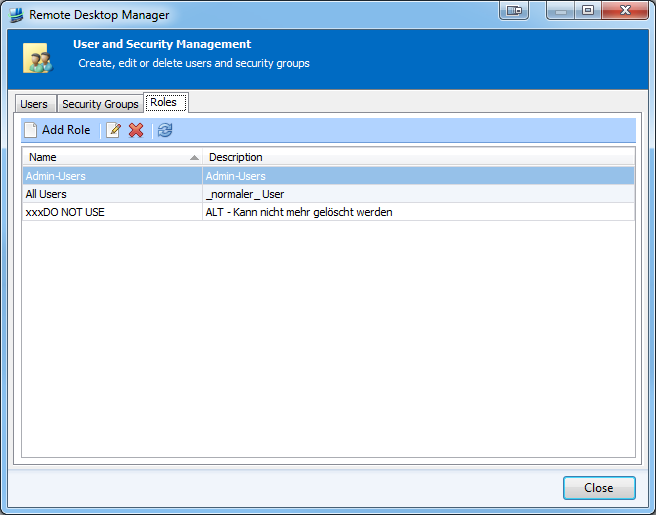
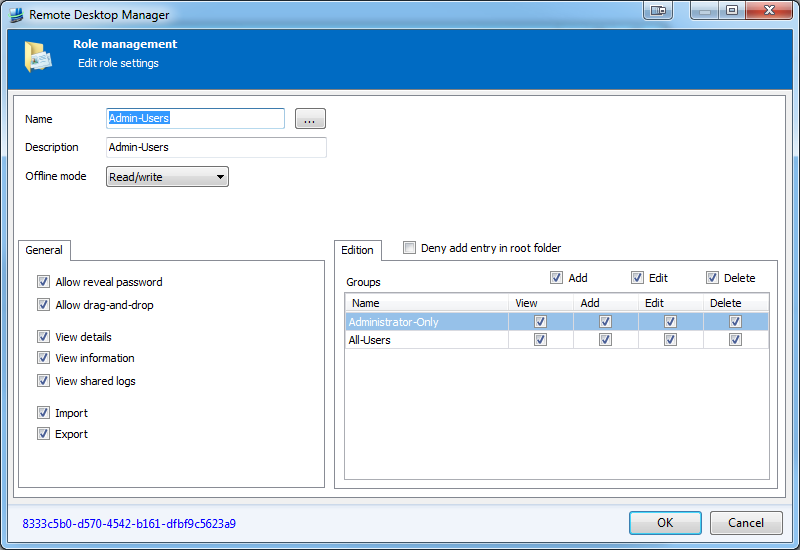
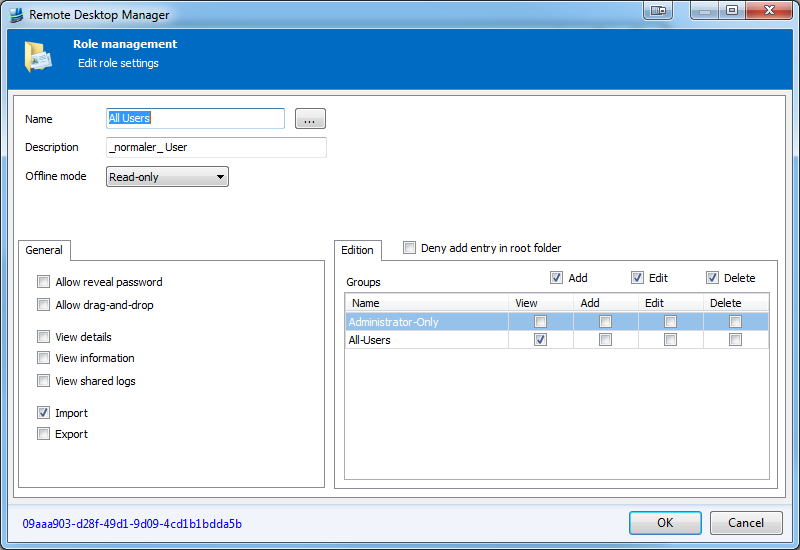
The user "Max-User" is only able to see groups that are in the security group All-Users. But he is not able to manage his Private Fault. How can i accomplish this?
Greetings
Max
Enabled/Disabled in RightClickMenu not logical
Hi,
i don't see any logic between disabled and not disabled elements in right click menu.
- There is nothing in "Import" that i am allowed to click but the text is black
- There is nothing in "Export" that i am allowed to click but the text is gray
- Even there is nothing to click in both i can expand them while i can't expand something like "Add"

Show group description when adding a new user
Hi,
first some amazing paint skills to show you what i mean:

I am trying to build a good user-role structure to manage my "normal" users and my "adminstrator" users. There is a Description in the Role Tab, but it would be nice to see it when you apply one.
Greetings
Max
Icon for Open Session like ShortCut Icon
It's because it's one check just before opening the connection. It's also only for one specific connection.
okay, i see.
There is a small bug with it, i was warned that the connection is currently in use after RDM was cold restarted. From my user on my local machine ;)
edited by Max on 11/25/2013
Icon for Open Session like ShortCut Icon
The currently open List is already there, but works only if everybode openes connection only via RDM with shared Database and not native RDP sessions:
I know, as i worte: "There is an Tab for that". We are using Enterprise with Shared Database and are not rolling out to more employes. thats why we found this "problem"
Hi Max,
This has been on our todo list for many many version. Unfortunately it's not a UI issue but a performance one. We haven't found an easy way to add this without impacting the performance of RDM.
What you can do is enable the warning for an opened connection. This setting is in the Log tab page of the session configuration.
Thanks, this is working. But why is this not impacting the perfomance? Becouse it is only one check? I mean is it not just a simple query on my SQL? We are all using the same Database, so there is no need to finger on the rdp connection ;)
Icon for Open Session like ShortCut Icon
Hi,
the shortcut icon is nice, i like it :)
As is saw it, i thought of an "currently open" icon. We have some testing Machines and it is making my employes angy if they kick each other out ;)
I know there is an Tab for that, but as an overlay it would be easily visible.
Greetings
Max
Pin to Start Menu
mhm. tried a few things like making an shortcut by hand but all seem to be killed by windows on update when the RemoteDesktopManager.exe is replaced...
My five minutes hack:
- open AutoIT
- write on line
- rent RDM icon from exe
- compile as exe
- pin to start menu
works fine even after updating. only issue it opens an own entry in taskbar for RDM. So it is like a persistent shotcut.
If David is okay with "stealing" his icon for this suppose i am happy to share my sollution for anyone who is mad about this little "bug" like me:
Install: Copy to RDM directory and pin to start bar via drag&drop
Greetings
Max
Pin to Start Menu
Hi,
one thing that bugs me is that after every update my pinned start icon is broken.
An option in the setup like "pin to start menu" would be great :)
Greetings
Max
MMC & External Application
In general when embedding a "Run As Administrator" application RDM must also be "Run As Administrator" or the embedding will not succeed.
Now in this case it looks like the mmc console must also be running in 64-bit (not sure why this is the case but...). Try checking "Run in 64 Bits mode".
Does that work?
You're right. The WSUS.mmc has to be started with Administrator rights. Should have thought of this >.<
Running RDM as Administrator solves this problem and now it is embedded fine.
Thanks :)
MMC & External Application
i am also looking to embed an mmc.
"C:\Program Files\Update Services\administrationsnapin\wsus.msc"
This is the WSUS msc for Windows Server Update Service. But it is opening in an external window. What am i doing wrong? :/
<?xml version="1.0"?>
<ArrayOfConnection>
<Connection>
<Cmd>
<RunAsAdministrator>true</RunAsAdministrator>
</Cmd>
<CommandLine>C:\Program Files\Update Services\administrationsnapin\wsus.msc</CommandLine>
<ConnectionType>CommandLine</ConnectionType>
<Events />
<ID>88030650-c0e1-4df5-bd3a-d964ec925b29</ID>
<Image>......</Image>
<ImageMD5>1a59182ba52418ed625ba81154b2e14d</ImageMD5>
<MetaInformation />
<Name>WSUS Console</Name>
<OpenEmbedded>true</OpenEmbedded>
<Stamp>1c8deb5c-6f88-4636-b508-e1330c8d9f51</Stamp>
</Connection>
</ArrayOfConnection>
edited by Max on 2/28/2013
Cannot rename folders anymore
This is something i have thought on before.
I can rename an entry via rightclick->edit but not an group.
Why? :)
Dashboard - Order by Type (RDP, SSH, VNC...)
Hi,
i had to batch override a lot of conenctions, but ony the RDP settings. I used my main group und CNTRL-Clicked the hell out of my mouse to get all together.
In dashboard sorting by name or Description is possible, but by type would be nice :)
greetings - max
Webmin/untrusted Certificates
Update: i think i got it:
Microsoft issue KB2661254 : Update for minimum certificate key length (min. length:1024) see http://support.microsoft.com/?kbid=2661254 cause IE can't access webminthe webmin initial self ssl key is 512 byteSolutions: using chrome or firefox , login in webmin , in webmin configuration ->SSL Encryption->Self-Signed Certificatecreate a new SSL key and certificate for your Webmin server , the RSA key select default (2048), and make sue 'Use new key immediately'then you can using IE access Webmin
After updating/regenerating my SSL-Keys in my webin with 2048 (default in Webmin 1.620?!) it works fine in embedded :)
Webmin/untrusted Certificates
Seems to be fixed to me @ 8.0.18.0 && Embedded IE