error when trying to delete role

Hi,
i am working with the role management. i created a role that i do not need anymore, but i am not able to delete it. It freez and after a few seconds I get:
It seems like my Database is freezing completly becourse others are not able to use RDM while i am waiting for the error/timeout.
Let me know how i can provide you some debugging infos :)
RDM Enterprise 9.1.2.0 with MSSQL
Greetings
Max
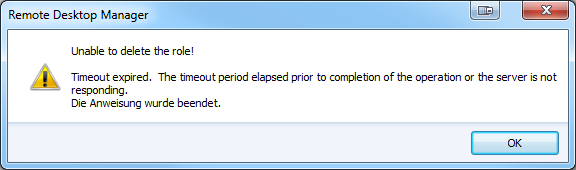
rdm-delete-role.png
All Comments (11)
Hi
For me its instantaneous, is there something relevant in Help-View Application Logs?
Maurice
Could you try to remove the role to your users before deleting it?
David Hervieux
Not really, thats all:
[27.02.2014 11:55:06 - 9.1.3.0]ERROR System.Data.SqlClient.SqlException: Timeout expired. The timeout period elapsed prior to completion of the operation or the server is not responding.
Die Anweisung wurde beendet.
at System.Data.SqlClient.SqlConnection.OnError(SqlException exception, Boolean breakConnection)
at System.Data.SqlClient.SqlInternalConnection.OnError(SqlException exception, Boolean breakConnection)
at System.Data.SqlClient.TdsParser.ThrowExceptionAndWarning(TdsParserStateObject stateObj)
at System.Data.SqlClient.TdsParser.Run(RunBehavior runBehavior, SqlCommand cmdHandler, SqlDataReader dataStream, BulkCopySimpleResultSet bulkCopyHandler, TdsParserStateObject stateObj)
at System.Data.SqlClient.SqlCommand.FinishExecuteReader(SqlDataReader ds, RunBehavior runBehavior, String resetOptionsString)
at System.Data.SqlClient.SqlCommand.RunExecuteReaderTds(CommandBehavior cmdBehavior, RunBehavior runBehavior, Boolean returnStream, Boolean async)
at System.Data.SqlClient.SqlCommand.RunExecuteReader(CommandBehavior cmdBehavior, RunBehavior runBehavior, Boolean returnStream, String method, DbAsyncResult result)
at System.Data.SqlClient.SqlCommand.InternalExecuteNonQuery(DbAsyncResult result, String methodName, Boolean sendToPipe)
at System.Data.SqlClient.SqlCommand.ExecuteNonQuery()
at Devolutions.RemoteDesktopManager.Business.DataSources.DatabaseConnectionDataSource.ExecuteNonQuery(String sql, IDbTransaction dbTransaction, IDbDataParameter[] parameters)
at Devolutions.RemoteDesktopManager.Business.DataSources.SQLServerSecuritySubDataSource.DeleteRoleInfo(Guid roleInfoId)
****************************** SqlError ******************************
Message:Timeout expired. The timeout period elapsed prior to completion of the operation or the server is not responding.
****************************** SqlError ******************************
Message:Die Anweisung wurde beendet.
I checked every user, but no one is assigned to that role.
By the way, an option to see all linked users to a role would be nice :)
Edit: After some searching i found that the query is in "suspended"-mode on the mssql server. i took a look into dbo.UserInfo but the role seems to be like any other role there.
Spid ecid start_time Age Seconds nt_username status wait_type Individual Query Parent Query program_name Hostname nt_domain
57 0 2014-02-27 12:10:41.353 7 Max suspended PAGEIOLATCH_SH DELETE FROM UserInfo WHERE ID = @ID (@ID uniqueidentifier)DELETE FROM UserInfo WHERE ID = @ID .Net SqlClient Data Provider MAX-myPC myDomain
Greetings
Max
edited by Max on 2/27/2014
edited by Max on 2/27/2014
Could you create a new role and check if you can delete it. Is it only this one?
David Hervieux
Now i have 2 roles that i can not delete :(
Stefane will create this morning a small script to detect the dependency. This will help us.
David Hervieux
Can you try deleting the role manually using SSMS (SQL Server Management Studio)?-- list your rolesselect * from UserInfowhere UserType = 1-- delete a roleselect * from UserInfowhere ID = 'PASTE-ID-HERE'
Please post any error messages you might get.
Stéfane Lavergne
You made a little mistake in your statement, so here is the correct one:
-- list your roles
select * from UserInfo where UserType = 1
-- delete a role
delete from UserInfo where ID = 'PASTE-ID-HERE'
I was able to delete the rule via statement, not via "edit first 200 rows" gui. The delete via statement took 1min8s which seems a little bit to long for just a delete statement.
I took a look at the running plans for the delete statement and i see that there is a lot happening there. Some index will be scanned and some other things i don't have any clue about (maybe i should read these SQL-Server-2012 books from my shelf some day...).
A thing i recognized is that my ConnectionLog contains about 500.000 entries and is about 500MB. Maybe there is the problem based?
Greetings
Max
Max you hit the nail on the head. ConnectionLog has a reference to UserInfo, but no index, so it took 1m8s to scan the entire table.
Run this script, it will solve you issue once and for allIF NOT EXISTS(SELECT * FROM sys.indexes WHERE name = 'IX_ConnectionLog_UserInfoID' AND object_id = OBJECT_ID('ConnectionLog'))BEGIN create nonclustered index IX_ConnectionLog_UserInfoID on [dbo].[ConnectionLog] (UserInfoID)ENDNote: We have a todo logged to be able to manage the connection logs (truncate and such).
Regards,
Stéfane Lavergne
Hello Stéfane,
this solved it! :)
Do you think this will solve more issues with long running queries? I tried the feature that warns me if a connection is already opened, but it took about 15s for each connection to be opened. Maybe there is also an index missing?
Greetings - max
Yes it should help with that. I will take a note a verify the entire database for missing indexes.
Best regards,
Stéfane Lavergne