MMC & External Application

Hello,
I have been evaluating Remote Desktop Manager and like it so far. However, I am having a few issues that I wonder if it can be fixed as follows:
1) I'm trying to open an embedded mmc snap-in for managing many servers. When I add it as a 'Command Line' session with 'Embedded' selected the mmc snap-in will open outside of RDM. I tried playing around with the 'Embedded wait time' and set to 'Run as Administrator', but this doesn't seem to help. Also, I searched your forum here, but couldn't really find a solid answer.
2) I have an application that I've set to open 'Embedded' and it opens fine and I can see the contents of this first page. However, when I click on a different tab in the application to open a new view the page is blank. If I go back to the first tab that showed content when I first opened it the page becomes blank again. If I open the application as 'External' all the tabs in the application show fine.
3) I have a second application that I'm trying to open as 'Embedded', but when it opens it doesn't open as a tab in RDM. Instead it opens outside of RDM. I tried playing with all the settings, but nothing seems to work.
If you have any suggestions on how I might fix these issues I would greatly appreciate it. Thanks very much in advance and keep up the good work on this great application!
All Comments (23)
Hi,
Embedding an application is always a tricky. However for MMC it usually work fine. Could you export the .rdm file and I will take a look at it.
For the other application, could you give me more details and perhaps the name of those applications?
David Hervieux
Sure no problem, I exported it and attached here. As for the other applications, one is called Active Administrator (http://www.quest.com/active-administrator/) and the other is SpotLight on Active Directory (http://www.quest.com/spotlight-on-active-directory-pack/).
For Active Administrator, I have attached a screenshot showing what it looks like when I first open it to the Start Page. The second screenshot shows what happens when I click on one of the tabs in the application. The last screenshot shows the result of me going back to the Start Page.
As for SpotLight I'm not sure what details your looking for? I set it up the same way I did for Active Administrator. The only difference is that it opens externally and never returns to RDM as an 'embedded' tab.
Thanks for the help!
edited by HaVoCMeSS on 2/12/2013
Start Page Before.png
Any Other Tab.png
Start Page After.png
Hi,
I don't see the exported file. You can send it by email to support at devolutions.net
David Hervieux
i am also looking to embed an mmc.
"C:\Program Files\Update Services\administrationsnapin\wsus.msc"
This is the WSUS msc for Windows Server Update Service. But it is opening in an external window. What am i doing wrong? :/
<?xml version="1.0"?>
<ArrayOfConnection>
<Connection>
<Cmd>
<RunAsAdministrator>true</RunAsAdministrator>
</Cmd>
<CommandLine>C:\Program Files\Update Services\administrationsnapin\wsus.msc</CommandLine>
<ConnectionType>CommandLine</ConnectionType>
<Events />
<ID>88030650-c0e1-4df5-bd3a-d964ec925b29</ID>
<Image>......</Image>
<ImageMD5>1a59182ba52418ed625ba81154b2e14d</ImageMD5>
<MetaInformation />
<Name>WSUS Console</Name>
<OpenEmbedded>true</OpenEmbedded>
<Stamp>1c8deb5c-6f88-4636-b508-e1330c8d9f51</Stamp>
</Connection>
</ArrayOfConnection>
edited by Max on 2/28/2013
In general when embedding a "Run As Administrator" application RDM must also be "Run As Administrator" or the embedding will not succeed.
Now in this case it looks like the mmc console must also be running in 64-bit (not sure why this is the case but...). Try checking "Run in 64 Bits mode".
Does that work?
<?xml version="1.0"?>
<ArrayOfConnection>
<Connection>
<Cmd>
<Run64BitsMode>true</Run64BitsMode>
<RunAsAdministrator>true</RunAsAdministrator>
</Cmd>
<CommandLine>mmc.exe</CommandLine>
<ConnectionType>CommandLine</ConnectionType>
<ID>247c0121-33ed-4055-b875-a7171d9a0863</ID>
<Name>post14869</Name>
<OpenEmbedded>true</OpenEmbedded>
<Stamp>5fee0963-cec7-4ea9-b81b-9be3837c6e3e</Stamp>
</Connection>
</ArrayOfConnection>
Stéfane Lavergne
You're right. The WSUS.mmc has to be started with Administrator rights. Should have thought of this >.<
Running RDM as Administrator solves this problem and now it is embedded fine.
Thanks :)
Hello. Please allow me to dig up this old post.
I am launching wsus console via RDM using macro/script tool:
"%ProgramFiles%\Update Services\AdministrationSnapin\wsus.msc" /ComputerName wsus-vm2
It opens, but central pane is empty for some reason. No update list, and no approval drop down menu visible:
Also, all mmc windows grabs focus several times after opening. When i try to open navigation pane, it instantly closes 4-5 times because mmc windows grabs focus.

Capture.PNG
@Nazar,
Is it possible for you to post a small video of the issue so that we can see what is happening exactly.
Best regards,
Jeff Dagenais
Here you go.
First i open original windows wsus console, you can see list of updates available.
Then i open wsus console via RDM typing macro, you can see that list is blank.
Then, i try to open navigation pane and it keeps closing several times by itself. This happens only when wsus tab is active.
Navigation pane also closes when i open remote command line via psexec. This is also a typing macro type.
Untitled.mp4
Hi Nazar,
Could you edit the session and in the Tools section select Use Session Credentials and test again your Script.
Best regards,

David Grandolfo
tools_credentials.jpg
This is a very Interesting Topic. Searching for a solution to launch MMC Consoles with RDM for a while.
Also the possibility to choose another Account to run as.
For example, for simple RDP connections i can choose a Secret from SecretServer to logon (my admin account in AD domain).
When i try to run a mmc from a "Command Line" script it's not possible to choose another account to run as.
Maybe you'll find a way to accomblish this and add new template for MMC? ;-)
Hi Markus,
Multiple customers asked us this question about MMC. When you want to manage or use an administrative tool for Windows you do not need to use MMC, but the direct console.
In RDM we integrate multiple remote tools that could help you manage the server and when you run these consoles they use the Remote tools credentials as explained above.
Best regards,

David Grandolfo
remote_tools.jpg
Thank you for a reply.
Tried it, behavior is the same. Still inactive lists and closing navigation pane.
And i do not use RDP, i just launch macros with command line, there is no such options:

Capture.PNG
Hi,
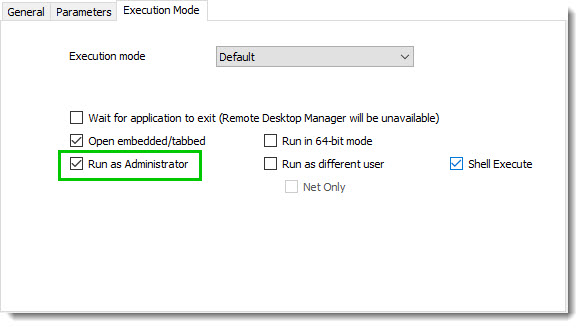
I'm not sure if that error is the same as Max had, but in the Execution mode could you try checking Run as administrator.
If it doesn't work could you try run RDM as admin and execute the Typing Macro again to see if it change something?
Best regards,
David Grandolfo
macro_admin.jpg
Already executing as Administrator and RDM is launched as admin too.
Hi,
Thanks for the test, unfortunately after a chat with the engineering department we weren't able to isolate where the issue could be.
So I transferred this issue to our QA department to build a WSUS server and try to reproduce the issue.
Best regards,
David Grandolfo
Any luck?
The issue is still present in RDM 14.1.1.0.
Windows 10 1809 with WSUS console from RSAT, installed via optional features.
Hi,
I will do a follow up, unfortunately with the holiday I'm not able to have any ETA at this time.
As soon as I have further information I will make a follow up.
Best regards,
David Grandolfo
Hi,
I include our internal ticket number, IT-955.
Best regards,
David Grandolfo
Hi,
With our WSUS server I was able to reproduce the same scenario as yours.
If I use a Command Line (External Application) instead of using the Macro/Script/tools Command line entry. I'm able to get a full list of WSUS embedded in RDM.
This is my Command Line (External Application) entry:
Could you confirm if it works.
Best regards,

David Grandolfo
WSUS_CMDEA.png
Thanks for a reply!
As i tested further, the problem is actually in the embedded window mode.
When i open WSUS via mmc or external application, the problem still occurs in embedded mode.
But everything is ok when i use external window mode for both mmc and external application.
Something of a fix, but i would still prefer to use embedded mode.
Just had a discussion with David. Embedding external processes in RDM is somewhat "magical". We use Windows API to grab the process handle and re-parent it within RDM. This works with most processes but a few specific ones, like MMC consoles, it's a different story. My guess is that in the case of a .msc it is actually a re-parented process within the MMC console. Trying to re-parent a re-parented process is probably what is causing the issue. This is something that we've been unable to solve for many years. Maybe one day we will have a "eureka moment" but until then there isn't much we can do.
Stéfane Lavergne
Thank Stefane.
Fingers crossed :)