
fvigo1128
SFTP Issue on RDM 2024.1.15.0 64-bit
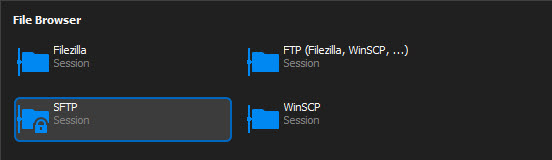
The SFTP session locks up and will not exit via the x in the session tab or via "Close All other Tabs" option. I'm only able to end the sessions via Task Manager. I'm able to replicate issue on already established SFTP sessions and new SFTP sessions. All other connection modes seem to be working as intended. If I open an SSH session into a machine and then open an SFTP session I'm able to close that SFTP & SSH session w/o an issue. I'm using the SFTP session with a padlock on it per provided image.
Overdue & Upcoming Tasks
Awesome and thank you as that worked for me!
Overdue & Upcoming Tasks
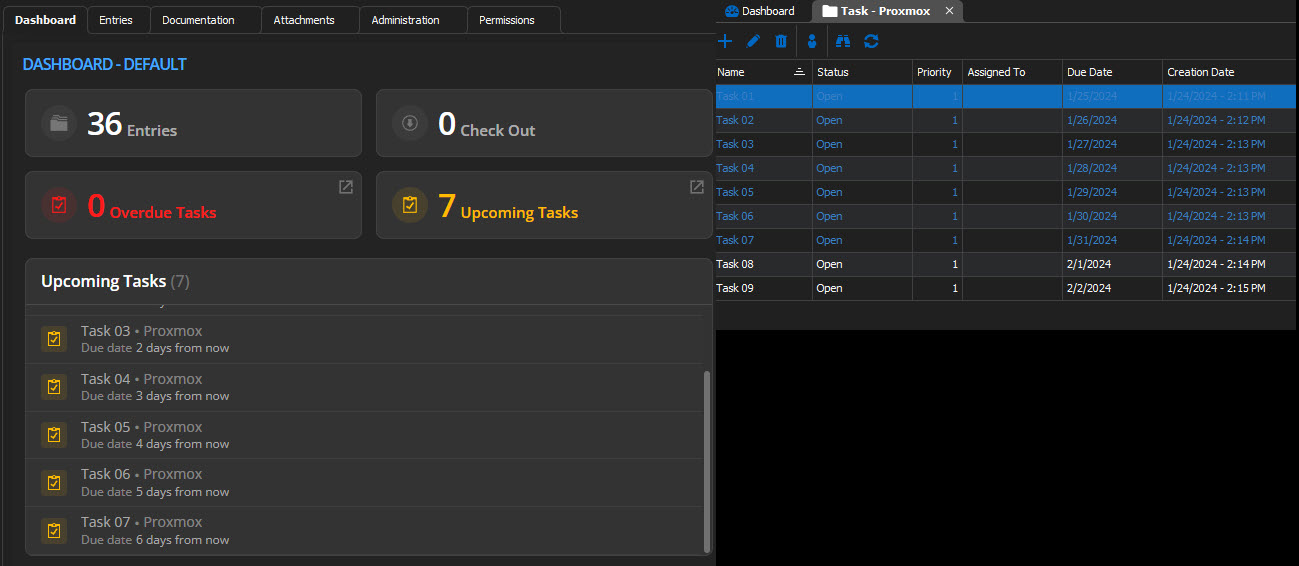
Is there anyway, to have Overdue & Upcoming Tasks go beyond six days? I created an initial task for a VM that I manage for application testing to be 60 days out and it will not show up on my dashboard. Anything outside of what seems to be a six-day window will not show up at all. I've attached a sample of ten tasks that can be seen in the attached image. I'm not looking to load RDM with allot of tasks however I would like to keep a few items per VM within RDM and not have to have that information outside of the application.
SSH Connections
Hello Carl,
My apologies for not being more specific. Yes, I am running RDM on windows to administer multiple Linux servers. The application crashed on me while I was rebooting the first server.
Thank you for responding and letting me know it is on the developer list!
Felix.
RDM crashes in SFTP session
Hello Carl,
A refresh of my Windows PC did the trick as I'm no longer seeing a crash of RDM as I had reported on 11.20.2023.
Felix
SSH Connections
While working to update four Linux servers last week I
completed the updates on one server w/o an issue and while logged in as root I
restarted the one server and RDM froze and shutdown closing all the tabs I had
open to the other servers. Is there a setting that I may have missed that would
prevent a restart of an SSH connection from impacting the entire RDM
application and additional connections?
RDM crashes in SFTP session
Awesome, thank you, Carl!
RDM crashes in SFTP session
One other issue I noticed that I was able to replicate on two different Windows machines: I was connected via SSH doing updates on multiple Linux machines and upon the completion of the updates on the first vm I entered a sudo shutdown -r and once the first vm proceeded to start the reboot my entire RDM session shutdown taking me out of all of the other Linux sessions.
RDM crashes in SFTP session
Hello,
I recorded the below information from my system:
RDM: Version 2023.3.25.0 64-bit
Microsoft Windows 11 Version 23H2 (OS Build 22635.2771)
Data Source Type: Microsoft SQL Server 2022
Database: RDM23-24 v1.910
RDM crashes in SFTP session
I created an SFTP session to a Linux server w/o an issue. However, when I go into the session and download, or edit a file RDM would crash. The edit would not open the file to be viewed. The download task works and will not show 100% done in the app and it would crash. I can create a folder in Linux and upload a file successfully.
I created an SSH session to the same server and within that session, I opened SFTP, and that process will allow for me to download and edit w/o an issue.
Attached are the screenshot from the windows event viewer on RDM crash.

Also noted in Event Viewer under System:


Renewal Period Expired
Hi Jeff,
My data source is SQL based an error message was based off my serial from my renewal on 11/2018 which expired on 12/2019. I missed the email for renewal as it was mixed in with forum related emails. Mathieu from sales reached out on a SATURDAY with a quote that has allowed me to renew and correct my mistake in missing the initial renewal email.
Thank you Jeff and Mathieu for your help on the weekend.
Felix
Renewal Period Expired
Does anyone know how long the renewal period would be for RDM as I updated my application today and now I'm locked out of the sessions I have saved. I tried to renew and it stated that my renewal period expired.
Felix
Password Analyzer
Could we have the application list the actual password in the results that can be exported which would be helpful. Also adding at the top a possible filter to exclude from results entries without a password.
Only method at the moment is to go to File, Export, Export Special, CSV Export All provide a password and path and then finally extract the zip. Once extracted then we would need to filter out everything w/o a password etc.
13.0.12.0 - Add-On Update Window
Team,
The update doesn't seem to be working correctly. I updated to 13.0.12.0 and in past versions the Add-On window (AOW) would come up, I would update, and then proceed to use RDM as intended. However in past updated the AOW came up, I ran the update and it would come up again, repeat the process with same results. However, on last version I was able to update via the Add-On Manger (AOM) until 13.0.12.0 as both AOW & AOM are not updating the files for the PowerToolsAddOn.dll.
It seems like the update if successful is not communicating the version internally correctly as to not prompt for an update after initially running on RDM startup.
Felix
Errors after update to 12.9.0.0
Thanks David as that's good to know, looking forward to the fix soon!
Felix
Errors after update to 12.9.0.0
Team,
Since update of RDM to 12.9.0.0 I've been seeing almost daily errors (seen below) initial update wiped all of the listed favs and search bar was not working however it was fixed with 12.9.1.0 however error below is still an issue for me with current version 12.9.2.0. Any ideas as to what I can do to correct?
Felix
System.NullReferenceException: Object reference not set to an instance of an object.
at DevExpress.XtraBars.Docking2010.Views.BaseView.DocumentClosedContextKey..ctor(BaseView view, BaseDocument document)
at DevExpress.XtraBars.Docking2010.Views.BaseView.DocumentClosedContext.IsDocumentClosing(BaseView view, BaseDocument document)
at DevExpress.XtraBars.Docking2010.Views.BaseView.IsDocumentClosing(BaseDocument document)
at DevExpress.XtraBars.Docking2010.ContainerControlManagementStrategy.CheckFocus(Int32 Msg, BaseView view, Control control, IntPtr wParam)
at DevExpress.XtraBars.Docking2010.DocumentManager.CheckFocus(Int32 msg, BaseView view, Control control, IntPtr wParam)
at DevExpress.XtraBars.Docking2010.Views.BaseDocumentCollection.CheckFocus(Int32 msg, Control control, IntPtr wParam)
at DevExpress.XtraBars.Docking2010.Views.BaseDocumentCollection.PostFilterMessageCore(Int32 Msg, Control wnd, IntPtr HWnd, IntPtr WParam, IntPtr LParam)
at DevExpress.XtraBars.Docking2010.Views.BaseDocumentCollection.DevExpress.Utils.Win.Hook.IHookController.InternalPostFilterMessage(Int32 Msg, Control wnd, IntPtr HWnd, IntPtr WParam, IntPtr LParam)
at DevExpress.Utils.Win.Hook.HookManager.InternalPostFilterMessage(HookInfo hInfo, Int32 Msg, Control wnd, IntPtr HWnd, IntPtr WParam, IntPtr LParam)
at DevExpress.Utils.Win.Hook.HookManager.WndHook(Int32 ncode, IntPtr wParam, IntPtr lParam)
RDM Extension Manager - Firefox Ext Issue
Hi David,
My apolgies for the late response, yes I am using the default Firefox (FF) profile. On some of the websites I accessed it was recommeded to use FF when compared to Internet Explorer (IE) however this weekend I'll compare the sites with both browsers and if I see no difference then I will set those sites using IE and I belive that will clear the issue.
Felix
RDM Extension Manager - Firefox Ext Issue
Currently using RDM 12.0.8.0 and I installed the Ext for Firefox however Ext Mgr still shows it as not being installed. I was able to install for IE & Chrome and they work and show up as installed in Ext Mgr however Firefox and Edge show as not being installed. I was able to install for both browsers outside of RDM however they dont seem to work reliably as do Chrome & IE. Any ideas as to what I can do to correct?
Felix
Rename Custom #1-5 Option In Dashboad
Hi David,
Yes as I'm experimenting with the default view vs overview for a selected session to provide information that would pertain to the specific connection or person(s). For user connections I'm looking at the specifics for non standard users like remote, work hours, etc. for overview tab however for the column in question now I'm using the cust field 1 as phone number as I tweak RDM to provide as much information as initially needed before I contact the user or remote in for assistance.
Felix
Rename Custom #1-5 Option In Dashboad
Team,
Please allow option to rename column header names in dashboard for Custom Fields 1 - 5. Also allow option to search for items in those columns if possible however that's a minor request since you have provided many options to search for via the status bar.
Felix
Overview panel on Dashboard
Team,
Can we expand the options for the overview tab to possibly include contact information or select options of the users choice? Currently I would need to add the information to the description tab which also shows up in the dashboard which would clutter up the view I have setup with columns showing Name, Host, Description etc.
Felix
11.5 RDM - Load from Inventory Results
Hi Sebastien,
My apologies for the late response. In response to your questions, please see below:
I'm using the "Microsoft Remote Desktop (RDP)" session type.
"Use default credentials" - Information option fails.
"Use session credentials" - Information option fails.
"Use custom credentials" - Information option is successful.
"Use credential repository" - Information option is successful.
Unless I use "Use custom credentials" or "Use credential repository" the MAC Address find will not work in 11.5 as it did in 11.1.x version.
I also checked the applications log and didnt see an entry for today based on the above testing.
Felix
11.5 RDM - Load from Inventory Results
Hi Sebastien,
Yes I'm on a domain and I'm also able to access the remote connection sessions w/o an issue using my own login credentials. When checking the tools section of any created session only "Use default credentials" is selected.
Felix.
11.5 RDM - Load from Inventory Results
Hi David,
Yes I'm able to pull the information from a machine that still has 11.1.12.0 installed. I can update that version to .14, .15, .16, & .17 and test to see if the feature works as well. Let me know if you wish for that additional information.
Felix
11.5 RDM - Load from Inventory Results
Team,
Since the update to 11.5 has produced failures on the Information feature and the result is attached. I've tested the feature after going to 11.5 and 11.5.1.0 on all connections.