
robbinsd
2022.3.27.0 64-bit - Visual Bug - "Q","q","p"
I had this problem also when I upgraded RDM recently. The "Tree view item height" needs to be adjusted to a slightly higher value (from above that would be 19 or 20) to alleviate the bottom of the characters being cut off.
RSS Feed problem
I might also say that "The Official Devolutions Blog" RSS feed works correctly. It's just the forums feeds that are being wacky.
Maybe that helps...
RSS Feed problem
I appreciate the update and your work on the matter. It's been broken for a while, so it's not exactly time sensitive.
Thanks again!
RSS Feed problem
I'm not sure if this is the correct place, but the RSS feeds that are coming from the forums have stopped having a valid link to the topic thread. Only the actual forum has a link.

Above, the "Cross Platform" is clickable, but no link associated with it. The "RDM - Feature Requests" is okay.
This behavior started about 4 or 5 months ago. (At least to my recollection.)
Thanks!
Missing option in version 2202.1.x
I just added the line back into the configuration file. Or, I could have put all the credentials into a folder. Thanks for the answer and the explanation.
Missing option in version 2202.1.x
I noticed when upgrading to the new 2202 version of RDM that the Credentials section in the navigation tree is now broke out to the root level.
The option that controlled that in previous versions is now missing (see screenshot).
I also noticed that if I check that option on the old version, it is now missing there also.
After examining the RemoteDesktopManager.cfg file, it appears the line controlling this behavior is:
<LoadCredentialsInSessions>false</LoadCredentialsInSessions>
I would like to see the option visible again to toggle this behavior of keeping the credentials in a separate "Credentials" section in the Tree View.
Not sure if this is a Bug Report or a Feature Request.
Thanks!
Error message opening more than two entries simultaneously
That version solved the issue! Thank you so much!
I have to say that this kind of responsiveness to problems is what has always stood out. You guys rock. This is a main reason I recommend Devolutions. And of course that your products are rock solid and great.
Thanks again!
Error message opening more than two entries simultaneously
Also, if I close all the sessions in the initial set, the number of sessions I can open resets. One initial session -> 2nd session is blocked. Two initial sessions -> 3rd is blocked. Etc...
Error message opening more than two entries simultaneously
I did the Windows reset and tried again. The problem is still present.
Interestingly, if I select 3 sessions to begin with, it will open them all. If I then select another to open (a fourth) I get the error.
It seems to be that the next session I open after the initial set (I tried up to 6 sessions) will generate the error.
Error message opening more than two entries simultaneously
Getting an error when trying to open more than two entries simultaneously with latest version of RDM:
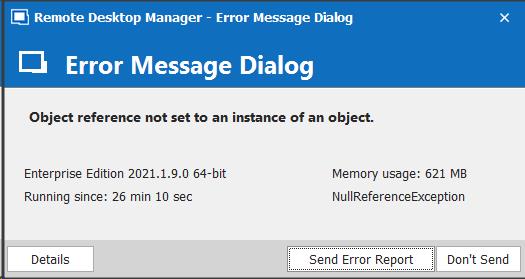
It doesn't seem to matter what type of entry.
Closing one tab should not focus to Dashboard
That's okay. I've been living with the behavior for awhile now and it's not a deal breaker. I am scheduled to get a new system w/Windows 10 soon, so it won't be an issue for me much longer.
Thank you for your diligence and answer.
Closing one tab should not focus to Dashboard
I changed the setting to EDP 7.0 and the behavior continued. It makes no difference if I manually close the tab (while focused on another tab) or if I logout of the server on one tab, RDM changes to focus to the first tab (Dashboard if I have it configured to show or the first RDP session if not).
I'm running RDM Enterprise Edition, Windows 7 64-bit, local database

Closing one tab should not focus to Dashboard
I have uploaded my configuration file also.
Thanks.
Closing one tab should not focus to Dashboard
I set that option and it did not make any difference. Any tab closing focuses the first tab (Dashboard). Sorry.
Closing one tab should not focus to Dashboard
I have also struggled with this problem for awhile. I have the options set as above and the problem persists. This behavior has changed over time. The requested behavior was fixed once or twice, but was "broken" several major versions ago.
Here's a forum topic regarding this changing focus to the first tab after logout: https://forum.devolutions.net/topics/26580/active-tab-after-closing-a-session
I would also like to see it fixed again. Maybe the referenced post will be able to "jog" the memory as to the cause and ultimate fix.
Thanks!
Re-pin RDM icon to task bar with an app update
This was a big problem for a while (probably what the old post was referencing and I probably started the thread), but I haven't seen the behavior lately. Just FYI.
Crash app with code jscript.dll 0xc0000005
There have been reported jscript.dll errors associated with the Microsoft patch to implement the fix for "CVE-2019-1367 | Scripting Engine Memory Corruption Vulnerability". I would uninstall the patch associated with your version of Windows 10 as specified in the Microsoft Technet webpage: https://portal.msrc.microsoft.com/en-US/security-guidance/advisory/CVE-2019-1367?mc_cid=035d6925a7&mc_eid=7f8b35e42e
Thanks, Microsoft...
uptime function in Dashboard
Powershell can get the uptime of system, querying WMI. Here's a sample script of how to do it:
<#
.SYNOPSIS
Demonstrates uptime using WMI
.DESCRIPTION
This script used Win32_ComputerSystem to determine how long your system
has been running. This is a rewrite/improvement of sample 3 at
http://msdn.microsoft.com/en-us/library/aa394591(VS.85).aspx.
.NOTES
File Name : Get-UpTime.ps1
Author : Thomas Lee - tfl@psp.co.uk
Requires : PowerShell V2 CTP3
.LINK
Script Posted to:
http://www.pshscripts.blogspot.com
Original sample posted at:
http://msdn.microsoft.com/en-us/library/aa394591(VS.85).aspx
.EXAMPLE
PS c:\foo> .\Get-UpTime.Ps1
System Up for: 1 days, 8 hours, 40.781 minutes
#>
##
# Start of script
##
# Helper Function - convert WMI date to TimeDate object
function WMIDateStringToDate($Bootup) {
[System.Management.ManagementDateTimeconverter]::ToDateTime($Bootup)
}
# Main script
$Computer = "." # adjust as needed
$computers = Get-WMIObject -class Win32_OperatingSystem -computer $computer
foreach ($system in $computers) {
$Bootup = $system.LastBootUpTime
$LastBootUpTime = WMIDateStringToDate($Bootup)
$now = Get-Date
$Uptime = $now - $lastBootUpTime
$d = $Uptime.Days
$h = $Uptime.Hours
$m = $uptime.Minutes
$ms= $uptime.Milliseconds
"System Up for: {0} days, {1} hours, {2}.{3} minutes" -f $d,$h,$m,$ms
}
# End script
Navigation Menu doesnt save
Thank you, sir!
Navigation Menu doesnt save
For me, it alters the behavior ever so slightly. If I close the application with the MRU or Favorites selected, then the Navigation Tree is fully collapsed (Both Local Data Source and Credentials). Otherwise, only my Local Data Source portion is collapsed and the Credentials section is fully expanded.
I have the Navigation Tree set to hide, but setting it to dock does not make a difference either.
Navigation Menu doesnt save
I deleted the .ext file and started RDM. Navigated the navigation pane to a server and connected. Logged off, closed RDM and restarted. Navigation pane was collapsed. <frown>
In short, no effect.
Navigation Menu doesnt save
I also am having this problem after upgrading to 13.0.4.0. I also see that logging out of a session reverts to the dashboard as well. There was an earlier thread covering this problem: https://forum.devolutions.net/topic26280-close-session-then-jumps-back-to-dashboard.aspx
I remember having the navigation pane problem also for quite a few versions until it finally got solved. I never changed any settings to achieve the fix.
As I recall, these two problems were linked.
For the record, my RDM is installed locally and I see current time/date stamps on my %APPDATA%\local\Devolutions\RemoteDesktopManager\RemoteDesktopManager.ext
Each new install unpins RDM from taskbar
I see that the latest beta install (Version 12.9.3) did not unpin the icon from the taskbar. Yeah!
I don't know if you've been working on the issue or not in recent builds, but it is good to see the behavior is fixed in this latest release.
Thanks!
Each new install unpins RDM from taskbar
Just a bump on this topic. Any progress on finding a solution?
Each new install unpins RDM from taskbar
I did pin a desktop icon to my taskbar and just upgraded to the 12.5.11.0 beta. My pinned icon disappeared, no change from the previous behavior.
FYI: I actually downloaded the setup file from the website and ran it. I have tried the in-place "Update" from the "new version available" dialog as well with the same outcome.