Closing one tab should not focus to Dashboard
0 vote

I'm using RDM primarily with multiple RDP sessions open.
If I go to one tab, click 'sign off' under Windows and change the tab to an other RDP session the tab changes automatically to Dashboard when the sign out operation is finished.
There should be a way to stay on the current RDP session instead of changing to the dashboard tab.
Kind Regards
All Comments (22)
Hello,
Thank you for contacting us on that matter!
Would it be possible for you to go under File -> options -> User Interface -> Dashboard, uncheck "Auto focus dashboard" and see if this behavior persists?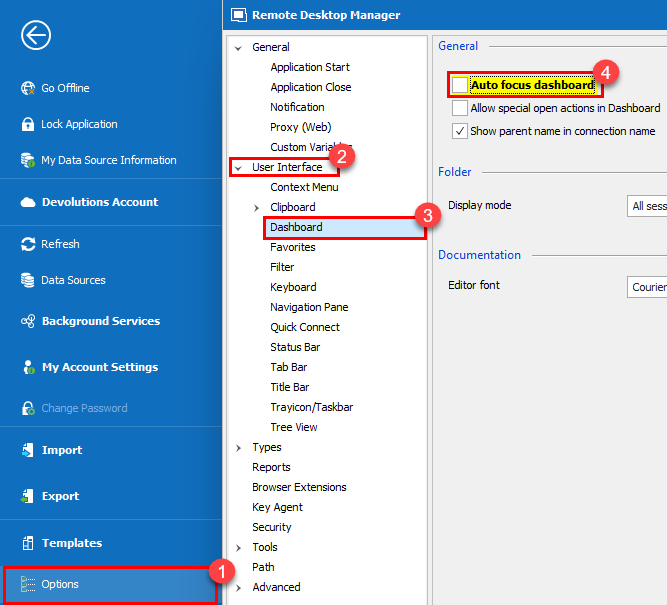
Best regards,
James Lafleur
autofocusdashboard.png
I have also struggled with this problem for awhile. I have the options set as above and the problem persists. This behavior has changed over time. The requested behavior was fixed once or twice, but was "broken" several major versions ago.
Here's a forum topic regarding this changing focus to the first tab after logout: https://forum.devolutions.net/topics/26580/active-tab-after-closing-a-session
I would also like to see it fixed again. Maybe the referenced post will be able to "jog" the memory as to the cause and ultimate fix.
Thanks!
I tried unchecking "Auto focus dashboard" but unfortunately it didn't change anything.
Hey buenyamin,
quick question - on which version do you encounter this issue?
Regards,
Min
Hey,
on the latest version (2020.2.13.0).
Regards,
buenyamin
Hello,
Thank you both for your quick replies!
That being said, would it be possible for you to install RDM as a portable version and see if this issue persists? This test will allow us to see if this behavior could be caused by the current configuration of your RDM instance.
To do so, you will need to download the .zip file below, extract its content in a newly created folder, run the executable and enter your current serial:
https://remotedesktopmanager.com/home/thankyou/rdmbin
In the meantime, I will go through our options and see what might cause this kind of behavior.
Best regards,
James Lafleur
Hello,
thank you also for your reply!
I'm using only portable versions of RDM Enterprise.
Kind Regards
Hello,
In that case, could you please go under File -> Options -> Advanced and check "Use manual active tab" and see if this issue persists?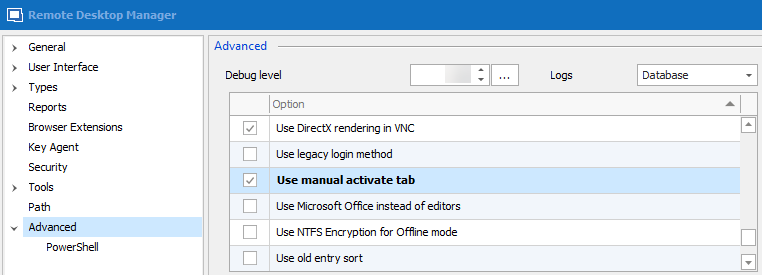
Best regards,
James Lafleur
usemanualactivate.png
I set that option and it did not make any difference. Any tab closing focuses the first tab (Dashboard). Sorry.
Nothing has changed for me either after setting this option.
Hello,
Thank you both for your reply!
Since we are currently unable to reproduce this issue on our end, I contacted each of you via private message in order to see if you could provide us your RemoteDesktopManager.cfg file. With it, we will try to replicate this issue in our test environment.
Best regards,
James Lafleur
Hello,
I've uploaded the required config file.
Kind Regards
I have uploaded my configuration file also.
Thanks.
Hello,
Thank you both for these files, they have been provided to our Engineering Department for further investigation.
We will be in touch as soon as we will have an update on that matter.
Best regards,
James Lafleur
Hello,
Unfortunately, even though we are using your RemoteDesktopManager.cfg files for our tests, we are currently unable to reproduce this issue.
That being said, would it be possible for both of you to go under File -> Options -> Types -> RDP and change the RDP engine to RDP 7.0 and see if this issue still occurs?
Best regards,
James Lafleur
I changed the setting to EDP 7.0 and the behavior continued. It makes no difference if I manually close the tab (while focused on another tab) or if I logout of the server on one tab, RDM changes to focus to the first tab (Dashboard if I have it configured to show or the first RDP session if not).
I'm running RDM Enterprise Edition, Windows 7 64-bit, local database
Hello Robbin,
Thank you for your quick reply!
I will provide this information to our Engineering Department and get back to you shortly.
Best regards,
James Lafleur
Hello Robbin,
After having a discussion on that matter with our QA and our Engineering Departments, they confirmed that unfortunately this is an issue tied directly to Window 7.
When RDM is installed on this OS, there is no workaround or fix that can be done to prevent the focus from going back to the Dashboard when a session is closed.
Sorry for the inconvenience.
Best regards,
James Lafleur
That's okay. I've been living with the behavior for awhile now and it's not a deal breaker. I am scheduled to get a new system w/Windows 10 soon, so it won't be an issue for me much longer.
Thank you for your diligence and answer.
Hello Robbin,
You are more than welcome! Thank you for your comprehension.
Best regards,
James Lafleur
Hi all
isn't this settable via File - Options - Treeview
I typically disable both the 'Auto focus tab on item select' and 'Auto select item on tab focus' to make sure the treeview doesn't jump away when I close a session.
otherwise the closed session will disappear, RDM selects the 'next' open TAB and jumps in the treeview to that item.
i personally don't want that behaviour since I often need to logoff + logon to the same box.
Hello Ben,
Thank you for updating this old forum thread!
It is true that both of these options are meant to help control the focus in RDM. By disabling both of them, the focus should not change when a connection is closed.
Best regards,
James Lafleur