
sabasigh
Certificate help
No hard drive mapping.
No RDP Gateway.
DNS lookup is fine
Latency is fine.
Pretty sure its the Certifcate checking.
Certificate help
OK I switched to FreeRDP and tested 2 connections and seems like it negotiated a remote session immediately but sat at a black screen for a very long time before giving you the welcome message and logging onto Windows (2012).
Also, seems like FreeRDP is grabbing my keyboard/focus much more forcefully.
Certificate help
Thanks i will test the RDP security layer on a server. Problem is some connections negotiate fast, others do not. One time a connection may connect fast, subsequent won't.
When i was on a domain PC that is the same as RDP hosts, then everything was fine...but this legacy AD domain will be decommissioned in the coming 18mos so we're phasing in parent company laptops which are Azure AD.
Certificate help
Have probably an odd situation here. Using a new company laptop that's been deployed to me using Azure Autopilot, joined to Azure AD and i log on with my Azure acct, synced with on-prem AD.
Have RDM running, latest version and i have all these connections to servers that are in another Active Directory domain. This AD domain is in a 2-way trust with the AD domain that is sync'd to Azure. Probably not relevant.
Anyway, certificate negotiation is killing the time to connect to any RDP, either using MSTSC or RDM. All the "legacy" domain connections are using self-signed certs for the RDP service.
In MSTSC, if i click "don't ask me again to accept the cert for connections" the cert thumbprint gets put into my laptop registry: HKCU\SOFTWARE\MICROSOFT\TERMINAL SERVER CLIENT\SERVERS but still mstsc can hang @ "Securing remote connection" In RDM you get no feedback on the extremely long delay
I've exported all the RDP certs, imported them into personal store and/or Trusted Publishers and sometimes RDP connects fast but the first time it does not.
Since this laptop is managed by Azure, i dont want to go in and hack up the registry/group policy to turn off any type of cert validation...was hoping there was something in RDM that could do this?
I unchecked the "Check for server cert revocation" in Options but i believe this is only for WWW connections?
Thanks
Cannot upgrade database
SQL stmt appears to have worked!
Thanks
Cannot upgrade database
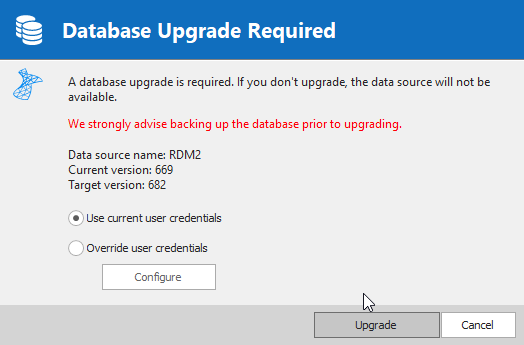
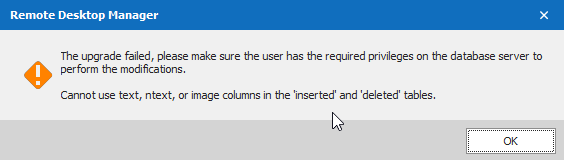
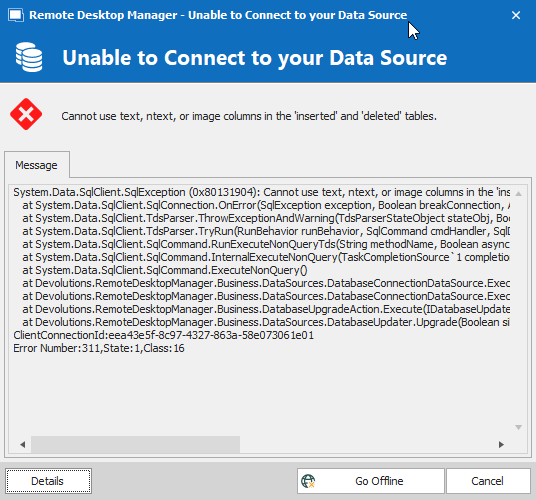
Just upgraded my RDM Enterprise to 2021.1.26.0 64bit and it requires a DB upgrade which fails.
I have appropriate permissions with my user account.
Any ideas?
Header tab list
Excellent! Thanks
Header tab list
Silly question. Thought in previous RDM the tabs in the header would require scrolling if they exceeded your display? Now they seem to carriage return to a new line, throwing off resolution of some sessions. Is there a way to go back to the scroll way?

Random Crashing of RDM
Hi,
In the link you provided it says to uncheck the option but there is no checkbox to uncheck.
Regards
Shane
Exactly! True, False, Default.
My RDM was hanging on logoff of Win2012 sessions. Now it's doing it on Win2008R2.
RDM hangs on logging off RDP session
Just updated to RDM 11.5.1.0 and still the issue persists.
RDM hangs on logging off RDP session
I am running Win10 Pro and RDM 11.1.0.0 and have intermittent RDM lockups when logging off an RDP session. I do not recall if there is any commonality with the remote session OS.
Most recent issue was with a Win2012 STD remote session.
Update* just did it again on a Win2012 STD remote session.
Issue with High res displays and scaling?
Has this been fixed yet?
Issue with High res displays and scaling?
Thanks...I've seen that suggestion in other articles in regards to dealing with programs on high DPI displays. Trying that on RDM makes it pretty tough to read.
Issue with High res displays and scaling?
Hello, I'm using a Dell Precision M3800 with 3200x1800 resolution and the DPI is set at 150%.
Some of my Embedded RDP connections will work fine for a while and then when i go to click say the Start menu of the session, the remote session doesn't recognize the click. Basically, say the 15% border around the session just doesn't accept clicking. The pointer is there, but no clicking is available.
So I tried reducing the resolution of the session down to 1400x1050 and it may work for a while, but after the M3800 has blanked to screensaver, going back to the remote session, the issue reappears. I've tried turning off smart scaling in the RDP options...no luck.
Any ideas?
TIA