Random Crashing of RDM
Howdy,
We've been using RDM for a year or so and we always have times where it just crashes out for no apparent reason. We had a new guy start and within a week he was asking if it was normal for it to just freeze up and crash. Sometimes it will hang for a bit and I can tell that a crash is on its way, and other time I click a new session to open and it just dies.
Is there any debugging I can do or log files I can send to someone to try to figure out what might be causing this? It's happening to everyone on our team so it doesn't seem to be specific to a particular computer unless it's something we have installed on all our machines.
All Comments (53)
Hi,
Do you get error message when it crashes? Is it when you logoff an RDP session?
Regards
David Hervieux
I don't get any error from within RDM. I just get a Windows box that says it has stopped responding. I don't think it only occurs during specific events but I'll try to make a note of exactly what I was doing the next time it happens.
Just had it crash a couple times on me. Usually when I'm trying to start a session but not always. We do use SSH connections along with all of our RDP sessions and I'm guessing it has something to do with that but I get no errors or anything. The program jsut vanishes and dies.
Which SSH connection type do you use? Is it our own SSH, Rebex or Putty?
David Hervieux
It's whatever the new one is you put in a few months back that lets us put a bunch of tunnels into one session.
Ok,
Could you verify if you get anything in the Windows Event Viewer after a crash?
Regards
David Hervieux
Nothing that mentions RDM anywhere that I see.

I also get random crashes and this is the event in the application log:
The program RemoteDesktopManager.exe version 11.1.0.0 stopped interacting with Windows and was closed. To see if more information about the problem is available, check the problem history in the Action Center control panel.
Process ID: 24b4
Start Time: 01d1a9ba4ec7daf4
Termination Time: 55
Application Path: C:\Program Files (x86)\Devolutions\Remote Desktop Manager\RemoteDesktopManager.exe
Report Id: 4784b501-184b-11e6-a4f3-028037ec0200
I had one session open from my list and one session open from quick connect.
Could you post the details of the error logs?
David Hervieux
I did see that same error in my event viewer. I just installed the new beta today so I'll see if this crashes on me and will post what I see.
Do you use RDM 32 or 64 bit?
David Hervieux
The 64-bit version doesn't work with something that we do so we only use the 32-bit version.
In the task manager it appears to be the 32bit version.
I don't see an option to download the 64bit version. There is text that states this product is compatible with 64bit.
You have remotedesktopmanager64.exe in the installation folder.
Regards
David Hervieux
The 64-bit version doesn't work with our SSH connections. We get:
[5/16/2016 8:28:41 AM] We claim version: SSH-2.0-PuTTY_Release_0.64
[5/16/2016 8:28:41 AM] Server version: SSH-2.0-OpenSSH_5.3
[5/16/2016 8:28:41 AM] We believe remote version has SSH-2 channel request bug
[5/16/2016 8:28:41 AM] Using SSH protocol version 2
[5/16/2016 8:28:41 AM] Doing Diffie-Hellman group exchange
[5/16/2016 8:28:41 AM] Doing Diffie-Hellman key exchange with hash SHA-256
[5/16/2016 8:28:41 AM] Host key fingerprint is:
[5/16/2016 8:28:41 AM] ssh-rsa 2048 ce:2e:6f:f2:3a:88:85:d5:69:e2:6d:fe:1e:7f:62:75
[5/16/2016 8:28:41 AM] Initialised AES-256 SDCTR client->server encryption
[5/16/2016 8:28:41 AM] Initialised HMAC-SHA-256 client->server MAC algorithm
[5/16/2016 8:28:41 AM] Initialised AES-256 SDCTR server->client encryption
[5/16/2016 8:28:41 AM] Initialised HMAC-SHA-256 server->client MAC algorithm
[5/16/2016 8:28:41 AM] Disconnected: No supported authentication methods available (server sent: publickey)
That last line usually means the program can't see my private key for some reason.
Hello,
Just to confirm, is the private key you use not directly entered in the session? For example are you using the credential repository, personal private key, etc? There might be an issue in that case with the 64 bits version, which we'll work on.
Regards,
Hubert Mireault
As for the crash issue, is there any logs outputted in the PortForward session itself or does it crash before it can output anything? We will add a way to output the log to a file directly like with the SSH Shell session type.
Regards,
Hubert Mireault
Doh!!! Didn't see that... am working with it now and will let you know what happens...
I have the key in the private vault and it's linked to the session via the Edit User Specific Settings.
I haven't crashed since installing the 11.5 version but when it happens again, I'll see what I can find.
The issue has been fixed internally for the private key not being sent properly in 64 bits. This will be in the next minor version.
As for the crash, we might have a lead but we still appreciate any information you guys can give us. Thank you!
Regards,
Hubert Mireault
OK, just crashed when I double clicked to launch a new session.
~~~~~~~~~~~~~~~~~~~~~~~~~~~~~~~~~~~~~~~~~~~~~~~~~~~~~~~~~~~~~~~~
This was in Event Viewer:
Application: RemoteDesktopManager.exe
Framework Version: v4.0.30319
Description: The process was terminated due to an unhandled exception.
Exception Info: System.ComponentModel.Win32Exception
Stack:
at System.Windows.Forms.NativeWindow.CreateHandle(System.Windows.Forms.CreateParams)
at System.Windows.Forms.Timer+TimerNativeWindow.EnsureHandle()
at System.Windows.Forms.Timer+TimerNativeWindow.StartTimer(Int32)
at System.Windows.Forms.Timer.set_Enabled(Boolean)
at System.Windows.Forms.Timer.Start()
at DevExpress.XtraBars.BarManager.CreateCheckMdiTimer()
at DevExpress.XtraBars.MessageFilter.BarManagerHook.DevExpress.Utils.Win.Hook.IHookController.InternalPostFilterMessage(Int32, System.Windows.Forms.Control, IntPtr, IntPtr, IntPtr)
at DevExpress.Utils.Win.Hook.HookManager.InternalPostFilterMessage(DevExpress.Utils.Win.Hook.HookInfo, Int32, System.Windows.Forms.Control, IntPtr, IntPtr, IntPtr)
at DevExpress.Utils.Win.Hook.HookManager.WndHook(Int32, IntPtr, IntPtr)
at System.Windows.Forms.UnsafeNativeMethods.CallWindowProc(IntPtr, IntPtr, Int32, IntPtr, IntPtr)
at System.Windows.Forms.NativeWindow.DefWndProc(System.Windows.Forms.Message ByRef)
at System.Windows.Forms.Control.DefWndProc(System.Windows.Forms.Message ByRef)
at System.Windows.Forms.Control.WndProc(System.Windows.Forms.Message ByRef)
at System.Windows.Forms.MdiClient.WndProc(System.Windows.Forms.Message ByRef)
at System.Windows.Forms.Control+ControlNativeWindow.OnMessage(System.Windows.Forms.Message ByRef)
at System.Windows.Forms.Control+ControlNativeWindow.WndProc(System.Windows.Forms.Message ByRef)
at System.Windows.Forms.NativeWindow.Callback(IntPtr, Int32, IntPtr, IntPtr)
at System.Windows.Forms.NativeWindow.DefWndProc(System.Windows.Forms.Message ByRef)
at DevExpress.Utils.Mdi.MdiClientSubclasser.WndProc(System.Windows.Forms.Message ByRef)
at System.Windows.Forms.NativeWindow.Callback(IntPtr, Int32, IntPtr, IntPtr)
at System.Windows.Forms.UnsafeNativeMethods.DefMDIChildProc(IntPtr, Int32, IntPtr, IntPtr)
at System.Windows.Forms.Control.DestroyHandle()
at System.Windows.Forms.Form.SetVisibleCore(Boolean)
at Devolutions.RemoteDesktopManager.Forms.FrmEmbeddedContainer.SetVisibleCore(Boolean)
at System.Windows.Forms.Control.set_Visible(Boolean)
at Devolutions.RemoteDesktopManager.Forms.FrmMainRibbon.SetMdiChildVisible(System.Windows.Forms.Form, Boolean)
at Devolutions.RemoteDesktopManager.Forms.FrmMainRibbonBase.ApplyMdiFilter()
at Devolutions.RemoteDesktopManager.Managers.UIManager.set_SelectedTabGroup(System.String)
at Devolutions.RemoteDesktopManager.Frames.ConnectionViews.FreTabGroups.c038194182b359e894c9ce999b5e1e0d5(System.Object, System.EventArgs)
at System.Windows.Forms.Timer.OnTick(System.EventArgs)
at System.Windows.Forms.Timer+TimerNativeWindow.WndProc(System.Windows.Forms.Message ByRef)
at System.Windows.Forms.NativeWindow.Callback(IntPtr, Int32, IntPtr, IntPtr)
at System.Windows.Forms.UnsafeNativeMethods.DispatchMessageW(MSG ByRef)
at System.Windows.Forms.Application+ComponentManager.System.Windows.Forms.UnsafeNativeMethods.IMsoComponentManager.FPushMessageLoop(IntPtr, Int32, Int32)
at System.Windows.Forms.Application+ThreadContext.RunMessageLoopInner(Int32, System.Windows.Forms.ApplicationContext)
at System.Windows.Forms.Application+ThreadContext.RunMessageLoop(Int32, System.Windows.Forms.ApplicationContext)
at System.Windows.Forms.Application.Run(System.Windows.Forms.Form)
at Devolutions.RemoteDesktopManager.Program.Main(System.String[])
~~~~~~~~~~~~~~~~~~~~~~~~~~~~~~~~~~~~~~~~~~~~~~~~~~~~~~~~~~~~~~~~~~~~~~~
This was also in there:
Faulting application name: RemoteDesktopManager.exe, version: 11.5.0.0, time stamp: 0x5734e22f
Faulting module name: KERNELBASE.dll, version: 10.0.10240.16766, time stamp: 0x56e8cf1c
Exception code: 0xe0434352
Fault offset: 0x000b40f8
Faulting process id: 0x8e98
Faulting application start time: 0x01d1af7808a568d1
Faulting application path: C:\Program Files (x86)\Devolutions\Remote Desktop Manager\RemoteDesktopManager.exe
Faulting module path: C:\WINDOWS\SYSTEM32\KERNELBASE.dll
Report Id: 74676428-96f2-4bd1-8d12-3b3f1bb81487
Faulting package full name:
Faulting package-relative application ID:
~~~~~~~~~~~~~~~~~~~~~~~~~~~~~~~~~~~~~~~~~~~~~~~~~~~~~~~~~~~~~~~~~~~~~~
As was this:
Fault bucket 129102899031, type 5
Event Name: CLR20r3
Response: Not available
Cab Id: 129020321448
Problem signature:
P1: RemoteDesktopManager.exe
P2: 11.5.0.0
P3: 5734e22f
P4: System.Windows.Forms
P5: 4.6.79.0
P6: 556bc619
P7: 2c5b
P8: 168
P9: System.ComponentModel.Win32
P10:
Attached files:
C:\Users\mboehm\AppData\Local\Temp\WER23D4.tmp.WERInternalMetadata.xml
C:\Users\mboehm\AppData\Local\Temp\WER2F8D.tmp.appcompat.txt
C:\ProgramData\Microsoft\Windows\WER\Temp\WER3E62.tmp.dmp
C:\Users\mboehm\AppData\Local\Temp\WER523A.tmp.WERDataCollectionFailure.txt
These files may be available here:
C:\ProgramData\Microsoft\Windows\WER\ReportArchive\AppCrash_RemoteDesktopMan_5fbf522cc5b1f571ca8fb72eb3f6724eb3f5c3ae_cbe23a07_cab_c7f2759d
Analysis symbol:
Rechecking for solution: 0
Report Id: 74676428-96f2-4bd1-8d12-3b3f1bb81487
Report Status: 9
Hashed bucket: 3ac1c3bda236e538562131ab5745fc3a
Does the application was terminated with this crash?
Regards
David Hervieux
The program completely died and had to be re-opened.
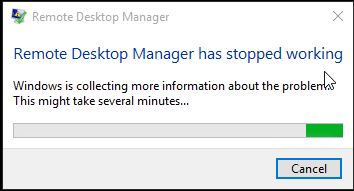
RDM Crash1.jpg
Could send me a print screen of your main form. You can send it as a private message.
Regards
David Hervieux
Done
Ok,
I've made a potential fix. You're logs were useful. This will be in the next minor update that we will release later this week. I hope this helps.
Regards
David Hervieux
Hi,
My RDM has stopped responding
4 sessions open
performed a reboot of one of the sessions and RDM stopped responding.
Had to kill the process as after 5 minutes it still had not recovered.
The only entry in the Application event log:
The program RemoteDesktopManager64.exe version 11.5.0.0 stopped interacting with Windows and was closed. To see if more information about the problem is available, check the problem history in the Action Center control panel.
Process ID: 9354
Start Time: 01d1af80dc3f3d37
Termination Time: 60
Application Path: C:\Program Files (x86)\Devolutions\Remote Desktop Manager\RemoteDesktopManager64.exe
Report Id: f9b97ceb-1ce4-11e6-a4d6-028037ec0200
Hi,
I need the details in the event viewer. We have a troubleshooting topic for the hang after a reboot:
http://help.remotedesktopmanager.com/index.html?troubleshooting_rdphanglogoff.htm
Regards
David Hervieux
Hi,
In the link you provided it says to uncheck the option but there is no checkbox to uncheck.
Regards
Shane
My RDP manager has crashed 4 times today
Each time it was after either rebooting or logging off from a Windows Server 2012 R2 server
Do you use the RDP connection with an SSH connection?
Regards
David Hervieux
No
Exactly! True, False, Default.
My RDM was hanging on logoff of Win2012 sessions. Now it's doing it on Win2008R2.
Hi,
I had a crash on Friday where all I did was try to exit out of RDM... I didn't have any clients open at the time either.
Could you provide us the error log?
Regards
David Hervieux
Here is the event from my event viewer:
The program RemoteDesktopManager64.exe version 11.5.4.0 stopped interacting with Windows and was closed. To see if more information about the problem is available, check the problem history in the Action Center control panel.
Process ID: 790
Start Time: 01d1bccc0df6d835
Termination Time: 34
Application Path: C:\Program Files (x86)\Devolutions\Remote Desktop Manager\RemoteDesktopManager64.exe
Report Id: f29cfd42-29af-11e6-ae03-028037ec0200
Do you have the log from RDM in Help->View Application Logs?
Please try to post only the log for this specific day
Regards
David Hervieux
There are only 4 entries in the log and the last entry dates back to 11/05/2016
I've made a tweak in the disconnection process in the latest beta. Could you give it a try?
http://remotedesktopmanager.com/Home/ThankYou?f=RDMsetupBeta
David Hervieux
I've installed it... will let you know how things go...
Hmm, I thought I replied to this but maybe it didn't send. My 11.5.5.0 crashed on me but didn't seem to give any notification. I just looked over and it was gone.
From the Application Log:
System.ComponentModel.Win32Exception (0x80004005): Error creating window handle.
at System.Windows.Forms.NativeWindow.CreateHandle(CreateParams cp)
at System.Windows.Forms.Timer.TimerNativeWindow.EnsureHandle()
at System.Windows.Forms.Timer.TimerNativeWindow.StartTimer(Int32 interval)
at System.Windows.Forms.Timer.set_Enabled(Boolean value)
at System.Windows.Forms.Timer.Start()
at Devolutions.RemoteDesktopManager.Forms.FreEmbeddedDashboard.SetControlStates()
at Devolutions.RemoteDesktopManager.Forms.FrmMainRibbonBase.SetControlStates()
at Devolutions.RemoteDesktopManager.Forms.FrmMainRibbonBase.EnableSetControlStates()
at Devolutions.RemoteDesktopManager.Managers.UIManager.EnableSetControlStates()
at Devolutions.RemoteDesktopManager.Business.SetControlStatesDisabler.Dispose()
at Devolutions.RemoteDesktopManager.Managers.ActionManager.OpenConnections(Connection[] currentConnections, OpenConnectionMode openConnectionMode, IConnectionSource source, Boolean checkOpenedConnection)
at Devolutions.RemoteDesktopManager.Frames.ConnectionViews.FreBaseConnectionView.OpenConnection(Connection[] currentConnections, OpenConnectionMode openConnectionMode)
at Devolutions.RemoteDesktopManager.Frames.ConnectionViews.FreConnectionTreeListView.cbad026f0443b4db7579b28d004e7ca8d(Boolean ce86b9cea9309620f2c628f54915f70f5)
at Devolutions.RemoteDesktopManager.Frames.ConnectionViews.FreConnectionTreeListView.ca390b353885c14c1b462fd0a75363620.cc01875c85cc41d29b721f72e6758884f()
at Devolutions.RemoteDesktopManager.Managers.ThreadManager.caa310ce107ed0c993f3d034df6d00336(Object c19f185fd70cefc696ba148af1c4faf54, EventArgs cf1018bb83ec7debd818319fd3cb4844e)
at System.Windows.Forms.Timer.OnTick(EventArgs e)
at System.Windows.Forms.Timer.TimerNativeWindow.WndProc(Message& m)
at System.Windows.Forms.NativeWindow.Callback(IntPtr hWnd, Int32 msg, IntPtr wparam, IntPtr lparam)
and
System.Runtime.InteropServices.ExternalException (0x80004005): A generic error occurred in GDI+.
at System.Drawing.Bitmap.GetHicon()
at Devolutions.Utils.ImageUtils.ImageToIcon(Image image, Int32 size, Boolean keepAspectRatio)
at Devolutions.RemoteDesktopManager.Forms.FrmMessageBox.cd04ab500ad779625ac6f4295e2c380db()
at Devolutions.RemoteDesktopManager.Forms.FrmMessageBox..ctor(String c513fe200f6b62709aa48fbd4042c401f, String c863cd14f2c3dc07de645e375107700a7, MessageBoxButtons c66c90fd39932c85e9c11df61da88aaf7, MessageBoxIcon cf30babfeab74b6b48bf3b166ec3cd476, MessageBoxDefaultButton c91253767548490b8b5eece20a45992dc)
at Devolutions.RemoteDesktopManager.Forms.FrmMessageBox.Show(String text, String caption, MessageBoxButtons messageBoxButtons, MessageBoxIcon messageBoxIcon, MessageBoxDefaultButton messageBoxDefaultButton)
at Devolutions.RemoteDesktopManager.Managers.UIManager.cac954c29f4d8d2406545c160a2ba2263.c498157ce0f0d12aa5ca864c92f6f3b04()
at Devolutions.RemoteDesktopManager.Managers.ThreadManager.Invoke(MethodInvoker invoker, Boolean force)
Hi,
This is really a strange error from Windows. I will investigate.
Regards
David Hervieux
Hi,
I have been on 11.5.6.0 and updated to 11.5.8.0
I have not experienced any crashes in 11.5.6.0 but I have just had one crash now.
I had 3 RDP connections open and went to close the application with the 3 machines connected. The application didn't ask if I was sure I wanted to disconnect the machines. It just crashed.
The following found in event viewer:
The program RemoteDesktopManager64.exe version 11.5.8.0 stopped interacting with Windows and was closed. To see if more information about the problem is available, check the problem history in the Action Center control panel.
Process ID: 11cb8
Start Time: 01d1cb8398a2b072
Termination Time: 33
Application Path: C:\Program Files (x86)\Devolutions\Remote Desktop Manager\RemoteDesktopManager64.exe
Report Id: 8dec1955-37b1-11e6-82eb-028037ec0200
Do you get anything in the application logs?
David Hervieux
Nothing in the application log for today... the last error entry was 11/05/2016
The last entry of any sort was 16/06/2016.
Just had another crash today. One minute RDM was there. The next it was gone. 11.5.9.0
System.ComponentModel.Win32Exception (0x80004005): Error creating window handle.
at System.Windows.Forms.NativeWindow.CreateHandle(CreateParams cp)
at System.Windows.Forms.Control.CreateHandle()
at System.Windows.Forms.Control.CreateControl(Boolean fIgnoreVisible)
at System.Windows.Forms.Control.CreateControl(Boolean fIgnoreVisible)
at System.Windows.Forms.Control.CreateControl()
at System.Windows.Forms.Control.ControlCollection.Add(Control value)
at Devolutions.RemoteDesktopManager.Frames.Embedded.FreEmbeddedPortForward.Setup(Connection connection, OpenConnectionMode openConnectionMode)
at Devolutions.RemoteDesktopManager.Managers.EmbeddedViewManager.c05a4a169bb1ade915a9f6f7b6339eeac(FreEmbeddedView c60a5c3d79f5c9d8ce9ed13393ea1eab7, Connection c6aea3d31dfb3fea36c5f53f7fe93584c, Boolean c483b2477d7bfce4f8b55bb662eb78b4e, Boolean ca6a22d3f25c975ff31a01aa94e590fe7, OpenConnectionMode c602973c05c2f5870e41c508b048b13c5, Image cab3b489b5921f9edda008f021b9c5ea9)
at Devolutions.RemoteDesktopManager.Managers.EmbeddedViewManager.Open(Connection connection, FreEmbeddedView frame, Boolean isConnected, OpenConnectionMode openConnectionMode, Boolean undocked, Image image)
at Devolutions.RemoteDesktopManager.Business.Connectors.EmbeddedConnector.Connect(Connection connection, OpenConnectionMode openConnectionMode)
at Devolutions.RemoteDesktopManager.Managers.ConnectionManager.OpenConnection(Connection connection, OpenConnectionParameter parameter)
at Devolutions.RemoteDesktopManager.Managers.ConnectionManager.OpenConnection(Connection connection, OpenConnectionMode mode)
at Devolutions.RemoteDesktopManager.Business.VPNOpeners.VPNExistingSessionOpener.Open(Connection vpn)
at Devolutions.RemoteDesktopManager.Managers.VPNManager.OpenVPN(Connection connection)
at Devolutions.RemoteDesktopManager.Managers.ConnectionManager.OpenConnection(Connection connection, OpenConnectionParameter parameter)
at Devolutions.RemoteDesktopManager.Managers.ConnectionManager.OpenConnections(Connection[] connectionList, OpenConnectionParameter parameter)
at Devolutions.RemoteDesktopManager.Managers.ActionManager.c2d3a897d165d9e56a0d53f388986ac51(Connection[] cfabc0254f46d7d8ae5a71db9e5a0b5b5, OpenConnectionMode c602973c05c2f5870e41c508b048b13c5, IConnectionSource c5b7a41272702648f46cf77ee6b3a92cb)
at Devolutions.RemoteDesktopManager.Managers.ActionManager.OpenConnections(Connection[] currentConnections, OpenConnectionMode openConnectionMode, IConnectionSource source, Boolean checkOpenedConnection)
at Devolutions.RemoteDesktopManager.Frames.ConnectionViews.FreBaseConnectionView.OpenConnection(Connection[] currentConnections, OpenConnectionMode openConnectionMode)
at Devolutions.RemoteDesktopManager.Frames.ConnectionViews.FreConnectionTreeListView.cbad026f0443b4db7579b28d004e7ca8d(Boolean ce86b9cea9309620f2c628f54915f70f5)
at Devolutions.RemoteDesktopManager.Frames.ConnectionViews.FreConnectionTreeListView.ca390b353885c14c1b462fd0a75363620.cc01875c85cc41d29b721f72e6758884f()
at Devolutions.RemoteDesktopManager.Managers.ThreadManager.caa310ce107ed0c993f3d034df6d00336(Object c19f185fd70cefc696ba148af1c4faf54, EventArgs cf1018bb83ec7debd818319fd3cb4844e)
at System.Windows.Forms.Timer.OnTick(EventArgs e)
at System.Windows.Forms.Timer.TimerNativeWindow.WndProc(Message& m)
at System.Windows.Forms.NativeWindow.Callback(IntPtr hWnd, Int32 msg, IntPtr wparam, IntPtr lparam)
and
System.Runtime.InteropServices.ExternalException (0x80004005): A generic error occurred in GDI+.
at System.Drawing.Bitmap.GetHicon()
at Devolutions.Utils.ImageUtils.ImageToIcon(Image image, Int32 size, Boolean keepAspectRatio)
at Devolutions.RemoteDesktopManager.Forms.FrmMessageBox.cd04ab500ad779625ac6f4295e2c380db()
at Devolutions.RemoteDesktopManager.Forms.FrmMessageBox..ctor(String c513fe200f6b62709aa48fbd4042c401f, String c863cd14f2c3dc07de645e375107700a7, MessageBoxButtons c66c90fd39932c85e9c11df61da88aaf7, MessageBoxIcon cf30babfeab74b6b48bf3b166ec3cd476, MessageBoxDefaultButton c91253767548490b8b5eece20a45992dc)
at Devolutions.RemoteDesktopManager.Forms.FrmMessageBox.Show(String text, String caption, MessageBoxButtons messageBoxButtons, MessageBoxIcon messageBoxIcon, MessageBoxDefaultButton messageBoxDefaultButton)
at Devolutions.RemoteDesktopManager.Managers.UIManager.ca5cd5389d81ce4cabe811a4a6d79d7a2.c620b62130127ff9e1d58248b07032031()
at Devolutions.RemoteDesktopManager.Managers.ThreadManager.Invoke(MethodInvoker invoker, Boolean force)
Just clicked to open up a session and RDM Crashed on me.
Event Viewer items below:
Application: RemoteDesktopManager.exe
Framework Version: v4.0.30319
Description: The process was terminated due to an unhandled exception.
Exception Info: System.ComponentModel.Win32Exception
Stack:
at System.Windows.Forms.NativeWindow.CreateHandle(System.Windows.Forms.CreateParams)
at System.Windows.Forms.Control.CreateHandle()
at System.Windows.Forms.Control.get_Handle()
at System.Windows.Forms.Application.ParkHandle(System.Windows.Forms.CreateParams)
at System.Windows.Forms.Control.CreateHandle()
at System.Windows.Forms.Control.get_Handle()
at System.Windows.Forms.Control.CreateGraphicsInternal()
at System.Windows.Forms.ThreadExceptionDialog..ctor(System.Exception)
at System.Windows.Forms.Application+ThreadContext.OnThreadException(System.Exception)
at System.Windows.Forms.Control.WndProcException(System.Exception)
at System.Windows.Forms.Control+ControlNativeWindow.OnThreadException(System.Exception)
at System.Windows.Forms.NativeWindow.Callback(IntPtr, Int32, IntPtr, IntPtr)
at System.Windows.Forms.SafeNativeMethods.ShowWindow(System.Runtime.InteropServices.HandleRef, Int32)
at System.Windows.Forms.Control.SetVisibleCore(Boolean)
at System.Windows.Forms.Form.SetVisibleCore(Boolean)
at DevExpress.Utils.Win.TopFormBase.SetVisibleCore(Boolean)
at System.Windows.Forms.Control.set_Visible(Boolean)
at System.Windows.Forms.Application+ThreadContext.RunMessageLoopInner(Int32, System.Windows.Forms.ApplicationContext)
at System.Windows.Forms.Application+ThreadContext.RunMessageLoop(Int32, System.Windows.Forms.ApplicationContext)
at System.Windows.Forms.Application.RunDialog(System.Windows.Forms.Form)
at System.Windows.Forms.Form.ShowDialog(System.Windows.Forms.IWin32Window)
at DevExpress.XtraSplashForm.SplashFormBase.ShowDialogCore()
at DevExpress.XtraSplashForm.SplashFormBase.ShowDialog()
at DevExpress.XtraSplashScreen.ThreadManagerBase.DoRun()
at DevExpress.XtraSplashScreen.ThreadManagerBase.ThreadEntryPointCore(System.String)
at DevExpress.XtraSplashScreen.ThreadManagerBase.ThreadEntryPoint(System.Object)
at System.Threading.ThreadHelper.ThreadStart_Context(System.Object)
at System.Threading.ExecutionContext.RunInternal(System.Threading.ExecutionContext, System.Threading.ContextCallback, System.Object, Boolean)
at System.Threading.ExecutionContext.Run(System.Threading.ExecutionContext, System.Threading.ContextCallback, System.Object, Boolean)
at System.Threading.ExecutionContext.Run(System.Threading.ExecutionContext, System.Threading.ContextCallback, System.Object)
at System.Threading.ThreadHelper.ThreadStart(System.Object)
and
Faulting application name: RemoteDesktopManager.exe, version: 11.5.11.0, time stamp: 0x57731a90
Faulting module name: KERNELBASE.dll, version: 10.0.10240.16766, time stamp: 0x56e8cf1c
Exception code: 0xe0434352
Fault offset: 0x000b40f8
Faulting process id: 0x2d88
Faulting application start time: 0x01d1d20e4804867a
Faulting application path: C:\Program Files (x86)\Devolutions\Remote Desktop Manager\RemoteDesktopManager.exe
Faulting module path: C:\WINDOWS\SYSTEM32\KERNELBASE.dll
Report Id: 13fb0b26-90c2-4cee-aa91-9f6db7c141f5
Faulting package full name:
Faulting package-relative application ID:
Application Log info below:
System.ComponentModel.Win32Exception (0x80004005): Error creating window handle.
at System.Windows.Forms.NativeWindow.CreateHandle(CreateParams cp)
at System.Windows.Forms.Control.CreateHandle()
at System.Windows.Forms.TextBoxBase.CreateHandle()
at System.Windows.Forms.Control.CreateControl(Boolean fIgnoreVisible)
at System.Windows.Forms.Control.CreateControl(Boolean fIgnoreVisible)
at System.Windows.Forms.Control.CreateControl(Boolean fIgnoreVisible)
at System.Windows.Forms.Control.CreateControl()
at System.Windows.Forms.Control.ControlCollection.Add(Control value)
at Devolutions.RemoteDesktopManager.Frames.Embedded.FreEmbeddedPortForward.Setup(Connection connection, OpenConnectionMode openConnectionMode)
at Devolutions.RemoteDesktopManager.Managers.EmbeddedViewManager.c05a4a169bb1ade915a9f6f7b6339eeac(FreEmbeddedView c60a5c3d79f5c9d8ce9ed13393ea1eab7, Connection c6aea3d31dfb3fea36c5f53f7fe93584c, Boolean c483b2477d7bfce4f8b55bb662eb78b4e, Boolean ca6a22d3f25c975ff31a01aa94e590fe7, OpenConnectionMode c602973c05c2f5870e41c508b048b13c5, Image cab3b489b5921f9edda008f021b9c5ea9)
at Devolutions.RemoteDesktopManager.Managers.EmbeddedViewManager.Open(Connection connection, FreEmbeddedView frame, Boolean isConnected, OpenConnectionMode openConnectionMode, Boolean undocked, Image image)
at Devolutions.RemoteDesktopManager.Business.Connectors.EmbeddedConnector.Connect(Connection connection, OpenConnectionMode openConnectionMode)
at Devolutions.RemoteDesktopManager.Managers.ConnectionManager.OpenConnection(Connection connection, OpenConnectionParameter parameter)
at Devolutions.RemoteDesktopManager.Managers.ConnectionManager.OpenConnection(Connection connection, OpenConnectionMode mode)
at Devolutions.RemoteDesktopManager.Business.VPNOpeners.VPNExistingSessionOpener.Open(Connection vpn)
at Devolutions.RemoteDesktopManager.Managers.VPNManager.OpenVPN(Connection connection)
at Devolutions.RemoteDesktopManager.Managers.ConnectionManager.OpenConnection(Connection connection, OpenConnectionParameter parameter)
at Devolutions.RemoteDesktopManager.Managers.ConnectionManager.OpenConnections(Connection[] connectionList, OpenConnectionParameter parameter)
at Devolutions.RemoteDesktopManager.Managers.ActionManager.c2d3a897d165d9e56a0d53f388986ac51(Connection[] cfabc0254f46d7d8ae5a71db9e5a0b5b5, OpenConnectionMode c602973c05c2f5870e41c508b048b13c5, IConnectionSource c5b7a41272702648f46cf77ee6b3a92cb)
at Devolutions.RemoteDesktopManager.Managers.ActionManager.OpenConnections(OpenConnectionMode openConnectionMode, IConnectionSource source, Boolean checkOpenedConnection)
at Devolutions.RemoteDesktopManager.Managers.SessionMenuManager.c552f6de7933b91b08a4107f7410f30d0(Object c19f185fd70cefc696ba148af1c4faf54, EventArgs cf1018bb83ec7debd818319fd3cb4844e)
at System.Windows.Forms.ToolStripItem.RaiseEvent(Object key, EventArgs e)
at System.Windows.Forms.ToolStripMenuItem.OnClick(EventArgs e)
at System.Windows.Forms.ToolStripItem.HandleClick(EventArgs e)
at System.Windows.Forms.ToolStripItem.HandleMouseUp(MouseEventArgs e)
at System.Windows.Forms.ToolStripItem.FireEventInteractive(EventArgs e, ToolStripItemEventType met)
at System.Windows.Forms.ToolStripItem.FireEvent(EventArgs e, ToolStripItemEventType met)
at System.Windows.Forms.ToolStrip.OnMouseUp(MouseEventArgs mea)
at System.Windows.Forms.ToolStripDropDown.OnMouseUp(MouseEventArgs mea)
at System.Windows.Forms.Control.WmMouseUp(Message& m, MouseButtons button, Int32 clicks)
at System.Windows.Forms.Control.WndProc(Message& m)
at System.Windows.Forms.ScrollableControl.WndProc(Message& m)
at System.Windows.Forms.ToolStrip.WndProc(Message& m)
at System.Windows.Forms.ToolStripDropDown.WndProc(Message& m)
at System.Windows.Forms.Control.ControlNativeWindow.OnMessage(Message& m)
at System.Windows.Forms.Control.ControlNativeWindow.WndProc(Message& m)
at System.Windows.Forms.NativeWindow.Callback(IntPtr hWnd, Int32 msg, IntPtr wparam, IntPtr lparam)
and
System.Runtime.InteropServices.ExternalException (0x80004005): A generic error occurred in GDI+.
at System.Drawing.Bitmap.GetHicon()
at Devolutions.Utils.ImageUtils.ImageToIcon(Image image, Int32 size, Boolean keepAspectRatio)
at Devolutions.RemoteDesktopManager.Forms.FrmMessageBox.cd04ab500ad779625ac6f4295e2c380db()
at Devolutions.RemoteDesktopManager.Forms.FrmMessageBox..ctor(String c513fe200f6b62709aa48fbd4042c401f, String c863cd14f2c3dc07de645e375107700a7, MessageBoxButtons c66c90fd39932c85e9c11df61da88aaf7, MessageBoxIcon cf30babfeab74b6b48bf3b166ec3cd476, MessageBoxDefaultButton c91253767548490b8b5eece20a45992dc)
at Devolutions.RemoteDesktopManager.Forms.FrmMessageBox.Show(String text, String caption, MessageBoxButtons messageBoxButtons, MessageBoxIcon messageBoxIcon, MessageBoxDefaultButton messageBoxDefaultButton)
at Devolutions.RemoteDesktopManager.Managers.UIManager.ca5cd5389d81ce4cabe811a4a6d79d7a2.c620b62130127ff9e1d58248b07032031()
at Devolutions.RemoteDesktopManager.Managers.ThreadManager.Invoke(MethodInvoker invoker, Boolean force)
and
System.ComponentModel.Win32Exception (0x80004005): Error creating window handle.
at System.Windows.Forms.NativeWindow.CreateHandle(CreateParams cp)
at System.Windows.Forms.Control.CreateHandle()
at System.Windows.Forms.Control.get_Handle()
at System.Windows.Forms.Application.ParkHandle(CreateParams cp)
at System.Windows.Forms.Control.CreateHandle()
at System.Windows.Forms.Control.get_Handle()
at System.Windows.Forms.Control.CreateGraphicsInternal()
at System.Windows.Forms.ThreadExceptionDialog..ctor(Exception t)
at System.Windows.Forms.Application.ThreadContext.OnThreadException(Exception t)
at System.Windows.Forms.Control.WndProcException(Exception e)
at System.Windows.Forms.Control.ControlNativeWindow.OnThreadException(Exception e)
at System.Windows.Forms.NativeWindow.Callback(IntPtr hWnd, Int32 msg, IntPtr wparam, IntPtr lparam)
Do you know if RDM was running from a long time?
David Hervieux
I had just downloaded the new version this morning so not longer than that.
Hi,
I suspect that we have a memory leak and Windows crashes because of that. How many port forward do you have in your entry?
Regards
David Hervieux
The biggest one has around 150. Two others are around 85 and the last one around 50.
Hi,
I have updated to version 11.6.0.0 this morning and my RDP manager has just crashed.
I have one VM open with RDP and one connected through quick connect.
When I logged off the server connected through quick connect, my RDP manager crashed.
@Kelemvor: We will list the tunnels using a list control instead of how it is currently which should augment stability. This will be in the next minor version of RDM.
@Shane: Was the connection opened with the quick connect an RDP too? Does it happen every time, no matter the host?
Regards,
Hubert Mireault