Certificate help

Have probably an odd situation here. Using a new company laptop that's been deployed to me using Azure Autopilot, joined to Azure AD and i log on with my Azure acct, synced with on-prem AD.
Have RDM running, latest version and i have all these connections to servers that are in another Active Directory domain. This AD domain is in a 2-way trust with the AD domain that is sync'd to Azure. Probably not relevant.
Anyway, certificate negotiation is killing the time to connect to any RDP, either using MSTSC or RDM. All the "legacy" domain connections are using self-signed certs for the RDP service.
In MSTSC, if i click "don't ask me again to accept the cert for connections" the cert thumbprint gets put into my laptop registry: HKCU\SOFTWARE\MICROSOFT\TERMINAL SERVER CLIENT\SERVERS but still mstsc can hang @ "Securing remote connection" In RDM you get no feedback on the extremely long delay
I've exported all the RDP certs, imported them into personal store and/or Trusted Publishers and sometimes RDP connects fast but the first time it does not.
Since this laptop is managed by Azure, i dont want to go in and hack up the registry/group policy to turn off any type of cert validation...was hoping there was something in RDM that could do this?
I unchecked the "Check for server cert revocation" in Options but i believe this is only for WWW connections?
Thanks
All Comments (9)
Hello,
In RDM , when you launch a RDP session in embedded mode, we use an activeX to establish the connection. It's an ActiveX developed by Microsoft.
In external mode, we use mstsc to establish the connection.
In both scenario, we use Microsoft technologies to establish the connection, so if it's not working with Microsoft RDP properly, it will not work in RDM as well.
I will have a chat with my team tomorrow on this to see if something can be done on our side to try to help.
Best regards,
Jeff Dagenais
Ideal would be if you have your own PKI infrastructure, in that case you can automatically deploy trusted certificates for different purposes, including RDP to your servers.
if that is not the case, you may try to set the Require use of specific security layer for remote (RDP) connections setting (on your target servers), as follows:
Start the Group Policy editor (GPEdit.msc)
navigate to: Computer Configuration - Administrative Templates - Windows Components - Remote Desktop Services - Remote Desktop Session Host - Security
Then look at the setting: 'Require use of specific security layer for remote (RDP) connections', whether it is configured.
You may want to set it to RDP and see if connections improve. As stated in the help then the 'RD Session host server is not authenticated' but hey, if you're using self-signed certificates authentication isn't trustable as well.
(note that this may also be set by a domain based GPO). if not set by a domain GPO you can use the above method to update on 1 machine and test. if it IS already set via GPO you may have to update that one.
Hope that helps, Ben van Zanten
Thanks i will test the RDP security layer on a server. Problem is some connections negotiate fast, others do not. One time a connection may connect fast, subsequent won't.
When i was on a domain PC that is the same as RDP hosts, then everything was fine...but this legacy AD domain will be decommissioned in the coming 18mos so we're phasing in parent company laptops which are Azure AD.
Hello,
I had a chat with my team today and we would need to escalate this thread to our security team.
I will send them a message and we will then get back to you.
Best regards,
Jeff Dagenais
Hi,
Could you try switching the RDP component from "Latest" to "FreeRDP Latest", restart RDM and see if the delay still occurs? (View the screenshot below)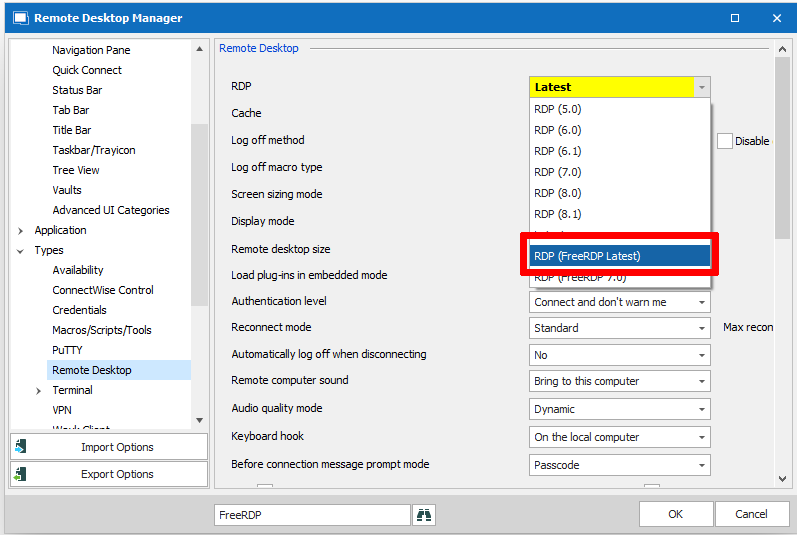
Yes, "Check for server cert revocation" is only for www connections.
Best regards,
Mathieu Morrissette
Mathieu Morrissette
rdp.png
OK I switched to FreeRDP and tested 2 connections and seems like it negotiated a remote session immediately but sat at a black screen for a very long time before giving you the welcome message and logging onto Windows (2012).
Also, seems like FreeRDP is grabbing my keyboard/focus much more forcefully.
Hi,
Is there any kind of drive mapping configured in the RDP entry? You could try unchecking this to see if it improves things.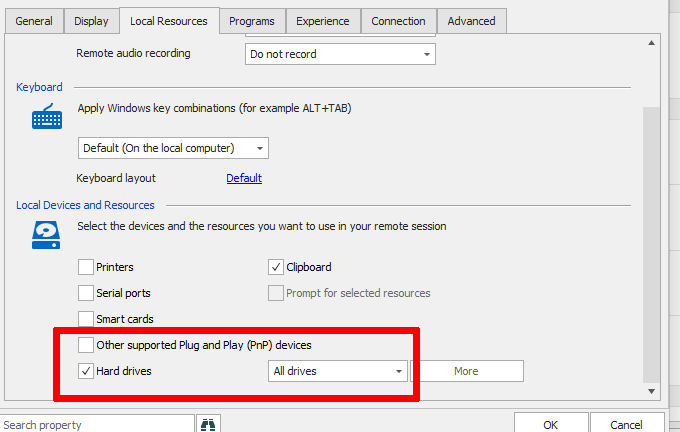
Also, are the servers in the same network or going through a gateway?
I'm wondering if it could be caused by a network bottleneck of some kind or a performance issue somewhere in the chain.
Best regards,
Mathieu Morrissette
Mathieu Morrissette
drives.png
No hard drive mapping.
No RDP Gateway.
DNS lookup is fine
Latency is fine.
Pretty sure its the Certifcate checking.
Is there a delay in the certificate verification process if you export the self-signed certificate then run certutil -verify <path_to_certfile> on it?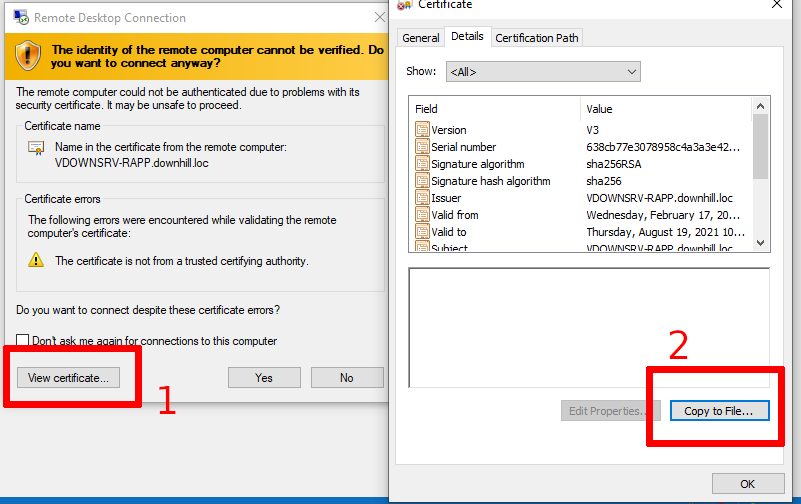
Exporting the certificate
Usually, this command takes 1 or 2 seconds. I'm thinking that the CRL distribution point might be the culprit.
Best regards,
Mathieu Morrissette
Mathieu Morrissette
export cert.png