
klages
private vault loses connection to database
I'm using version 10.9.8.0. The Application Logs show nothing since 20.08.2015, but the last time problem occurred was yesterday.
Reproducing seems difficult, because I cannot say in which situation this occurs. It seems to happen when I'm longer on the "all entries" tab and then switch to my private vault. But it happens not every time when I switch the tabs.
I'll also try uninstalling, deleting the folder and reinstalling.
Thanks so far,
klages
private vault loses connection to database
CTRL-Refresh has no visible effect. The entries in the private vault still are not visible.
Any other suggestions?
private vault loses connection to database
Hello,
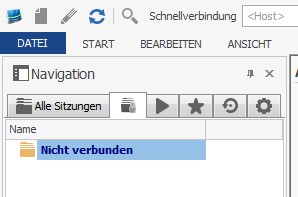
I have the problem that the private vault occasionally loses connection to the database, while the "all entries" tab keeps its connection. When I refresh my private vault, it no longer says "not connected" and shows the "sessions" main folder, but no entries are there. I have to exit RDM and start it again to get my private vault back.
"Preview text in description" not working
Just installed the new beta 9.0.16.0, the text preview is working! Thank you!
Greetings,
klages
"Preview text in description" not working
Today I installed the update 9.0.12.0 (prior version was 9.0.8.0), and now it seems that the option "Preview text in description" for text entries is not working. Only if the text is actually in the description field, it is shown in the description preview in RDM main window.
With older versions this behaviour was different.
Could you please check this issue?
Greetings (and a happy new year),
klages
8.9.2.0 - Document Sessions
Another thing I found while using the document type "Text". Using a text session as a template will not keep the contained template text, if I add a new document session from this text template.
The template itself still has its text, but the newly created session will not.
VMware Synchronizer - VM Tags
Thank you Stéphane!
Greetings,
klages
VMware Synchronizer - VM Tags
Ok, I found out it does not work if you try to create a subconnection for the document type "text".
VMware Synchronizer - VM Tags
@ SMG: this does not work for me in beta 8.9.2.0 and 8.9.4.0. In prior versions it worked that way, right.
VMware Synchronizer - VM Tags
Another thing I found in the beta 8.9.2.0 (and 8.9.4.0).
Installation of the SQL-Management Studio addon fails with the 64bit version of RDM:
Beschreibung: Stopped working
Problemsignatur:
Problemereignisname: APPCRASH
Application Name: RemoteDesktopManager64.exe
Application Version: 8.9.4.0
Application Timestamp: 51f81ffa
Fault Module Name: KERNELBASE.dll
Fault Module Version: 6.1.7601.18015
Fault Module Timestamp: 50b8479b
Exception Code: c0020001
Exception Offset: 0000000000009e5d
Betriebsystemversion: 6.1.7601.2.1.0.256.4
Gebietsschema-ID: 1031
VMware Synchronizer - VM Tags
Can I no longer create subconnections initially? Can't find it in 8.9.2.0 and 8.9.4.0.
Greetings,
klages
Add device warranty
It would be useful for all session types, I think.
Greetings,
klages
allow .cer and .p12 as a certificate attachment
Just a small wish:
Could you add the possibility to add the filetypes .cer and .p12 as a certificate attachment? Right now only .pfx and .crt are possible. Perhaps there are further more filetypes which act as certificates...
Greetings from sunny germany,
klages
Creating sub-connections
That sounds good. I'm looking forward to this feature. :)
Creating sub-connections
I'm so blind, totally forgot about this. But why is ist not possible per drag & drop, as it is possible for normal connection entries to be drawn from one folder to another?
Creating sub-connections
I'm lookin for ak possibility to change a connection entry into a sub-connection entry without creating a new one or using it as a template. If there's no option for this, could you integrate such?
Greetings from germany,
klages
Rearranging tabs
I don't mean to rearrange the tabs in the main window. It's about rearranging the tabs in the "edit entry" (CTRL-E) window. I want to change the order of the tabs shown here. Something like shown in the screenshot.
Rearranging tabs
Is it possible for you to integrate something like "tab rearrangement" in the "edit session" window? So that I can change the order of tabs, e.g. the information tab as second tab. This should then also be possible on the information tab itself.
And perhaps the option to hide / show certain tabs? :)
Greetings from germany,
David
Create Shortcuts with multiple selection
I want to see the content of a folder. Each customer has a folder in our RDM, with multiple sessions in it. I would like to create a link to that folder instead of creating links to each session, when I want to have a connection between our CRM system an RDM.
Create Shortcuts with multiple selection
Will it also be possible to create a shortcut to a group / folder?
Status "locked" not working
Aah, this information explains a lot. :)
Thank you!
edited by klages on 3/21/2013
Status "locked" not working
If I want to set the status "locked" for a connection entry, it can still be opened and no warning message appears. I can deactivate it or set it to "expired", this both works, but I think "locked" is not working as planned. I'm using version 8.1.0.0.
Could you check this?
edited by klages on 3/21/2013
Create desktop shortcut for session/group
Oh, I really didn't see that before!
That will be a great help I guess.
Thank you!
Create desktop shortcut for session/group
Is it somehow possible to create desktop shortcuts for a single session or a session group? As we want to integrate RDM in our existing CRM system, this would be really helpful. So we could just drag & drop a session or a group from RDM onto the desktop and then drag & drop it into the CRM system.
At the moment we use Siebekl CRM by Oracle, but we will perhaps change to Microsoft Dynamics CRM in the near future.
Or does anybody have other helpful hints or tips for this?
Greetings from Germany,
David S.
Using wildcards in Search Box
Could you integrate this in the 6.0? I couldn't find it in the readme.