
AustinArbour
Shared Credential Data Source Repository
My company is a contracted service provider.
Each branch has their own customers, but we use some shared credentials company wide.
We just upgraded our Devolutions Server to the latest version and are now running the v14 RDM Enterprise.
I am looking to assign each branch a repository for their sessions.
I would like to have a "global" repository that has shared data and credentials.
I do not see a way for a session to reference a credential in a different repository.
Search for Groups and change Security on results
Hello,
Thank you for your reply, I was hoping not to need a ForEach loop, but if that's what I need to do so be it.
Now I am getting the following error:
Set-RDMSessionProperty : Object of type 'System.String' cannot be converted to type 'System.Guid'.
Piped Command
ForEach-Object { Set-RDMSessionProperty -ID $_.ID -Property 'SecurityGroup' -Value '97f0081d-430c-410c-98b4-27a74ccec348' }
Search for Groups and change Security on results
I am attempting to update security permissions on all groups that match a certain string.
Here is my oneliner.
Get-RDMSession | Where-Object {CONDITIONAL STATEMENT} | Set-RDMSessionProperty -Property 'SecurityGroup' -Value 'GUID'
I get all groups that match my where filter, but when I add the Set-RDMSessionProperty I receive an error message.
Set-RDMSessionProperty : The input object cannot be bound to any parameters for the command either because the command
does not take pipeline input or the input and its properties do not match any of the parameters that take pipeline
input.
According to the help information on Set-RDMSessionProperty I should be able to pipe the Session through as a ByValue.
RDM 11.0.1.0 Enterprise - Offline Mode - Database login prompt
Thank you for the update. I will give it a try.
RDM 11.0.1.0 Enterprise - Offline Mode - Database login prompt
Hello Maurice,
I would also like to note that this is the same on a fresh install of Windows 7 64bit.
Application Security (Local) is set to No application password.
Offline Security is set to Default security.
We are using the RDMS server.


RDM 11.0.1.0 Enterprise - Offline Mode - Database login prompt
When in offline mode anytime I click (right or left) on an item in the tree view I will get multiple login prompts to connect to the database even though I am in offline mode. Clicking Go Offline does nothing. This makes the program useless in Offline mode.
RDMS Connection issues, staying online and offline to online transition
Hi Maurice,
Thanks for the quick reply. Unfortunately I am not the administrator of the server OS. I will have to get you in touch with my IT contact to further troubleshoot the server side. He is out of the office today, can you PM me your contact information so that he may contact you tomorrow?
Thanks
edited by AustinArbour on 2/16/2015
RDMS Connection issues, staying online and offline to online transition
Hello,
I am having a few issues with RDMS.
When online I find that I am often losing connection to the server. Upon a reconnection attempt I get a dialog saying that the data source is unavailable. After multiple attempts I finally have to close out of RDM and relaunch. Then I can usually connect after no more than 3 attempts.
I also have an issue where randomly I am unable to add/edit in offline mode. I do have my database setup for read/write mode and it has worked in the past.
I have already cleared my AppData folder and recreated.
Attached is my application log.
--
Austin
PowerShell Search for existing Session
Perfect I think that will work for me!
Thanks
PowerShell Search for existing Session
So looking at your last example, I would specify -Group "CompanyABC\NewYork\TechnologySolutions" and it would recreate the TechnologySolutions group using the given template?
What are the other "filters" I can use in addition to $_.Session.Kind -eq "Group"?
I would like to see if a group does exist; for example, I don't want to create the TechnologySolutions folder if it already exists.
Logic:
If CompanyABC\NewYork\TechnologySolutions does not exist then {
$session = New-RDM-Session -Name "TechnologySolutions" -Kind "Group" -Group "CompanyABC\NewYork\TechnologySolutions" -TemplateID [GUID]"80cbfce3-5315-4b02-ab65-eaef7afe8a04"
}
PowerShell Search for existing Session
I want to write a script that first searches to see if the session already exists and if it does then it throws an error. I would have it check every part of the path and for one section of the path if it doesn't exist I need to create a path based on a template. I was wondering if there was an easy way to do this?
Example:
Given Path: CompanyABC\NewYork\TechnologySolutions\Servers\RDPSESSION
Existing Path: CompanyABC\SanDiego
Flow:
CompanyABC folder exists, do not recreate
NewYork does not exist, create
TechnologySolutions does not exist, create from template
Servers folder exists, do not recreate
Create RDPSESSION
PowerShell
Yes, that will work for me. I was wondering if there was a way for me to convert my passwords to a secure format for importing. It is nice to see that example of how that is done.
Thanks
PowerShell Install Documentation
That is correct.
PowerShell
Hi David,
I'm not sure what you are trying to ask. I want to put a username and password in the session for RDP.
PowerShell
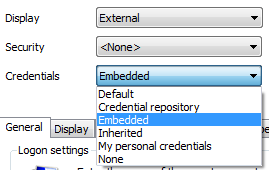
I am looking to set an embedded credential via powershell. I can't seem to figure out which credential variables associate.
See attached picture for the GUI setting.
Sub Connection Alternate Host
I am attempting to better organize our connections by having a generic Host entry and creating sub connections for each service available on that host. However, I have host with a main IP and a few alternate IPs based on which network I am connected to. I attempted to use the $PARENT_IP$ variable as the IP address thinking that the software would just use the IP that it detected was available, however, it just defaults to the main IP.
One caveat that I can think of offhand is that I believe the subconnection should determine if an IP is up or not in case the firewall is turned on to not reply to pings so you need to do a port scan. The host session itself would not know which port to check.
PowerShell Install Documentation
I just attempted to install the PowerShell add-ins following the documentation and received the following in PowerShell. I made sure that I was running in x86 PowerShell. I changed v2.0.50727 to v4.0.30319 and it seemed to install without an issue.
PS H:\> set-alias installutil $env:windir\Microsoft.NET\Framework\v2.0.50727\installutil;installutil 'C:\Program Files (
x86)\Devolutions\Remote Desktop Manager\RemoteDesktopManager.PowerShell.dll';Get-PSSnapin -Name *Remote.Desktop* -Regist
ered | % { Write-Host "$_..." -NoNewline; if ( (Get-PSSnapin -Name $_ -ErrorAction SilentlyContinue) -eq $null ) { Write
-Host "installing" -ForegroundColor Yellow; Add-PsSnapin $_ } else { Write-Host "already installed" -ForegroundColor Gre
en; } }
Microsoft (R) .NET Framework Installation utility Version 2.0.50727.5420
Copyright (c) Microsoft Corporation. All rights reserved.
Running a transacted installation.
Beginning the Install phase of the installation.
See the contents of the log file for the C:\Program Files (x86)\Devolutions\Remote Desktop Manager\RemoteDesktopManager.
PowerShell.dll assembly's progress.
The file is located at C:\Program Files (x86)\Devolutions\Remote Desktop Manager\RemoteDesktopManager.PowerShell.Install
Log.
Installing assembly 'C:\Program Files (x86)\Devolutions\Remote Desktop Manager\RemoteDesktopManager.PowerShell.dll'.
Affected parameters are:
logtoconsole =
assemblypath = C:\Program Files (x86)\Devolutions\Remote Desktop Manager\RemoteDesktopManager.PowerShell.dll
logfile = C:\Program Files (x86)\Devolutions\Remote Desktop Manager\RemoteDesktopManager.PowerShell.InstallLog
The Install phase completed successfully, and the Commit phase is beginning.
See the contents of the log file for the C:\Program Files (x86)\Devolutions\Remote Desktop Manager\RemoteDesktopManager.
PowerShell.dll assembly's progress.
The file is located at C:\Program Files (x86)\Devolutions\Remote Desktop Manager\RemoteDesktopManager.PowerShell.Install
Log.
Committing assembly 'C:\Program Files (x86)\Devolutions\Remote Desktop Manager\RemoteDesktopManager.PowerShell.dll'.
Affected parameters are:
logtoconsole =
assemblypath = C:\Program Files (x86)\Devolutions\Remote Desktop Manager\RemoteDesktopManager.PowerShell.dll
logfile = C:\Program Files (x86)\Devolutions\Remote Desktop Manager\RemoteDesktopManager.PowerShell.InstallLog
The Commit phase completed successfully.
The transacted install has completed.
Remote.Desktop.Manager.9.0.7...installing
Add-PSSnapin : Cannot load Windows PowerShell snap-in Remote.Desktop.Manager.9.0.7 because of the following error: The
Windows PowerShell snap-in module C:\Program Files (x86)\Devolutions\Remote Desktop Manager\RemoteDesktopManager.PowerS
hell.dll does not have required Windows PowerShell snap-in strong name RemoteDesktopManager.PowerShell, Version=9.0.7.0
, Culture=neutral, PublicKeyToken=null.
At line:1 char:409
+ set-alias installutil $env:windir\Microsoft.NET\Framework\v2.0.50727\installutil;installutil 'C:\Program Files (x86)[/color]
Devolutions\Remote Desktop Manager\RemoteDesktopManager.PowerShell.dll';Get-PSSnapin -Name *Remote.Desktop* -Registered
| % { Write-Host "$_..." -NoNewline; if ( (Get-PSSnapin -Name $_ -ErrorAction SilentlyContinue) -eq $null ) { Write-Ho
st "installing" -ForegroundColor Yellow; Add-PsSnapin <<<< $_ } else { Write-Host "already installed" -ForegroundColor
Green; } }
+ CategoryInfo : InvalidArgument: (Remote.Desktop.Manager.9.0.7:String) [Add-PSSnapin], PSSnapInException
+ FullyQualifiedErrorId : AddPSSnapInRead,Microsoft.PowerShell.Commands.AddPSSnapinCommand
Remote.Desktop.Manager.9.2.6...installing
AutoHotKey Path x86 & x64
It's not a huge deal to manually find the exe but AutoHotKey can install in either "Program files(x86)" or just "Program Files" depending on the architecture that is chosen. I believe that RDM should look in both folders when setting the path to AutoHotKey.
Warranty Reports
I would like to be able to run a report that will tell me if any warranties will be due in x amount of days/months/years.
As far as I can tell the current reporting will only show expired warranties which is nice unless you have a system that to renew outside the warranty period you have to pay a "get current" fee.
Thanks
3rd type of webpage authentication
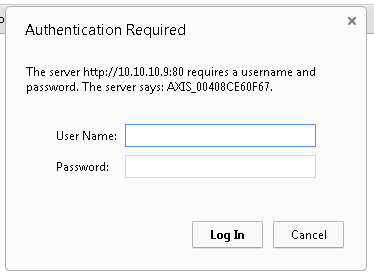
I access AXIS cameras on a nearly daily basis. I've noticed that when logging in that I am presented a dialog box rather than a form or basic authentication method. I was hoping that someone would be able to tell me how to use RDM to enter the username and password for this type of authentication.
On a side note it would be nice if RDM could discover the MAC for a web host as well; currently it asks me to enter an IP address for the session.
This is a picture of the authentication dialog in Chrome:
RDM 9.0.7.0 Offline mode R/W Edits
No, the only items in the log was the upgrading local database notifications from a new install.
However, I have attached my application log for my local installation.
RDM 9.0.7.0 Offline mode R/W Edits
Unfortunately that did not work. I have also installed this on a VM not connected to our domain to rule out a security GPO. The VM instance was unable to write in offline mode either.
Template duplicates
Yes
Import Sessions from network scan
What would also be cool with this is if you could filter by the manufacturer portion of the MAC address.
Template duplicates
When I add the template it adds just one. After I applied the template it duplicated. After I did a Ctrl+Refresh the duplicate disappeared.