PowerShell

I am looking to set an embedded credential via powershell. I can't seem to figure out which credential variables associate.
See attached picture for the GUI setting.
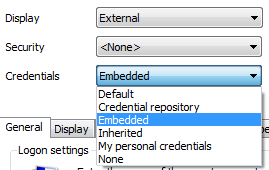
RDM Credential.PNG
All Comments (5)
Hi,
This is not supported in PowerShell. What type of credentials would you like to embed?
David Hervieux
Hi David,
I'm not sure what you are trying to ask. I want to put a username and password in the session for RDP.
So you want to use a basic credential entry. I don't think you need to create an embedded credentials. The embedded credential is used when you want to create a link to a external system like KeePass for example. I will ask stefane to post a simple sample to set a username and password.
David Hervieux
Here is sample script that creates a new session:# Create new session$session = New-RDM-Session -Name "AAAA" -Kind "RDPConfigured"# Save sessionSet-RDM-Session $session -NoRefresh;# Set HostSet-RDM-Property -ID $session.ID -Property "Url" -Value "127.0.0.1"# Set UsernameSet-RDM-Username -ID $session.ID -UserName "MyUser" -NoRefresh;# Set DomainSet-RDM-Domain -ID $session.ID -Domain "MyDomain" -NoRefresh;# Set Password$pass = ConvertTo-SecureString "NotMyPassword" -asplaintext -force;Set-RDM-Password -ID $session.ID -Password $pass;A few notes:
- use "-NoRefresh" will disable RDM UI refresh, faster when performing many calls
- if you want to set existing sessions simply use the "Set Password" section within a for-loop
Doest that work for you?
Stéfane Lavergne
Yes, that will work for me. I was wondering if there was a way for me to convert my passwords to a secure format for importing. It is nice to see that example of how that is done.
Thanks