RDM 9.0.7.0 Offline mode R/W Edits

I am having an issue that I am not always able to edit my offline data. Sometimes I can add and edit and sometimes I can only edit and not add and still other times I cannot do either. I have administrative privileges and R/W permissions on all 3 levels. We are authenticating to RDMS as our datasource with Domain authentication.
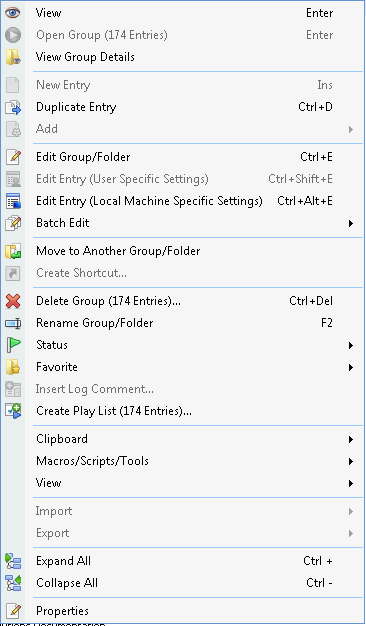
Offline Issue.PNG
All Comments (16)
Could you verify if you have an error in the application logs? Help->View application logs
David Hervieux
The log is quite large so I included today and yesterday. All seems to be the same error beforehand.
**************************************************************************************
[11/25/2013 11:13:13 AM]ERROR SILENT System.IO.IOException: This machine is disabled for file encryption.
at System.IO.__Error.WinIOError(Int32 errorCode, String maybeFullPath)
at System.IO.File.Encrypt(String path)
at Devolutions.RemoteDesktopManager.Managers.SecurityManager.SaveObjectToEncryptedFile(String fileName, Object value, String salt, Boolean ntfsEncrypt)
[11/25/2013 11:13:14 AM]ERROR SILENT System.IO.IOException: This machine is disabled for file encryption.
at System.IO.__Error.WinIOError(Int32 errorCode, String maybeFullPath)
at System.IO.File.Encrypt(String path)
at Devolutions.RemoteDesktopManager.Managers.SecurityManager.SaveObjectToEncryptedFile(String fileName, Object value, String salt, Boolean ntfsEncrypt)
[11/25/2013 11:13:33 AM]ERROR SILENT System.IO.IOException: This machine is disabled for file encryption.
at System.IO.__Error.WinIOError(Int32 errorCode, String maybeFullPath)
at System.IO.File.Encrypt(String path)
at Devolutions.RemoteDesktopManager.Managers.SecurityManager.SaveObjectToEncryptedFile(String fileName, Object value, String salt, Boolean ntfsEncrypt)
[11/25/2013 11:13:33 AM]ERROR SILENT System.IO.IOException: This machine is disabled for file encryption.
at System.IO.__Error.WinIOError(Int32 errorCode, String maybeFullPath)
at System.IO.File.Encrypt(String path)
at Devolutions.RemoteDesktopManager.Managers.SecurityManager.SaveObjectToEncryptedFile(String fileName, Object value, String salt, Boolean ntfsEncrypt)
[11/25/2013 11:13:43 AM]ERROR SILENT System.IO.IOException: This machine is disabled for file encryption.
at System.IO.__Error.WinIOError(Int32 errorCode, String maybeFullPath)
at System.IO.File.Encrypt(String path)
at Devolutions.RemoteDesktopManager.Managers.SecurityManager.SaveObjectToEncryptedFile(String fileName, Object value, String salt, Boolean ntfsEncrypt)
[11/25/2013 11:13:44 AM]ERROR SILENT System.IO.IOException: This machine is disabled for file encryption.
at System.IO.__Error.WinIOError(Int32 errorCode, String maybeFullPath)
at System.IO.File.Encrypt(String path)
at Devolutions.RemoteDesktopManager.Managers.SecurityManager.SaveObjectToEncryptedFile(String fileName, Object value, String salt, Boolean ntfsEncrypt)
[11/25/2013 11:13:55 AM]ERROR SILENT System.IO.IOException: This machine is disabled for file encryption.
at System.IO.__Error.WinIOError(Int32 errorCode, String maybeFullPath)
at System.IO.File.Encrypt(String path)
at Devolutions.RemoteDesktopManager.Managers.SecurityManager.SaveObjectToEncryptedFile(String fileName, Object value, String salt, Boolean ntfsEncrypt)
[11/25/2013 11:13:56 AM]ERROR SILENT System.IO.IOException: This machine is disabled for file encryption.
at System.IO.__Error.WinIOError(Int32 errorCode, String maybeFullPath)
at System.IO.File.Encrypt(String path)
at Devolutions.RemoteDesktopManager.Managers.SecurityManager.SaveObjectToEncryptedFile(String fileName, Object value, String salt, Boolean ntfsEncrypt)
[11/25/2013 11:14:21 AM]ERROR SILENT System.IO.IOException: This machine is disabled for file encryption.
at System.IO.__Error.WinIOError(Int32 errorCode, String maybeFullPath)
at System.IO.File.Encrypt(String path)
at Devolutions.RemoteDesktopManager.Managers.SecurityManager.SaveObjectToEncryptedFile(String fileName, Object value, String salt, Boolean ntfsEncrypt)
[11/25/2013 11:14:21 AM]ERROR SILENT System.IO.IOException: This machine is disabled for file encryption.
at System.IO.__Error.WinIOError(Int32 errorCode, String maybeFullPath)
at System.IO.File.Encrypt(String path)
at Devolutions.RemoteDesktopManager.Managers.SecurityManager.SaveObjectToEncryptedFile(String fileName, Object value, String salt, Boolean ntfsEncrypt)
[11/25/2013 11:19:03 AM]ERROR SILENT System.IO.IOException: This machine is disabled for file encryption.
at System.IO.__Error.WinIOError(Int32 errorCode, String maybeFullPath)
at System.IO.File.Encrypt(String path)
at Devolutions.RemoteDesktopManager.Managers.SecurityManager.SaveObjectToEncryptedFile(String fileName, Object value, String salt, Boolean ntfsEncrypt)
[11/25/2013 11:19:03 AM]ERROR SILENT System.IO.IOException: This machine is disabled for file encryption.
at System.IO.__Error.WinIOError(Int32 errorCode, String maybeFullPath)
at System.IO.File.Encrypt(String path)
at Devolutions.RemoteDesktopManager.Managers.SecurityManager.SaveObjectToEncryptedFile(String fileName, Object value, String salt, Boolean ntfsEncrypt)
[11/25/2013 7:37:37 PM]ERROR SILENT System.Web.Services.Protocols.SoapException: System.Web.Services.Protocols.SoapException: Server was unable to process request. ---> System.Exception: Invalid session provided!!!
at Devolutions.RemoteDesktopManager.Server.BaseService.ValidateSession() in c:\Dev\devolutions\Websites\RemoteDesktopManagerOnline\Server\BaseService.asmx.cs:line 16
at Devolutions.RemoteDesktopManager.Server.RDMSServices.GetDataSourceInfo() in c:\Dev\devolutions\Websites\RemoteDesktopManagerOnline\Server\RDMSService.asmx.cs:line 254
--- End of inner exception stack trace ---
at System.Web.Services.Protocols.SoapHttpClientProtocol.ReadResponse(SoapClientMessage message, WebResponse response, Stream responseStream, Boolean asyncCall)
at System.Web.Services.Protocols.SoapHttpClientProtocol.Invoke(String methodName, Object[] parameters)
at Devolutions.RemoteDesktopManager.RDMSProxy.RDMSServices.GetDataSourceInfo()
at Devolutions.RemoteDesktopManager.Business.DataSources.RDMSConnectionDataSource.<ProxyGetDataSourceInfo>b__23()
at Devolutions.RemoteDesktopManager.Business.DataSources.RDMSConnectionDataSource.ExecuteAction[T](ExecuteActionDelegate`1 action)
[11/25/2013 7:39:36 PM]ERROR SILENT System.IO.IOException: This machine is disabled for file encryption.
at System.IO.__Error.WinIOError(Int32 errorCode, String maybeFullPath)
at System.IO.File.Encrypt(String path)
at Devolutions.RemoteDesktopManager.Managers.SecurityManager.SaveObjectToEncryptedFile(String fileName, Object value, String salt, Boolean ntfsEncrypt)
[11/25/2013 7:39:37 PM]ERROR SILENT System.IO.IOException: This machine is disabled for file encryption.
at System.IO.__Error.WinIOError(Int32 errorCode, String maybeFullPath)
at System.IO.File.Encrypt(String path)
at Devolutions.RemoteDesktopManager.Managers.SecurityManager.SaveObjectToEncryptedFile(String fileName, Object value, String salt, Boolean ntfsEncrypt)
[11/26/2013 11:24:38 AM]ERROR SILENT Unauthorized access: Access is denied. (Exception from HRESULT: 0x80070005 (E_ACCESSDENIED))
It seems that RDM is unable to correctly save the security states. Could you try to go in File-> Options | Advanced
and unchecked the "Use NTFS encryption for Offline mode"
David Hervieux
It is unchecked, but I had already unchecked that in my initial troubleshooting. Is it possible that I just need to recreate my offline cache? If so how would I go about that?
Could you try to clear the application logs to see if the error message appear? Stefane will answer you about deleting the cache.
David Hervieux
I am unable to recreate the error message as of yet. I have gone offline and back online and added sessions and folders... I am currently able to edit entries but cannot add new ones.
Have you ever been able to add an entry? If this has never work, this could be a clue.
David Hervieux
Yes, I have been able to add in offline mode. It seems that on a rare occasion I am able to.
Ok, so I have 2 datasources. 1 for my home network that is a SQL database and one for work that is RDMS. I connected to my home datasource in online mode and then connected back to RDMS in offline mode and I could add/edit/etc... I shutdown RDM and opened it back up and logged into RDMS in offline mode and could only edit. I then logged into my home datasource and switched right back to RDMS after my home datasource loaded and viola I could add and edit.
Hope this helps figure out what is going on here.
Thank you for the information. I with all you have given me i should be able to reproduce and hence resolve the issue. I will get back to you as soon as I know more.
As for refreshing the offline cache. CTRL+refresh will do the trick.
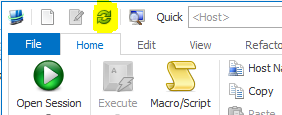
Stéfane Lavergne
Refresh.PNG
I've made a few changes in the latest build, that I hope, will resolve your issue. With all the good repro steps you gave me I still wasn't able to reproduce. Looking at the good I found, what I believe is the issue and have made the appropriate changes.
Please download the latest version from here:
http://remotedesktopmanager.com/Home/Download
and give it a try.
Note: once installed make sure you connect online once prior to testing the offline add/edit/delete.
Regards,
Stéfane Lavergne
Unfortunately that did not work. I have also installed this on a VM not connected to our domain to rule out a security GPO. The VM instance was unable to write in offline mode either.
Do you get an error message in the log for the VM machine?
David Hervieux
No, the only items in the log was the upgrading local database notifications from a new install.
However, I have attached my application log for my local installation.
RemoteDesktopManager.log
Austin,
I have a build that has more trace/debug info for you to test.
Could you send me an email at slavergne at devolutions.net so that I can send you the steps to follow, formatting will be easier then forum post or private message.
Regards,
Stéfane Lavergne
Thanks to Austin's help we were able to solve the issue. It's been fixed internally. Available in the next build.
Regards,
Stéfane Lavergne