
rdol
Opening website with alternate address and non-standard protocol port defined
Hello,
I am satisfied with RDM on Windows. Today, my colleague who bought MacBook Air has just informed me he met the very same problem on RDM for MacOS.
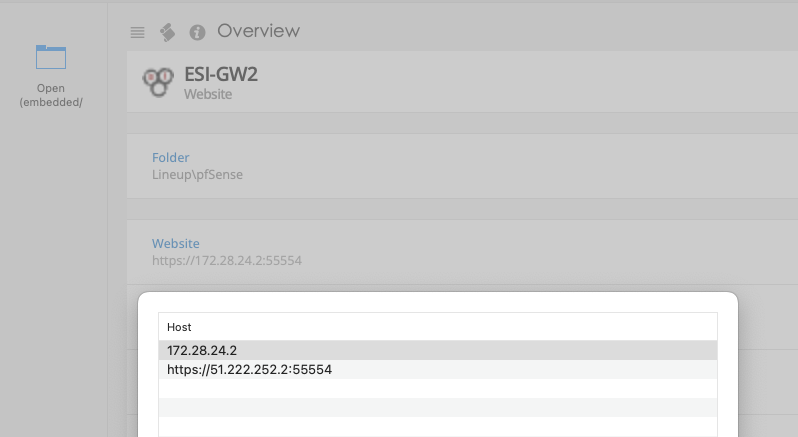
Opening website with alternate address and non-standard protocol port defined
Hello
it seems today's 2024.3.19.0 release fixed the bug.
Feel free to close this incident.
Regards
Radek Dolezel
Opening website with alternate address and non-standard protocol port defined
BTW the same problem appears with SSH connections listening on non-standard ports.
If I remove or disable alternate connection (so only FQDN entry exists with non-standard port defined) then it's also displayed as expected.
The problem exists only if Prompt is chosen, non-standard port is defined and at least one Alternate host exists.
I discussed it with my colleagues and we all think it has been broken in this RDM 2024.3.16.0 64-bit version.
Opening website with alternate address and non-standard protocol port defined
Yes, it is. If I add another option and choose it then the webpage is displayed as expected.
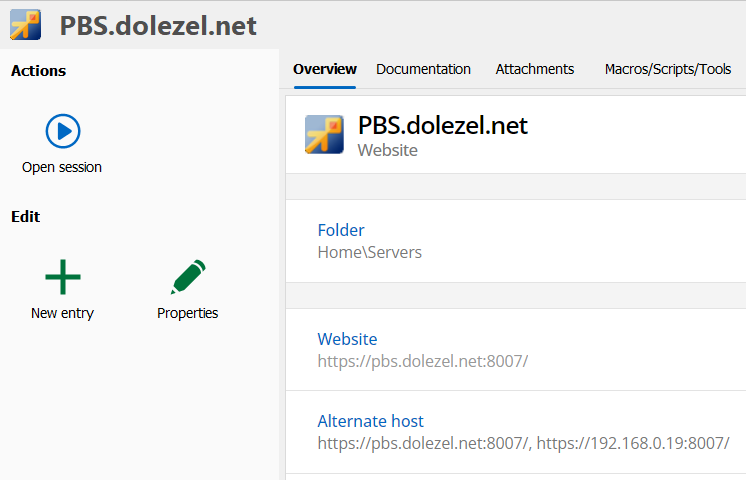
Opening website with alternate address and non-standard protocol port defined
I often use Alternate hosts for some records, for case when DNS is not working etc.
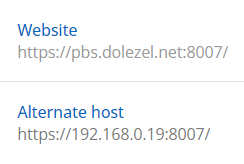
Saved definition looks ok. I use Prompt option.
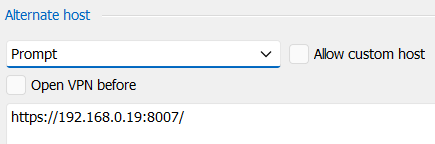
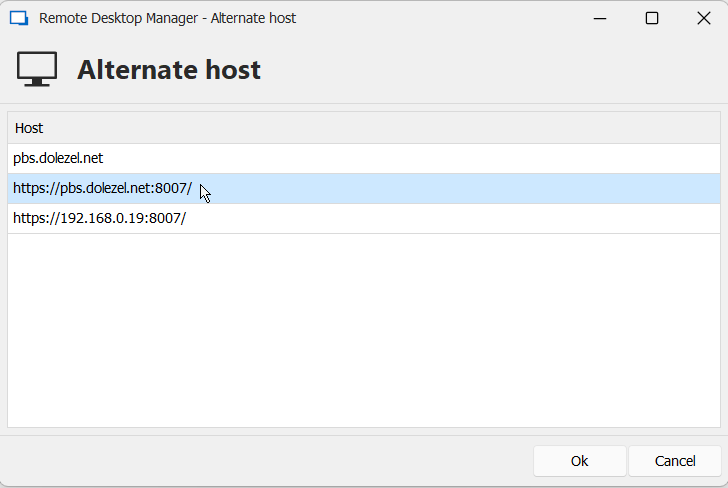
I am using RDM 2024.3.16.0 64-bit now (the latest available). When I click on "Open session" the following prompt window appears.
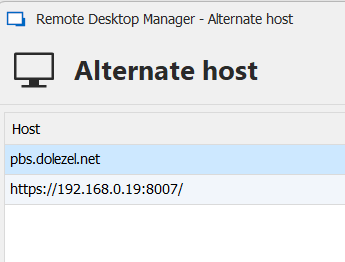
And when I click on the first row with FQDN I get an error because it doesn't open web page on 8007 port. It was working in earlier versions because I use this feature very often.
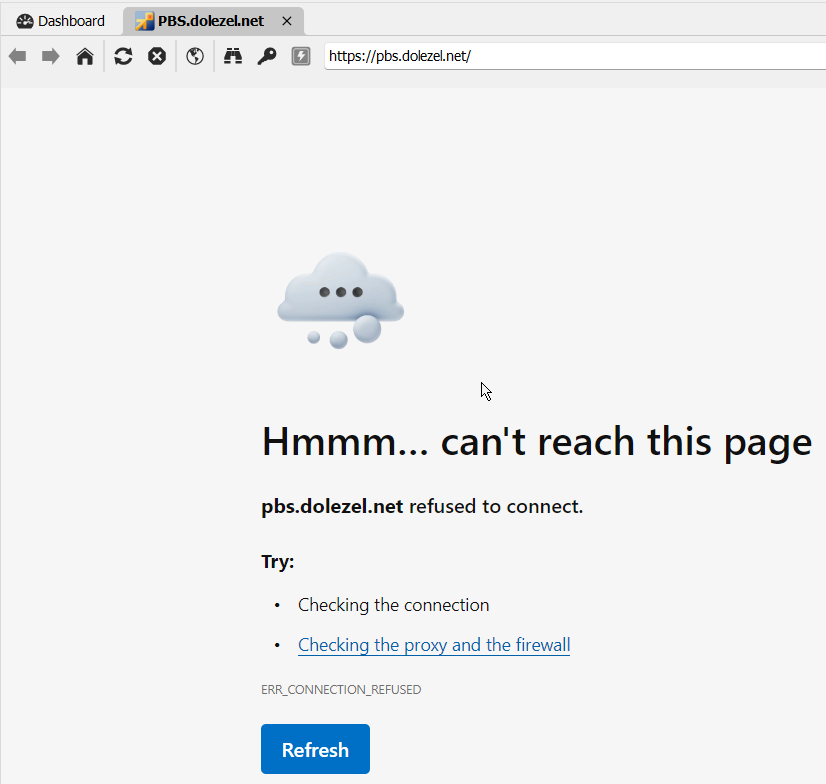
If I change Prompt to None the correct page https://pbs.dolezel.net:8007/ is open.
Support for Cisco ASA AnyConnect VPN with Microsoft Azure MFA
Hello
would it be possible to implement support for Cisco AnyConnect VPN when it has been reconfigured to MS Azure MFA?
Current vpncli.exe reports the following error:
VPN> connect server.company.com/RMM
>> contacting host (server.company.com/RMM) for login information...
>> notice: Contacting server.company.com/RMM.
>> warning: No valid certificates available for authentication.
>> error: The requested authentication type is not supported in AnyConnect CLI. >> The requested authentication type is not supported in AnyConnect CLI.
>> state: Disconnected
I am an end user of this VPN so I have no info about VPN's configuration but I believe it is based on https://www.cisco.com/c/en/us/support/docs/security/anyconnect-secure-mobility-client/215935-configure-asa-anyconnect-vpn-with-micros.html.
How it works from end user's perpective is described in the same document as "Test AnyConnect with SAML Auth".
Regards
Radek
SSH Sessions for vmware Appliances FAIL
Verbose logging set to 2.
[24.08.2020 22:40:08] Starting SSH, verbose level: 2
[24.08.2020 22:40:08] Setting up connection
[24.08.2020 22:40:08] Connecting as root
[24.08.2020 22:40:08] SSH banner: SSH-2.0-OpenSSH_8.3
[24.08.2020 22:40:08] Sending kex init
[24.08.2020 22:40:08] Received kex init
[24.08.2020 22:40:08] Selected algorithms: curve25519-sha256, ssh-ed25519, chacha20-poly1305@openssh.com, chacha20-poly1305@openssh.com, implicit by cipher, implicit by cipher, none, none
[24.08.2020 22:40:08] Sending Ed25519 kex init
[24.08.2020 22:40:08] Received Ed25519 kex reply
[24.08.2020 22:40:08] Successfully authentified server
[24.08.2020 22:40:08] Sending new keys message
[24.08.2020 22:40:08] Sending userauth service request
[24.08.2020 22:40:08] Received new keys message
[24.08.2020 22:40:08] Received extension info message
[24.08.2020 22:40:08] Server accepts public key types: ssh-ed25519,sk-ssh-ed25519@openssh.com,ssh-rsa,rsa-sha2-256,rsa-sha2-512,ssh-dss,ecdsa-sha2-nistp256,ecdsa-sha2-nistp384,ecdsa-sha2-nistp521,sk-ecdsa-sha2-nistp256@openssh.com
[24.08.2020 22:40:08] Received service accepted message
[24.08.2020 22:40:08] Sending userauth init request
[24.08.2020 22:40:08] Received userauth failure: publickey,password,keyboard-interactive
[24.08.2020 22:40:08] Starting interactive authentication
[24.08.2020 22:40:08] Sending userauth interactive request
[24.08.2020 22:40:08] Received userauth failure: publickey,password,keyboard-interactive
[24.08.2020 22:40:08] Starting interactive authentication
[24.08.2020 22:40:08] Sending userauth interactive request
[24.08.2020 22:40:08] Received userauth failure: publickey,password,keyboard-interactive
[24.08.2020 22:40:08] Starting interactive authentication
[24.08.2020 22:40:08] Sending userauth interactive request
[24.08.2020 22:40:08] Received userauth failure: publickey,password,keyboard-interactive
[24.08.2020 22:40:08] Starting interactive authentication
[24.08.2020 22:40:08] Sending userauth interactive request
[24.08.2020 22:40:08] Received userauth failure: publickey,password,keyboard-interactive
[24.08.2020 22:40:08] Starting interactive authentication
[24.08.2020 22:40:08] Sending userauth interactive request
[24.08.2020 22:40:08] Received userauth failure: publickey,password,keyboard-interactive
[24.08.2020 22:40:08] Starting interactive authentication
[24.08.2020 22:40:08] Sending userauth interactive request
[24.08.2020 22:40:08] Received disconnection message, code: 2
[24.08.2020 22:40:08] Too many authentication failures
[24.08.2020 22:40:08] Disconnection in progress
[24.08.2020 22:40:08] Disconnecting
BR,
Radek
SSH Sessions for vmware Appliances FAIL
Ok, it's not related to username root.
I uninstalled 2020.2.19.0 and installed 2020.2.18.0 and I am able to connect to CoreELEC boxes via SSH again! It seems like 2020.2.19.0 brought a breaking change for some SSH connections. Not all because I was able to connect to various Linux servers, DiskStations etc.
SSH Sessions for vmware Appliances FAIL
I am using Enterprise Edition 2020.2.19.0 x64 and I am not able to connect to multiple CoreLELEC boxes with the same error message :) No problem with Putty.
Log:
[22.08.2020 21:17:49] Starting SSH, verbose level: 1
[22.08.2020 21:17:49] Setting up connection
[22.08.2020 21:17:49] Connecting as root
[22.08.2020 21:17:50] SSH banner: SSH-2.0-OpenSSH_8.3
[22.08.2020 21:17:50] Successfully authentified server
[22.08.2020 21:17:50] Starting interactive authentication
[22.08.2020 21:17:50] Starting interactive authentication
[22.08.2020 21:17:50] Starting interactive authentication
[22.08.2020 21:17:50] Starting interactive authentication
[22.08.2020 21:17:50] Starting interactive authentication
[22.08.2020 21:17:50] Starting interactive authentication
[22.08.2020 21:17:50] Disconnecting
I tried to disable Default credentials, the connection was interrupted as soon as I entered usernam "root". I would like to try to test it with another user but CoreELEC doesn't allow any change.
I am curious if you use username "root" too.
RDMO down - no offline mode (URGENT)
This morning I was using 2019.1.36.0 x64 (already upgraded to yesterday's 2019.1.39.0), my colleague was using 2019.1.38.0 x64.
RDMO down - no offline mode (URGENT)
I hate that Devolutions white login page. Whatever architecture change decision you made a couple of weeks/months ago you made it very wrong. The outages are more and more frequent.
Can you please explain all of us what is the purpose of the Offline mode when your cloud goes Offline? It can happen and I would expect it but it was a very unpleasant surprise this morning when I wasn't able to login, wasn't able to go offline, wasn't able to login to this forum. I am really thinking about migrating my data source databases from your Online Drive to achieve a real offline mode.
Can you also explain why https://status.devolutions.info was completely green? It looks like a static HTML page...
Regards
Radek Dolezel
Wayk Now 3.0.0 beta 5
x86 doesn't support Unattended Service? It's a big disappointment. There are still many x86 installations on older computers or in virtualized environments.
CloudBerry Remote Assistant support
Perfect, I've already created tickets on both sides :)
https://forum.cloudberrylab.com/discussion/403/cli-support
Regards
Radek
CloudBerry Remote Assistant support
It seems CloudBerry Remote Assistant is going to be a perfect alternative to expensive TeamViewer. It would be nice to have an option in RDM to create and initiate CloudBerry Remote Assistant's sessions the same way like TeamViewer works.
Small cursor in RDP sessions on NON-high DPI machine
Hello Jeff
I downloaded RDCM 2.7 and configured a couple of servers. I can confirm the issue is the same. I've just found this discussion - https://social.technet.microsoft.com/Forums/lync/en-US/2c4f1b5b-f95b-4e0f-923e-68ff608691ce/small-or-missing-mouse-pointer-in-rdp-session-solved?forum=winserverTS and it seems per-user mouse cursor schema is the only known workaround.
Regards
Radek
Small cursor in RDP sessions on NON-high DPI machine
Hi
my current HW and OS setting is:
LCD resolution 2560 x 1440
W10 Creators Update version 1703 (build 15063.483)
Custom scale factor 225%
My current RDM settings include:
RDM 12.6.1.0 (tested both x86 and x64)
User Interface/Advanced - unchecked "Disable display scaling on high DPI settings"
Types/RDP - Screen sizing mode set to Smart sizing. Display mode Default. Disable RDP scale factor (HDPI) is unchecked.
The same RDP settings have been propagated on all RDP entries (right-click on the top of Devolutions Online Drive, Edit, Batch Edit, Edit Sessions (Session Type Settings), select Display tab, set Remote desktop size to Default and Screen sizing mode to Smart sizing).
Remote OS:
W2016 - higher resolution is offered on this OS when compared with W2012(R2)
W2012R2
W2012
W2008R2
Cursor is hard to find in remote programs like Notepad, Notepad++, SQL Mgmt. Studio etc.
Small cursor in RDP sessions on NON-high DPI machine
Hi
the same issues described above. I tried "Override high DPI scaling behavior. Scaling performed by: System". Didn't help.
The only workaroud we found (as my colleague met the same issues):
- on remote computer go to Control Panel, Hardware, Devices and Printers/Mouse, tab Pointers, change Windows Default (system scheme) to Windows Inverted (system scheme).
It's pretty annoying to change it on all existing servers.
Vivaldi browser support
Ok, I understand. Will you be able to deliver Browser extension?
Regards
Radek
Vivaldi browser support
Hi
embedded support for IE and FF works weird for me. I haven't tested Chrome because ... I don't want to report everything I do to Google. I will give it a chance now.
And to answer your question - I would like to see the same support for Vivaldi as for Chrome - both external (handy sometimes) and also embedded (which I prefer to use). It would be the best combination for me.
Regards
Radek
Vivaldi browser support
Hi
I would like to see Vivaldi browser supported in RDM. It is based on Chromium and supports Google Chrome browser extensions so it could be easily implemented. Is there anybody else using Vivaldi as a primary/preferred browser?
Regards
Radek
RDM 8.9.19.0 Allow password in variable
Oh, it wasn't. I am happy to confirm that it works as you described after checking "Allow password in variable" on Advanced tab of my RDP server entry.
Thanks.
Radek
RDM 8.9.19.0 Allow password in variable
Hello
I am trying to pass credentials to my custom Command Line tool/script.
c:\bat\getHW.cmd $HOST$ $DOMAIN$\$USERNAME$ $PASSWORD$
"Allow password in variable" has been checked in credentials entry assigned on Tools tab for my RDP entry.
When I try to echo script variables and pause the script I can see that $HOST$, $DOMAIN$ and $USERNAME$ were replaced by correct values but $PASSWORD$ contains string $PASSWORD$.
Regards
Radek