RDMO down - no offline mode (URGENT)
hello,
right now the personal cloud (RDMO Personl) seems to be down. What is a showstopper is, that, after pressing "go offline" the login window pops up again, so, no work today! :(
All Comments (23)
here the error message. looks like for going offline, RDM needs to check an online ressource which is down.

Disabled
It appears to be back working now
Cloud down again!
i couldn't even login to forum to post.
Devolution please fix this or give feedback.
Paying customer here, and the service and renewal is not cheap.
I couldn't even open the RDM and see the hosts, with local .xml file the white window with login kept popping-up.
You need contingency for this, skip this hateful window. It even pop-ups randomly while working.
RDM for Windows 11
Purchased Enterprise Edition v2026.x
I know that offline mode worked before, it looks like you changed something to the whole login procedure wich lead to the 401 errors https://forum.devolutions.net/messages.aspx?TopicID=32195 and the occasional popup of the login window, interrupting everything. not good..
Exactly like perier, that popup needs to go !!!
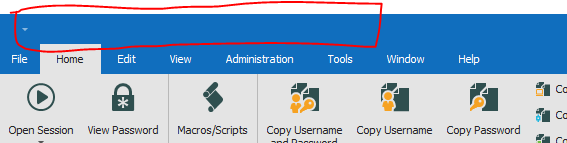
and seriously ??? I know lost my topbar icons after the fail and the connection now !!!!
RDM for Windows 11
Purchased Enterprise Edition v2026.x
Capture.PNG
Hello,
All of our services are back up, but @skoupidaki, it seems that your window layout is corrupted, please try Window - Reset layout. Also confirm that you can login.
Maurice
while that, i was unable to use the local db, do you?
@simone, no i couldnt. Which is not expected.
@maurice, that is not a solution. I have the default back, and not my own made with other buttons. That was lost don't know why. Yes i can login. Minor issue of course.
The major issue is to fix or get rid of the popup.
Also can you please advice on where this options are stored ? i have backup the options and restore them but the topbar shortcuts are note restored. So how can i keep them for sure ?

RDM for Windows 11
Purchased Enterprise Edition v2026.x
Clipboard-1.jpg
@skoupidaki,
As a workaround, could you try to turn off the automatically sign in option located in File -> Devolutions Account and see if that help you with the window at startup of RDM.
Best regards,
Jeff Dagenais
@Jean, Yes you don't get the pop up on startup but you get it eventually when you login and then randomly you get the popup again. So it does not solve the issue completely.
"Also can you please advice on where this options are stored ? i have backup the options and restore them but the topbar shortcuts are note restored. So how can i keep them for sure ?"
Can i get a reply on that ? I need them and keep them.
RDM for Windows 11
Purchased Enterprise Edition v2026.x
I hate that Devolutions white login page. Whatever architecture change decision you made a couple of weeks/months ago you made it very wrong. The outages are more and more frequent.
Can you please explain all of us what is the purpose of the Offline mode when your cloud goes Offline? It can happen and I would expect it but it was a very unpleasant surprise this morning when I wasn't able to login, wasn't able to go offline, wasn't able to login to this forum. I am really thinking about migrating my data source databases from your Online Drive to achieve a real offline mode.
Can you also explain why https://status.devolutions.info was completely green? It looks like a static HTML page...
Regards
Radek Dolezel
Hello,
@rodol, we are tweaking all of these separate pieces of our online services. We are aware of the issues and are working hard at improving our user experience.
As for the status page, it has been introduced really a short while ago and the intent is to have sensors and alarms that automatically feed into it. For the time being though, its updated manually, and our staff in Germany havent been trained on the system (they have sounded the alarm a while ago and could have posted the outage on the page). We feel that having the system, even in this early stage, is better then asking you to subscribe to a twitter feed. As with any of our services, we create the minimal viable feature, then expand on it.
We will post back shortly with an incident report.
Maurice
@ skoupidaki
As per Configuration File Location, if you followed the default install pattern, they are under %LocalAppData%\Devolutions\RemoteDesktopManager, the screen layout is stored in a bunch of lyt files, but you might as well just zip that whole folder recursively.
Maurice
This basically shows the issues with relying on cloud solutions.
took me ages to get into RDM and have it working. had to apply backup to local storage from a backup.
it's not good enough that the app tries to continually login, surely if it fails it should fail back to local storage or another solution.
this took me 30 minutes messing about with it this morning to get it functioning.
@Billy, exactly, i was without data for more than one hour, and lets not forger we are IT professionals here, we are not talking about a game not working.
I'm an Engineer and i rely almost all my work on my RDM to connect and solve issues with SLA 99,99% status. So yes if the cloud don't work and you have a local .xml connection and still don't access the data. That is a problem.
Again that annoying login window :)
@Maurice, found it thanks. Why this is not included in the options backup/export that the RDM offers ? Seams like a missing point here.
RDM for Windows 11
Purchased Enterprise Edition v2026.x
We are looking into it can you guys tell us which RDM version you are running?
Samuel Baker
enterprise
verison 2019. 1 .38 .0 64 bit
This morning I was using 2019.1.36.0 x64 (already upgraded to yesterday's 2019.1.39.0), my colleague was using 2019.1.38.0 x64.
I have 2019.1.38.0
RDM for Windows 11
Purchased Enterprise Edition v2026.x
Thanks for the extra info, I have made a fix for this that should be in the next version of RDM. We'll also keep an eye out for similar issues with the product.
Samuel Baker
@Sam, is there any .xml (RSS feed) for the release of new version that we can subscribe
https://remotedesktopmanager.com/release-notes
thanks
RDM for Windows 11
Purchased Enterprise Edition v2026.x
Hello,
Sorry to jump in.
Unfortunately, there is not .xml (RSS feed) that you can subscribe to receive a notification when a new version is available.
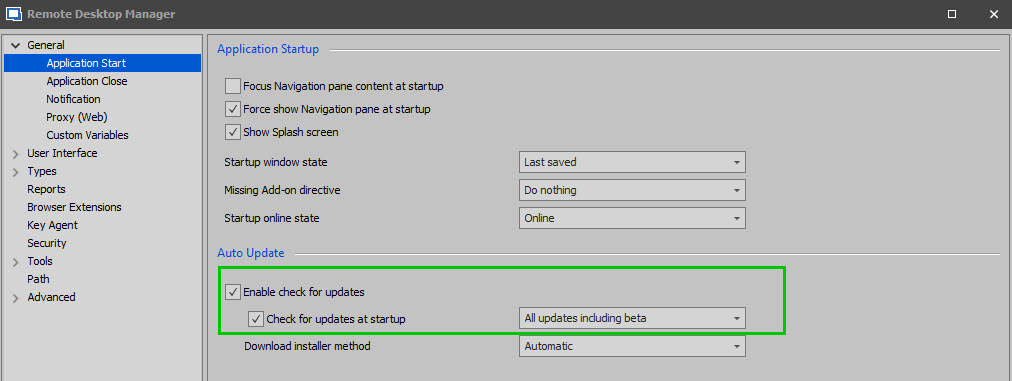
That being said, it is possible for you to use the "Check for Updates" feature of RDM, to receive a notification similar to the one you are looking for.
This option is located under File -> Options -> General -> Application Start:
Best regards,
James Lafleur
CheckForUpdates.jpg
Yes James, you are correct that is an option
But I just don't update on the latest or even update for months so i do not want everytime i start the RDM to get the update pop-up.
Just an email or RSS would be perfect. I'm just keen for the new one because of the issue in this thread.
oh well ;)
RDM for Windows 11
Purchased Enterprise Edition v2026.x