Small cursor in RDP sessions on NON-high DPI machine

RDM 12.5.5.0 on a Dell Latitude 7480 running at 1920x1080. This is NOT a high DPI screen and I am at 100% scaling. When I make a connection to any machine via RDP the arrow cursor is really small. The text select 'I bar' is so small it disappears. This happened recently and not sure if I hit a setting somewhere.
RDP sessions outside of RDM do not exhibit this behavior. The cursor sizes are correct.
I do run RDM with the same account across 4 machines....including a Surface Pro that is running high DPI at 150 or 175 scaling. Don't know if that somehow carries over to other machines. The other 2 machines I run RDM on are at 100% scaling.
All Comments (48)
Hello,
Could you please attach some screen shots depicting the behavior?
Best regards,
Marc Beauséjour
Trying to take a screenshot and the cursor is not showing up in RDM or mstsc.....so here are some pictures from my phone.....
Sort of hard to tell.....but in the RDM picture the cursor is really small (50% size or so) and connect with mstsc to the same host, it is normal size.
MSTSC.jpg
RDM.jpg
This is a little easier to see. One with the cursor inside the remote window and the cursor is really small. Second one is the cursor outside of the remote session, but still has RDM as the focused window.
Little testing show this does this on connections to 2008 R2 and 2012 R2. Does NOT do it on connections to Windows 7 or 2016. If I have a 2008 R2 session open in a tab and move into the remote window, cursor shrinks. If I move to the 2016 session, cursor is the correct/native size. Does not do this in the mstsc session to the same host.....no cursor 'resizing'. In RDM all of the cursors are 50% size.
I have tried logging off the remote session and making sure it is opening fresh. Also tried this with the scaling turned on and turned off in RDM.
RDM-large.jpg
RDM-small.jpg
Rolled back to 12.0.17 and still have the same issue. Going to try renaming my Devolutions folders in %appdata%
Tried a few different versions, started with clean %appdata% folders and same results. I wish I could remember when this started. I will look at one of my other machines when I get a chance and see if they do the same thing. Have another laptop and a desktop machine.
I do have my data source as RDM online so all my connection definitions are synced.
Hello,
I would like you to try something if possible.
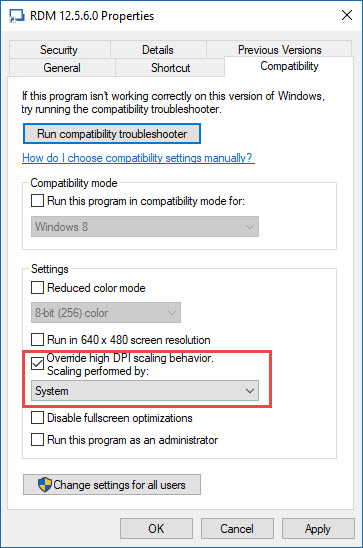
Could you close RDM, do a right-click on your RDM icon and select Properties. Go in the Compatibility tab and check the Override high DPI scaling behaviour.
In the dropdown, please select System and restart your computer.
Let us know if the cursor is still small in your remote connection.
Best regards,
Jeff Dagenais
2017-06-05_10-01-43.jpg
Hi
the same issues described above. I tried "Override high DPI scaling behavior. Scaling performed by: System". Didn't help.
The only workaroud we found (as my colleague met the same issues):
- on remote computer go to Control Panel, Hardware, Devices and Printers/Mouse, tab Pointers, change Windows Default (system scheme) to Windows Inverted (system scheme).
It's pretty annoying to change it on all existing servers.
Hello,
Do you use an HighDPI screen? And also what is your current version of Remote Desktop Manager?
Etienne Lord
Hi
my current HW and OS setting is:
LCD resolution 2560 x 1440
W10 Creators Update version 1703 (build 15063.483)
Custom scale factor 225%
My current RDM settings include:
RDM 12.6.1.0 (tested both x86 and x64)
User Interface/Advanced - unchecked "Disable display scaling on high DPI settings"
Types/RDP - Screen sizing mode set to Smart sizing. Display mode Default. Disable RDP scale factor (HDPI) is unchecked.
The same RDP settings have been propagated on all RDP entries (right-click on the top of Devolutions Online Drive, Edit, Batch Edit, Edit Sessions (Session Type Settings), select Display tab, set Remote desktop size to Default and Screen sizing mode to Smart sizing).
Remote OS:
W2016 - higher resolution is offered on this OS when compared with W2012(R2)
W2012R2
W2012
W2008R2
Cursor is hard to find in remote programs like Notepad, Notepad++, SQL Mgmt. Studio etc.
I have the same problem, the only workaround that works for me is change the mouse pointer scheme to "Windows Inverted" to see that little cursor. And that is very painful and unpleasant.
Hello,
In embedded mode, by default, RDM use a Microsoft ActiveX to establish the RDP connection. In fact, it's the same ActiveX used in Microsoft RDC Manager.
Could you try RDC Manager and see if you encounter the same issue using that application.
https://www.microsoft.com/en-us/download/details.aspx?id=44989
Best regards,
Jeff Dagenais
Hello Jeff
I downloaded RDCM 2.7 and configured a couple of servers. I can confirm the issue is the same. I've just found this discussion - https://social.technet.microsoft.com/Forums/lync/en-US/2c4f1b5b-f95b-4e0f-923e-68ff608691ce/small-or-missing-mouse-pointer-in-rdp-session-solved?forum=winserverTS and it seems per-user mouse cursor schema is the only known workaround.
Regards
Radek
Hello,
Since it's seems to be related to the Microsoft ActiveX, there's one last thing that you can try.
We have now integrated in RDM another rdp protocol which is FreeRDP and I may think that the cursor issue is not present using that protocol.
Could you edit your RDP session, go in the Advanced tab and change the RDP Version for FreeRDP and retry the RDP connection.
Best regards,
Jeff Dagenais
FreeRDP is unusable. Slow responses, slow screen refreshing, and RDM crashed several times.
Do you have any of these crash report in the event viewer or in the application logs?
Regards
David Hervieux
Here is eventlog.
rdm_crash.png
I am also experiencing the same issue. For me it appeared after last update to RDM. I am running 12.6.1 Enterprise. I can also confirm it is only happening to my 2008R2, 2012, and 2012R2 sessions. All of my 2016 sessions are normal. When I use native remote desktop connect to connect to these same servers I do not experience the issue.
@Richard Cusimano
In embedded mode, by default, RDM use a Microsoft ActiveX to establish the RDP connection. In fact, it's the same ActiveX used in Microsoft RDC Manager.
Could you try RDC Manager and see if you encounter the same issue using that application.
https://www.microsoft.com/en-us/download/details.aspx?id=44989
Best regards,
Jeff Dagenais
Thanks for the info. I can confirm I do not have the problem while using RDC manager. I tried to take screenshots but I could not capture the cursor and mouse pointer accurately.
@Richard,
Could you install RDM 12.6.2.0 and go in File -> Options -> Types -> RDP and check the option Disable RDP scale factor (HDPI) to see if that helps
You can download RDM 12.6.2.0 here
https://remotedesktopmanager.com/Home/Download
Best regards,
Jeff Dagenais
Thank you, update to 12.6.2.0 and settings helped with the cursor size. There is still a problem with the fact that, for example, when editing a text file in notepad, the cursor will disappear.
Does it disappear with RDCMan as well?
Regards
David Hervieux
After some time of use, I found that it only improved on some servers and unfortunately I still have not found a link why it does not happen everywhere.
I can confirm the same issue as Josef. The new version fixed the pointer but cursor still disappears in notepad. It does not appear to be an issue with RDCM. I have tried on many servers and found this to be inconsistent as well.
I am not experiencing the issue today as I work solely off of my laptop. In the office I dock my laptop and use 2 x 27" monitors at 1920x1080 with the laptop as my third monitor. It is also set to 1920 x 1080 but the display needs to be set to 150% zoom in order to read anything. I suspect the transitions between the two display zooms may be part of the issue. It is still interesting that the problem never occurs on server 2016.
Hi All: I just installed on a laptop with 3000X2000 res and I am having this same issue (Pointer tiny and disappears altogether in certain apps). It did fix it when i changed to Free RDP; however the entire app froze and crashed and I had to restart RDM. Was this ever resolved? I did the following and that fixed my resolution issue in RDM, but it did not fix the pointer. File -> Options -> Types -> RDP and check the option Disable RDP scale factor (HDPI)
Thank you.
@M W,
Do you encounter the same issue using Microsoft RDC Manager?
https://www.microsoft.com/en-ca/download/details.aspx?id=44989
By default, RDM use the same ActiveX to open the session in embedded mode.
Best regards,
Jeff Dagenais
Thanks. I do have the same issue with MS RDC manager. I don't have that issue with regular RDP. Is there currently no work around besides changing the mouse pointer color and size per server?
I was able to resolve this issue by having my Surfacebook (high DPI device) closed and only having the two connected monitors active. Logging off, then logging back in. the Active X control uses the settings of the primary device when logging in.
https://support.microsoft.com/en-us/help/3025083/windows-scaling-issues-for-high-dpi-devices
Hello,
Thank you for your feedback. Glad that is now working :)
Best regards,
Jeff Dagenais
This is still an issue for me. This is definitely something with RDM....... I launched RDM, got a notification that there was an update, hovered the mouse over the underlined version and the cursor went to a very small hand. Now everything with a hyperlink in Outlook is a small hand. I didn't have a single connection open.
@mvalpreda,
Where is the small cursor issue exactly? Not sure to understand the hyperlink in outlook part in the message above.
Is it possible for you to post a few screenshots?
Best regards,
Jeff Dagenais
Got a notification that RDM had an update. Hovered over the new version number and the 'hand' was really small. I get a small 'hand' when hovering on a link in RDP sessions. It has carried over to Outlook on my local machine. If I hover over a link in Outlook, the 'hand' is small. Same in Windows 2012 R2 and Windows 10 RDP sessions. The hand is fine in Windows 10 mail. It was fine before I hovered over the link in the RDM upgrade notification window.
I have small arrow and small I beam in a Windows 2012 R2 session in RDM. It is NOT small in native RDP client.
What is the general consensus on the DPI settings in RDM?
Here are two screenshots. One from Windows 10 Mail and one from Outlook. Again, this happened AFTER hovering over the version number in the RDM upgrade notification.
image2.jpeg
image1.jpeg
Hello,
When you mean that the cursor is small into Outlook, you mean that it's small inside Outlook on the remote session, not on your local. Am I correct?
You mentioned that it's working fine in Microsoft RDP (mstsc.exe). Is it also the case in Microsoft RDC Manager?
https://www.microsoft.com/en-ca/download/details.aspx?id=44989
I am asking this question because opening a session in embedded mode and in external mode doesn't use the same technology.
Opening a session in external mode use the native Microsoft RDP and opening a session in embedded mode use a Microsoft ActiveX.
In fact, it's the same Microsoft ActiveX that it's used in RDC Manager.
Best regards,
Jeff Dagenais
I feel like I have 14 different issues going on here.
Outlook and Word 2016 LOCALLY all of a sudden have a bunch of small cursors. Nothing else, it's driving me nuts. I have not done updates for days.
Remote sessions with RDM and MS RDCM have small cursor issues when doing embedded or fit to client area. mstsc.exe is fine across the board.
Why do you think that it's related to RDM if it's Outlook and Work locally?
Regards
David Hervieux
I didn't notice the small cursors in Word or Outlook until I hovered over the version link in RDM stating there was an upgrade available. I'm wondering if something gets overwritten somewhere
Hi All - If you are using external monitors, have you tried making sure to log out of windows and log in while only your external monitor is active?
I was able to resolve this issue by having my Surfacebook (high DPI device) closed and only having the two connected monitors active. Logging off, then logging back in. the Active X control uses the settings of the primary device when logging in.
https://support.microsoft.com/en-us/help/3025083/windows-scaling-issues-for-high-dpi-devices
I am on a laptop and using a Thunderbolt3 docking station. Not sure if that make any difference. I can certainly reboot without the dock connected. Not sure if Windows 'sees' the external LCDs even with they are on when the machine comes up. I only see POST on the laptop LCD, so maybe not?
Just rebooted without anything connected. Same results in RDP and everything else.
Hello,
If you uninstall RDM, do you still encounter the cursor issue in Outlook and Word installed locally on your laptop?
Best regards,
Jeff Dagenais
I can certainly try that tomorrow. I was working on another machine with nearly everything the same apart from it being a desktop.....and no issues anywhere. Really perplexing.
No change in Outlook/Word. I think all this might be coincidental with an Office or Windows update. Seeing others with similar issues in Outlook/Word with tiny cursors. I know Outlook depends on Word, but not sure why Word/Outlook have different cursor sets than everything else. Changing the mouse pointers make no difference.
Sorry for the hoops. Appreciate the help. This is incredibly frustrating. Did just connect to a 2008 R2 machine and the cursor was small.
On that 2008 R2 machine that I just connected to with the small cursor.....I logged out, logged back in and something happened during the login where the cursor went from normal to small.
@mvalpreda,
Since you experiencing the same issue using RDC Manager, there's nothing we can do since we use the same ActiveX to establish the RDP connection in embedded mode.
However, it's possible to use another RDP engine in RDM that is not from Microsoft. Could you go in File -> Options -> Types -> RDP and change the RDP engine for FreeRDP. This will use FreeRDP as the RDP engine instead of the Microsoft ActiveX.
That being said, does the cursor is small or normal?
Best regards,
Jeff Dagenais
Crazy thing.....new Windows 2018-07 update today and everything is back to normal. Even 2008 R2 remote sessions with small cursor are back to normal.
Shakes fist at Microsoft.
Hello,
Wow, this is crazy! Glad this is now working.
Regards,
Jeff Dagenais
Craziest damn thing......the small cursors are back. No updates, no reboot, nothing.
Hello,
Sorry, but I don't know what to see regarding your issue. Are they back in RDC Manager as well?
Best regards,
Jeff Dagenais