
akapsch
2026.1.5 and 2026.3.3 - Data grid column type 'date' and 'dateTime' causing error rendering dashboard
I have found if a data grid column is set to type 'date' or 'dateTime', an error appears when rendering the app. I do not see any additional logs throwing in the app's logging page or PSU's logging page.
2026.1.5:

2026.3.3:

Code:
New-UDPage -Url "/report-testreport" -Name "report-testreport" -Content {
    New-UDDataGrid -LoadRows {
        $Data = @(
            @{
                Name = 'Adam'
                Number = Get-Random -Minimum 1 -Maximum 10
                Boolean = if ((Get-Random -Minimum 1 -Maximum 10) -ge 6) { $true } else { $false }
                DateTime = Get-Date
            }
            @{
                Name = 'Tom'
                Number = Get-Random -Minimum 1 -Maximum 10
                Boolean = if ((Get-Random -Minimum 1 -Maximum 10) -ge 6) { $true } else { $false }
                DateTime = Get-Date
            }
            @{
                Name = 'Sarah'
                Number = Get-Random -Minimum 1 -Maximum 10
                Boolean = if ((Get-Random -Minimum 1 -Maximum 10) -ge 6) { $true } else { $false }
                DateTime = Get-Date
            }
        )
        $Data | Out-UDDataGridData -Context $EventData -TotalRows $Data.Count
    } -Columns @(
        New-UDDataGridColumn -Field 'Name'
        New-UDDataGridColumn -Field 'Number'
        New-UDDataGridColumn -Field 'Boolean'
        New-UDDataGridColumn -Field 'DateTime' -Type 'dateTime' # Both 'date' and 'dateTime' cause the errors. Commenting out the type parameter prevents the error.
    )
} -AutoInclude2026.3.3 - Data grid auto-sizing columns not consistent
I found the setting -DefaultSortColumn and -DefaultSortDirection appears to break auto-sizing when the page loads. This happens in both 2026.1.5 and 2026.3.3.
Error after upgrade to 2026.3.0
If it makes any difference, we just received this in 2026.1.5 after our app was working as expected for a while. Restarting the app fixes it, I suspect temporarily.
2026.3.3 - Data grid auto-sizing columns not consistent
This goes back many versions, and I may have created a GitHub issue for it. I'm raising it now that I am using Out-UDDataGridData correctly and are still observing the auto-sizing bug.
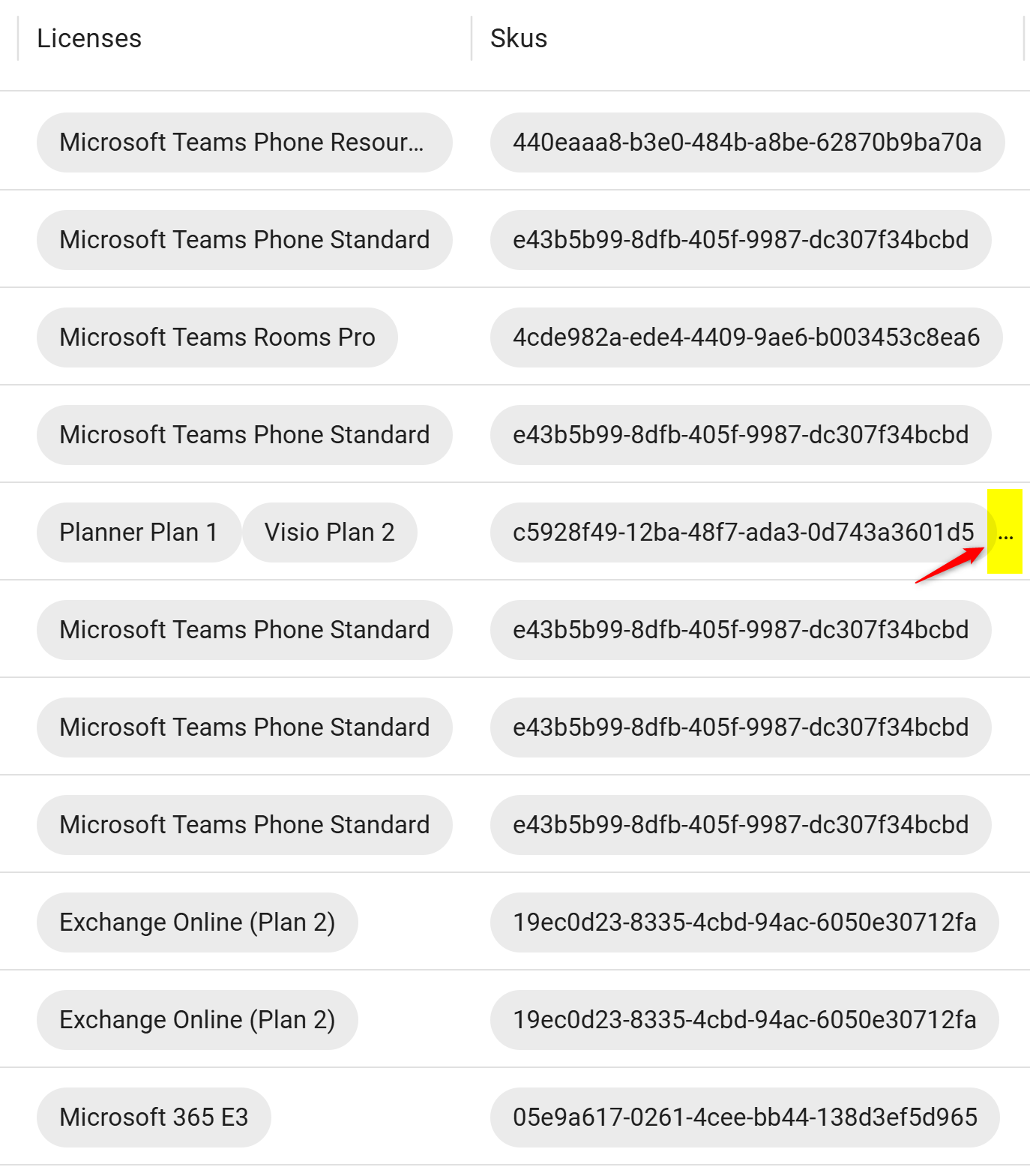
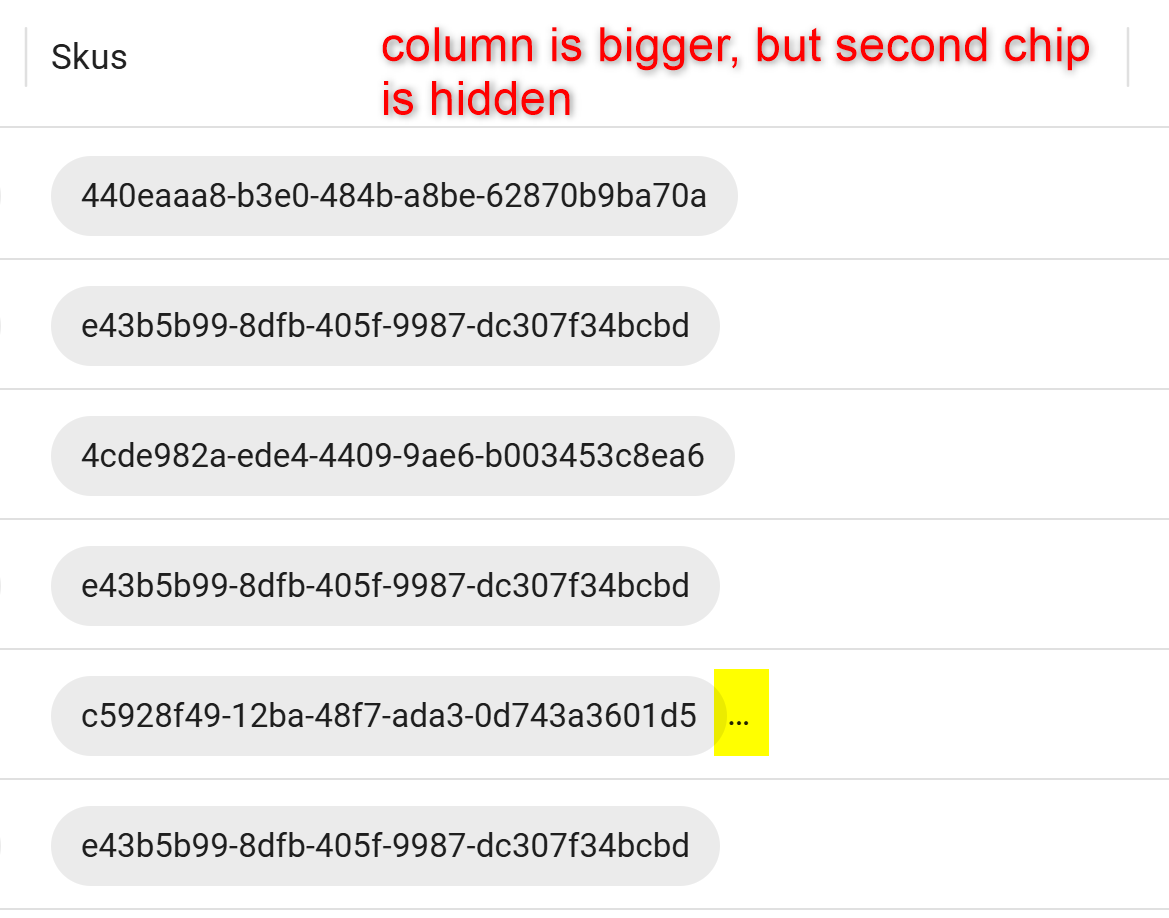
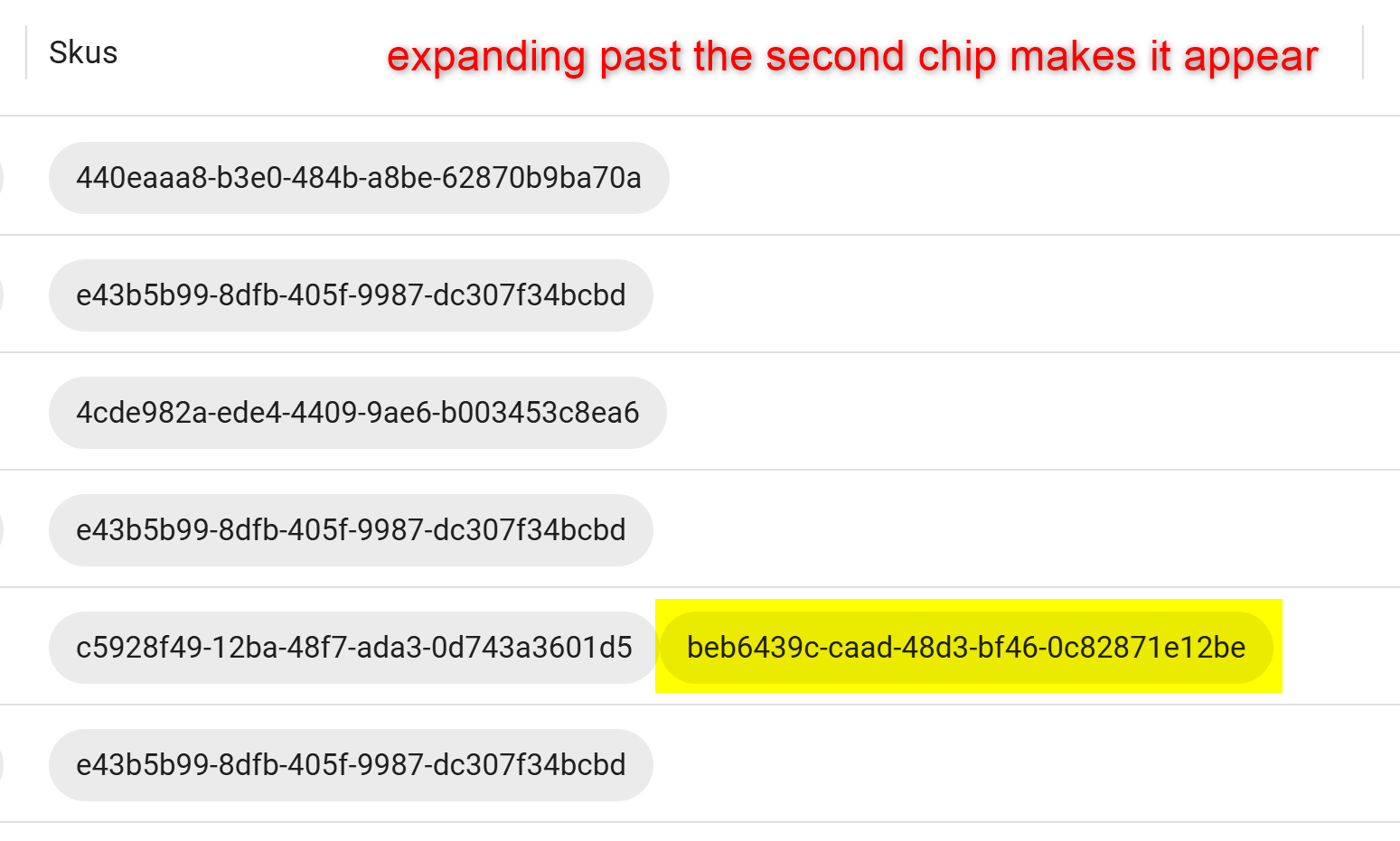
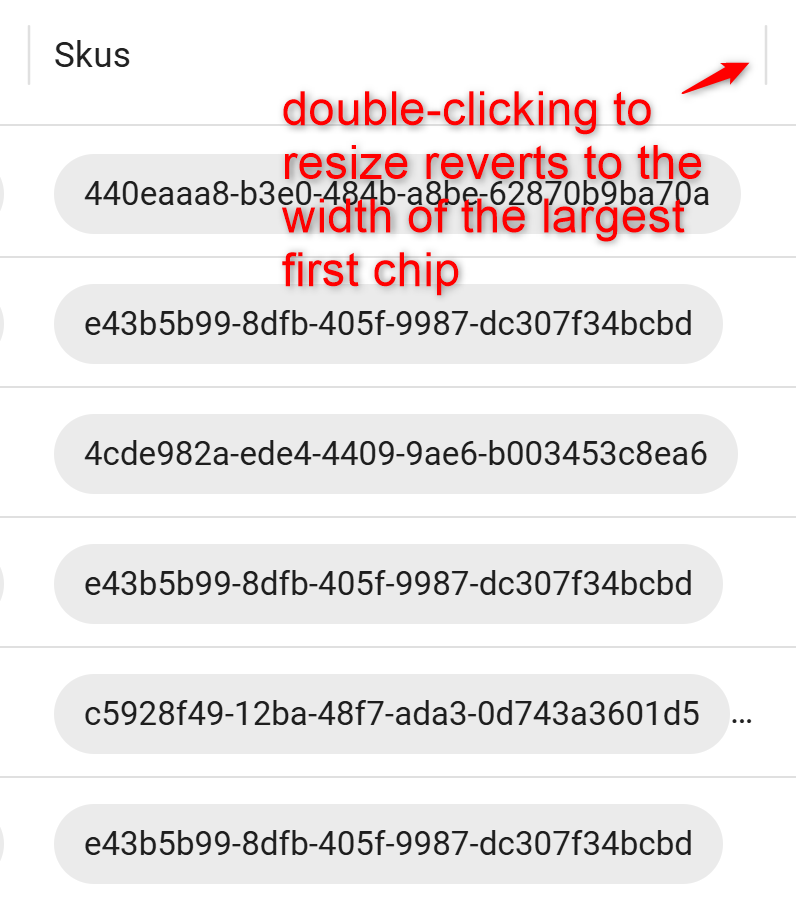
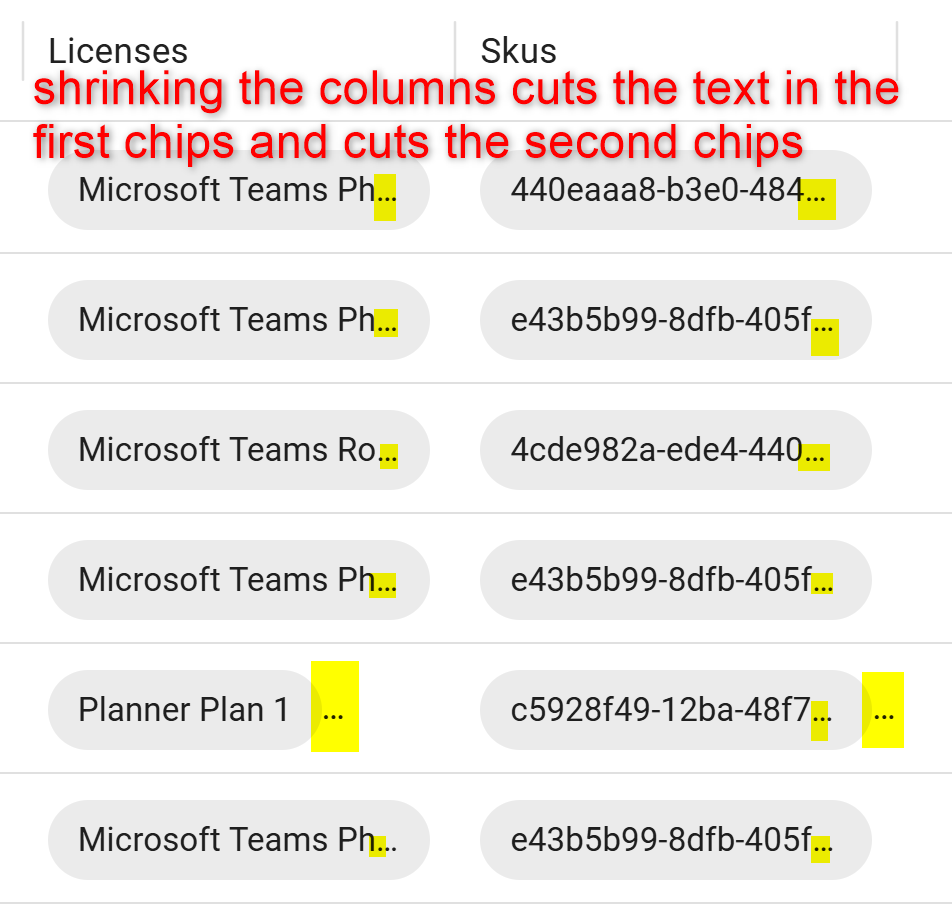
In our data grid, we have some columns rendered with UDChips inside. It appears the columns will only auto-size to the largest first chip in the column. Subsequent chips are cut off if they don't fit, displaying three dots that can easily be missed. Double-clicking the column resize handle changes the column width back to the width of the largest first chip. If you make the column smaller than the first chip, the chip is still visible, but the text inside gets cut off. Here are some screenshots that hopefully clarify what we observe, as well as the data grid code we are using.
Data grid code:
New-UDDataGrid -AutoSizeColumns -ShowPagination -PageSize 25 -RowsPerPageOptions @(10, 25, 50, 100) `
  -LoadRows {
    # Map "does not contain" / "does not equal" to "not contains" / "not equals"
    foreach ($item in $EventData.Filter.Items) {
      switch ($item.operator) {
        'doesNotContain' { $item.operator = 'notContains' }
        'doesNotEqual'   { $item.operator = 'notEquals' }
      }
    }

    $Data | Out-UDDataGridData -Context $EventData -TotalRows $Data.Count
  } `
  -Columns @(
    New-UDDataGridColumn -Field Id
    New-UDDataGridColumn -Field DisplayName
    New-UDDataGridColumn -Field UserPrincipalName
    New-UDDataGridColumn -Field Licenses -Render {
      $EventData.Licenses -split ';' | ForEach-Object {
        New-UDChip -Label $_
      }
    }
    New-UDDataGridColumn -Field Skus -Render {
      $EventData.Skus -split ';' | ForEach-Object {
        New-UDChip -Label $_
      }
    }
)PowerShell 7.5 still doesn't ship with the execute flag set
I should also add that we have apps that utilize environments that utilize that instance of PowerShell, and they will fail to start unless we set the execution flag.
PowerShell 7.5 still doesn't ship with the execute flag set
We run the Linux ZIP method on Rocky 9.8. Each time we upgrade, we have to run sudo chmod +x /opt/psuniversal/Hosts/7.5/PowershellUniversal.Host. Here is our upgrade script if you would like to take a look at it:
# These are used to derive the download URL
PSU_VERSION="2026.3.3.0" # Change this to the current version
PSU_ARCH="x64" # Change this to your desired architecture
PSU_FILE="Devolutions.PowerShellUniversal.linux-${PSU_ARCH}.${PSU_VERSION}.zip"
#PSU_URL="https://powershelluniversal.devolutions.net/download/psu/previous/${PSU_VERSION}/${PSU_FILE}"
PSU_URL="https://cdn.devolutions.net/download/${PSU_FILE}"

# These are used for installing PowerShell Universal
# If you'd like to use a different path, change this
PSU_PATH="/opt/psuniversal"
PSU_EXEC="${PSU_PATH}/Universal.Server"

# These are for installing it as a service
PSU_SERVICE="psuniversal"
PSU_USER="psuniversal"

BACKUP_DATE=$(date +"%Y%m%d_%H%M%S")
BACKUP_FILE="backup-${BACKUP_DATE}.tar.gz"
BACKUP_FILE_PATH="/home/psuniversal/${BACKUP_FILE}"
BACKUP_SOURCE="/home/psuniversal/.PowerShellUniversal"

echo "Stopping PSU"
sudo systemctl stop $PSU_SERVICE

echo "Making backup"
sudo tar -czf $BACKUP_FILE_PATH -C $BACKUP_SOURCE .

echo "Deleting existing installation folder"
sudo rm -rf $PSU_PATH

echo "Creating $PSU_PATH and granting access to $USER"
sudo mkdir $PSU_PATH
sudo setfacl -m "u:${USER}:rwx" $PSU_PATH

echo "Creating user $PSU_USER and making it the owner of $PSU_PATH"
sudo chown $PSU_USER -R $PSU_PATH

echo "Downloading PowerShell Universal $PSU_VERSION ($PSU_ARCH)"
wget -q $PSU_URL -O $PSU_FILE

echo "Extracting $PSU_FILE to $PSU_PATH"
unzip -o -qq $PSU_FILE -d $PSU_PATH

echo "Make $PSU_EXEC executable"
sudo chmod +x $PSU_EXEC

echo "Changing port to 50000"
sudo sed -i 's/*:5000"/*:50000"/' /opt/psuniversal/appsettings.json
sudo sed -i 's/*:5000"/*:50000"/' /opt/psuniversal/appsettings.linux.json

echo "Starting PSU"
sudo systemctl start $PSU_SERVICE
sudo systemctl status $PSU_SERVICE --no-pager
If you need our service file (/etc/systemd/system/psuniversal.service), here it is:
[Unit]
Description=PowerShell Universal
[Service]
ExecStart=/opt/psuniversal/Universal.Server
SyslogIdentifier=psuniversal
User=psuniversal
Restart=always
RestartSec=5
[Install]
WantedBy=multi-user.target2026.3.2 - Table filtering and sorting broken
Thanks Patrick and Ruben! I must have missed Adam's reply on the GitHub issue. Looks like using Out-UDDataGridData did the trick, and works in 2026.1.5 (We had to roll back).
I was unaware that -LoadRows is called every time the user sorts/filters/changes pages. With that being said, I would assume moving the Import-Csv outside of the -LoadRows would be beneficial. Is there any reason that shouldn't be done?
2026.3.2 - "Log in again" button on "Logged out" dialog doesn't always work
Hey Patrick, this bug appears if you return to the admin panel after a good chunk of time has passed. I found that sometimes when I return, the "Logged out" prompt isn't on the screen, but when I go to click a button, nothing happens. Well, sometimes the URL in the address bar will change, but the page doesn't. If I reload the page, PSU takes me through our OIDC auth again, then everything works again.
2026.3.0 - Exchange module not able to load
Looks like ExchangeOnlineManagement version 3.6.0 and Microsoft.Graph version 2.25.0 work together on PSU 2026.1.5.
2026.3.0 - Exchange module not able to load
@Patrick Ouimet We have to rollback to 2026.1.5. To fix the issue on that version with MSAL pinned at 4.66.2, what combination of versions for ExchangeOnlineManagement and Microsoft.Graph will work together? We are struggling to find a combination that works.
PowerShell Universal failed to start (Timed out waiting for security proxy to start) - Version 2026.3.0
@abang I've opened an issue for us to track this and see if we can determine why the external PowerShell 7 processes fail to start. I'll update this thread when we have a resolution or any other questions.
@Adam Driscoll
We also observed that environments other than the Integrated environment fail to start after upgrading. We had to set the execute flag on /opt/psuniversal/Hosts/7.5/PowerShellUniversal.Host. Granted we are on a Linux install and not using a container image, so this might not apply.
@Adam Driscoll I can confirm that the execution flag is not set with the built-in PowerShell 7.5 in 2026.3.3.
PowerShell 7.5 still doesn't ship with the execute flag set
I can confirm that I do not get the multi-pwsh error on the environments page anymore. I'm not sure if I mentioned it in this post or another, but PowerShell 7.5 still doesn't ship with the execute flag set. I can create a separate thread for that.
Ability to subscribe to PSU release notifications
Both are good options, but should probably be made easier to find. I would expect something on the Release notes | PowerShell Universal page.
2026.3.2 - Unable to delete a file in files tab
@akapsch I've opened an issue to track this. Once we dig in, I'll let you know if I need any more info.
@Adam Driscoll I tried creating a file, that also appears to be broken.
2026.3.2 - Table filtering and sorting broken
Hi Ruben,
This has to do with data grids in our app pages, not a page in the admin console
All data grids to my knowledge
I believe this bug goes back many many versions. I believe I opened an issue in GitHub when that was used to track bugs
Edge, 151.0.4129.93
Same behavior in Incognito
PSU is hosted on Linux using the ZIP method
No messages are appended to the browser console when attempting to sort or filter a column.
Here is the code with the bug. The CSV file has rows of mock user data with display names and usernames from an online generator.
New-UDPage -Url '/datagrid-test' -Name 'datagrid-test' -Content {
    New-UDContainer -Children {
        New-UDDynamic -Id 'ReportViewer' -Content {
            New-UDDataGrid -AutoSizeColumns `
                -LoadRows {
                    $Data = Import-Csv "Reports/Files/MockUsers100.csv"

                    @{
                        rows  = $Data
                        total = $Data.Count
                    }
                } `
                -Columns @(
                    New-UDDataGridColumn -Field DisplayName
                    New-UDDataGridColumn -Field Username
                )
        } -LoadingComponent {
            New-UDProgress -Circular
        }
    }
} -AutoInclude2026.3.2 - "Log in again" button on "Logged out" dialog doesn't always work
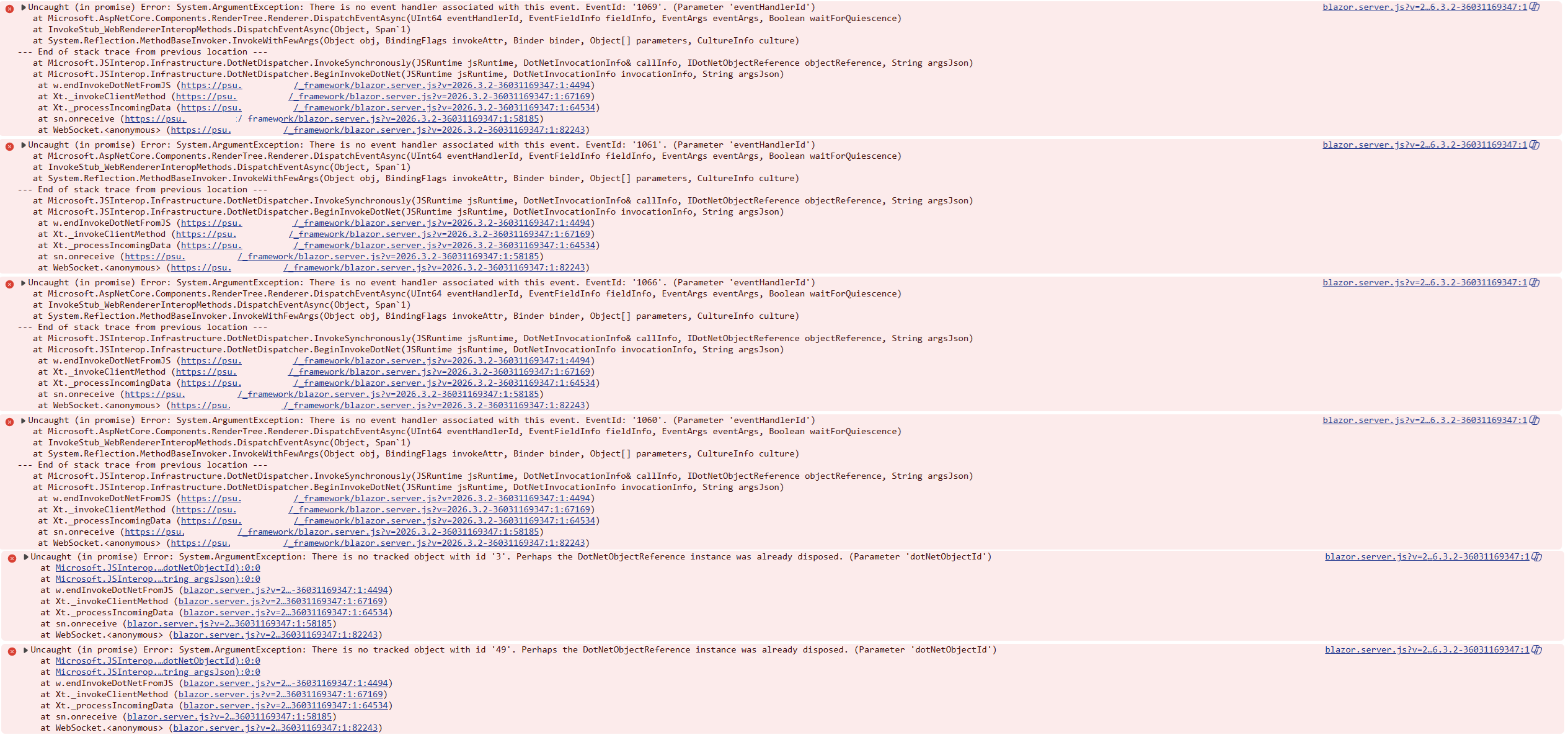
Clicking the button throws the following in the console:
Ability to subscribe to PSU release notifications
It would be nice to get an email with the changes whenever there is a new PSU release, and maybe even have an RSS feed for automated tools to keep track of releases.
After editing a script and running it, go back to editor
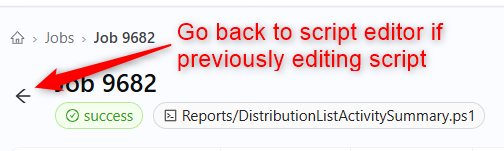
When editing a script and starting it from the editor page, I'm brought to the current job. If I click the back button next to the job number, it would be nice to be directed back to the editor instead of the jobs overview page.
2026.3.2 - Unable to delete a file in files tab
If I select a file in the files tab, click the delete icon, then click the delete button, nothing happens. I can then no longer select other files or close the delete confirm flyout.
2026.3.2 - Admin terminal doesn't open on all pages
@akapsch If you press F12 in your browser, are there any errors?
@Adam Driscoll Something about trying to access /assets/ with a 404 error. It doesn't appear when I click the admin terminal button, they error when the admin console loads.
GET https://psu.example.com/assets/ net::ERR_ABORTED 404 (Not Found)
2026.3.2 - Admin terminal doesn't open on all pages
When it doesn't load, the X doesn't close the popup and you have to refresh the window. I tested a handful of pages and these are the results:
Works:
Scripts tab
Files / Repository tab
Logging tab
Doesn't work:
Home tab (Sometimes works - sometimes loads previous terminal contents, shows "prompt" for a bit, then goes blank)
Apps tab
App edit code page
App page edit page
PSU commands failing with SSL connection error
I believe I have more to add to this. I have observed that if I don't include the -Integrated parameter with some cmdlets, that they will run forever until the page runs out of memory. Since they never end, -ErrorAction Stop doesn't take effect and the code never drops into the catch block. Below is the code I am using to test. If -Integrated on both Get-PSUScript and Get-PSUSchedule, it runs fine. If I don't include -Integrated on either, the page runs out of memory with "Insufficient memory to continue the execution of the program.". When this happens, no errors appear in the logs. I'm assuming they are throwing the SSL error, but I can't confirm.
It also appears that Get-PSUSchedule has the -Integrated parameter implemented, but it is not in the current docs: Get-PSUSchedule | Devolutions PowerShell Universal | Product guides & reference
New-UDPage -Url '/pageurl' -Name 'Bug Demonstration' -Content {
  $ScriptName = 'GenerateReport.ps1'
  New-UDStack -Spacing 2 -Direction 'column' -Content {
    New-UDDynamic -Content {
      try {
        $Script = Get-PSUScript -Name $ScriptName -ErrorAction Stop #-Integrated
        $Schedule = Get-PSUSchedule -Script $Script #-Integrated

        New-UDElement -Tag 'div' -Content {
          'Next run: '
          New-UDDateTime -InputObject $Schedule.NextExecution
        }
      } catch {
        New-UDElement -Tag 'div' -Content {
          'Error: '
          $_
        }
      }
    } -LoadingComponent {
      New-UDProgress -Circular
    }
  }
}PSU commands failing with SSL connection error
Hi Ruben,
We have observed this on 2026.3.0 through 2026.3.2
We run PSU as a Linux service
These commands are in an app page
We were previously on 2026.1.5
The logs only say
The SSL connection could not be established, see inner exception.. Where can I find the inner exception?
Public beta channel
With how many bugs have been in the 2026.3.x releases, I think it would be beneficial to have a public beta channel so releases can be tested and bugs can be identified before being pushed to production.
Download file from files tab
It would be nice to have the ability to download files from the files tab, as well as being able to select multiple and download them all at the same time.