2026.3.2 - Table filtering and sorting broken

Nothing happens when we try to filter or sort columns: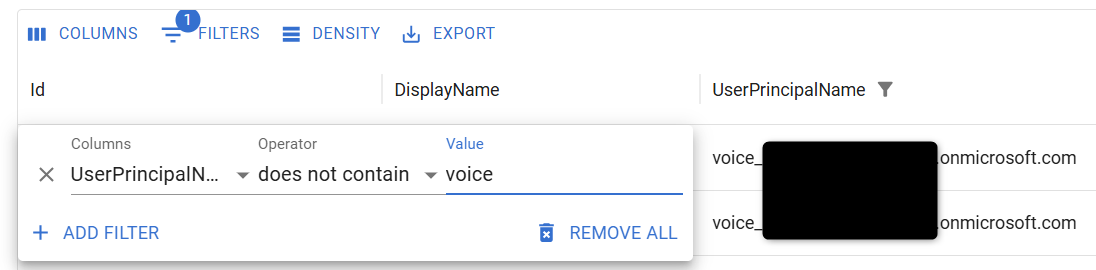
d6852c7c-3694-4d99-b1b5-8534841abfd2.png
Recommended Answer
Hello akapsch,
Thank you for the details and the sample code, they made it possible to reproduce the behavior on our side.
I tested your page on PowerShell Universal 2026.3.2 and 2026.2.5, and both versions behave the same way, so this is not a regression introduced by the upgrade.
There are two points to address.
The first one is the expected behavior of the -LoadRows parameter.
When a user sorts, filters, or changes page, the data grid runs the -LoadRows script block again and passes the request in the $EventData variable.
Your script block returns the full CSV every time, so the grid receives the same rows and nothing appears to change.
Piping the rows to Out-UDDataGridData applies the sort, the filter, and the paging for you.
This matches the answer on your earlier GitHub issue #4672.
The second point concerns two filter operators.
With Out-UDDataGridData, the "does not contain" and "does not equal" operators return no rows at all.
The "not contains" and "not equals" operators, lower in the same list, return the correct rows.
The version below handles this by switching those two operators to "not contains" and "not equals" before Out-UDDataGridData runs.
It also adds -ShowPagination and -PageSize, because without them the grid shows only 5 rows and no pager once Out-UDDataGridData is used.
New-UDPage -Url '/datagrid-test' -Name 'datagrid-test' -Content {
    New-UDContainer -Children {
        New-UDDynamic -Id 'ReportViewer' -Content {
            New-UDDataGrid -AutoSizeColumns -ShowPagination -PageSize 25 -RowsPerPageOptions @(10, 25, 50, 100) `
                -LoadRows {
                    # Map "does not contain" / "does not equal" to "not contains" / "not equals"
                    foreach ($item in $EventData.Filter.Items) {
                        switch ($item.operator) {
                            'doesNotContain' { $item.operator = 'notContains' }
                            'doesNotEqual'   { $item.operator = 'notEquals' }
                        }
                    }
                    $Data = Import-Csv "Reports/Files/MockUsers100.csv"
                    $Data | Out-UDDataGridData -Context $EventData -TotalRows $Data.Count
                } `
                -Columns @(
                    New-UDDataGridColumn -Field DisplayName
                    New-UDDataGridColumn -Field Username
                )
        } -LoadingComponent {
            New-UDProgress -Circular
        }
    }
} -AutoInclude
I tested this version with every filter operator except "is any of", and each one returned the expected rows.
If any of your other data grids already use Out-UDDataGridData and still do not sort or filter, please share a sanitized copy of that grid's code.
If some of your grids load data from a remote source such as SQL, the documentation recommends applying the filters in your own query instead.
References:
Data Grid: https://docs.devolutions.net/powershell-universal/apps/components/data-display/data-grid
Out-UDDataGridData: https://docs.devolutions.net/powershell-universal/powershell-commands/out-uddatagriddata
New-UDDataGrid: https://docs.devolutions.net/powershell-universal/powershell-commands/new-uddatagrid
GitHub issue #4672: https://github.com/ironmansoftware/powershell-universal/issues/4672
Best regards,
Patrick Ouimet
All Comments (5)
Hello @akapsch
Thank you for reporting this.
I reviewed the information provided and the current 2026.3.2 release notes. I did not find this specific table filtering and sorting behavior documented as a known issue, so I would like to narrow down the conditions before attempting to reproduce it.
Could you please confirm the following?
• Which exact page in the Admin Console is affected?
• Does the issue occur on all tables, or only on the table shown in your screenshot?
• Which PSU version were you using before 2026.3.2, and did filtering and sorting work correctly there?
• Which browser and browser version are you using?
• Does the same behavior occur in a private/incognito window or in a second browser?
• How is PSU hosted: Windows Service/MSI, IIS, ZIP, or Docker?
If the problem persists, please also check the browser developer console immediately after attempting to sort or apply a filter and share any relevant errors.
Because this is a public forum, please sanitize all evidence before posting. Remove credentials, tokens, license keys, cookies, private keys, full connection strings, email addresses, usernames, customer data, tenant or account identifiers, internal domains, hostnames, IP addresses, and private URLs. Please do not upload unredacted HAR files, memory dumps, database backups, or complete configuration files to this public thread.
References:
https://devolutions.net/powershell-universal/release-notes/
Best regards,
Ruben Tapia
Hi Ruben,
- This has to do with data grids in our app pages, not a page in the admin console
- All data grids to my knowledge
- I believe this bug goes back many many versions. I believe I opened an issue in GitHub when that was used to track bugs
- Edge, 151.0.4129.93
- Same behavior in Incognito
- PSU is hosted on Linux using the ZIP method
No messages are appended to the browser console when attempting to sort or filter a column.
Here is the code with the bug. The CSV file has rows of mock user data with display names and usernames from an online generator.
New-UDPage -Url '/datagrid-test' -Name 'datagrid-test' -Content {
    New-UDContainer -Children {
        New-UDDynamic -Id 'ReportViewer' -Content {
            New-UDDataGrid -AutoSizeColumns `
                -LoadRows {
                    $Data = Import-Csv "Reports/Files/MockUsers100.csv"

                    @{
                        rows  = $Data
                        total = $Data.Count
                    }
                } `
                -Columns @(
                    New-UDDataGridColumn -Field DisplayName
                    New-UDDataGridColumn -Field Username
                )
        } -LoadingComponent {
            New-UDProgress -Circular
        }
    }
} -AutoIncludeHello akapsch,
Thank you for the details and the sample code, they made it possible to reproduce the behavior on our side.
I tested your page on PowerShell Universal 2026.3.2 and 2026.2.5, and both versions behave the same way, so this is not a regression introduced by the upgrade.
There are two points to address.
The first one is the expected behavior of the -LoadRows parameter.
When a user sorts, filters, or changes page, the data grid runs the -LoadRows script block again and passes the request in the $EventData variable.
Your script block returns the full CSV every time, so the grid receives the same rows and nothing appears to change.
Piping the rows to Out-UDDataGridData applies the sort, the filter, and the paging for you.
This matches the answer on your earlier GitHub issue #4672.
The second point concerns two filter operators.
With Out-UDDataGridData, the "does not contain" and "does not equal" operators return no rows at all.
The "not contains" and "not equals" operators, lower in the same list, return the correct rows.
The version below handles this by switching those two operators to "not contains" and "not equals" before Out-UDDataGridData runs.
It also adds -ShowPagination and -PageSize, because without them the grid shows only 5 rows and no pager once Out-UDDataGridData is used.
New-UDPage -Url '/datagrid-test' -Name 'datagrid-test' -Content {
    New-UDContainer -Children {
        New-UDDynamic -Id 'ReportViewer' -Content {
            New-UDDataGrid -AutoSizeColumns -ShowPagination -PageSize 25 -RowsPerPageOptions @(10, 25, 50, 100) `
                -LoadRows {
                    # Map "does not contain" / "does not equal" to "not contains" / "not equals"
                    foreach ($item in $EventData.Filter.Items) {
                        switch ($item.operator) {
                            'doesNotContain' { $item.operator = 'notContains' }
                            'doesNotEqual'   { $item.operator = 'notEquals' }
                        }
                    }
                    $Data = Import-Csv "Reports/Files/MockUsers100.csv"
                    $Data | Out-UDDataGridData -Context $EventData -TotalRows $Data.Count
                } `
                -Columns @(
                    New-UDDataGridColumn -Field DisplayName
                    New-UDDataGridColumn -Field Username
                )
        } -LoadingComponent {
            New-UDProgress -Circular
        }
    }
} -AutoInclude
I tested this version with every filter operator except "is any of", and each one returned the expected rows.
If any of your other data grids already use Out-UDDataGridData and still do not sort or filter, please share a sanitized copy of that grid's code.
If some of your grids load data from a remote source such as SQL, the documentation recommends applying the filters in your own query instead.
References:
Data Grid: https://docs.devolutions.net/powershell-universal/apps/components/data-display/data-grid
Out-UDDataGridData: https://docs.devolutions.net/powershell-universal/powershell-commands/out-uddatagriddata
New-UDDataGrid: https://docs.devolutions.net/powershell-universal/powershell-commands/new-uddatagrid
GitHub issue #4672: https://github.com/ironmansoftware/powershell-universal/issues/4672
Best regards,
Patrick Ouimet
 Hello @akapsch
Thank you for the additional details and sample code.
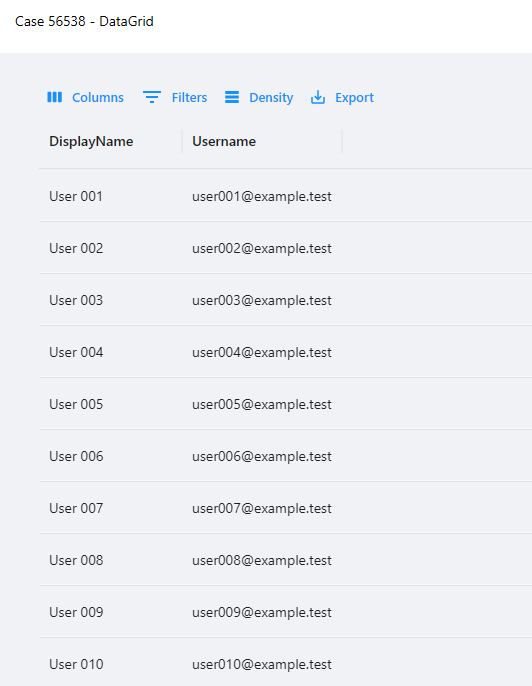
I completed an independent test in a clean PowerShell Universal 2026.3.2 environment and was able to confirm the behavior you reported with the original -LoadRows implementation.
When the grid returns the data directly as:
@{
rows = $Data
total = $Data.Count
}
the sorting and filtering controls update in the UI, but the returned dataset itself is not being processed according to the request in $EventData.
I then changed the implementation to:
$Data | Out-UDDataGridData `
-Context $EventData `
-TotalRows $Data.Count
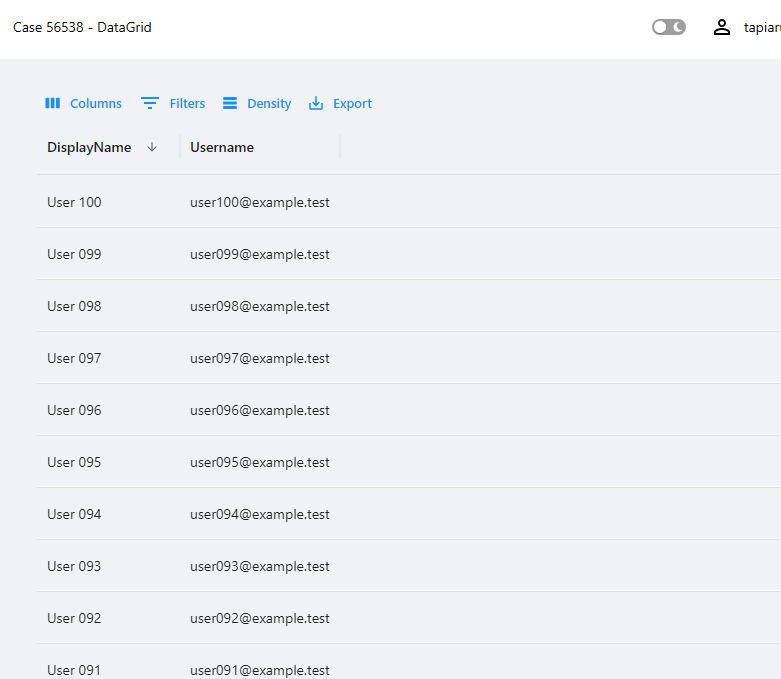
and enabled pagination. With this configuration, I was able to confirm that sorting works correctly in both ascending and descending directions.
I will attach screenshots from my clean 2026.3.2 reproduction showing the behavior before and after this change.
This also aligns with Patrik's findings. The original behavior does not appear to be a regression introduced in 2026.3.2, since the LoadRows script needs to process the sorting, filtering, and paging information provided through $EventData.
Patrik also identified a separate filtering detail with the "does not contain" and "does not equal" operators and provided a workaround by remapping those operators before passing the context to Out-UDDataGridData.
Could you please try the updated version Patrik provided in your Linux ZIP environment and let us know whether sorting and filtering behave correctly there?
Best regards,
Ruben Tapia
8b5db419-e1c9-4ee6-a9e7-f0ffe0092d6c.png
ce7d1d01-6c8b-4e08-ac06-c2f8df615e23.png
Thanks Patrick and Ruben! I must have missed Adam's reply on the GitHub issue. Looks like using Out-UDDataGridData did the trick, and works in 2026.1.5 (We had to roll back).
I was unaware that -LoadRows is called every time the user sorts/filters/changes pages. With that being said, I would assume moving the Import-Csv outside of the -LoadRows would be beneficial. Is there any reason that shouldn't be done?