
liamjpeters
All apps/scripts not working on 2026.3.0
I believe we're experiencing a similar issue. IIS hosted (not nested). Error when apps start is Grpc related but not identical to OP:
[17/09/2026 16:29:58] [Error] [App-**********] Inner Exception: Grpc.Core.Internal.CoreErrorDetailException
[17/09/2026 16:29:57] [Error] [App-**********]    at ProtoBuf.Grpc.Internal.Reshape.UnaryTaskAsyncImpl[TRequest,TResponse](AsyncUnaryCall`1 call, MetadataContext metadata, CancellationToken cancellationToken) in /_/src/protobuf-net.Grpc/Internal/Reshape.cs:line 554
   at PowerShellUniversal.ClientServiceRedirect.IsDebuggerAttachedAsync() in D:\a\powershell-universal\powershell-universal\src\Host\GrpcUniversalClient.cs:line 42
   at Nito.AsyncEx.Synchronous.TaskExtensions.WaitAndUnwrapException[TResult](Task`1 task)
   at Nito.AsyncEx.AsyncContext.<>c__DisplayClass16_0`1.<Run>b__0(Task`1 t)
   at System.Threading.Tasks.ContinuationResultTaskFromResultTask`2.InnerInvoke()
   at System.Threading.ExecutionContext.RunInternal(ExecutionContext executionContext, ContextCallback callback, Object state)
--- End of stack trace from previous location ---
   at System.Threading.ExecutionContext.RunInternal(ExecutionContext executionContext, ContextCallback callback, Object state)
   at System.Threading.Tasks.Task.ExecuteWithThreadLocal(Task& currentTaskSlot, Thread threadPoolThread)
--- End of stack trace from previous location ---
   at Nito.AsyncEx.Synchronous.TaskExtensions.WaitAndUnwrapException[TResult](Task`1 task)
   at Nito.AsyncEx.AsyncContext.Run[TResult](Func`1 action)
   at PowerShellUniversal.ValueTaskExtensions.ToResult[T](ValueTask`1 valueTask) in D:\a\powershell-universal\powershell-universal\src\PowerShellUniversal\ValueTaskExtensions.cs:line 49
--- End of stack trace from previous location ---
   at PowerShellUniversal.ValueTaskExtensions.HandleException[TResult](RpcException e) in D:\a\powershell-universal\powershell-universal\src\PowerShellUniversal\ValueTaskExtensions.cs:line 130
   at PowerShellUniversal.ValueTaskExtensions.ToResult[T](ValueTask`1 valueTask) in D:\a\powershell-universal\powershell-universal\src\PowerShellUniversal\ValueTaskExtensions.cs:line 49
   at UniversalDashboard.Services.UDRunspaceFactory.CreateRunspace() in D:\a\powershell-universal\powershell-universal\src\UniversalDashboard\Services\UDRunspaceFactory.cs:line 480
   at UniversalDashboard.Services.UDRunspaceFactory.Create() in D:\a\powershell-universal\powershell-universal\src\UniversalDashboard\Services\UDRunspaceFactory.cs:line 658
   at Microsoft.Extensions.ObjectPool.DefaultObjectPool`1.Get()
   at UniversalDashboard.Services.UDRunspaceFactory.GetRunspaceReference(Boolean sendSaturationWarning) in D:\a\powershell-universal\powershell-universal\src\UniversalDashboard\Services\UDRunspaceFactory.cs:line 112
   at UniversalDashboard.Services.UDRunspaceFactory.GetRunspaceAsync() in D:\a\powershell-universal\powershell-universal\src\UniversalDashboard\Services\UDRunspaceFactory.cs:line 78
   at UniversalAutomation.Host.UniversalDashboardService.StartDashboard() in D:\a\powershell-universal\powershell-universal\src\Host\DashboardService.cs:line 156
[17/09/2026 16:29:57] [Error] [App-**********] Failed to get dashboard. Status(StatusCode="Unavailable", Detail="failed to connect to all addresses", DebugException="Grpc.Core.Internal.CoreErrorDetailException: {"created":"@1789658997.465000000","description":"Failed to pick subchannel","file":"..\..\..\src\core\ext\filters\client_channel\client_channel.cc","file_line":3218,"referenced_errors":[{"created":"@1789658997.465000000","description":"failed to connect to all addresses","file":"..\..\..\src\core\lib\transport\error_utils.cc","file_line":165,"grpc_status":14}]}") Grpc.Core.RpcException
[17/09/2026 16:29:50] [Information] [App-**********] Dashboard information received. Starting dashboard. Large Excel UD-Table Exports Broken in Edge/Chrome v132+
Looks like they’ll have the fix for this through in the coming days and it’ll make it into a stable version before long. Appreciate your quick replies though
Large Excel UD-Table Exports Broken in Edge/Chrome v132+
I’ve opened the issue as requested.
Having dug into this some more I can see that someone opened the below issue on the SheetJS issue tracker for a similar issue with a CSV file.
#3273 - Missing data in csv file after export data from JSON response - sheetjs - SheetJS
They noted that it started recently impacting Chrome and not Firefox etc.
The maintainers looked into it in their discord and discovered this to be a Chromium bug, which they’ve since reported.
They have suggested a workaround in the interim that you could possibly implement:

Large Excel UD-Table Exports Broken in Edge/Chrome v132+
Product: PowerShell Universal
Version: 4.2.13
Environment: PowerShell 7.3.9
Hosting: IIS (Server 2019)
Overview
When doing an Export to Excel (of admittedly a lot of data) from Edge or Chrome version 132+, the downloaded file is all over the place and mostly blank.


We’ve tried many devices and it’s consistent - Edge or Chrome on v131 - all working great 100% of the time - Exports work flawlessly.
Upgrade to the latest version and the exports break as described below.
Edge - 132.0.2957.115, Chrome - 132.0.6834.83 in stable at the time of writing. This is the same in Dev and Beta versions of Edge too.
Most of our userbase have been updated to Edge 132 in the last week or so, and so this has brought it to our attention.
The headers are mostly missing and 50-95% of the rows are blank.


Repro Code
This is a very artificial example - all of the irrelevant niceties have been stripped away. In our actual pages, the data is being fetched from a SQL database.
New-UDTable -LoadData {
    $TableData = ConvertFrom-Json $Body
    1..$TableData.PageSize | ForEach-Object {
        @{
            Column1  = New-Guid
            Column2  = New-Guid
            Column3  = New-Guid
            Column4  = New-Guid
            Column5  = New-Guid
            Column6  = New-Guid
            Column7  = New-Guid
            Column8  = New-Guid
            Column9  = New-Guid
            Column10 = New-Guid
            Column11 = New-Guid
            Column12 = New-Guid
            Column13 = New-Guid
            Column14 = New-Guid
            Column15 = New-Guid
            Column16 = New-Guid
        }
    } | Out-UDTableData -Page $TableData.Page -TotalCount 50000 -Properties $TableData.Properties
} -ShowPagination -DisablePageSizeAll -Columns @(
    New-UDTableColumn -Property 'Column1' -IncludeInExport -DefaultSortColumn
    New-UDTableColumn -Property 'Column2' -IncludeInExport
    New-UDTableColumn -Property 'Column3' -IncludeInExport
    New-UDTableColumn -Property 'Column4' -IncludeInExport
    New-UDTableColumn -Property 'Column5' -IncludeInExport
    New-UDTableColumn -Property 'Column6' -IncludeInExport
    New-UDTableColumn -Property 'Column7' -IncludeInExport
    New-UDTableColumn -Property 'Column8' -IncludeInExport
    New-UDTableColumn -Property 'Column9' -IncludeInExport
    New-UDTableColumn -Property 'Column10' -IncludeInExport
    New-UDTableColumn -Property 'Column11' -IncludeInExport
    New-UDTableColumn -Property 'Column12' -IncludeInExport
    New-UDTableColumn -Property 'Column13' -IncludeInExport
    New-UDTableColumn -Property 'Column14' -IncludeInExport
    New-UDTableColumn -Property 'Column15' -IncludeInExport
    New-UDTableColumn -Property 'Column16' -IncludeInExport
) -ShowExport -ExportOption 'XLSX' -OnExport {
    foreach ($Index in 0..50000) {
        @{
            Column1  = New-Guid
            Column2  = New-Guid
            Column3  = New-Guid
            Column4  = New-Guid
            Column5  = New-Guid
            Column6  = New-Guid
            Column7  = New-Guid
            Column8  = New-Guid
            Column9  = New-Guid
            Column10 = New-Guid
            Column11 = New-Guid
            Column12 = New-Guid
            Column13 = New-Guid
            Column14 = New-Guid
            Column15 = New-Guid
            Column16 = New-Guid
        }
    }
}
We’re at a bit of a loss. This is Server-Side exporting as far as we know, so aren’t quite sure how the browser version is impacting the creation of the XLSX file which is ultimately downloaded.
None of the logs we’ve checked have shed any light on things. The Dashboard log itself shows nothing. The System logs show the connection and the transfer of bytes but not errors. IIS logs and event viewer logs show nothing of note.
Any light you can shed on this @Adam Driscoll?
Thanks!
How pass variable to a page?
Hi,
As with most things, there’s always more than one way to achieve the same outcome.
The built-in way of doing this, since version 4.0.10, is by accessing the $Query variable. This is a dictionary of the variables passed via the url query string. It’s already there and parsed for you - saving you the work.
So in your example Url: https://FQDN/devce?DeviceName=xxx
You can access the value of DeviceName using $Query['DeviceName'].
Hope that helps!
Line Charts do not respect chart options
I change my suspicion to be the below from the New-UDChartJS cmdlet definition:
if (-not ($MyInvocation.BoundParameters.ContainsKey('LoadData'))) {
    Foreach ($datasetDef in $Dataset) {
        if ($Type -eq 'Line' -and $datasetDef.Options -eq $null) {
            $Options = @{
                fill    = $true
                tension = 0.4
            }
        }

        if ($datasetDef.DataProperty) {
            $datasetDef.data = @($Data | ForEach-Object { $_.($datasetDef.DataProperty) })
        }
    }
}$nullshould be on the left hand side of that equality check - but that’s not the issue.The
$datasetDef.Optionsis not being set if it’s null here - the main$Optionsof the chart are instead being overwritten.
Line Charts do not respect chart options
Product: PowerShell Universal
Version: 4.2.1
Issue
There seems to be an issue where if a chart, is set to -Type 'line', it ignores the Options that are supplied and uses it’s own.
Example Setup
$Data = @(
    [PSCustomObject]@{
        Date = 'Oct 2019'
        Total = 54
    },
    [PSCustomObject]@{
        Date = 'Nov 2019'
        Total = 15
    },
    [PSCustomObject]@{
        Date = 'Dec 2019'
        Total = 5
    }
)

$DataSet = New-UDChartJSDataset -DataProperty 'Total' -AdditionalOptions @{
    fill = $false
}

$ChartSplat = @{
    Type          = 'line'
    Data          = $Data
    Dataset       = $DataSet
    LabelProperty = 'Date'
    Options = @{
        plugins               = @{
            legend = @{
                display = $false
            }
        }
        maintainAspectRatio = $false
        responsive          = $true
    }
}

New-UDChartJS @ChartSplat
If we just inspect the hashtable that the command produces, we can see that our supplied options have been dropped in favour of different options
Name                           Value
----                           -----
data                           {[datasets, System.Collections.Hashtable[]],
chartType                      line
assetId
loadData
type                           ud-chartjs
onClick
id                             b2b7ca50-a2c2-4a48-9eeb-e934e6c50905
options                        {[tension, 0.4], [fill, True]}
isPlugin                       True
Simply changing the chart type to ‘bar’ and inspecting the hashtable again, we see:
Name                           Value
----                           -----
data                           {[datasets, System.Collections.Hashtable[]],
chartType                      bar
assetId
loadData
type                           ud-chartjs
onClick
id                             c8b59f19-3366-47e3-8578-482e1e3f7d63
options                        {[maintainAspectRatio, False], [plugins, Syste
isPlugin                       True
Note: This happens whether a dataset is used or not
The below line from the Cmdlet definition looks sus, but I’m supplying options, and I should be in the ‘Datasets’ parameterset when using a dataset.
f ($PSCmdlet.ParameterSetName -eq 'Simple') {
        if (-not $DatasetLabel) {
            $DatasetLabel = $DataProperty
        }

        if (-not $Options -and $Type -eq 'Line') {
            $Options = @{
                fill    = $true
                tension = 0.4
            }
        }

        $Dataset += New-UDChartJSDataset -Data $Data -DataProperty $DataProperty -Label $DatasetLabel -BackgroundColor $BackgroundColor -BorderColor $BorderColor -HoverBackgroundColor $HoverBackgroundColor -HoverBorderColor $HoverBorderColor -BorderWidth $BorderWidth -AdditionalOptions $Options
}Powershell Universal Desktop 4.2.2 Failed to Start
Product: PowerShell Universal Desktop
Version: 4.2.2
Powershell Universal Desktop does not start after updating from version 4.0.2 to either 4.2.1 or 4.2.2.
I just get the splash screen indefinitely.
Below is from %AppData%\PowerShellUniversal\systemLog20231121.txt
2023-11-21 08:59:28.999 +00:00 [FTL] Fatal error starting PowerShell Universal.
System.InvalidCastException: Unable to cast object of type 'PowerShellUniversal.ModifierKeys' to type 'System.Int32'.
   at PowerShellUniversal.Extensibility.ResourceFeature`1.AddField[TProp](Expression`1 expression, ResourceField options) in C:\actions-runner\_work\universal\universal\src\PowerShellUniversal.Extensibility\Interfaces\ResourceFeature.cs:line 64
   at PowerShellUniversal.Desktop.Server.HotKeyResource..ctor() in C:\actions-runner\_work\universal\universal\src\Plugins\PowerShellUniversal.Desktop.Server\Resources\HotKeyResource.cs:line 19
   at PowerShellUniversal.Desktop.Server.Plugin.get_Features() in C:\actions-runner\_work\universal\universal\src\Plugins\PowerShellUniversal.Desktop.Server\Plugin.cs:line 12
   at PowerShellUniversal.PluginService.<>c__6`1.<GetFeatures>b__6_0(IPlugin m) in C:\actions-runner\_work\universal\universal\src\Universal.Server\Services\PluginService.cs:line 30
   at System.Linq.Enumerable.SelectManySingleSelectorIterator`2.MoveNext()
   at Universal.Server.Startup.ConfigureServices(IServiceCollection services) in C:\actions-runner\_work\universal\universal\src\Universal.Server\Startup.cs:line 252
   at System.RuntimeMethodHandle.InvokeMethod(Object target, Void** arguments, Signature sig, Boolean isConstructor)
   at System.Reflection.MethodInvoker.Invoke(Object obj, IntPtr* args, BindingFlags invokeAttr)
   at System.Reflection.RuntimeMethodInfo.Invoke(Object obj, BindingFlags invokeAttr, Binder binder, Object[] parameters, CultureInfo culture)
   at Microsoft.AspNetCore.Hosting.ConfigureServicesBuilder.InvokeCore(Object instance, IServiceCollection services)
   at Microsoft.AspNetCore.Hosting.GenericWebHostBuilder.UseStartup(Type startupType, HostBuilderContext context, IServiceCollection services, Object instance)
   at Microsoft.AspNetCore.Hosting.GenericWebHostBuilder.<>c__DisplayClass14_0.<UseStartup>b__0(HostBuilderContext context, IServiceCollection services)
   at Microsoft.Extensions.Hosting.HostBuilder.InitializeServiceProvider()
   at Microsoft.Extensions.Hosting.HostBuilder.Build()
at Universal.Server.Program.<>c__DisplayClass3_0.<Main>b__0(Options o) in C:\actions-runner\_work\universal\universal\src\Universal.Server\Program.cs:line 79Pass in query string parameter
As of version 4.0.10, Query string values are now passed in via a $Query dictionary rather than as variables to avoid potential injection issues
So for a URL that’s like ?variable=value, you access the value by using $Query['variable']
New-UDNivoChart -pie (version 4.0.11)
Just struggled with this myself.
I got it to show a label eventually after adding an '"id" field to my data and also adding the -Id 'id' parameter to the New-UDNivoChart call.
New-UDDatePicker not updated by Set-UDElement
Product: PowerShell Universal
Version: 4.0.2
When calling Set-UDElement to set the value of a New-UDDatePicker, the backing-value is updated, but it does not visually update.
This previously worked (in version 2.12.6)
New-UDDatePicker -Id 'CalendarDatePicker'

New-UDButton -Text 'Change' -OnClick {

    Set-UDElement -Id 'CalendarDatePicker' -Properties @{
        'value' = (Get-Date).AddDays(7)
    }
    $UDElement = Get-UDElement -Id 'CalendarDatePicker'
    Show-UDToast -Persistent -message "$($UDElement)"
}
Value starts as today’s date. After running the above you get a toast that shows the value is now the 4th of July (7 days from now) - but the date picker has not visually changed.

I’ve also tried calling Sync-UDElement to no avail.
Upgrade from 3.x to 4.x
I had this New-UDHelmet issue where it was prompting for a -Tag.
The signature of the function has changed to:
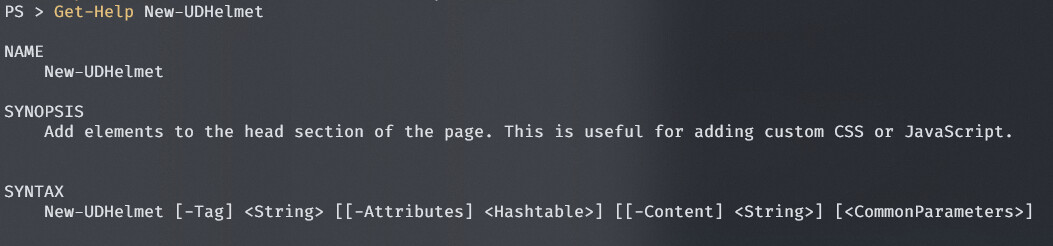
I previously had something like
New-UDHelmet -Content {
    New-UDHtmlTag -Tag 'title' -Content { "My Title - $MyVar" }
}
I had to change it to:
New-UDHelmet -Tag 'title' -Content "My Title - $MyVar"Looks like your other tag is just passing to -Attributes.
Hope that helps
New-UDChartJS not Rendering Line Chart as per Docs
+1 for this - I’m seeing this exact same behaviour
New-UDLink not using the `-Children`/`-Content` Parameters
Product: PowerShell Universal
Version: 4.0.1
Links ignore their -content parameter in favour of the default value of their -Text parameter (which is "Ironman Software").
Github issue #2490 opened for this here.
Repro Steps
Create a new link element and pass it a -Url and a -Content (or -Children) argument. Such as in the example below from the Live Docs:
New-UDLink -Url "https://www.google.com" -Content {
    New-UDImage -Url "https://www.ironmansoftware.com/img/ps-logo.png" -Height 20 -Width 20
} -Id 'link7'
Expected behavior
The content is rendered and the default value of the `-Text` parameter (`"Ironman Software"`) is ignored.Actual behavior
The content is ignored in favour of rendering the default `-Text` parameterDynamic Table vs Dynamic Button 🥊
Hey. In the non-functional example all of the Ids are unique and it’s the only dashboard on my test instance - so I don’t know that it can be an ID conflict
Dynamic Table vs Dynamic Button 🥊
Product: PowerShell Universal
Version: 2.5.5
Framework: 3.8.0
TL;DR: When I have a New-UDTable with an -id, wrapped in a New-UDDynamic, the table does not reload/refresh when Sync-UDElement is called on the Dynamic wrapper. When the -id is omitted, it behaves as expected and reloads. Why does specifying the table’s ID change this behaviour?
I’ve bumped up against an issue and could do with some advice. I’ve come up with a work-around but it doesn’t really feel like how the framework should work - it’s brittle and makes me feel icky! I want to make sure I’m not missing a trick.
I’ll outline the problem and them show how I’ve worked around it. I’ve put together a dummy dashboard to repro this. The dashboard it’s a part of is more complex - but isn’t relevant to this issue.
Problem
I have a table of values that contains some data that I want the user to be able to select and perform some action on the selected rows. That action can affect the underlying data in the table so once the user has performed the action - the table needs to be reloaded. As the user selects the row items - the intent of the action needs to be made clear to them.
I’m doing this with a table that has selectable rows. On selection the table tells the button to refresh - everytime the button refreshes, it gets the table element and checks how many selected rows it has. It displays the appropriate text / disables itself as required.
Should be a simple one - a New-UDButton inside a New-UDDynamic and a New-UDTable inside a New-UDDynamic.
New-UDDashboard -Title "🐔 or 🥚" -Content {

    # Button needs to be wrapped in a dynamic along with logic to work out
    # a) is the button enabled
    # b) what text to show the user
    New-UDDynamic -Id 'DynButton' -Content {
        # From the table, get the number of selected rows.
        # Assume if we fail to get the table element it may not be loaded yet
        # and so nothing can be selected.
        $SelectedRows = try {
            (Get-UDElement -Id 'Table' -ErrorAction Stop).'selectedRows'
        } catch {
            @()
        }
        # Decide, based on the number of selected rows, what the text of the
        # button will read.
        $NumSel = ($SelectedRows | Measure-Object).Count
        if ($NumSel -eq 10) {
            $NumSel = 'All'
        }
        $ButtonText = switch ($NumSel) {
            0 { 'Nothing Selected' }
            1 { '1 Item Selected' }
            Default { "$NumSel Items Selected" }
        }
        New-UDButton -Text $ButtonText -OnClick {
            # This is a placeholder for manipulating the selected rows in some
            # way. Think - interacting with a Database.
            $SelRows = (Get-UDElement -Id 'Table' -ErrorAction Stop).'selectedRows'
            Show-UDToast "$(
                ($SelRows | Measure-Object).Count
            ) rows selected. Their sum is $(
                ($SelRows | Select-Object -Expand Randos | Measure-Object -Sum).Sum
            )"
            # The underlying data for the table may have changed so reload the
            # table.
            Sync-UDElement -Id 'DynTable'
        } -Disabled:($NumSel -eq 0)
    }

    # Table needs to be dynamic
    New-UDDynamic -Id 'DynTable' {
        New-UDTable -Id 'Table' -LoadData {
            # This part is unimportant. Just showing 10 random numbers here so
            # it's very obvious when the table has reloaded.
            $TableData = ConvertFrom-Json $Body
            Get-Random -Count 10 | ForEach-Object {
                @{
                    'Randos' = $_
                }
            } | Out-UDTableData -Total 10 -Page 0 -Properties $TableData.Properties
        } -COlumns @(
            New-UDTableColumn -Property 'Randos'
        ) -ShowSelection -OnRowSelection {
            # When a row is selected/unselected - refresh the button
            Sync-UDElement -Id 'DynButton'
        }
    }
}
The table is able to refresh the button when rows are selected/unselected and the button is able to get the selected rows of the table just fine.
The issue is that the table does not refresh. No call to Sync-UDElement aimed a table with an ID or it’s parent New-UDDynamic will cause said table to refresh. Any other content inside the Dynamic is re-executed as expected.
If I remove the -id from the table (and in the example code - change the button logic so the button is enabled) - the table refreshes when Sync-UDElement is called on the New-UDDynamic. This, however, means I cannot use Get-UDElement to get the selected rows of the table (as I don’t know it’s -Id).
I can either have:
The table with an ID and row selection enables the button - but the button can’t refresh the table.
or
The table with No ID - is hypothetically refreshable. Rows can be selected but the button can’t find the table so stays at 'Nothing Selected`
Workaround
The workaround came about when I saw that New-UDElements return their content when you Get-UDElement on them. I remove the ID from the table and
basically replace the New-UDDynamic wrapping the table with a New-UDElement. Then in the button I first call Get-UDElement on the table’s parent element. Then I get the id of the first child in the content property and call Get-UDElement on that. If the order of it’s children changes - this workaround would break.
New-UDDashboard -Title "🐔 or 🥚" -Content {

    # Button needs to be wrapped in a dynamic along with logic to work out
    # a) is the button enabled
    # b) what text to show the user
    New-UDDynamic -Id 'DynButton' -Content {
        # From the table, get the number of selected rows.
        # Assume if we fail to get the table element it may not be loaded yet
        # and so nothing can be selected.
        $SelectedRows = try {
            Get-UDElement -Id $((Get-UDElement -Id 'DynTable').Content.Id) -ErrorAction Stop | Select-Object -ExpandProperty 'selectedRows' -ErrorAction Stop
        } catch {
            @()
        }
        # Decide, based on the number of selected rows, what the text of the
        # button will read.
        $NumSel = ($SelectedRows | Measure-Object).Count
        if ($NumSel -eq 10) {
            $NumSel = 'All'
        }
        $ButtonText = switch ($NumSel) {
            0 { 'Nothing Selected' }
            1 { '1 Item Selected' }
            Default { "$NumSel Items Selected" }
        }
        New-UDButton -Text $ButtonText -OnClick {
            # This is a placeholder for manipulating the selected rows in some
            # way. Think - interacting with a Database.
            $SelRows = try {
                Get-UDElement -Id $((Get-UDElement -Id 'DynTable').Content.Id) -ErrorAction Stop | Select-Object -ExpandProperty 'selectedRows' -ErrorAction Stop
            } catch {
                @()
            }
            Show-UDToast "$(
                ($SelRows | Measure-Object).Count
            ) rows selected. Their sum is $(
                ($SelRows | Select-Object -Expand Randos | Measure-Object -Sum).Sum
            )"
            # The underlying data for the table may have changed so reload the
            # table.
            Sync-UDElement -Id 'DynTable'
            Sync-UDElement -Id 'DynButton'
        } -Disabled:($NumSel -eq 0)
    }

    # Table needs to be dynamic
    New-UDElement -Tag 'div' -Id 'DynTable' -Endpoint {
        New-UDTable -LoadData {
            # This part is unimportant. Just showing 10 random numbers here so
            # it's very obvious when the table has reloaded.
            $TableData = ConvertFrom-Json $Body
            Get-Random -Count 10 | ForEach-Object {
                @{
                    'Randos' = $_
                }
            } | Out-UDTableData -Total 10 -Page 0 -Properties $TableData.Properties
        } -COlumns @(
            New-UDTableColumn -Property 'Randos'
        ) -ShowSelection -OnRowSelection {
            # When a row is selected/unselected - refresh the button
            Sync-UDElement -Id 'DynButton'
        }
    }
}
Note: There was a gif here similar to above but showing the above workaround code working - I’m a new user so can only have one embedded image per post
Any advice appreciated - thanks in advance