Upgrade from 3.x to 4.x

Product: PowerShell Universal
Version: 4.0.1
I have upgraded to v4 in my dev environment and have a few things that I haven’t found a solution for yet.
The first is that when every page loads, I get the following tag dialog: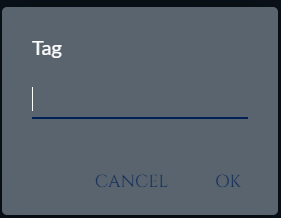
I’m not sure where this is coming from.
The second is that if I have any buttons or cards that don’t have labels, I get something like this:
and this
You can see that it adds “button” or “card” to these items.
Anyone else run into this and have any suggestions on changes I need to make to fix this?
25b1834d0ffd09666abc0b71571830f4a637a8d9.png
a6f33617891676c383b39cdeec4dd5126f68379a.png
b4c791a7a8d2120062ab107e67bb228b032553a1.png
Recommended Answer
I had this New-UDHelmet issue where it was prompting for a -Tag.
The signature of the function has changed to: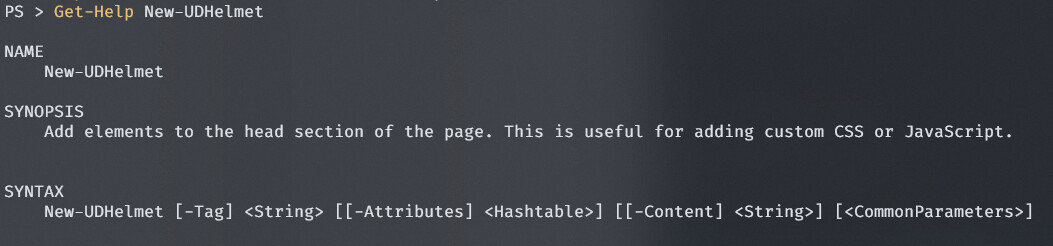
I previously had something like
New-UDHelmet -Content {
    New-UDHtmlTag -Tag 'title' -Content { "My Title - $MyVar" }
}
I had to change it to:
New-UDHelmet -Tag 'title' -Content "My Title - $MyVar"
Looks like your other tag is just passing to -Attributes.
Hope that helps
1aec9ce09e1eeb395c529939cb3357dba709f174.jpeg
All Comments (5)
If you click cancel on that tag popup, you should get an error and it may provide more info in the log.
The issue with buttons is known and resolved in the current v4 nightly and will be included in v4.0.2.
I’ll check on the card issue. I don’t think that is resolved but should be an easy fix.
Adam Driscoll
PowerShell Expert and Software Architect at Devolutions
I see this in the logs:
2023-06-23 10:41:28.522 -04:00 [DBG] Reading configuration for Tag
2023-06-23 10:41:28.524 -04:00 [DBG] Reading configuration file tags.ps1
2023-06-23 10:41:28.524 -04:00 [DBG] File doesn’t exist or is empty. Setting default items.
and this:
An error occurred: Cannot bind argument to parameter ‘Tag’ because it is an empty string.
Endpoint: PageUsersBasicTab
Session: a1032bad-2d10-489e-96b0-cf001afde5da, User: doug@xxx.org
at PageUsersBasicTab: line 122
at PageUsersBasicTab: line 1
at UsersBasicConfigTabDynamic.ps1 : line 13
I figured out what is causing the tag to show up. On each page, I have the following:New-UDHelmet -Content {New-UDHtmlTag -Tag ‘title’ -Content { “$Cache:SiteName - Telephony” }New-UDHtmlTag -Tag ‘link’ -Attributes @{rel = ‘icon’href = $Cache:FavIco}}
I am guessing you made some changes to UDHelmet (I see notes saying it is integrated), but I don’t know what changes were made or what to change to accommodate the changes.
I had this New-UDHelmet issue where it was prompting for a -Tag.
The signature of the function has changed to:
I previously had something like
New-UDHelmet -Content {
    New-UDHtmlTag -Tag 'title' -Content { "My Title - $MyVar" }
}
I had to change it to:
New-UDHelmet -Tag 'title' -Content "My Title - $MyVar"
Looks like your other tag is just passing to -Attributes.
Hope that helps
1aec9ce09e1eeb395c529939cb3357dba709f174.jpeg
New-UDHelmet -Tag 'title' -Content "My Title - $MyVar"Thanks, I think that got everything resolved for me now with the upgrade to 4.0.2 and the changes to UDHelmet. Thanks everyone for your help!