
crc32
Paste several text into SSH console UI design problem
RDM version 2026.2.8.0 64-bit (PreJIT).
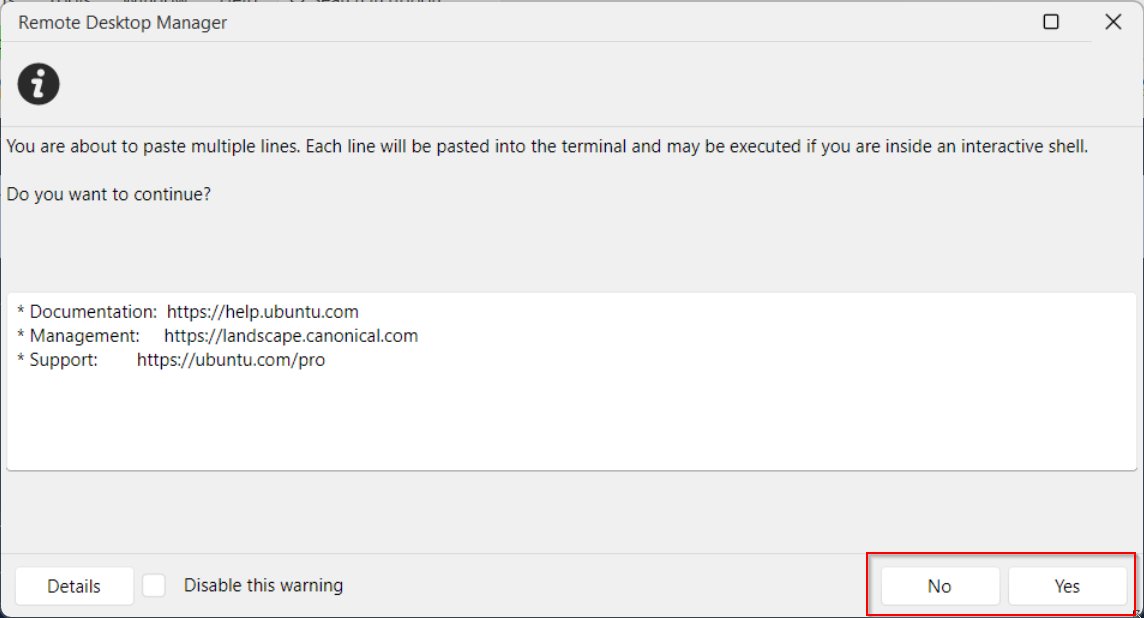
Using the right-click button to paste a few lines into SSH terminal,
the dialog does not respect Windows UI rules:
"Yes" button must come first (on left), then "No" button (on right) - See picture below, it's reversed, and this is very annoying as this is the opposite of all other dialogs in the system, this will cause error as we're used to the other way in Windows.
ESC key must invoque the "Abort" modal result (aka "No" in this dialog). Clicking on the "x" button to simply abort is annoying.
Can't paste long text in RDM SSH console - 2026.2.8.0 64-bit (PreJIT)
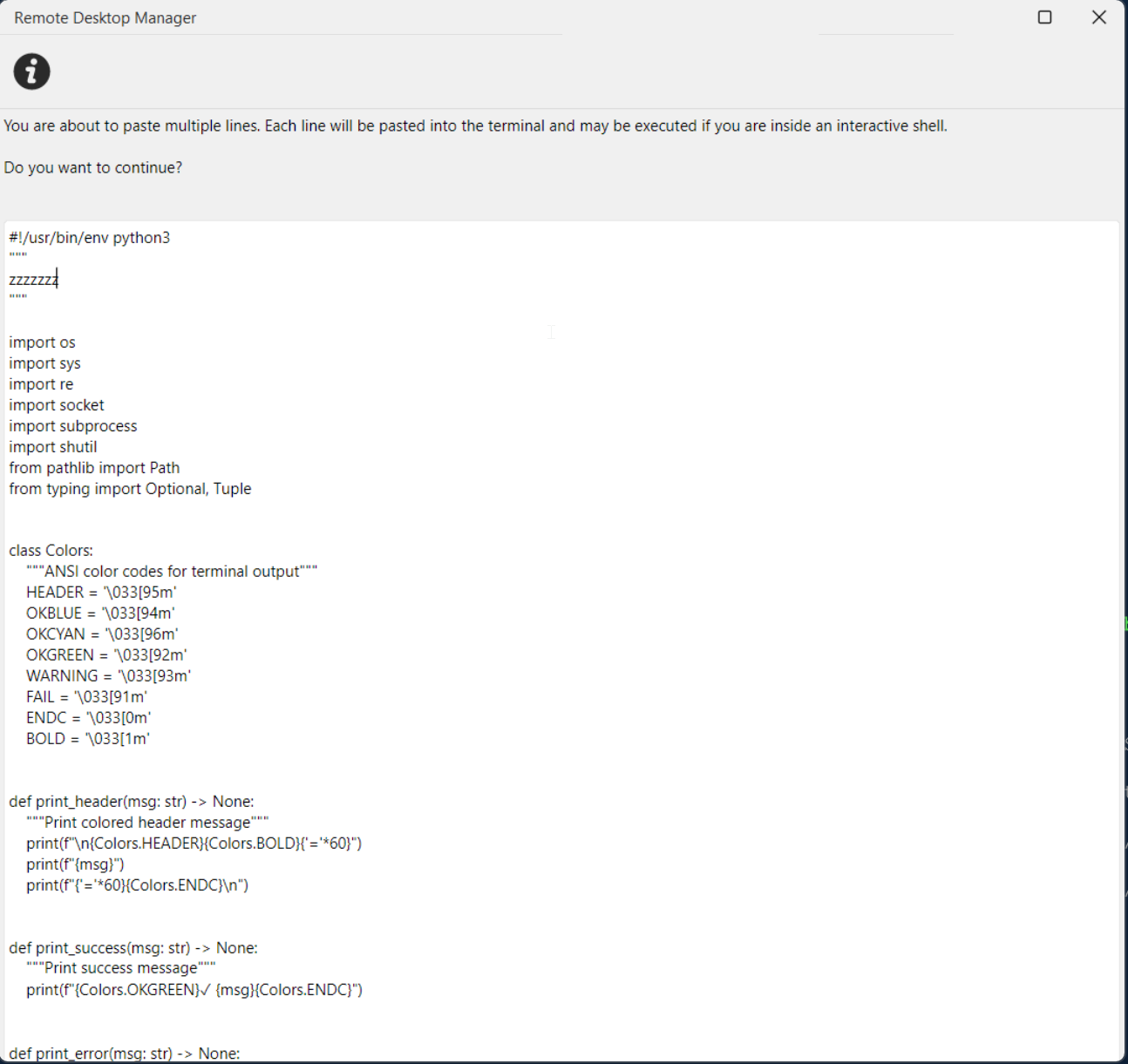
Pasting more than X lines of text into SSH console using right-click, the RDM confirmation dialog shows the text that fits the dialog size, but no scroll control, no yes or no button to confirm, because i guess they are out of sight. So i just can't paste my text. I have to revert to previous version.
Also, ESC key should abort the dialog as regular Windows dialogs do, but it doesnt, i have to click on the [x] close button.
This is right after installing version 2026.2.8.0 64-bit (PreJIT).
Here is a screenshot -- see there is no yes/no button
SFTP Window resize problem - RDM 2025.3.20.0
Thanks a lot for the quick reply, i noticed also the very tiny grabbable edge which is indeed annoying :-)
Generally in my own windows programs, i use something like 4 pixels for the resize line, and sometimes I add a flashy green color that cleraly shows the grabble area...
Well, in this case just a bit more pixels would be ok I guess.
best regards,
Chris
SFTP panel drag drop don't work - either way
Hello tech team,
just installed RDM 2025.3.20.0 on WIndows 11 25H2, build 26200.6899.
Using an SSH session, I open the SFTP panel, and I can't drag & drop to or from Windows Explorer.
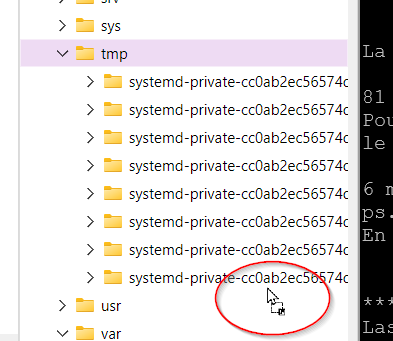
1/ From Windows Explorer to SFTP : In the attached screenshot, see the cursor when hovering SFTP directories, when dropping in my own /home, nothing happens.
2/ From SFTP to Windows Explorer : the cursor don't even change, meaning the drag didn't start.
Here is a screenshot when dragging from Windows Explorer to SFTP.
SFTP Window resize problem - RDM 2025.3.20.0
Hello tech team,
just installed RDM 2025.3.20.0 on WIndows 11 25H2, build 26200.6899.
Coming from MobaXTerm, I really like your program ; however, up to now I found 2 annoying problems regarding the SFTP panel, here is the first one, related to SFTP panel resize.
Using an SSH session, i open the SFTP panel, and:
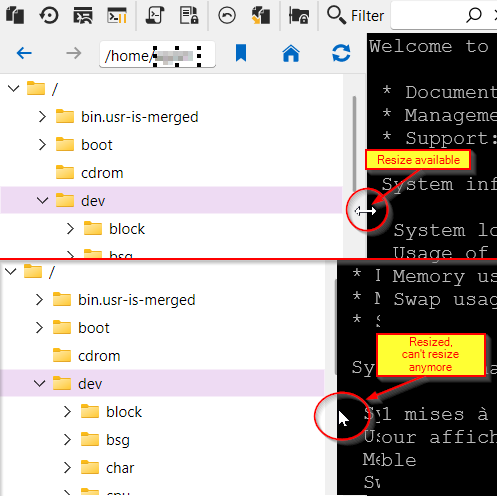
1a/ Resizing the panel to make it narrower, after a point, the scroller in SFTP panel disappear
1b/ After the panel has been resized and the scoll bar is no more visible, so is the panel separator ; no way to make it wider again, as the panel separator seems to be "under" the console panel -- mouse cursor wont change to "resize" mode anymore.
Here are 2 screenshots: top part shows how I can resize the SFTP panel (see the mouse cursor),
bottom part shows the same after it has been resized... cursor wont change, no resize possible.
You can see a small visible portion of the scroll bar...
I hope you will be able to fix this :)
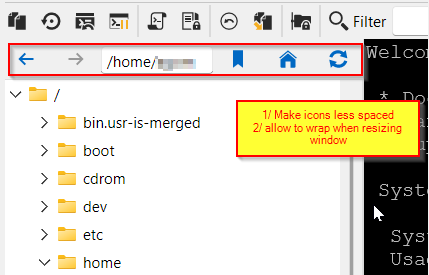
Suggestion:
1/ Use less space between SFTP top icons
2/ Allow these toolbar elements to wrap when resizing.
Best regards
Chris