Paste several text into SSH console UI design problem

RDM version 2026.2.8.0 64-bit (PreJIT).
Using the right-click button to paste a few lines into SSH terminal,
the dialog does not respect Windows UI rules:
- "Yes" button must come first (on left), then "No" button (on right) - See picture below, it's reversed, and this is very annoying as this is the opposite of all other dialogs in the system, this will cause error as we're used to the other way in Windows.
- ESC key must invoque the "Abort" modal result (aka "No" in this dialog). Clicking on the "x" button to simply abort is annoying.
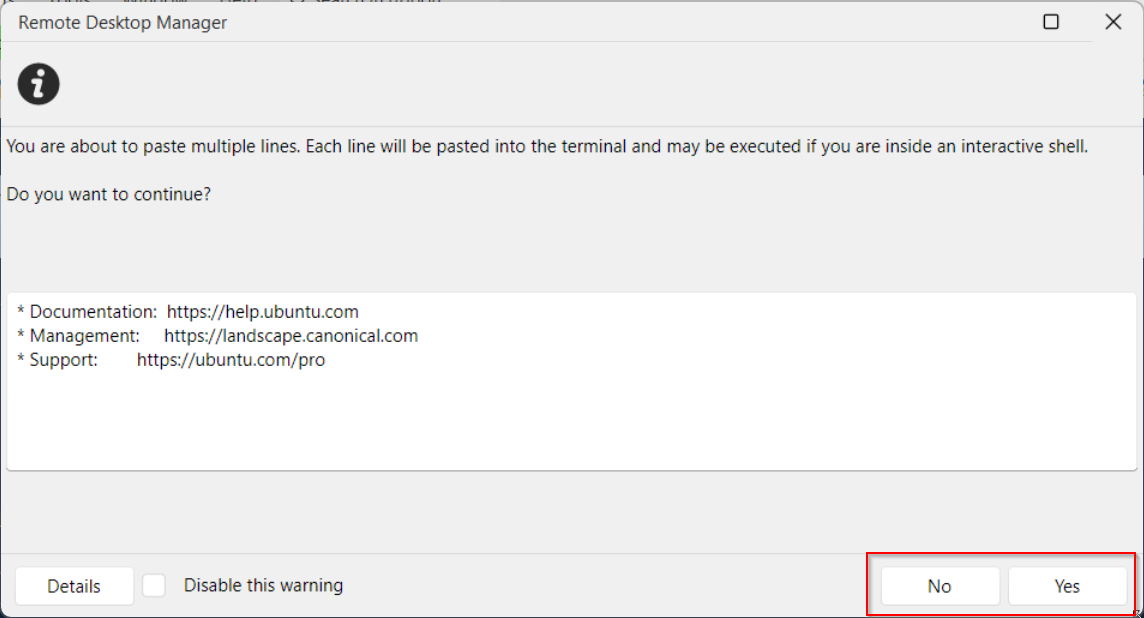
a52d9591-7871-4204-be33-95bfca73ca47.png
All Comments (3)
Hello,
I will open a ticket so we can improve this window, thank you for reporting this.
Regards,
Hubert Mireault
Hello,
Thanks for bringing this to our attention. We've gone ahead and done several improvements to this window. You can expect this to reach live with the upcoming 2026.2.10 version.
Regards,
Jafran Majeau
Hello,
Thank you for being so patient!
I'm pleased to inform you that a new version of RDM (2026.2.11.0) has been released, featuring the fix for your issue.
Latest Version: Download RDM
Please let us know if this works or if you encounter any issues.
Best regards,
Maxim Robert