
Mateusz Tyborski
Find PAM accounts by name
Hello,
At the beginning I was thinking about second case. Let's say there is vault with PAM Credentials with names in some convection. That naming convention could be used to finding them using variables, rather than manually linking. As I said it would be very similar to finding normal credential by "Devolution Server" credential entry:
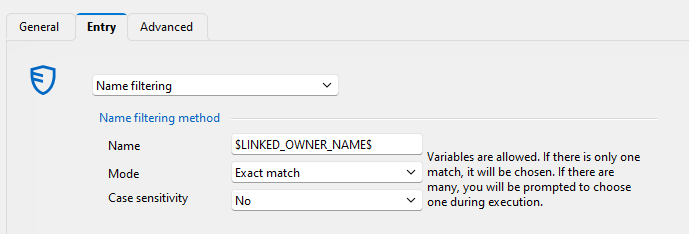
But first case is also familiar for us. We currently using "Find by name (user vault)" but only for personal accounts, for shared accounts name convection and lookup is needed, but not possible for PAM Accounts yet.
Regards
Mateusz
SAP GUI
Hi,
I have used Get-RDMEntry to retrieve sap gui entry, and i Addon filed there is field Properties with XML configuration of entry and looks like:
Properties   : <?xml version="1.0" encoding="utf-8"?>
               <SAPGuiConfiguration>
                 <AutomationCommand />
                 <AutomationTitle />
                 <CustomLogonGroup />
                 <CustomSapRouterString />
                 <CustomServer>hostxxx</CustomServer>
                 <CustomSID>PRD</CustomSID>
                 <CustomSystemNr>00</CustomSystemNr>
                 <CustomUseLogonGroup>false</CustomUseLogonGroup>
                 <CustomWAN>false</CustomWAN>
                 <EncryptedPassword>**************</EncryptedPassword>
                 <IsCustomConnection>true</IsCustomConnection>
                 <LogonClient />
                 <LogonLanguage />
                 <LogonTracelevel />
                 <LogonUserName>admin</LogonUserName>
                 <MaximizeGui>false</MaximizeGui>
                 <SapConnectionName />
                 <SapConnectionTag>0</SapConnectionTag>
                 <SapLogonConnectionInternalName />
                 <SapLogonIniFile></SapLogonIniFile>
                 <ShowCommandLine>false</ShowCommandLine>
                 <SncName />
                 <SncOptions />
               </SAPGuiConfiguration>
I have additional question is it possible to decrypt from xml field "EncryptedPassword" or retrieve password other way from SAP GUI entries in PowerShell?
PS. With Convert-XMLToPSCustomObject it is possible to convert xml to PSObject change/set values and than using Convert-PSCustomObjectToXML convert back to xml. Example:
$entry=Get-RDMEntry -ID "<<GUID>>"
$fromxml = $sap.AddOn.Properties|Convert-XMLToPSCustomObject
$fromxml.SAPGuiConfiguration.CustomServer='<<new host name>>'
$xml= $fromxml|Convert-PSCustomObjectToXML
$entry.AddOn.Properties=$xml.OuterXml
Set-RDMEntry $entryPassword heartbeat via sudo
My case is little different, but what you write could be also a case. Generally I have local linux accounts which password needs to be rotated and saved. So in Devolution Server the PAM linux provider is a solution. Currently it can't do password verification, because in tires to login using SSH but it is blocked for these accounts. So like during change password is used technical account linked with provider it also should be used during verification, just to connect to system via ssh, and than check password of local account with ex. "su - <<pam account name>>".
Find PAM accounts by name
Hi, I have idea similar to this in request Find by name in the PAM vault. There is a credential type "Devolutions Server privileged account", if it could serach entries by name like credential type "Devolutions Server", it would improve linking PAM Accounts with sessions.
Also a credential "Devolutions Server" could find "Devolutions Server privileged account" credential entries but currently it filter them out.
Regards
Mateusz
Password heartbeat via sudo
Hi, currently heartbeat of passwords is done using credentials from PAM Account but change using credential linked with provider. In case when account is disabled for networked login (ex. root account on Linux when SSHD has PermitRootLogin set to no) it is no possible. There could be a checkbox on account entry level and/or provider level that will switch to "sudo mode". In such mode Heartbeat would be processed in two fazes. First login to system with provider account, and than check password from PAM Account.
Regards
Mateusz
Additional fields in entries reports
Hi,
The entry reports should be able to provide values for entry properties such as: name, host, username, password date, password age, custom fields, tags, folder, expiration date, description, status, and ID.
Not all of these should be included by default, but they should be available for optional inclusion in the report.
This could be a starting point for creating a more universal reporting tool with enhanced customization capabilities.
Regards
Mateusz
The report of expired entries is missing the 'Folder' column.
Hi, Like other reports in DVLS "Reports->Expired entry list" should have folder column.
Regards
Mateusz