Find by name in the PAM vault
2 votes

Would it be interesting to be able to configure a search by name in the PAM vault? This is possible in the personal vault but not in the PAM vault.
It is easy to automate the creation of PAM vaults and the privileged accounts there in via the Devolutions PowerShell module, but less easy to automate in PowerShell the creation of credentials in each user's personal vault. You have to go through a script made available in a shared vault, which will create a DVLS privileged account linked to the PAM credentials vault, not the simplest.
Do you think this option is possible?
thanks
All Comments (25)
Agree this feature would be very useful.
Would be nice if the 'Find' could be applied to either vault name or credential name, or both. For example, each user may have a personal PAM vault prefixed with a string (i.e 'PV_') to which only they have access, then within their respective vault they might have a unique named credental with a common prefix (i.e. 'domain1_admin_').
Further, it would be great if the search strings supported standard wildcard combinations, i.e. https://support.microsoft.com/en-gb/office/examples-of-wildcard-characters-939e153f-bd30-47e4-a763-61897c87b3f4#:~:text=Wildcards%20are%20special%20characters%20that,similar%2C%20but%20not%20identical%20data.
Thanks
Joe
Hello,
Thank you for your suggestion. I understand your need. We don't have anything on our short term roadmap for that, but I'm taking note of your request and we will have internal discussion first to see what could be done.
Best regards,
François Dubois
In order to automate the OnBoarding of our users, I will have to create a powershell script which will be made available in a shared vault. I can create a "simple" identifier with the following script:
$session = New-RDMSession -Name "$domain - $username" -Type Credential
Set-RDMSessionUsername -Session $session -Username $username
Set-RDMSessionDomain -Session $session -Domain $domain
Set-RDMSessionPassword -Session $session -Password
I haven't found any type PAM or Privilegied Account in Get-Help New-RDMSession -detailed
How can I create a DVLS Privilegied account, linked to a PAM account with these informations?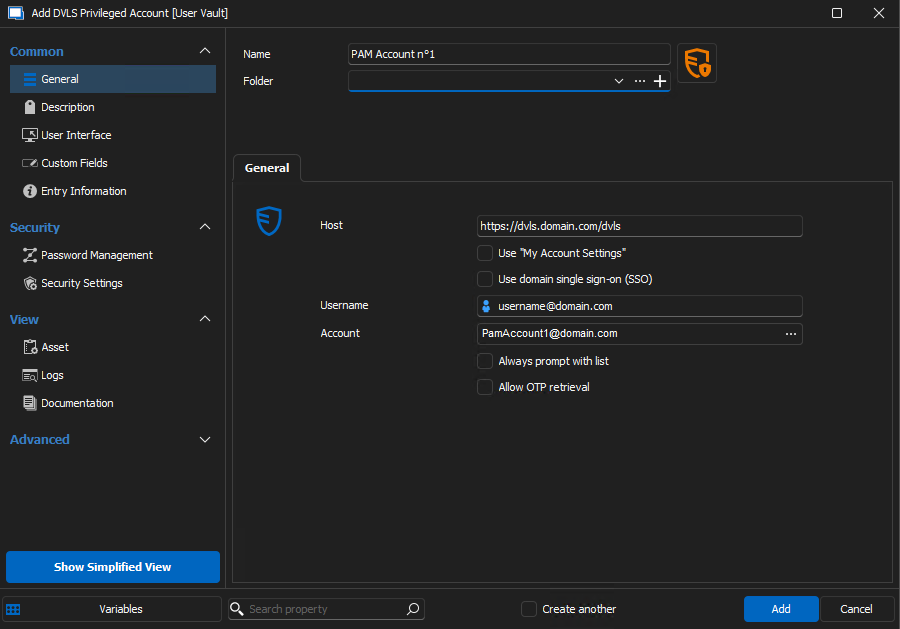
thx
767c12d1-2643-4d0a-8e28-58c30ad6e722.png
Hello,
Would it be interesting to be able to configure a search by name in the PAM vault? This is possible in the personal vault but not in the PAM vault.
It is easy to automate the creation of PAM vaults and the privileged accounts there in via the Devolutions PowerShell module, but less easy to automate in PowerShell the creation of credentials in each user's personal vault. You have to go through a script made available in a shared vault, which will create a DVLS privileged account linked to the PAM credentials vault, not the simplest.
Do you think this option is possible?
Could you please confirm if the advanced search functionality within the Web UI meets your requirements? This feature is currently implemented through the Search-DSEntry cmdlet. Given your usage of RDM cmdlets, we are considering integrating this functionality into an RDM cmdlet as well.
Would be nice if the 'Find' could be applied to either vault name or credential name, or both. For example, each user may have a personal PAM vault prefixed with a string (i.e 'PV_') to which only they have access, then within their respective vault they might have a unique named credental with a common prefix (i.e. 'domain1_admin_').
Further, it would be great if the search strings supported standard wildcard combinations, i.e. https://support.microsoft.com/en-gb/office/examples-of-wildcard-characters-939e153f-bd30-47e4-a763-61897c87b3f4#:~:text=Wildcards%20are%20special%20characters%20that,similar%2C%20but%20not%20identical%20data.
Please note that the Search-DSEntry cmdlet does not search by vault name. However, the search results do include the vault name, allowing for direct filtering within PowerShell. Additionally, you have the option to use the IncludeVault parameter alongside a specific PAM vault ID to narrow down your search. This approach, however, necessitates knowing the ID of each vault you wish to search.
Regarding wildcard support, it is currently not available. However, the search functionality does permit queries based on 'Contains', 'StartsWith', 'EndsWith', and 'ExactExpression' criteria.
If this solution is not adequate, I will see what I can do for the wildcard support.
In order to automate the OnBoarding of our users, I will have to create a powershell script which will be made available in a shared vault. I can create a "simple" identifier with the following script:
$session = New-RDMSession -Name "$domain - $username" -Type Credential
Set-RDMSessionUsername -Session $session -Username $username
Set-RDMSessionDomain -Session $session -Domain $domain
Set-RDMSessionPassword -Session $session -Password
I haven't found any type PAM or Privilegied Account in Get-Help New-RDMSession -detailed
How can I create a DVLS Privilegied account, linked to a PAM account with these informations?
To find which property to modify, you can look at the preview in the clipboard. In this case, the credenttial yype must be changed:
$session = New-RDMSession -Name "$domain - $username" -Type Credential
$session.Credentials.CredentialType = 'DpsPam'
$session.Credentials.DpsPamCredentialID = 'pam-credential-id'
$session.Credentials.DpsPamCredentialName = 'pam-credential-name'
$session.Credentials.DPSServer = 'my-host'
$session.Credentials.DPSUsername = 'my-username'
Set-RDMSession -Session $session
Best regards,
Maxime
Hi Maxime,
Thanks for the powershell examples. While they maybe useful for some scenarios, its not really what I was refering to in the request comment. The ask is to be able to configure 'find by name' for a PAM credential in the properties of an RDM connection. Currently in order to achieve this, 'loopback' credentials need to be added into each user vault, which point back to a PAM credential, which is tedios to setup for multiple users.
An example scenario is, a user has 10 different personal admin accounts for different domains stored in a private PAM vault with password rotation enabled. Lets say these are named domain1_admin_bob, domain2_admin_bob etc. Currently there is no way for an RDM RDP entry in a shared vault used by multiple people to automatically reference their unique personal PAM account. Ideally the credential field for an RDM entry would allow finding PAM accounts by specifying the search criteria for both the PAM vault name (i.e. 'PersonalVault_*'), and the contained credential (i.e. 'domain1_admin_*').
Pls let me know if you would like more information.
Thanks
Joe
Hello,
Thank you for the clarification. I will confer with my colleagues to assess whether we can put this into action. I will keep you updated as soon as a decision is made.
Regards,
Maxime
Hi,
Not very simple to create a credential in personnal vault pointing to PAM account in powershell. Like Maxime, i would like to use 'find by name in PAM vault' from Shared Vault.
So i tried to use the given script, but when i do this:
$session = New-RDMSession -Name "$domain - $username" -Type Credential
$session.Credentials.CredentialType = 'DpsPam'
i have this error:
InvalidOperation: The property 'CredentialType' cannot be found on this object. Verify that the property exists and can be set
To find which property to modify, you can look at the preview in the clipboard.
-> good information thx.
Hello,
Thanks for the powershell examples. While they maybe useful for some scenarios, its not really what I was refering to in the request comment. The ask is to be able to configure 'find by name' for a PAM credential in the properties of an RDM connection. Currently in order to achieve this, 'loopback' credentials need to be added into each user vault, which point back to a PAM credential, which is tedios to setup for multiple users.
The response aligns with Francois's, indicating no immediate change is anticipated. I overlooked his comment previously.
So i tried to use the given script, but when i do this:$session = New-RDMSession -Name "$domain - $username" -Type Credential$session.Credentials.CredentialType = 'DpsPam'
i have this error:
InvalidOperation: The property 'CredentialType' cannot be found on this object. Verify that the property exists and can be set
Could you please provide the version of your module? I intend to investigate any issues related to the PSConnection object.
Additional factors to consider for this error:
- Failure of the New-RDMSession command to generate the PSConnection object.
- A potential misspelling in $session.Credentials, although this seems unlikely in this instance.
Best regards,
Maxime
Could you please provide the version of your module? I intend to investigate any issues related to the PSConnection object.
My module version is 2023.3.1
Hello,
Sorry for the delay in my response, and thank you for your patience. I was unable to reproduce the issue you're experiencing. To assist you further, could you please confirm that the $session object you're using is not null? Additionally, could you check if you can access its Credentials property successfully?
Regards,
Maxime
Hi,
The Set-RDMPrivateSession instead of Set-RDMSession do the job to store the session in the private vault.
Regards.
Hi,
Is there any news on the integration of a "search by name in the PAM vault" fonctionality?
Thanks.
Hello,
Unfortunately, I don't have any news on that and I don't have an ETA for now for a such feature.
Best regards,
François Dubois
Hello François,
Would it be possible to get an ETA of when the "search by name in the PAM vault" functionality will be available pls. I have a scenario where there are multiple admins, each with 25+ of their own unique PAM credentials for different providers, and there are 100's of connections in an RDM shared vault that require each user to use their unique PAM credential for the connection. Currently the only way I've found to achieve this is to populate each users RDM user vault with 'DVLS privileged account' entries for all 20 of their unique PAM credentials, and then configure the RDM connections to 'search by name in user vault' for a common naming prefix. This is cumbersome to deploy and future manage as a DVLS admin cannot access other user vaults. Yes a script could be built for each admin to run and populate their own user vault with the linked PAM entries, but that requires user coordination and can be complicated by powershell module requirements and associated dependencies on each admin's endpoint.
Pls let me know if you would like any additional info.
Thanks
Joe
Hello Joe,
Unfortunately, I don't have an ETA for the 'search by name in the PAM vault' functionality at this time. I understand the complexity this adds to using DVLS privileged account in user vault. However, we have to analyze how we could implement such a feature. From what I understand, you would like to search in a different PAM vault for each user, am I right? Should we have a PAM user vault? I don't know yet, and this is what we need to analyze first, but I will let you know once we have discussed it internally.
Please let us know if there is anything else you would like to add or if there is further information we can assist you with.
Best regards,
François Dubois
Hello François,
Thanks for looking into this. Yes in the scenario I outlined, the ask is to be able to search in a different PAM vault for each user. However, there maybe other scenarios where multiple PAM shared vaults contain similarly named entries, in which case a being able to configure which PAM vault to search would be preferable.
Regarding 'Should we have a PAM user vault?'; That is a very good question, typically in a PAM deployment, users want to have a place to store their personal PAM credentials that other users cannot access. The logical way to do this is create a dedicated PAM vault for each user, however I've often found it challenging to communicate the concept to users that they have a private RDM 'user vault', and another seperate PAM 'user/personal vault'. I think ideally the 2 would be combined, but that opens up some challenges to how admins would have visibility/manageability of PAM credentials within the standard private 'user vaults'. I can appreciate there is some architectual and security considerations that need to be analyzed to find the best solution for this, although its somewhat seperate than the ask for being able to specific a specific PAM vault in the search vault property of an RDM entry.
Please let me know if you would like any additional info.
Joe
Hello François,
Circling back on this one to see if any ETA is available yet?
Thanks
Joe
Hello Joe,
Unfortunately, I don't have an ETA available for that feature. I will raise the subject again though, and see what can be done to improve that and if we have enough work force to do that short/mid term.
Best regards,
François Dubois
Thank you François
Hello,
In version 2025 it is now possible to link an entry to a privileged account in a PAM vault, this is a start, but you have to duplicate all the connections in order to assign a different PAM login per user. Any news about the searching by name in the PAM vault feature?
Thx
Hello,
Unfortunately, we don't have an ETA for that feature. We keep it in mind and will see how it fits with our other priorities.
Best regards,
François Dubois
Hello,
some news about this?
Thx
Hello,
Unfortunately, we don't have an ETA. I will speak with the product manager to see if it can be prioritized.
Best regards,
François Dubois
Hi everyone,
We are currently in the process of merging the architecture of Shared vaults and PAM vaults into one, allowing the use of any PAM vault feature with Shared vaults. Of course, you will still be able to dedicate vaults to be PAM specific, but there will no longer be a difference technically speaking between PAM vaults and Shared vaults. We are still not at the step of being able to put PAM entries into user vaults, but this is a big step towards making that possible. We're hoping for this merge to be done before the end of the year. Once this major change will be complete, it will be easier for us to add features such as the "Find by name" you have requested, but our goal here is to reach a point where PAM entries can be stored in user vaults.
Let us know if you have any questions or concerns about this.
Cheers,
Luc Fauvel
Hello,
That's great news!! so I'll just have to be patient... Thanks a lot for the information.