se7ensong
Smart resize on VNC session doesn't work on some Windows machines
Hi Martin,
Right, it's TigerVNC on RHEL8.8 (we version locked it so it's not receiving any update beyond 8.8). Details below
tigervnc-server-minimal-1.12.0-15.el8_8.x86_64
tigervnc-server-1.12.0-15.el8_8.x86_64
Note that the same account works on my laptop. And my account doesn't works on the laptop with issue either....so it feels like it's the client causing issues
Best regards,
Smart resize on VNC session doesn't work on some Windows machines
Hi @Richard Markiewicz ,
For one machine, it starts working again so I cannot get the log anymore.
But we have a new machine setup for a new Linux account. The same issue happens again with the latest version of RDM. The log is attached. If it helps, both machine are connected to a Dell 34inch wide monitor during first setup. The VNC session is the first time the user login on Linux GNOME.
Thank you for your help.
Smart resize on VNC session doesn't work on some Windows machines
Hi @Richard Markiewicz ,
I just noticed that the smart scaling stops working again even with the latest 2025.3.15.0 for that user. She hasn't done anything other than change a FortiClient IPSec VPN connection...I wonder if it is something with the OS that is causing it. Thank you
Best regards,
Smart resize on VNC session doesn't work on some Windows machines
Hi @Richard Markiewicz,
I just reinstalled the RDM PreJIT version on my own laptop but I cannot produce what I see previously. The scaling works. I think this has been fixed in the 2025.3.15.0?
Thanks
Song
Smart resize on VNC session doesn't work on some Windows machines
Hello
That's really unexpected; and I did just try this on a PreJIT build for ARM and found it to work well. So maybe there is a problem with x64.
This is a weird issue; if using the JIT build is an acceptable workaround for you I probably won't look into it further for now. The advantage of the PreJIT build is a faster startup time for RDM.
If you want to look into this further please let me know and I can provide some further troubleshooting steps.
Thanks and kind regards,
@Richard Markiewicz
Hi, yes, using a JIT build is okay for us although we do notice it takes a while to load RDM. I am actually searching for options to speed it up! So I can help you to check what would be the problem. Thanks
Smart resize on VNC session doesn't work on some Windows machines
Hello
One thing that stands out from your post is the JIT versus PreJIT; and although I cannot envision a scenario where the PreJIT would cause this to not work - I think we should rule it out in the first case. Software can be weird sometimes.
The simplest would be, to ask the user to download a portable JIT build from the website and quickly try the connection using that (so they don't need to do the uninstall / reinstall dance). That's the "zip universal" download on the website.
Please let me know if something isn't clear
Kind regards,
@Richard Markiewicz
Thank you. I will try and report back.
Just a note that the JIT version is from software update and PreJIT version is from the website. It's the ".msi, x64".
Hi @Richard Markiewicz ,
The JIT version works. We ended up installing the universal installation versions as well. Thank you.
Smart resize on VNC session doesn't work on some Windows machines
Hello
One thing that stands out from your post is the JIT versus PreJIT; and although I cannot envision a scenario where the PreJIT would cause this to not work - I think we should rule it out in the first case. Software can be weird sometimes.
The simplest would be, to ask the user to download a portable JIT build from the website and quickly try the connection using that (so they don't need to do the uninstall / reinstall dance). That's the "zip universal" download on the website.
Please let me know if something isn't clear
Kind regards,
@Richard Markiewicz
Thank you. I will try and report back.
Just a note that the JIT version is from software update and PreJIT version is from the website. It's the ".msi, x64".
Smart resize on VNC session doesn't work on some Windows machines
Hi,
This is a weird one. I am connecting from Windows 11 to a RHEL 8.8 tigerVNC server. For one user, the smart resize works. The resolution scales with the window size. On the other one, it doesn't work. The resolution is fixed...Both are running 2025.2.30.0 (although the one working is JIT, the one failing is PreJIT) and using the same connection settings....
Any idea where to start debug the session?
Thank you very much
Does smart resize for VNC session available for Mac
Hello,
Thank you for reaching out to us regarding this,
Currently, there are no options for this on RDM Mac, however, we have the following feature request open for this:
I recommend you demonstrate your interest in this thread, as we use this to prioritize the features we implement.
Best regards,
@Samuel Dery
Hi,
I am not sure this is the same feature. What I meant is that the resolution on VNC can adjust itself based on the size of the VNC viewer window. This is nicely done in RDM in Windows as Smart Resize

However, it is not available to RDM Mac version.
Possible to use TigerVNC on Mac
I think I should explain more about why I request this.
Firstly, when comparing the TigerVNC and the default VNC app in RDM, it feels TigerVNC performs better in terms of speed. This is based on user's feelings.
Secondly, the TigherVNC app supports dynamic resolution while the smart resize feature is not there yet for RDM.
Thank you.
TigerVNC display is messed up
Hello
This does look related to the original issue posted by @Mwyann. Can you tell me which VNC server you're using (e.g. is it TigerVNC or something else?), the version, and the parameters you use for the VNC session on the server (especially, if you're forcing a specific colour depth or resolution).
Please let me know if something isn't clear or you have further questions
Kind regards,
Hi @Richard Markiewicz
The VNC server version is tigervnc-server-1.12.0-15.el8_8.x86_64.
The server is below with color set to 24-bit with no forced resolution.
session=gnome
securitytypes=vncauth,tlsvnc,x509vnc
depth=24
localhost
alwaysshared
The VNC setting in RDM is FreeVNC(embedded) with Auto for color depth and encoding.
Update:
Even if I don't enforce the depth, the problem still exists. The session parameter is blow
song 3565083 3565082 0 09:46 ? 00:00:00 xinit /etc/X11/xinit/Xsession gnome-session -- /usr/bin/Xvnc :7 -alwaysshared -localhost -securitytypes vncauth,tlsvnc -auth /home/song/.Xauthority -desktop example-server:7 (song) -fp catalogue:/etc/X11/fontpath.d -pn -rfbauth /home/song/.vnc/passwd -rfbport 5907
Possible to use TigerVNC on Mac
Hi,
When using external VNC apps, would it be possible to use TigerVNC? Or is there a plan to support it?
Thank you
Does smart resize for VNC session available for Mac
Is there a way to do smart resize when connecting from a Mac to a Linux server via VNC? I didn't see the same options as RDM on windows. Thank you.
TigerVNC display is messed up
Hello,
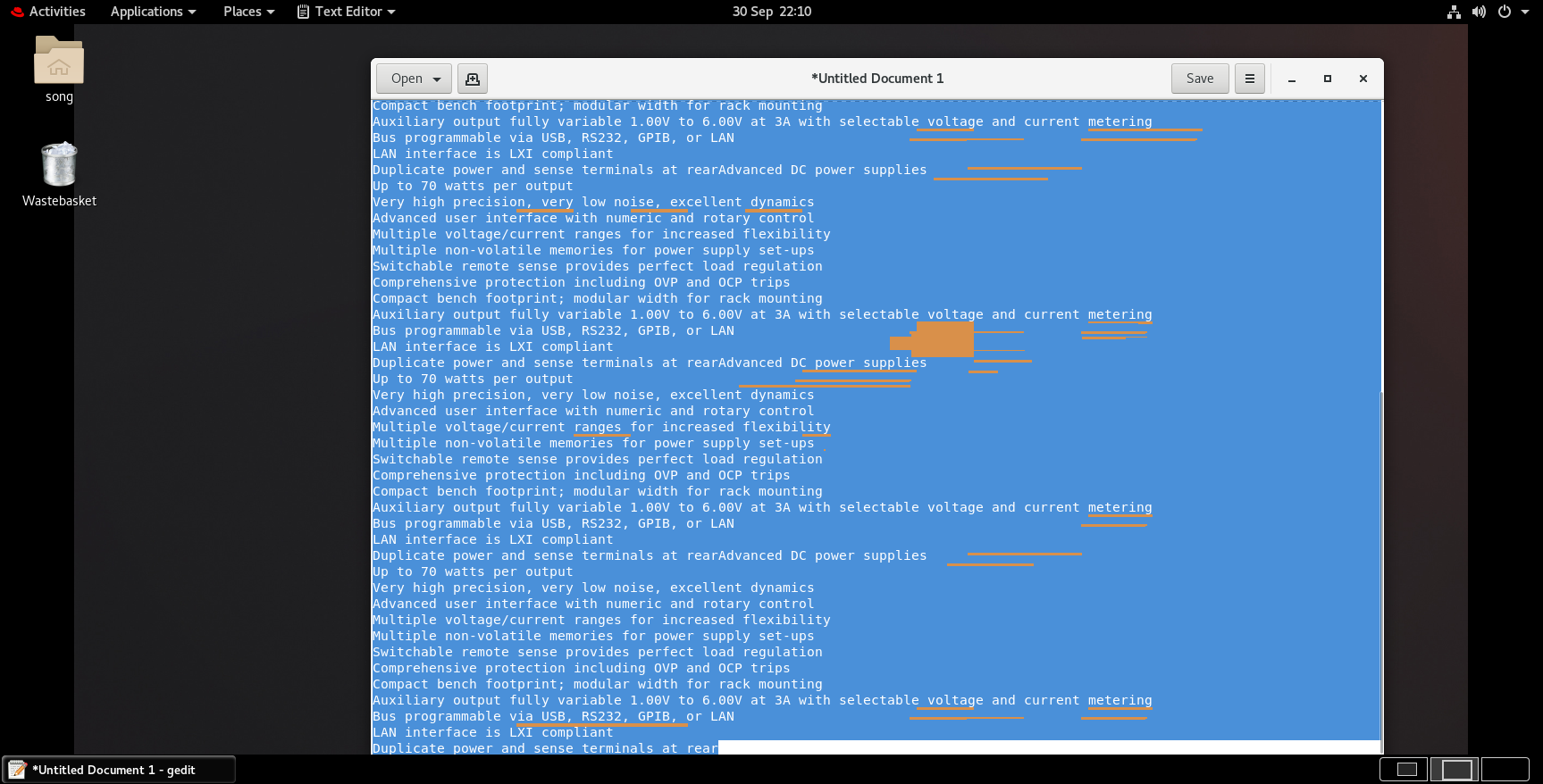
I am using the latest version of RDM on Windows (25.2.30.0 64-bit) and I still experience this problem when I drag a gedit window with all its content selected. Probably this is a corner case? The server is RHEL 8.8.
Thank you
Song