TigerVNC display is messed up

Hi,
I'm connecting to several of my computers using TigerVNC on the server side and RemoteDesktop always screws up the colors of the screen, which can make it difficult to read sometimes. See the attached screenshot (tested on Windows, Android and iOS).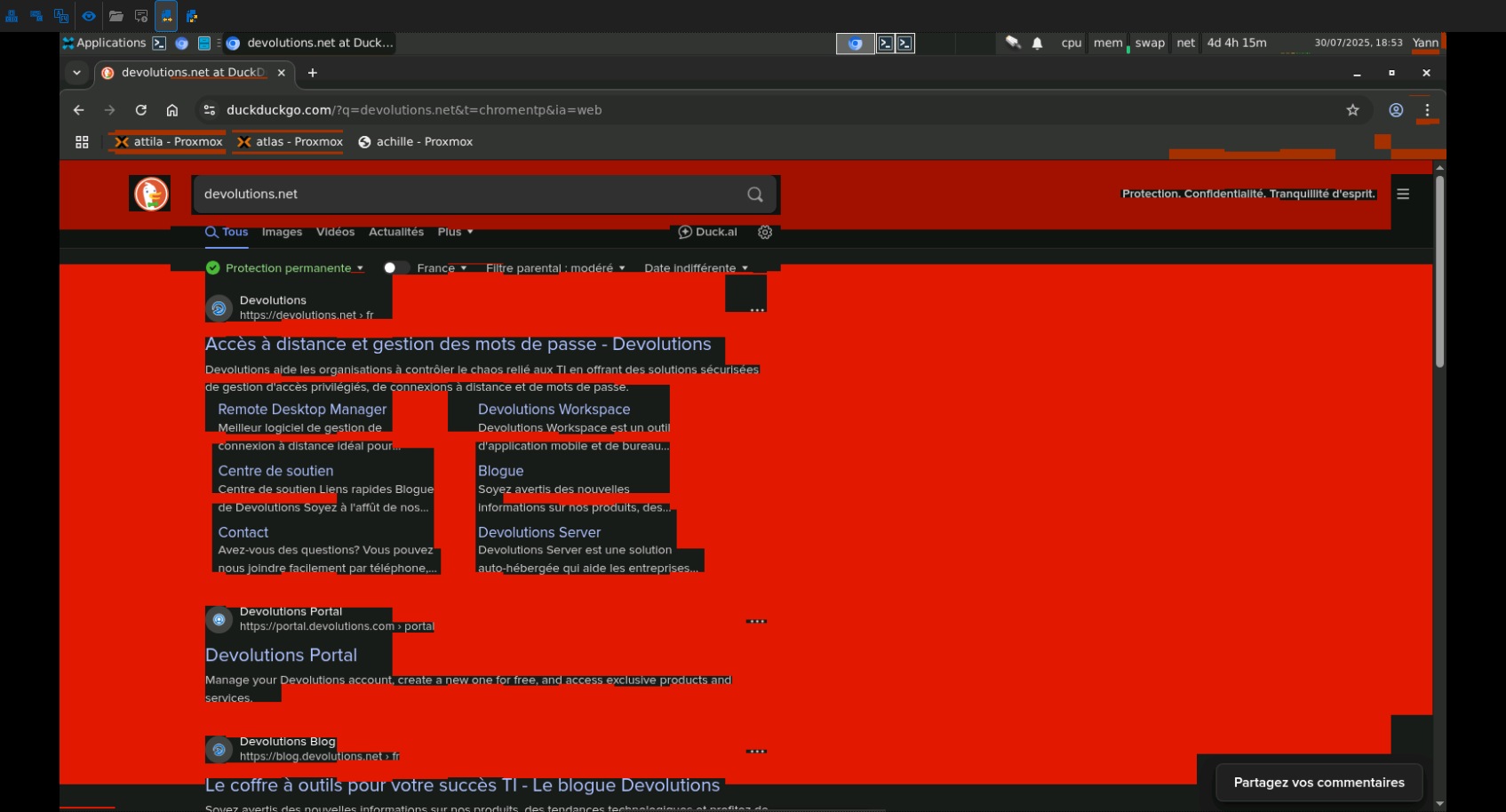
alain - 2025-07-30T18-52-48.jpg
All Comments (30)
Hello
Sorry for the inconvenience. Can you let me know the version of TigerVNC running on the server, as well as the server OS and version?
Thanks and kind regards,
Richard Markievicz
Yes of course, it's Xvnc TigerVNC 1.12.0 - built 2023-01-06 16:01 running on the latest Debian 12.
Xvnc TigerVNC 1.12.0 - built 2023-01-06 16:01
Copyright (C) 1999-2021 TigerVNC Team and many others (see README.rst)
See https://www.tigervnc.org for information on TigerVNC.
Underlying X server release 12101006, X.Org
You can install it by using the command:
apt install tigervnc-standalone-server
And run it with:
vncserver -depth 16 -geometry 1600x900 -localhost no -SecurityTypes VncAuth :1
Then connect to the host, port 5901
Hello
Thanks for that.
I'm wondering if this is something codec specific.
Can you please - and these instructions are for RDM Windows, which if I understand properly you are using - go to File > Settings > Entry Types > Sessions > Apple Remote Desktop (ARD / VNC); then under "Advanced" check "Enable logging..." and provide a path to create the log file.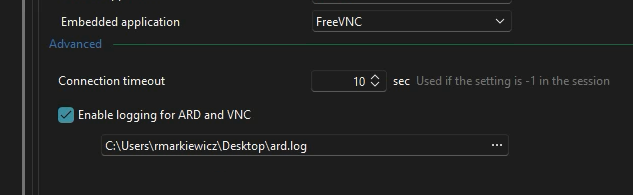
Save your changes and relaunch RDM, then reproduce the issue and send me the created log file by PM here on the forum.
Afterwards you should disable logging again.
Please let me know if you have some questions
Kind regards,
Richard Markievicz
Screenshot 2025-07-30 at 13.58.46.png
Thank you for your reply. I've sent the logs in your inbox.
Hello
Thanks for the log file. I can see that your server is sending updates in a 16-bit RGB565 format; so I suspect you've either manually set the pixel format to that on the server or - more likely - your using a 16-bit colour depth, which gives RGB565 as the default pixel format.
Out of curiosity, is there a reason you're using a low colour depth? Is it for bandwidth or performance reasons for example?
Natively our VNC client wants to display in 32-bit XRGB so we must do a colour conversion here; and I suspect you have uncovered a bug in this particular conversion.
It's likely that I'll need to set up a test environment to reproduce this behaviour and it should be easy to find and fix this. However, there might be some overhead in getting an environment set up as I'll need to involve my lab team - I've tried quickly but I'm no guru at this kind of thing on Linux. I'll create a ticket for the problem and once I have a fix we'll let you know through this thread.
In the meantime, if you need a workaround, sadly all I can suggest is to configure a 24 or 32-bit colour depth on the server.
Please, let me know if you have some questions or comments
Kind regards,
Richard Markievicz
Hi, I just tried setting 24 bit depth and it works fine, so yeah it looks like it's a conversion problem. I use 16 bits as I often control my computer from my phone in the field so I'd rather not waste bandwidth and latency with higher colors, 16 bits is enough for my usage, but as a quick fix it can be good enough until you figure out the problem :-)
I've provided a quick way of setting up such a config in my second post if needed.
Thanks a lot for the investigation and the temp fix, and have a nice day!
Hello
I understand completely. My feeling is, the bug will be easy to fix (and I'm surprised this hasn't come up before); but I need to reproduce it to understand what's happening. So you can consider the workaround a temporary one.
I appreciate the tips on setting up the server, my main difficulty was trying to get Xvnc to launch something (either a desktop environment or even an application like Firefox). I think we should get something on our side in the next week or two and should be able to follow with a fix shortly after. I will update you.
Thanks for your patience
Kind regards,
Richard Markievicz
Hello
I got a test environment on my side and I'm able to reproduce a problem, but I want to be sure it's the same problem you're hitting. Something seems weird - it's not a general colour conversion issue; because my initial desktop loads just fine. However, if I - for example - drag a selection loupe over a white area of the desktop, when I'm finished dragging the region renders in yellow rather than white. This only occurs at 16-bit colour depths. I also get yellow artifacts in other regions on certain updates.
I see your screenshot above which appears similar (with red instead of yellow). Is there any way you can make a short video of the issue on your side and post it?
Basically, I need to narrow down the code path(s) where this occurs (in my case, it seems related to certain hextile updates from the server only), and I want to be sure I catch all the issues.
For full transparency, I will be on vacation for the next 10 days. My colleague who would also be positioned to fix this is also on vacation for the next few weeks. So there will be a delay before we get back to this. Summer is simply a more difficult time with a lot of people taking vacations.
Please, let me know if you have some questions or something isn't clear
Kind regards,
Richard Markievicz
Hi Richard,
You're absolutely right: the bug isn't visible on the first screen loading upon connection, but it will eventually show up where the screen updates, in particular when there's a running length of the same color. So it looks like an RLE related issue or something. I think you don't need the video, you describe the same behaviour as I have. And 24-bit depth doesn't show the problem. In my screenshot, the big red area you're seeing is after the Google results updated the screen with a flat background, which resulted in a big red mess all around the text.
And it's okay for the delay, enjoy your vacation, I hope you have good weather and get some good rest :)
Have a nice one,
Yann
Hello Yann
Yes, it sounds exactly the same. Thanks for the follow up!
Kind regards,
Richard Markievicz
Oooh I think I can guess what's happening there: in the RLE processing routine, the 16-bit color field is copied straight into the 24-bit buffer without proper conversion, which only fills the Red-Green part of the color with the 16-bit version of the original color. That's why big white patches are turned into yellow (full Red-Green), and why a dark grey background turned into just red. So it's just a matter of some bitwise operations to convert into 24-bit colors. Am I right?
Hello
Great analysis and, in short, yes you are right! However there was a subtle aspect that led me on something like a wild-goose chase here...
The majority of the updates from the server are sent as hextile. Hextile divides the update into 16x16 tiles and then can use a few different sub encodings (including RLE). Your assumption was spot on - white becoming yellow would be the result of incorrectly masking the bits of the incoming pixel, and losing the blue value for example. However I hunted high-and-low through the hextile decoder and couldn't find any issue; we're properly handling the colour according to the configured pixel format in every case...
What I realized was: I was reproducing the issue by dragging a selection loupe in the file explorer, but the yellow blocks only appeared after releasing my mouse (and the loupe disappears). At that point, Tiger is sending a Tight encoded frame buffer (not hextile), and this is where the issue was: Tight has a sub encoding called "FillCompression" which says "here's a pixel, fill the update rectangle with that colour" and that pixel was not being shifted according to the configured pixel format.
There's a slight edge case because according to the spec, Tight pixels have a special mode where they might just be a 3-byte RGB value and the pixel format is disregarded in this case. I don't know how to get a server to send such an update, but I believe I have accounted for it properly on my side.
I'll try to publish the fix today so it can be in the upcoming RDM 2025.2 releases. We'll update this thread accordingly.
Thanks for your patience, this was an interesting bug!
Kind regards,
Richard Markievicz
Nicely done sir, you have earned your vacations now ;) Thanks a lot for the fast answers, keep going!
Hello
I've made the fix for RDM Windows 2025.2.24, which is the next minor release. If you still get an issue after updating, please let me know!
I know you're specifically concerned with mobile - I've created tickets for both the Android and iOS teams and asked them to integrate this. We should have more news on that, but right now I don't have insight in to when they will integrate the fix and release. It should not be very long though.
Please don't hesitate with further questions or comments
Kind regards,
Richard Markievicz
Hi Richard,
Hope you had good vacation :)
I'm following up this thread as the 2025.2.26 version of the desktop app doesn't seem to have integrated the fix yet, nor the mobile apps. Do you know when it will make it to the public release?
Have a nice day!
Yann
Hello Yann
Huh, that's weird - I wanted to validate this on my side, and even after setting up a fresh VNC server to test with I can easily reproduce the issue on 2025.2.21; but 2025.2.26 is working really well (and I did already check that the fix was part of that release).
Are things exactly as before? No change on your side?
Can you run the following PowerShell and let me know the output?
Get-FileHash 'C:\Program Files\Devolutions\Remote Desktop Manager\runtimes\win-x64\native\DevolutionsVnc.dll'
(Assuming the default installation path of C:\Program Files... of course)
I'll have to check with the mobile teams as they have a different release cadence.
Richard Markievicz
Hi Richard,
In fact we're pretty close to a full fix, indeed it's mostly fixed but I think there's still an edge case where it's still not completely over, especially with large areas. Take a look at the included screenshot. The background is supposed to be solid blue all the way, but the orange artifact remains. I couldn't find any other place where I can trigger this bug though, so I don't know why it still happens on some occasion. Even after redrawing the screen the bug does still remain, for example opening the Application menu. The orange rectangle in the top right corner is when I showed and closed the clock popup. And of course that's not the only color who does that, I tried other background colors and it was still showing the bug.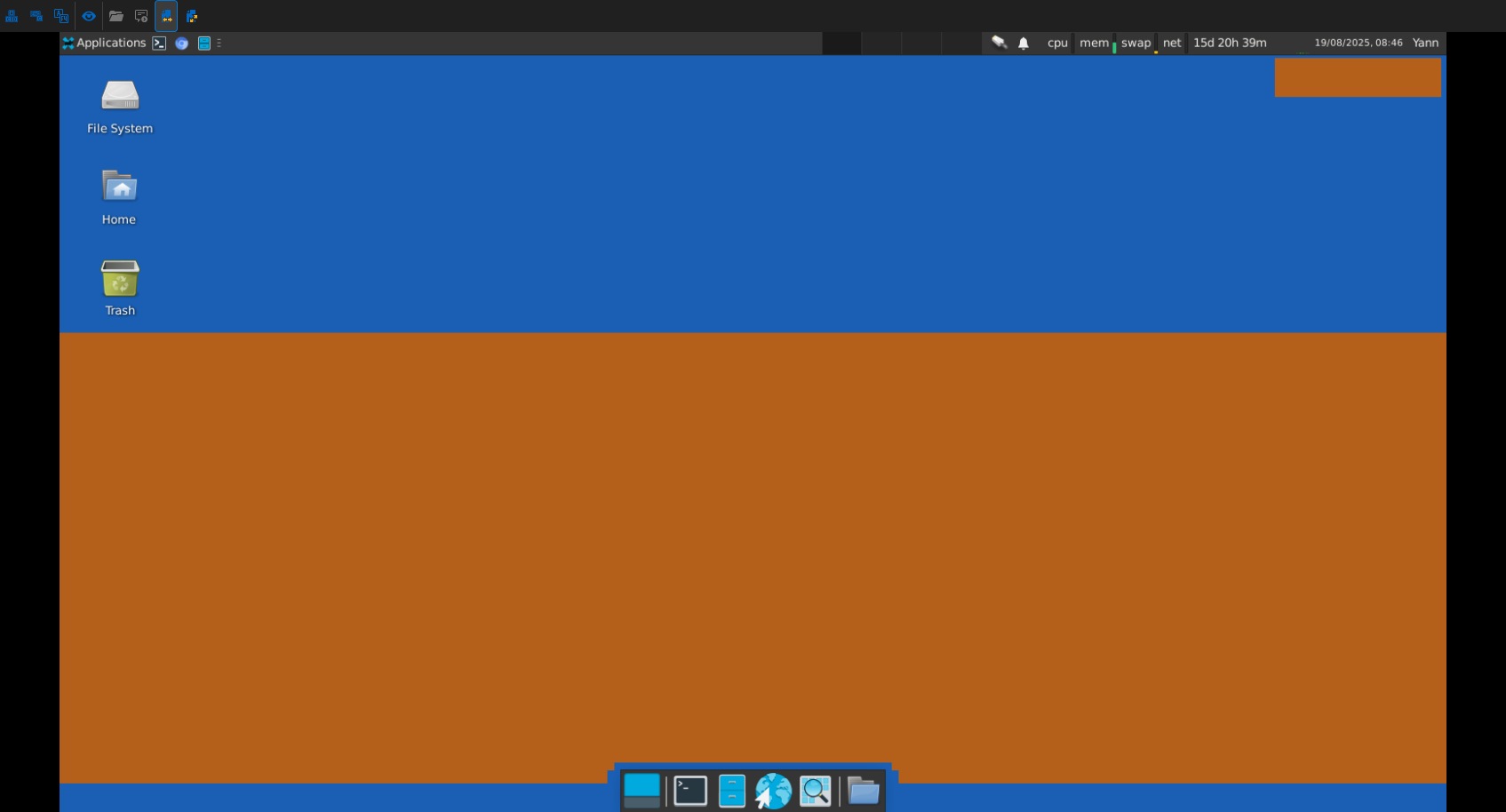
So basically I think we're very very close to have fixed this weird bug once and for all.
And for the record, the hash for the DLL is 5EE723A694C8936FE21782EA0845E974ECB1784D79FF5AE2EF8DC2A08631079F
Thanks
Yann
ain - 2025-08-19T08-46-20.jpg
Hello
Thanks for the update! This is weird indeed, because I can't reproduce that at all on my side. I guess that in this case, the server is sending a different update encoding where this bug still exists. I've been through the encodings and tried to find a likely place where that can occur but nothing stood out (and there are a lot of encodings, and it's generally not simple code).
What might really accelerate a diagnosis here is if you could grab a network capture of the issue.
If you don't mind trying, the easiest way would be:
- Open an administrative command prompt and start a trace
- netsh trace start capture=yes IPv4.Address=IPADDRESS
- (replacing IPADDRESS with the address of the server you're connecting to)
- Open the session and go ahead and reproduce the issue
- Back on the command prompt
- netsh trace stop
- Netsh will compile a bunch of diagnostic data, it takes a minute or two
- At the end it will give you the path to both an .etl and a .cab file. We are not interesting in the .cab file, which contains diagnostic information, just the .etl which has the network trace
- If you want to validate what the .etl contains, you can convert it to a .pcapng using etl2pcapng and then open it in WireShark. It's not necessary for you to do that, it's what I'll do on my side.
- Send me either the .etl or .pcapng. Please send by private message or let me know for a secure upload link; don't post it here. The capture contains enough information to reconstruct the details of your session.
Let me know if that's something you're happy to do; if not I'll have to approach this differently but it will likely take a bit longer. And, as always, let me know any questions or comments.
Thanks and kind regards,
Richard Markievicz
Hello
Thanks a lot for sending the ETL file. It's really helpful.
I think we are hitting an edge case with Tight encoding and probably a mistake in my earlier fix: in certain conditions, the pixel sent is just 3 bytes in plain RGB values with no shift needed (i.e. the pixel format from the server is ignored). I couldn't get my server to send me an update like that so I wrote the code that seemed correct, but based on your results I would guess that the red and blue values are getting inadvertently swapped (medium blue becomes orange).
I'll need to write a test case on my side to be sure it's fixed, so thanks for your patience. I'll be back with an update.
Kind regards,
Richard Markievicz
Hi Richard, thanks for the heads up.
If possible, you can send me a dll to replace in my current install to try out the new fix.
Yann
Hello again
Thanks for your patience. This should be resolved in RDM 2025.2.28. Once that's released (it shouldn't be very long) and you've updated, please let me know if you experience further issues or have more comments or questions.
I'll liaise back with the mobile teams to make sure they pick up the new changes.
Kind regards,
Richard Markievicz
Hi Richard,
I've updated RDM to 2025.2.28 and as you predicted, the bug has vanished, as far as I can tell! I'll get back to you if there's any new occurence but for now everything's fine on my side. Just waiting for a similar update to the mobile version.
Have a nice day!
Yann
Hello
Excellent news, thanks for the follow up!
I've looked at our internal ticketing system and this fix is tagged for release in RDM iOS 2025.2.4 and RDM Android 2025.2.3.
Please, let me know if you have any further questions or problems.
Kind regards,
Richard Markievicz
Hello,
Versions containing the fix have been released on RDM Android and iOS.
Best regards,
Maxime Brousseau
Hello,
I am using the latest version of RDM on Windows (25.2.30.0 64-bit) and I still experience this problem when I drag a gedit window with all its content selected. Probably this is a corner case? The server is RHEL 8.8.
Thank you
Song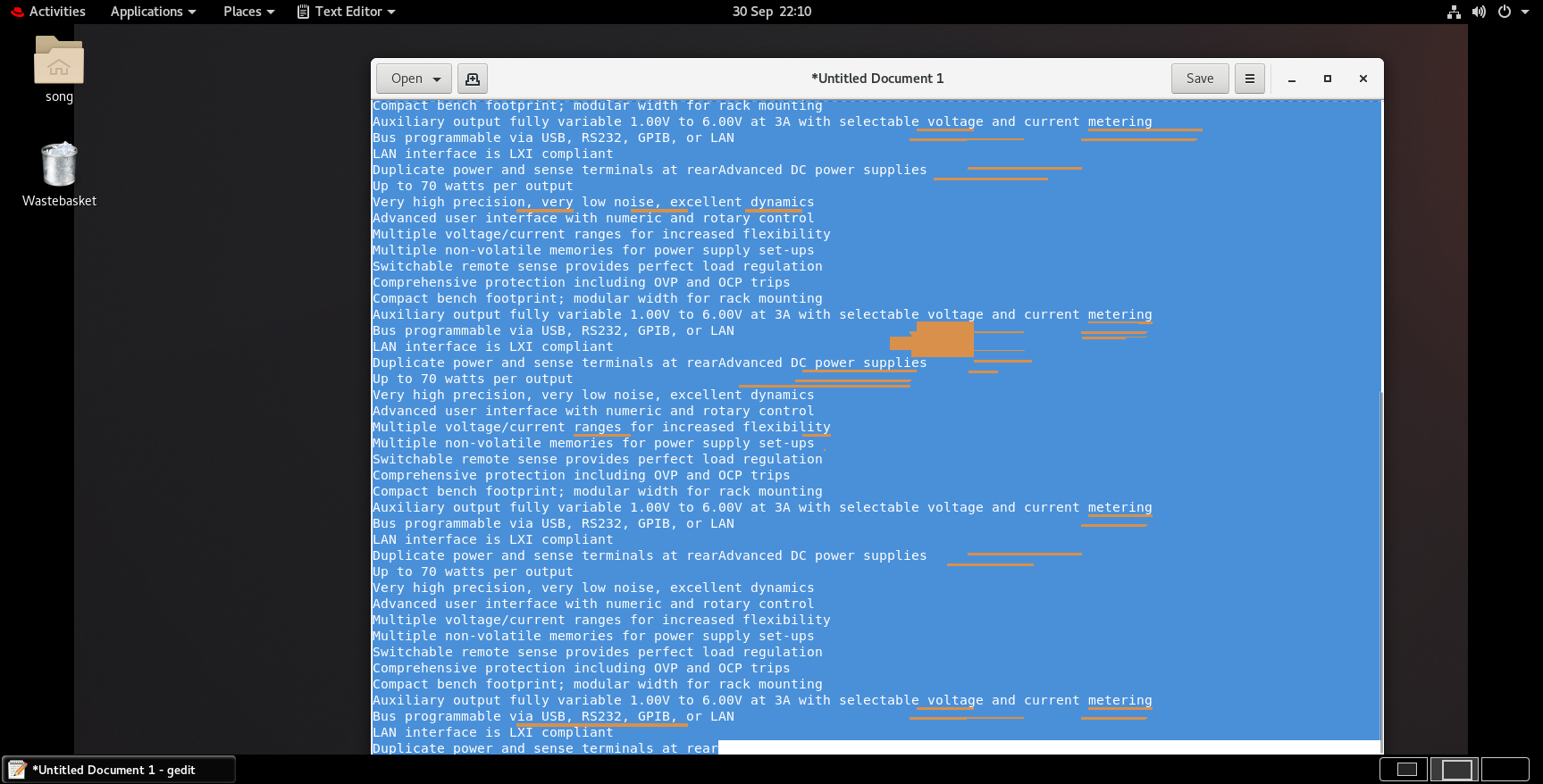
931159ab-0be0-4251-b82d-f72cf9ab7fcd.png
Hello
This does look related to the original issue posted by @Mwyann. Can you tell me which VNC server you're using (e.g. is it TigerVNC or something else?), the version, and the parameters you use for the VNC session on the server (especially, if you're forcing a specific colour depth or resolution).
Please let me know if something isn't clear or you have further questions
Kind regards,
Richard Markievicz
Hello
This does look related to the original issue posted by @Mwyann. Can you tell me which VNC server you're using (e.g. is it TigerVNC or something else?), the version, and the parameters you use for the VNC session on the server (especially, if you're forcing a specific colour depth or resolution).
Please let me know if something isn't clear or you have further questions
Kind regards,
Hi @Richard Markiewicz
The VNC server version is tigervnc-server-1.12.0-15.el8_8.x86_64.
The server is below with color set to 24-bit with no forced resolution.
session=gnome
securitytypes=vncauth,tlsvnc,x509vnc
depth=24
localhost
alwaysshared
The VNC setting in RDM is FreeVNC(embedded) with Auto for color depth and encoding.
Update:
Even if I don't enforce the depth, the problem still exists. The session parameter is blow
song 3565083 3565082 0 09:46 ? 00:00:00 xinit /etc/X11/xinit/Xsession gnome-session -- /usr/bin/Xvnc :7 -alwaysshared -localhost -securitytypes vncauth,tlsvnc -auth /home/song/.Xauthority -desktop example-server:7 (song) -fp catalogue:/etc/X11/fontpath.d -pn -rfbauth /home/song/.vnc/passwd -rfbport 5907
Hello
Thanks for the update, I will try to reproduce the issue on my side and I'll post back with what I find out.
Thanks and kind regards,
Richard Markievicz
Hello
I wanted to let you know that I haven't forgotten about this issue, but I didn't have time to work on it yet. Thanks for your patience.
Kind regards,
Richard Markievicz
Quick update: I can still see those color bugs in the Android version 2025.2.2.2. Not in the iOS nor the Windows version, which is weird.
(Also, quick little bug for the iOS version, if you set your default view to "Favorite" it doesn't work, it still shows you the server list at launch).
Yann