
oliviercammarata
Manage External Credentials through Devolutions.Powershell module
Hello,
Version 2026.3.3 of the Devolutions.PowerShell module adds two cmdlets for “My account settings”, including Delinea Secret Server:
Get-RDMMyAccountSetting -Type <type> reads the settings of that type.
Set-RDMMyAccountSetting saves the changed object you pipe to it.
Here is an example:
$secretServer = Get-RDMMyAccountSetting -Type DelineaSecretServer
$secretServer.Username = 'jdoe'
$secretServer.Domain = 'CONTOSO'
$secretServer.Password = Read-Host -AsSecureString
$secretServer | Set-RDMMyAccountSetting
Each type returns an object with its own properties. Passwords are SecureString values. They come back as $null unless you use -IncludeSecret. If you leave Password as $null, the stored password stays the same.
If you need anything else, let us know.
Best regards,
Maxime
@Maxime Bernier
Hi Maxime,
Great. This works perfectly.
Any idea about how to get the info refreshed in an already opened RDM client without the need to close it and reopen (or switch to another datasource and back again, which give the same) ?
I mean like the "Update-RDMUI" command that dynamically refresh sessions, but for the "My Accounts" credentials ?
Thx.
2026.3.8.0 - Bugs report
Hi,
So, I gave a try on 2026.3.9 which didn't solve any of the 4 issues I reported (Column display, display bugs).
Now I'm on 2026.3.10, and cannot yet reply for display bugs (just installed) but can already statut on column chooser, where issue remains :
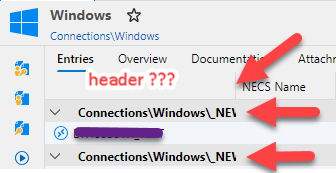
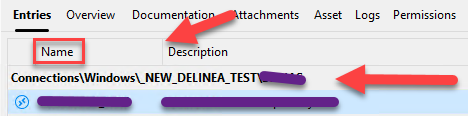
By default, the first column is the "Name" of sessions, but header is still missing and group names are still not fully shown as in 2026.1.x
This release :
2026.1.14 :
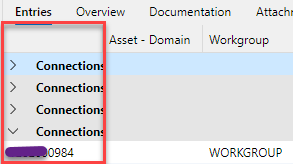
Then, if you select to add the "Host" column to display, it becomes the fisrt coulmn and replaces the "Name" column (instead of showing both). After this, if you deseclect "Host" column from display, it removes "Host", but do not show back the "Name" column (which is not proponed in the "column chooser" list)==> Both column are no more shown at all). In all cases, the header of the 1st column - which is now no more Name or host column - is still empty.
In this example, 1st column is now corresponding to "NECS Name' after having selected then sdeselected the "Host" column :
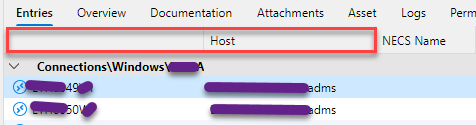
If I close RDM 2026.3.x and reopen, it displays the Name and Host by default now (even after a "reset layout" :
So, to summarize :
Would like the 1st column header displayed
Would like the group names fully displayed, even when streching the 1st column (like in 2026.1.x)
Would like to be able to chose to display Name only, Host only or both easily (like in 2026.1.x)
Thx.
Delinea Secret Server - "Refresh token" option seems not working and it keeps prompting credentials after token expiration
Hi.
Just a follow up.
I'm testing the new 2026.3.8.0 RDM version (still on MS SQL Workspace), and the option "Save authentication token between sessions" is now available.
After tests, it didn't permit to solve our recurrent token refresh problem.
Anyway, as already mentionned, we'are now using the OAUTH Authentication with the "Delinea Secret Server" RDM credential, and it gives the results we expected.
Kr.
2026.3.8.0 - Bugs report
Hi,
I'm currently testing the 2026.3.8.0 version, and encountered those bugs :
Display was flickering sometimes during my tests : In a web session connecting to Azure, display was flickering at MFA prompt when mouse was put over an option of the MFA Window.
I Also encountered display refresh problems on opened RDP sessions (some abnormal squares appearing here and there, or only displaying part of the screen - see below)
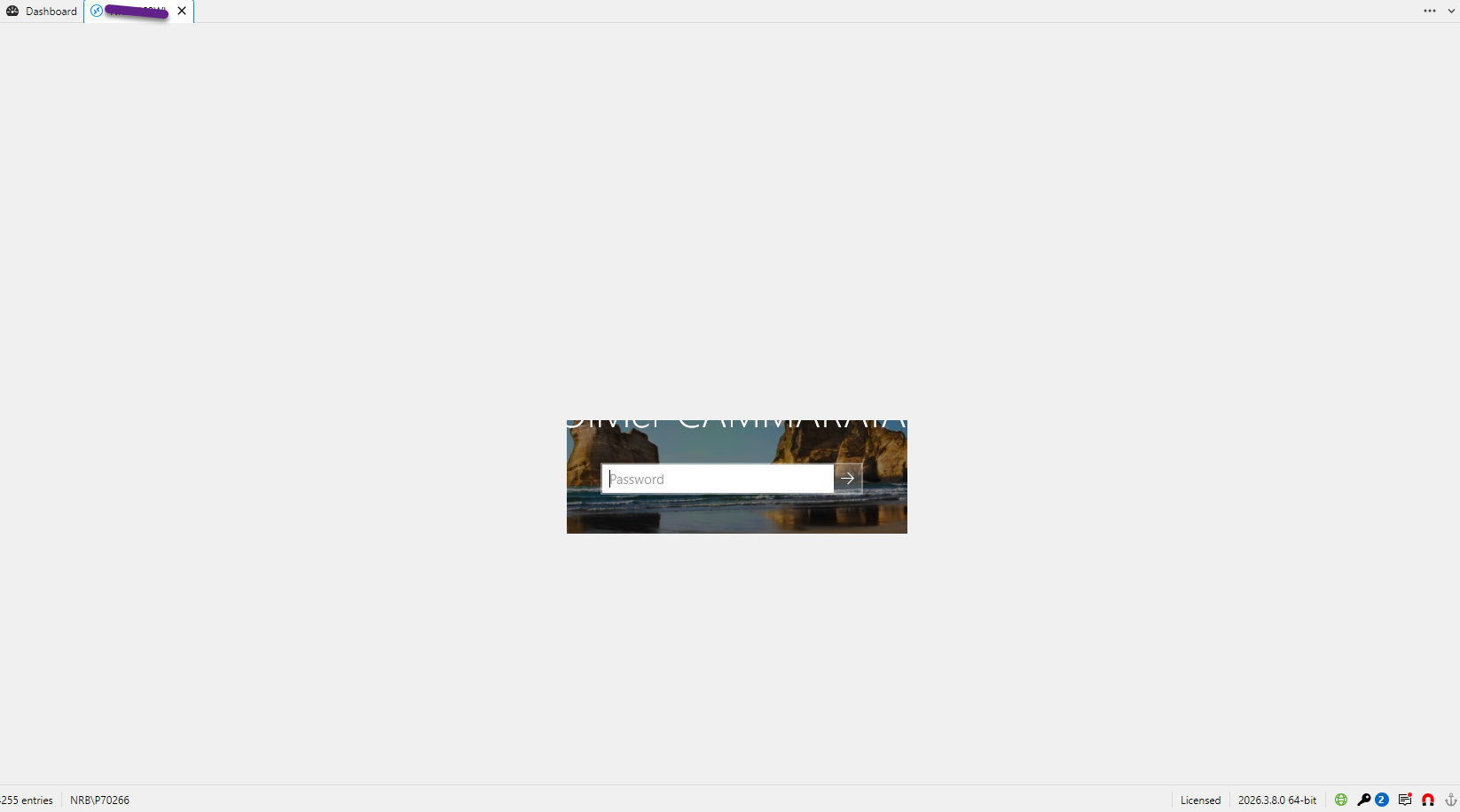
Column chooser display Connections group only on 1st column (when you fit it, group is not displayed entirely (see fig below)
Column chooser does not display "Name" in title (see fig below) :
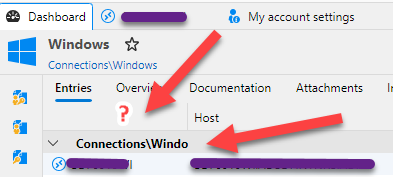
Column chooser does not seem to allow anymore to only display "Name" column without displaying the "Host" column, which was not the case in RDM 2026.1.x
Not exhaustive list. If I find others, I'll post again.
Manage External Credentials through Devolutions.Powershell module
Hi,
We are currently using RDM 2026.1.14 version with Datasources hosted on MS SQL 2025.
I'm in charge of automating RDM users profiles creation and updates for all our operators.
I would like to force, using a powershell script, the username/Passwords/Domain of the "My account settings - External credential - Delinea Secret Server", but could not find a powershell way to achieve this (only manual creation).
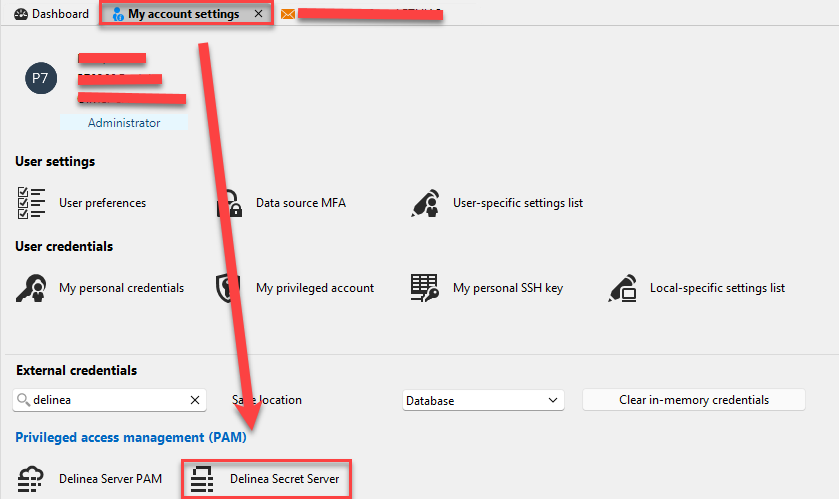
I successfully set this for "My account settings - My Personal Credentials" using the "Get-RDMPersonalCredentials" command, but could not find any command for the Extrnal Credentials part (even with AI, that concluded that this feature was not yet implented, suggesting me opening this thread).
Can you analyze this request, please ?
Thx.
Delinea Secret Server - "Refresh token" option seems not working and it keeps prompting credentials after token expiration
Hi Samuel,
RDM DBs are hosted on MS SQL server 2025.
Regarding the version, we updated from RDM 2025 to 2026 because of the rebuilding of the Delinea RDP solution (currently 'common" RDP session while delinea specific on 2025) that allow more flexibility and variables usage. And the 2026.1.14 was the one available at this moment.
I requested some feature improvements to Devolution Support which will be available in 2026.3.4 it seems (and I'm going to request a new one), and I'm waiting it to be available to be able to test it before putting in prod.
Regarding this recurrent reauthentication problem, I modified the authentication method from SSO to OAuth in my Delinea Secrets, and used the "Delinea Secret Server" external credential to bypass it.
Now, with this config, the Delinea account password is only asked once a day (at RDM first start), then no more asked the whole day.
This is exactly what I expected as behaviour, so I won't investigate more on this.
Except if I miss something, I'm going to open a feature request to be able to manage this "External credential" using the Devolutions.Powershell module, cause it seems not possible currently (while the "My Personal Credentials" can be managed easily this way using the "get-RDMPersonalCredentials"). Is it correct ?
This point is important for me to be able to finalize the fully automated deployment of RDM profiles for all our operators.
Br.
Olivier.
Delinea Secret Server - "Refresh token" option seems not working and it keeps prompting credentials after token expiration
Hi Samuel,
Thx for this quick reply.
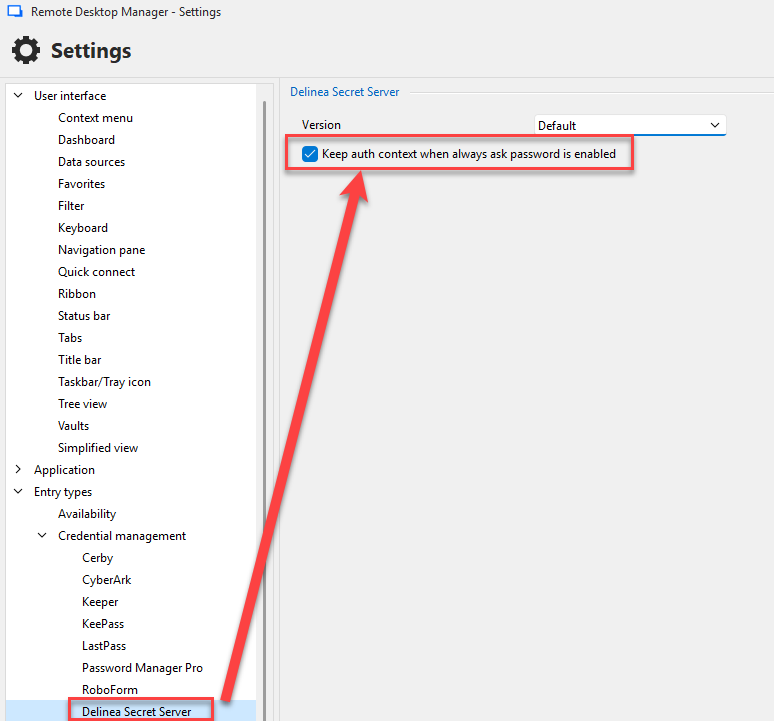
I don't get this option in my RDM current version (2026.1.14.0 64bit).
I only see this one, but doesn't change anything and, except if I misunderstand, not applying in our implementation context :
Kr.
Delinea Secret Server - "Refresh token" option seems not working and it keeps prompting credentials after token expiration
Hi,
We are using currently 2026.1.14.0 64bit client under Windows 11.
We have implemented Delinea Secret Server solution with PAM distributed engines to be able to RDP connect onto our machines through PAM proxy, and it works great.
To be able to retrieve Delinea secrets info, we must first, for sure, provide Secret Server credentials when we launch the first related RDP session of the day and this part is working as expected.
At secret Server side, we've got this config :
Session Timeout for Webservices : 90 mins
Enable Refresh Tokens for Webservices : yes
Maximum Token Refreshes Allowed : 6
This should allow us not being asked for Secret Server credentials the whole day. But it seems not taking into account this "Enable Refresh Tokens for Webservices" option and prompts systematically to renter credentials for Secret Server login after 90 mins (then OK for the next 90 min and so on).
Could you check by your side or tell me what we miss, please ?
Thx
Delinea Secret Server
We are using Delinea Secret Server with PAM Distributed Engines for multiple sites.
I'm not managing this part, but I'm in charge of RDM RDP Sessions (so Windows only) and their linked credentials.
With this config in RDM 2026, the proxy connection and its associated port is not managed inside RDM RDP Session, but at Delinea Secret credential side, setting the PAM DE site and enabling the proxy option at secret level.
Ex : Secret existing in Delinea Secret Server :


The only thing I have to do at RDM side, is to set the "Connection through proxy" resolving mode on RDM Delinea Secret Server Credential linked on the RDM RDP Session.
Ex : Delinea Secret Server Credential created in RDM :


Don't know if it can help in your case.
Kr.
Easy search for values directly set inside the Custom Fields
Yes, exactly :

Thx.
Easy search for values directly set inside the Custom Fields
Hello,
Currently, except if I miss something, it's required to use the advanced search to find values put inside the Custom Fields, which is not convenient for us.
We use Custom Fields to put informations that are specifics to our infra and not corresponding to any other existing RDM fields and, for sure, if we implement these info, it's because they are very usefull for us.
So we would like a very quick and easy way to search inside these fields directly, rather than going to less practical (but powerfull) advanced search.
Could you implement this, please ?
Thank you by advance.
Be able to use RDM variables inside Delinea Secret Server Secrets fields
Hi,
This would require resolving the variables after resolving the credential (I presume we do it before currently if this does not already work). This would work fine for credential resolving with the Delinea Secret Server credential entry (or any other credential entry actually). But I don't think it would really apply to RDP over Delinea Secret Server Proxy though. This entry does not really resolve credential in the traditional sense, it makes a proxy request and receives the proxy information (host/domain/port) as well as generated temporary username and password. The domain here would be the domain to connect to the proxy, not to the end host, so I doubt you'd find a way to pass your variable along like this. Was RDP over Delinea Secret Server Proxy a real case of yours? Or do you just intend on doing credential resolving?
Best regards,
@Xavier Fortin
You're right.
It's currently working with RDP connections (resolving the variable inside the Delinea secret), but effectivelly not on "RDP over Delinea Secret Server" connections (from where I did my tests).
I'm not owner of the Delinea Secret Server Solution nor the Distributed Engines part, so missed the info you provided about the way it resolves the credentials.
Anyway, when I configure the secret with the full domain name (instead of the $CUSTOM_FIELD1$ value), it's working correctly using the "RDP over Delinea Secret Server" connection object.
I'll try to check internally how they configured the Delinea Distributed Engines first to get more info at this level.
Thx for your reply.
Be able to use RDM variables inside Delinea Secret Server Secrets fields
If you are talking global..
You could do what we do.
Auto map user credentials from secret server to entries.
So we have a naming convention for all SS entries "Hostname - OurDefaultUser""
Then in RDM in the SS entry we set the following:
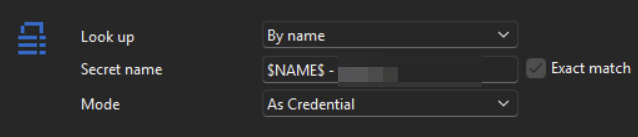
"$NAME$ - OurDefaultUser" is then pulled to all RDP entries which are set to inherit and at the folder or root level where we point to this entry for credentials.
If you wanting it to work for users specific they could override the folder or root level and point to there own credentials.
Apologies if I have misunderstood you goal and feel free to ignore if that's the case!
@Iain
Thx, but not my concern.
In my example, the variable is set at Secret Server side (not RDM side), and RDM "read" it as plain text.
So it shows at login the error message :
"Your credentials $CUSTOM_FIELD1$\MyUserName didn't work"
While I would like it to use the value put in the RDM "Custom Field 1" variable (ex : Mydomain.adms) set at RDP connection level.
Be able to use RDM variables inside Delinea Secret Server Secrets fields
Would be very usefull to be able use RDM variables inside Delinea Secret Server Secrets fields.
Exemple :
1/ We create a unique secret in "Delinea Secret Server" as per below :
Username : MyUserName
Password : MyOwnPassword
Domain : $CUSTOM_FIELD1$
2/ When creating the RDP (or RDP over Delinea Secret Server Proxy) connections in RDM, we fill the "Custom Field 1" value of each connection with the remote machine AD Domain name (or perhaps we can use the $MACHINE_DOMAIN$ variable in this specific case - but my request is more global that this specific one - like when using an internal RDM credential)
3/ Each RDP connection will be linked to the "Delinea Secret Server" secret created at point one, and use the value of its own $CUSTOM_FIELD1$ as domain name at logon.
Very usefull in a multi-domain managed environnement with MIM Synchronized AD accounts with a very resticted password expiration policy, where you get only 1 and only secret to update at expiration date.
Other competitor in the market that we are testing (Royal TS solution for example) has already successfully implemented this feature, and it's significant for our usage.
Thx.