Manage External Credentials through Devolutions.Powershell module
Manage External Credentials through Devolutions.Powershell module
1 vote

Hi,
We are currently using RDM 2026.1.14 version with Datasources hosted on MS SQL 2025.
I'm in charge of automating RDM users profiles creation and updates for all our operators.
I would like to force, using a powershell script, the username/Passwords/Domain of the "My account settings - External credential - Delinea Secret Server", but could not find a powershell way to achieve this (only manual creation).
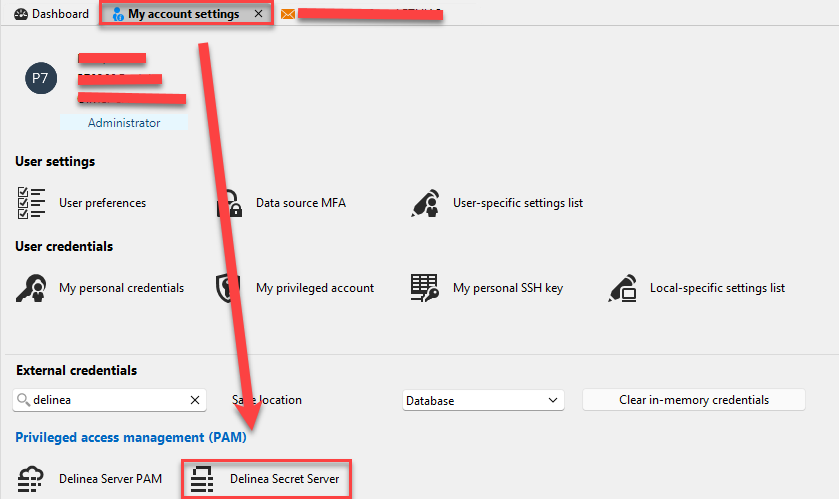
I successfully set this for "My account settings - My Personal Credentials" using the "Get-RDMPersonalCredentials" command, but could not find any command for the Extrnal Credentials part (even with AI, that concluded that this feature was not yet implented, suggesting me opening this thread).
Can you analyze this request, please ?
Thx.
Recommended Answer
Hello,
Version 2026.3.3 of the Devolutions.PowerShell module adds two cmdlets for “My account settings”, including Delinea Secret Server:
Get-RDMMyAccountSetting -Type <type> reads the settings of that type.
Set-RDMMyAccountSetting saves the changed object you pipe to it.
Here is an example:
$secretServer = Get-RDMMyAccountSetting -Type DelineaSecretServer
$secretServer.Username = 'jdoe'
$secretServer.Domain = 'CONTOSO'
$secretServer.Password = Read-Host -AsSecureString
$secretServer | Set-RDMMyAccountSetting
Each type returns an object with its own properties. Passwords are SecureString values. They come back as $null unless you use -IncludeSecret. If you leave Password as $null, the stored password stays the same.
If you need anything else, let us know.
Best regards,
Maxime
All Comments (4)
Hello,
You're right, there's no PowerShell support for External Credential settings today. A ticket has been opened and we'll keep you updated on progress.
Best regards,
Maxime
Hello,
Version 2026.3.3 of the Devolutions.PowerShell module adds two cmdlets for “My account settings”, including Delinea Secret Server:
Get-RDMMyAccountSetting -Type <type> reads the settings of that type.
Set-RDMMyAccountSetting saves the changed object you pipe to it.
Here is an example:
$secretServer = Get-RDMMyAccountSetting -Type DelineaSecretServer
$secretServer.Username = 'jdoe'
$secretServer.Domain = 'CONTOSO'
$secretServer.Password = Read-Host -AsSecureString
$secretServer | Set-RDMMyAccountSetting
Each type returns an object with its own properties. Passwords are SecureString values. They come back as $null unless you use -IncludeSecret. If you leave Password as $null, the stored password stays the same.
If you need anything else, let us know.
Best regards,
Maxime
Hello,
Version 2026.3.3 of the Devolutions.PowerShell module adds two cmdlets for “My account settings”, including Delinea Secret Server:
Get-RDMMyAccountSetting -Type <type> reads the settings of that type.
Set-RDMMyAccountSetting saves the changed object you pipe to it.
Here is an example:
$secretServer = Get-RDMMyAccountSetting -Type DelineaSecretServer
$secretServer.Username = 'jdoe'
$secretServer.Domain = 'CONTOSO'
$secretServer.Password = Read-Host -AsSecureString
$secretServer | Set-RDMMyAccountSetting
Each type returns an object with its own properties. Passwords are SecureString values. They come back as $null unless you use -IncludeSecret. If you leave Password as $null, the stored password stays the same.
If you need anything else, let us know.
Best regards,
Maxime
Hi Maxime,
Great. This works perfectly.
Any idea about how to get the info refreshed in an already opened RDM client without the need to close it and reopen (or switch to another datasource and back again, which give the same) ?
I mean like the "Update-RDMUI" command that dynamically refresh sessions, but for the "My Accounts" credentials ?
Thx.
Hi,
Glad to hear it works.
Unfortunately, there is currently no way to refresh the My Account settings in an RDM instance that is already open. RDM loads them when it connects to the workspace and keeps them in memory afterwards. Update-RDMUI only refreshes the vaults and entries, not the user’s account settings.
I’ve noted your request to have this refresh possible from PowerShell, like Update-RDMUI does for sessions. It needs a change on the RDM side first, so I can’t give you a timeline yet.
Regards,
Maxime