
megosu
Regression since the new interface
Hi,
I tried the drag and drop from the drop down list, it is perfect !
What would also be good is to be able to sort them by Name for instance.
I tried to drag a tab beyond the screen, and it scrolls naturally, also great ! thank you
I tried to use the mouse wheel to scroll the tabs, it still jump 1 "page" at a time, instead of smooth scrolling. Is it something you can allow ?
Small notes:
the new interface is great but has a lot of bugs. I get weird error message sometimes, like this:
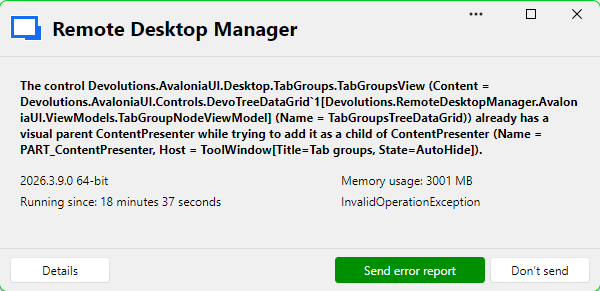
InvalidOperationException - The control Devolutions.AvaloniaUI.Desktop.TabGroups.TabGroupsView (Content = Devolutions.AvaloniaUI.Controls.DevoTreeDataGrid`1[Devolutions.RemoteDesktopManager.AvaloniaUI.ViewModels.TabGroupNodeViewModel] (Name = TabGroupsTreeDataGrid)) already has a visual parent ContentPresenter while trying to add it as a child of ContentPresenter (Name = PART_ContentPresenter, Host = ToolWindow[Title=Tab groups, State=AutoHide]).

   at Avalonia.Visual.Avalonia.Collections.IAvaloniaListItemValidator<Avalonia.Visual>.Validate(Visual item)
   at Avalonia.Controls.Presenters.ContentPresenter.UpdateChild(Object content)
   at Avalonia.Controls.Presenters.ContentPresenter.ContentChanged(AvaloniaPropertyChangedEventArgs e)
   at Avalonia.Animation.Animatable.OnPropertyChangedCore(AvaloniaPropertyChangedEventArgs change)
   at Avalonia.PropertyStore.EffectiveValue`1.NotifyValueChanged(ValueStore owner, StyledProperty`1 property, T oldValue)
   at Avalonia.PropertyStore.EffectiveValue`1.SetAndRaise(ValueStore owner, IValueEntry value, BindingPriority priority)
   at Avalonia.PropertyStore.ValueStore.Avalonia.Data.Core.IBindingExpressionSink.OnChanged(UntypedBindingExpressionBase instance, Boolean hasValueChanged, Boolean hasErrorChanged, Object value, BindingError error)
   at Avalonia.Data.TemplateBindingExpression.PublishValue()
   at Avalonia.PropertyStore.EffectiveValue`1.NotifyValueChanged(ValueStore owner, StyledProperty`1 property, T oldValue)
   at Avalonia.PropertyStore.ValueStore.SetValue[T](StyledProperty`1 property, T value, BindingPriority priority)
   at Devolutions.AvaloniaUI.Docking.DockingHostView.RefreshPaneContentOnce(ToolWindow toolWindow)
   at Devolutions.AvaloniaUI.Docking.DockingHostView.ConvertActiproAutoHidePopup(ToolWindow toolWindow)
   at Avalonia.Threading.DispatcherOperation.InvokeCore()
------------------------ extended stack ------------------------
   at Devolutions.RemoteDesktopManager.AvaloniaUI.ViewModels.ErrorMessageViewModel.LoadParameters(ErrorMessageParameters parameters)
   at Devolutions.RemoteDesktopManager.AvaloniaUI.ViewModels.ErrorMessageViewModel..ctor(ErrorMessageParameters parameters)
   at Devolutions.RemoteDesktopManager.Managers.UIManager.<>c__DisplayClass218_0.<ShowErrorMessage>b__0()
   at Avalonia.Threading.Dispatcher.Invoke[TResult](Func`1 callback, DispatcherPriority priority, CancellationToken cancellationToken, TimeSpan timeout)
   at Avalonia.Threading.Dispatcher.Invoke[TResult](Func`1 callback)
   at Devolutions.RemoteDesktopManager.Managers.UIManager.ShowErrorMessage(ConnectionEngine engine, Exception exception, String message, String details, String title, String xml)
   at Devolutions.RemoteDesktopManager.Managers.UIManager.ShowErrorMessage(ConnectionEngine engine, Exception exception, String message, String title)
   at Devolutions.RemoteDesktopManager.Managers.LogManager.HandleException(Exception exception)
   at Devolutions.RemoteDesktopManager.Managers.LogManager.OnThreadException(Object sender, DispatcherUnhandledExceptionEventArgs e)
   at Avalonia.Threading.Dispatcher.CatchException(Exception e)
   at Avalonia.Threading.Dispatcher.TryCatchWhen(Exception e)
   at Avalonia.Threading.DispatcherOperation.InvokeCore()
   at Avalonia.Threading.CulturePreservingExecutionContext.CallbackWrapper(Object obj)
   at System.Threading.ExecutionContext.RunInternal(ExecutionContext executionContext, ContextCallback callback, Object state)
   at Avalonia.Threading.DispatcherOperation.Execute()
   at Avalonia.Threading.Dispatcher.ExecuteJobsCore(Boolean fromExplicitBackgroundProcessingCallback)
   at Avalonia.Win32.Win32Platform.WndProc(IntPtr hWnd, UInt32 msg, IntPtr wParam, IntPtr lParam)
   at Windows.Win32.PInvoke.DispatchMessage(MSG* lpMsg)
   at System.Windows.Forms.Application.LightThreadContext.FPushMessageLoop(msoloop uReason)
   at System.Windows.Forms.Application.LightThreadContext.RunMessageLoop(msoloop reason, Boolean fullModal)
   at System.Windows.Forms.Application.ThreadContext.RunMessageLoopInner(msoloop reason, ApplicationContext context)
   at System.Windows.Forms.Application.Run()
   at Devolutions.RemoteDesktopManager.Program.RunApplication(String[] args)
   at Devolutions.RemoteDesktopManager.Program.Main(String[] args)
It happens mainly when I click on the "Tab groups", "Tab list" or "Navigation" on the left:

Also, with 2026.3.9.0, I can't access my Navigation list anymore, it looks like it goes behind the current remote session window.
However, if I switch to the dashboard, then the navigation list shows on top as it should.
See screenshots:
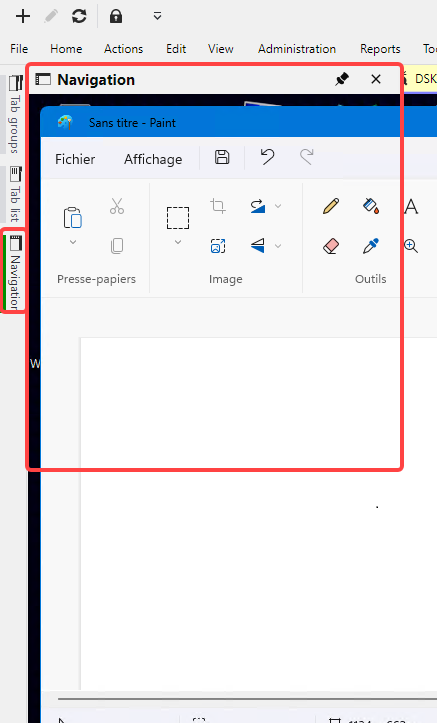
It should show this, currently it only does it when Dashboard is selected.
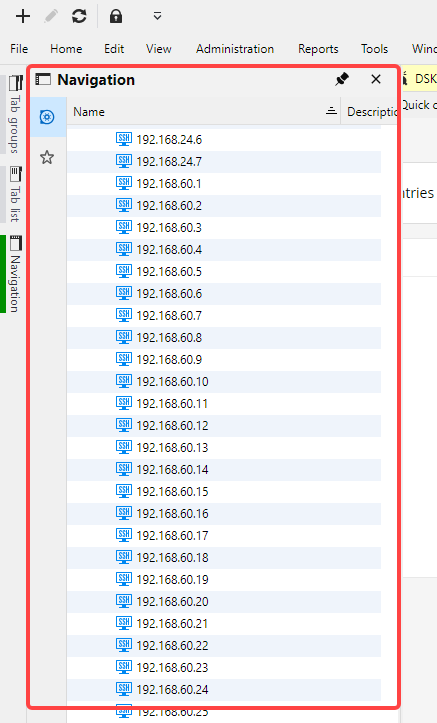
There is a regression since the new interface (since 2026.3.5): I used to be able to go to "Navigation list" and type directly some text to filter the list. Now I need to click on the 'Filter entries" field before typing the text.
Is it possible to use the mouse wheel to scroll through tabs ?
Hello,
I saw the release notes of 2026.3.5 and I jumped on it to try to scroll through tabs.
This is great ! Thank you.
Is it possible to have a smooth scrolling ? It's easier to keep track of mouvement. Currently, it "jumps" to the next page, instead of scrolling the list to the left or the right.
It's like it's doing a sort of "page up/page down", instead of a scroll.
For instance, if I have 22 tabs opened and 10 tabs displayed on screen, currently if I scroll 1 time, it jumps to the next 10. I can't see tabs 10 and 12 on the same screen. There is no in between.
Ideally, could it scroll 1 tab at a time ? (like in notepad++ for instance, or like on a webpage when you scroll up/down).
I have a few comments to help, if I may. Please let me know if there is a better way to share them:
1/ When I drag a tab, I can't drag it past the screen, the list doesn't slide when I reach the edge of the displayed tabs. It's very hard to move a tab to the end of the list for instance.
2/ I tried the "Shrink tabs to fit", it didn't manage to fit more than 18 tabs (out of 22). Is there a way to set a "minimum tab size" for this option ?
3/ Is there a way to drag the tabs using the list on the right (see screenshot):
or using the Tab list ?
Thank you
Is it possible to use the mouse wheel to scroll through tabs ?
Hello,
Good news, with our upcoming major release of 2026.3, this will be possible. We're planning to release the beta next week, with the stable release a few weeks after.
Regards,
@Hubert Mireault
Thank you for the update, I'll try it out as soon as it is available 🤩
Keep "Tab list" panel open when a connection is closed from the panel
Hi,
no worries, I was just wondering if it was one of these bugs that I could reproduce easily but not other persons :)
At least you can confirm what I saw, I'll give it a try in the next release.
Thank you
Keep "Tab list" panel open when a connection is closed from the panel
Hello,
I was please to give it a try, but didn't see any difference unfortunately.
I'm running 2026.2.11.0 64-bit (JIT) and when I press the "Close" icon in the tab list, the tab list auto collapses and disappears.
I need to move my mouse over the tab list in order to access the list again and close another one.
Keep "Tab list" panel open when a connection is closed from the panel
Hello,
great news, I'm looking forward to trying it.
Thank you
Is it possible to use the mouse wheel to scroll through tabs ?
Hi,
would it be possible to allow to use mouse wheel to scroll tabs left and right ?
Like in Notepad++ for instance.
On this example: placing the mouse on 1 tab (without clicking) and scrolling the wheel Up would slide the tabs to the left, to access the first tabs.
And moving the wheel Down would slide the tabs to the right, to access the tabs to the end.

Currently, when there are several tabs opened, it is not practical to access the first tabs, or the last.
You could click on the little arrow at the right end, but the connections are sorted by name, so it is hard to identify recognize the order and find the first or last for instance.
I know you can display the tabs on multiple rows, but then you lose a lot of space.
Ideally, using the mouse wheel to slide to the left or right would be really helpful.
Note: it would not switch to the previous or next tabs, it would only scroll the tabs list without changing the current connection.
Thank you
Keep "Tab list" panel open when a connection is closed from the panel
Hello,
just to be sure this issue is not forgotten, do you have an ETA ?
Thank you
GUI layout optimisation - Title bar
Thank you.
I'm glad you share the same idea, even though it is "only" to gain 30px, it still a lot of space that would be better used to display important information, from terminal or RDP.
I'm looking forward to seeing the results :)
GUI layout optimisation - Title bar
Hi,
would it be possible to optimise the wasted space in the title bar like some other apps do ?
For instance, to go from this:

to this:

This way, we could keep the menu (File, Home, Actions, Edit...) easily accessible and save ~30 pixels in height, to get more space for remote connections.
Thank you :)
Restore connections with their last status (connected ✅/disconnected❌)
Hello,
any info about restoring sessions in last known state ?
Or in "Disconnected" mode at least ?
Thank you :)
Keep "Tab list" panel open when a connection is closed from the panel
Thank you, this is great news, I'll wait for news updates from you :)
Restore connections with their last status (connected ✅/disconnected❌)
@megosu
Thank you for the clarifications,
I will check if I can get my hand on some hardware to reproduce your issue and will try to find a solution for that. I don't have any ETA for that at the moment, I'll keep you informed when there is any news regarding this.
@Vincent Forest
You could try Bluestack to run a virtual android on PC for instance, just a thought :)
However, I hope it won't keep you from adding the restore disconnect ;-)
Restore connections with their last status (connected ✅/disconnected❌)
Hi,
I did a few tests, sorry if you received many notifications.
I have a Samsung phone but I don't think it is related.
Apparently, it is related to Swiftkey keyboard.
The issue is: with Swiftkey keyboard, if I type "num" and select the word "number" from the suggestions, when I press the Save post, only "num" will be sent.
Restore connections with their last status (connected ✅/disconnected❌)
Hello,
Thank you for the request. Restoring disconnect should be easy, but remembering the last state will be more difficult. Unfortunately, we are not storing the state at the moment, but this is not impossible.
Regards
@David Hervieux
Hi,
I wanted to reply from my phone, but I don't know why, whenever I do, the answer appears empty once posted...
Unless I type letter by letter without using keyboard suggestion.
It has never worked on this forum and I never had this issue anywhere else, too bad :(
Have you ever heard about this ?
Regarding the suggestion, Restoring disconnect would already be amazing ! And if it is easy to do, then it is good news.
Of course, if later on, the state could be remembered, it would be even more helpful. Is it something that would be approved by the "change committee" ? :)
Keep "Tab list" panel open when a connection is closed from the panel
Hello,
I have noticed a strange behavior, which doesn't seem normal, and is not user friendly.
In the following panel, which I have set to auto-hide, whenever I click on one of the "Close" icon on the right, the whole panel disappears, which makes it more difficult to close another tab right away.
I then need to move the mouse again to "Tab list" on the left to get the panel back and then I can close another one.
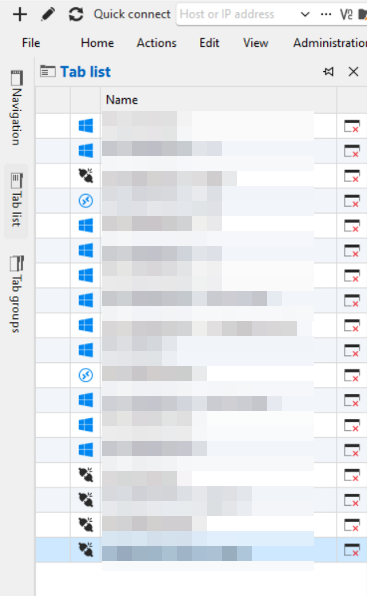
In my experience, having used side panels in other apps, it shouldn't disappear unless the mouse either move away from the panel, or if a click happens outside the panel.
But clicking anywhere in the panel, shouldn't make it disappear.
Is it something you can fix/enhance ?
This would be great and more consistent.
Thank you
Restore connections with their last status (connected ✅/disconnected❌)
Hello,
I have a small request regarding the Restore sessions feature.
Whenever we launch RDM, it displays a window called "Do you want to restore the last opened sessions?" with all the tabs which were open before closing RDM, and we can select which one to keep and open, which is great.
Would it be possible to add the 2 following options in this window and/or in main Settings ?
1/ restore the last tabs with their last status (if a tab was open but disconnected, restore the tab without connecting the session. And if a tab was connected, then connect it again after retore)
2/ restore all tabs but don't reconnect any.
And would it be possible to add a column with the last status in the retore Session window ? (connected/disconnected)
For instance, if a RDP or a SSH session was disconnected on a server when I closed RDM (for an update or whatever), then why would RDM try to connect it ?
I hope you'll find that these options make sense for your users, let me know if I can add anything.
Have a great day :)
Add a Disconnect ✂️ feature next to Reconnect (not a log off, just Disconnect to cut the connection)
Hello,
Thanks for the feedback. I went ahead and made the change so other session types will also support the "disconnect" button provided you've activated the option. I tested with VNC and it works well. Just note that for most types, there's effectively no difference between closing the entry and using "disconnect" as far as the remote connection goes, but it will allow you to more easily leverage the "keep tab opened on disconnect" feature (renamed to "disconnect action" more generally).
This change will be available in our next major version, 2026.1. We're currently planning to release this version in March.
Once this is available, it would be nice to hear your feedback on the feature.
Regards,
@Hubert Mireault
Dear Hubert,
I didn't notice your reply, but I read the changelogs today, when I saw the new version, and I was amazed to see exactly this !
I quickly updated, and I rushed to try it, this is so cool ! thank you
I came here to ask if it was a coincidence, that's when I saw your previous reply. I got my answer :)
I'm happy you saw the potential behind this request, and I'm sure a lot of users will be glad to have this and will use it without having any idea it was missing until now !
Do you have some kind of telemetry to know how much this will be used ?
Great stuff, thank you again 💪
Add a Disconnect ✂️ feature next to Reconnect (not a log off, just Disconnect to cut the connection)
Hi @Hubert Mireault
Just wanted to check if the same could be done with VNC instead of waiting for a complete overhaul.
It would cover 99% of my usage :) as I basically use RDP, VNC and SSH.
RDP, you added already, thank you again.
SSH, there is a way to do it.
But VNC, I often need to disconnect to prevent my clipboard content to be accessible, or to let the user do what he needs for some minutes without me spying on him, and then reconnect.
Having a Disconnect button on VNC sessions would be great.
Do you think it could be possible to add it ?
Thank you
Add a Disconnect ✂️ feature next to Reconnect (not a log off, just Disconnect to cut the connection)
Congrats to the team to provide spot on answers to us 👍
You don't find this everywhere...
Add a Disconnect ✂️ feature next to Reconnect (not a log off, just Disconnect to cut the connection)
I think you understand the matter very well.
Having a way to Disconnect/free the connection, but keep the tab open for next time, would be convenient in all types of connection, not only RDP. Even better if we don't have to enter any command in CLI. IMO, closing the remote connection is not the same as typing "EXIT" in CLI.
Adding such option on all types would give a more consistent experience.
Thank you again for adding this option to RDP so quickly :)👍
Add a Disconnect ✂️ feature next to Reconnect (not a log off, just Disconnect to cut the connection)
Thank you very much, this is perfect !
Thank you, thank you, thank you, thank you, thank you, thank you, thank you !
Is there a way to make it work globally now ? Like SSH, telnet, vnc...
Add a Disconnect ✂️ feature next to Reconnect (not a log off, just Disconnect to cut the connection)
Hi,
yes I believe it can be useful for all protocols.
For instance, you want to disconnect from SSH but keep the window open to scroll up and see previous output, or be able to reconnect quickly the next day, or close VNC to let the user check some sensitive documents, then reconnect when he gives you the green light.
It would be great to make it a standard option for all protocols.
However, if it is ready "only" for RDP in next version, it is a good start, please don't remove it in the meantime :)
Add a Disconnect ✂️ feature next to Reconnect (not a log off, just Disconnect to cut the connection)
This is EPIC ! :)
Will it work with everything and not only RDP ?
I'm refreshing the release notes every hour :)
Add a Disconnect ✂️ feature next to Reconnect (not a log off, just Disconnect to cut the connection)
Hello,
There's no way to track progress through public means (tickets like these are internal), but you can ask in this thread and we'll update you.
At the moment, we're seeing if we can fit this into either the second half of our roadmap for our 2026.1 version, or in-between two other tasks before that. We are also aiming to have this be cherry-picked to our stable branch so it can be available in a minor update for 2025.3, so you don't need to wait as long for this feature.
I can't give you an accurate estimate due to those reasons, but I hope this helps.
Regards,
@Hubert Mireault
thank you, this is great information already. I'll check the changelog hoping to see it coming to 2025.3 :)
Cheers