Add a Disconnect ✂️ feature next to Reconnect (not a log off, just Disconnect to cut the connection)
Add a Disconnect ✂️ feature next to Reconnect (not a log off, just Disconnect to cut the connection)
2 votes

Hi all,
following ticket:
https://forum.devolutions.net/topics/51315/is-it-possible-to-add-an-option-to-disconnect-but-keep-the-tab-open-#219738
I open this Feature request:
I often need to disconnect from a RDP without doing a log off, but I need to keep the tab open to connect easily later.
We have "Reconnect", would it be possible to add a "Disconnect" option ?
For instance, with RDP, "Log off", will actually end my session and close all the running programs, which is not at all the same as "disconnecting".
"Log off" is the equivalent of "Sign out".
Disconnect would simply leave the session as it is and cut the RDP connection.
What I "request" (humbly 😅 ) is to be able to stop/cut the connection from RDM directly and keep the tab open.
Basically, it would be an action in the menu, like "Reconnect", but it would be "Disconnect":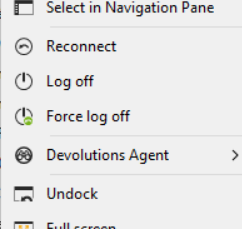
It is useful whenever I need to leave my spot on the server to another admin, and then reconnect later. Currently I have to close the tab to free the connection and then I have to find the host and reopen it later.
I hope this feature will get some support, as other Remote Session software have such feature already :)
Thank you
All Comments (23)
Hello,
Thank you for the request and the in-depth description of your scenario and why the available options aren't appropriate. I think it should be a simple addition on our end, and I've opened an internal ticket.
Regards,
Hubert Mireault
Hello,
Thank you for the request and the in-depth description of your scenario and why the available options aren't appropriate. I think it should be a simple addition on our end, and I've opened an internal ticket.
Regards,
@Hubert Mireault
thank you, this is great news !
Hello,
Thank you for the request and the in-depth description of your scenario and why the available options aren't appropriate. I think it should be a simple addition on our end, and I've opened an internal ticket.
Regards,
@Hubert Mireault
thank you, this is great news !
@megosu
hi @Hubert Mireault
is there a way to follow the progress of this request ? Would you have any ETA to share please ?
Thank you :)
Hello,
There's no way to track progress through public means (tickets like these are internal), but you can ask in this thread and we'll update you.
At the moment, we're seeing if we can fit this into either the second half of our roadmap for our 2026.1 version, or in-between two other tasks before that. We are also aiming to have this be cherry-picked to our stable branch so it can be available in a minor update for 2025.3, so you don't need to wait as long for this feature.
I can't give you an accurate estimate due to those reasons, but I hope this helps.
Regards,
Hubert Mireault
Hello,
There's no way to track progress through public means (tickets like these are internal), but you can ask in this thread and we'll update you.
At the moment, we're seeing if we can fit this into either the second half of our roadmap for our 2026.1 version, or in-between two other tasks before that. We are also aiming to have this be cherry-picked to our stable branch so it can be available in a minor update for 2025.3, so you don't need to wait as long for this feature.
I can't give you an accurate estimate due to those reasons, but I hope this helps.
Regards,
@Hubert Mireault
thank you, this is great information already. I'll check the changelog hoping to see it coming to 2025.3 :)
Cheers
Hello,
We've added a Disconnect feature, which will essentially break the connection with a remote session without forcefully closing the opened tab. Combined with the correct settings, this should provide the behavior you are looking for.
First, to display the option, you need to active it. It is located under File - Settings - Entry types - Sessionsb. In the available list, look for Show disconnect option. This will will display the option in the context menu found on the opened tabs of RDP sessions.
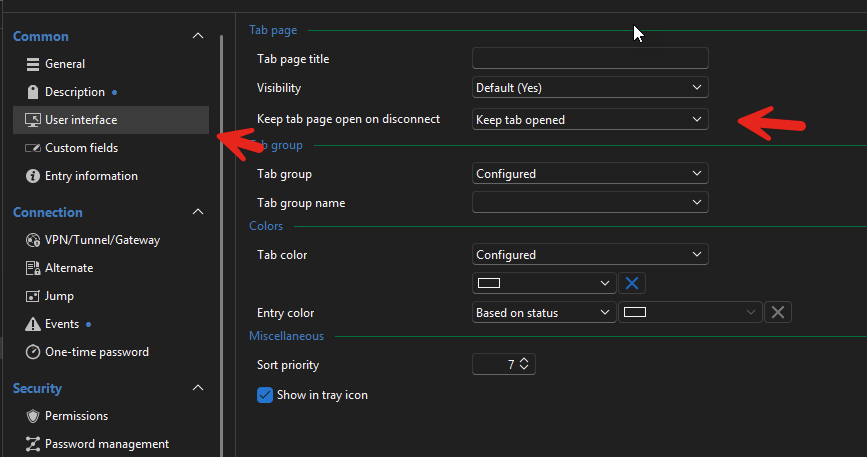
Second, make sure you have the Keep tab open on disconnect located in the User inteface properties of entries. (It can also be found in the same context menu as Disconnect, under Settings.
With both of these options active, using the Disconnect button will effectively cut off the connection (without logging off) and keep the tab opened.
You can expect these changes with the upcoming 2025.3.26 version.
Regards,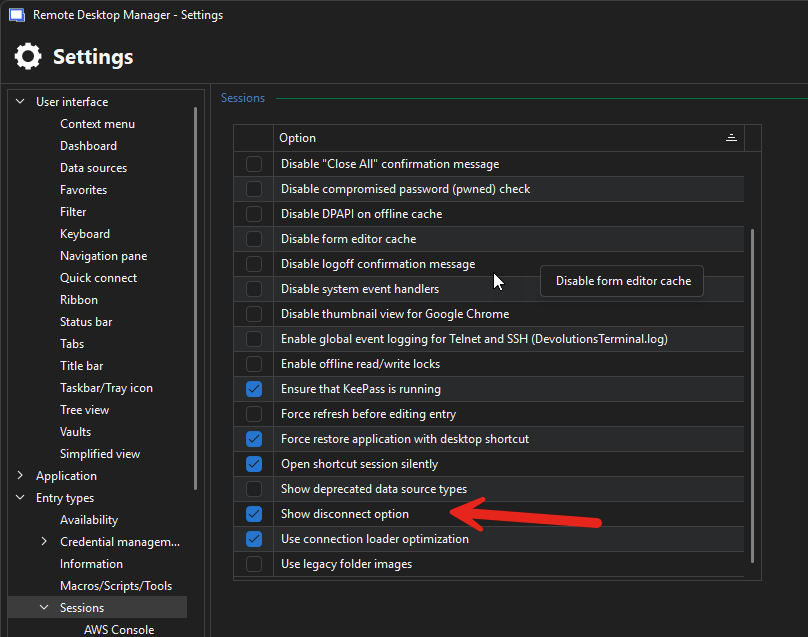
Jafran Majeau
00abc14b-10f5-458b-9ade-adc4648708d7.png
0a183c98-393f-4460-b177-565e116953a8.png
This is EPIC ! :)
Will it work with everything and not only RDP ?
I'm refreshing the release notes every hour :)
Hello,
Currently, only RDP supports Logging Off through RDM, meaning that other entry types shouldn't be logging off when disconnecting (at least not due to our interactions) . As such, the feature really only makes sense with an RDP session. If you find that it could be used on other entry types, let us know, and we will see what we can do.
Regards,
Jafran Majeau
Hi,
yes I believe it can be useful for all protocols.
For instance, you want to disconnect from SSH but keep the window open to scroll up and see previous output, or be able to reconnect quickly the next day, or close VNC to let the user check some sensitive documents, then reconnect when he gives you the green light.
It would be great to make it a standard option for all protocols.
However, if it is ready "only" for RDP in next version, it is a good start, please don't remove it in the meantime :)
Hello,
Thank you for being so patient!
I'm pleased to inform you that a new version of RDM (2025.3.26.0) has been released, with the feature included.
Latest Version: Download RDM
Please let us know if this works or if you encounter any issues.
Best regards,
Maxim Robert
Thank you very much, this is perfect !
Thank you, thank you, thank you, thank you, thank you, thank you, thank you !
Is there a way to make it work globally now ? Like SSH, telnet, vnc...
Hello,
As Jafran said, for now, this is only for RDP, but it doesn't mean we won't add it for other entries in the future.
From what I understand of your request, there's two parts to it:
For instance, you want to disconnect from SSH but keep the window open to scroll up and see previous output
Specifically for SSH, there is an option for the "Disconnect action" that you can configure to "keep open":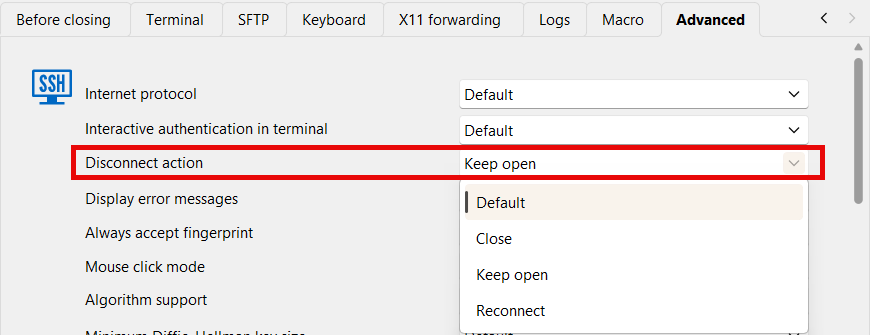
You can also configure this for all your SSH entries by keeping the value to Default which checks your local settings. You can change these local settings by going in File > Settings > Entry types > Sessions > Terminal: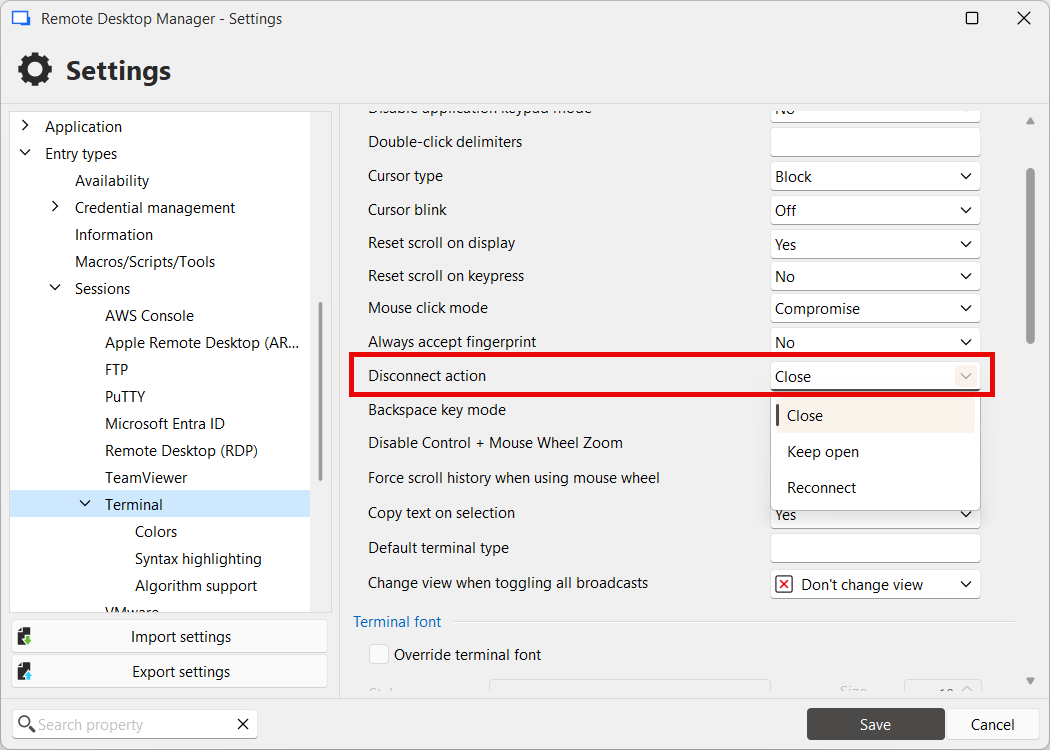
So, while you wouldn't have a "disconnect" action on that entry, if you typed for example "exit" in the terminal or lost connection, the tab would stay opened with its content still visible and scrollable.
or be able to reconnect quickly the next day, or close VNC to let the user check some sensitive documents, then reconnect when he gives you the green light.
More generally, for this part, we would have to support the "Keep tab page opened on disconnect" feature that RDP supports, but for other entries. If we had this, then the "disconnect" would make more sense to have, otherwise closing the tab is equivalent. Having this feature available for more entry types has been in my personal todo list for a while, so it would be nice to make some time for it. I'll note that this is something you'd be interested in.
If I missed something, let me know and I would be happy to address it.
Regards,
Hubert Mireault
3e002785-f367-4404-9b93-7026bb13405c.png
6e0d2be9-2e73-458c-9d0f-66cf2a785f11.png
I think you understand the matter very well.
Having a way to Disconnect/free the connection, but keep the tab open for next time, would be convenient in all types of connection, not only RDP. Even better if we don't have to enter any command in CLI. IMO, closing the remote connection is not the same as typing "EXIT" in CLI.
Adding such option on all types would give a more consistent experience.
Thank you again for adding this option to RDP so quickly :)👍
I agree this option should be added to all types. Also, related to this, on ssh when I disconnect (currently by typing exit in the CLI) The tab stays open with my session as I'd expect, however if I click Reconnect my session is closed and a new one opened, this same tab should be used with all my scrollback, I just want the session started back up. (similar to the "restart session" function in putty)
Hello,
How are you doing this reconnect? On my end, the same tab is kept with the same scrollback. Either through the reconnect button in the ribbon, or on the right click of the tab itself. Maybe there's a setting that's affecting this on your end, but I'm not exactly sure which one it might be as I couldn't find anything related to forcing this tab to perform a "full" reconnect (closing and reopening). Are you having your SSH go through Devolutions Gateway, perhaps? I think that might force a full reconnect.
Regards,
Hubert Mireault
Ah yes that's the difference, the SSH connection is going through the Devolutions Gateway, if I disable that then things work as expected. Of course, I need to use the Devolutions Gateway, so how can I adjust my setting to stop the tab from doing a "full" reconnect?
Thanks!
Hello,
At the moment it's a limitation when going through the Gateway and there's no setting to change how this works. I will open a ticket so we can see how we could improve this.
Regards,
Hubert Mireault
Congrats to the team to provide spot on answers to us 👍
You don't find this everywhere...
Hi @Hubert Mireault
Just wanted to check if the same could be done with VNC instead of waiting for a complete overhaul.
It would cover 99% of my usage :) as I basically use RDP, VNC and SSH.
RDP, you added already, thank you again.
SSH, there is a way to do it.
But VNC, I often need to disconnect to prevent my clipboard content to be accessible, or to let the user do what he needs for some minutes without me spying on him, and then reconnect.
Having a Disconnect button on VNC sessions would be great.
Do you think it could be possible to add it ?
Thank you
Hello,
Thanks for the feedback. I went ahead and made the change so other session types will also support the "disconnect" button provided you've activated the option. I tested with VNC and it works well. Just note that for most types, there's effectively no difference between closing the entry and using "disconnect" as far as the remote connection goes, but it will allow you to more easily leverage the "keep tab opened on disconnect" feature (renamed to "disconnect action" more generally).
This change will be available in our next major version, 2026.1. We're currently planning to release this version in March.
Once this is available, it would be nice to hear your feedback on the feature.
Regards,
Hubert Mireault
Hello,
Thanks for the feedback. I went ahead and made the change so other session types will also support the "disconnect" button provided you've activated the option. I tested with VNC and it works well. Just note that for most types, there's effectively no difference between closing the entry and using "disconnect" as far as the remote connection goes, but it will allow you to more easily leverage the "keep tab opened on disconnect" feature (renamed to "disconnect action" more generally).
This change will be available in our next major version, 2026.1. We're currently planning to release this version in March.
Once this is available, it would be nice to hear your feedback on the feature.
Regards,
@Hubert Mireault
Dear Hubert,
I didn't notice your reply, but I read the changelogs today, when I saw the new version, and I was amazed to see exactly this !
I quickly updated, and I rushed to try it, this is so cool ! thank you
I came here to ask if it was a coincidence, that's when I saw your previous reply. I got my answer :)
I'm happy you saw the potential behind this request, and I'm sure a lot of users will be glad to have this and will use it without having any idea it was missing until now !
Do you have some kind of telemetry to know how much this will be used ?
Great stuff, thank you again 💪
Hello,
Thanks for the feedback, I'm glad that this works well for you and fulfills your needs! We always try and keep user feedback in mind and try to fit in quick wins in-between bigger developments, when time allows. For bigger requests, it may take more time or we may wait for more user feedback before starting development, if it makes sense for our products and vision. It's important to us that we keep that communication channel open and monitored, it's been core to the development of Remote Desktop Manager and Devolutions for over a decade now, and I think our users appreciate this a lot.
To answer your question, at the moment we don't have telemetry specifically for this, as we're selective with the kind of information we log. It doesn't mean we won't eventually add it though, but for now we don't see a need to track this information.
Regards,
Hubert Mireault
Thank you! I should have asked for that years ago, apparently.
Also, I didn't know options could be added and remove from the menu.