Regression since the new interface

Hi,
I tried the drag and drop from the drop down list, it is perfect !
What would also be good is to be able to sort them by Name for instance.
I tried to drag a tab beyond the screen, and it scrolls naturally, also great ! thank you
I tried to use the mouse wheel to scroll the tabs, it still jump 1 "page" at a time, instead of smooth scrolling. Is it something you can allow ?
Small notes:
the new interface is great but has a lot of bugs. I get weird error message sometimes, like this: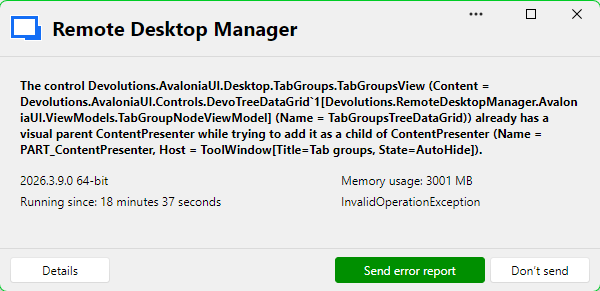
InvalidOperationException - The control Devolutions.AvaloniaUI.Desktop.TabGroups.TabGroupsView (Content = Devolutions.AvaloniaUI.Controls.DevoTreeDataGrid`1[Devolutions.RemoteDesktopManager.AvaloniaUI.ViewModels.TabGroupNodeViewModel] (Name = TabGroupsTreeDataGrid)) already has a visual parent ContentPresenter while trying to add it as a child of ContentPresenter (Name = PART_ContentPresenter, Host = ToolWindow[Title=Tab groups, State=AutoHide]).

   at Avalonia.Visual.Avalonia.Collections.IAvaloniaListItemValidator<Avalonia.Visual>.Validate(Visual item)
   at Avalonia.Controls.Presenters.ContentPresenter.UpdateChild(Object content)
   at Avalonia.Controls.Presenters.ContentPresenter.ContentChanged(AvaloniaPropertyChangedEventArgs e)
   at Avalonia.Animation.Animatable.OnPropertyChangedCore(AvaloniaPropertyChangedEventArgs change)
   at Avalonia.PropertyStore.EffectiveValue`1.NotifyValueChanged(ValueStore owner, StyledProperty`1 property, T oldValue)
   at Avalonia.PropertyStore.EffectiveValue`1.SetAndRaise(ValueStore owner, IValueEntry value, BindingPriority priority)
   at Avalonia.PropertyStore.ValueStore.Avalonia.Data.Core.IBindingExpressionSink.OnChanged(UntypedBindingExpressionBase instance, Boolean hasValueChanged, Boolean hasErrorChanged, Object value, BindingError error)
   at Avalonia.Data.TemplateBindingExpression.PublishValue()
   at Avalonia.PropertyStore.EffectiveValue`1.NotifyValueChanged(ValueStore owner, StyledProperty`1 property, T oldValue)
   at Avalonia.PropertyStore.ValueStore.SetValue[T](StyledProperty`1 property, T value, BindingPriority priority)
   at Devolutions.AvaloniaUI.Docking.DockingHostView.RefreshPaneContentOnce(ToolWindow toolWindow)
   at Devolutions.AvaloniaUI.Docking.DockingHostView.ConvertActiproAutoHidePopup(ToolWindow toolWindow)
   at Avalonia.Threading.DispatcherOperation.InvokeCore()
------------------------ extended stack ------------------------
   at Devolutions.RemoteDesktopManager.AvaloniaUI.ViewModels.ErrorMessageViewModel.LoadParameters(ErrorMessageParameters parameters)
   at Devolutions.RemoteDesktopManager.AvaloniaUI.ViewModels.ErrorMessageViewModel..ctor(ErrorMessageParameters parameters)
   at Devolutions.RemoteDesktopManager.Managers.UIManager.<>c__DisplayClass218_0.<ShowErrorMessage>b__0()
   at Avalonia.Threading.Dispatcher.Invoke[TResult](Func`1 callback, DispatcherPriority priority, CancellationToken cancellationToken, TimeSpan timeout)
   at Avalonia.Threading.Dispatcher.Invoke[TResult](Func`1 callback)
   at Devolutions.RemoteDesktopManager.Managers.UIManager.ShowErrorMessage(ConnectionEngine engine, Exception exception, String message, String details, String title, String xml)
   at Devolutions.RemoteDesktopManager.Managers.UIManager.ShowErrorMessage(ConnectionEngine engine, Exception exception, String message, String title)
   at Devolutions.RemoteDesktopManager.Managers.LogManager.HandleException(Exception exception)
   at Devolutions.RemoteDesktopManager.Managers.LogManager.OnThreadException(Object sender, DispatcherUnhandledExceptionEventArgs e)
   at Avalonia.Threading.Dispatcher.CatchException(Exception e)
   at Avalonia.Threading.Dispatcher.TryCatchWhen(Exception e)
   at Avalonia.Threading.DispatcherOperation.InvokeCore()
   at Avalonia.Threading.CulturePreservingExecutionContext.CallbackWrapper(Object obj)
   at System.Threading.ExecutionContext.RunInternal(ExecutionContext executionContext, ContextCallback callback, Object state)
   at Avalonia.Threading.DispatcherOperation.Execute()
   at Avalonia.Threading.Dispatcher.ExecuteJobsCore(Boolean fromExplicitBackgroundProcessingCallback)
   at Avalonia.Win32.Win32Platform.WndProc(IntPtr hWnd, UInt32 msg, IntPtr wParam, IntPtr lParam)
   at Windows.Win32.PInvoke.DispatchMessage(MSG* lpMsg)
   at System.Windows.Forms.Application.LightThreadContext.FPushMessageLoop(msoloop uReason)
   at System.Windows.Forms.Application.LightThreadContext.RunMessageLoop(msoloop reason, Boolean fullModal)
   at System.Windows.Forms.Application.ThreadContext.RunMessageLoopInner(msoloop reason, ApplicationContext context)
   at System.Windows.Forms.Application.Run()
   at Devolutions.RemoteDesktopManager.Program.RunApplication(String[] args)
   at Devolutions.RemoteDesktopManager.Program.Main(String[] args)
It happens mainly when I click on the "Tab groups", "Tab list" or "Navigation" on the left:
Also, with 2026.3.9.0, I can't access my Navigation list anymore, it looks like it goes behind the current remote session window.
However, if I switch to the dashboard, then the navigation list shows on top as it should.
See screenshots: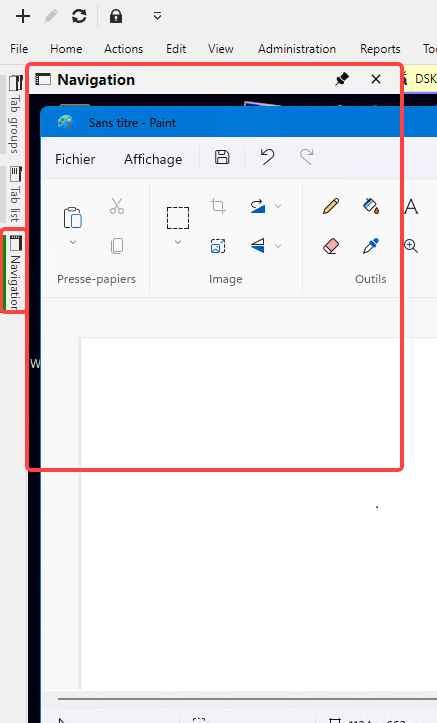
It should show this, currently it only does it when Dashboard is selected.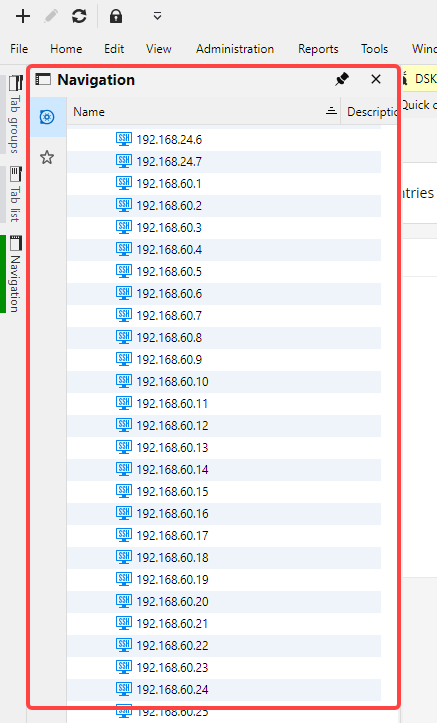
There is a regression since the new interface (since 2026.3.5): I used to be able to go to "Navigation list" and type directly some text to filter the list. Now I need to click on the 'Filter entries" field before typing the text.
5a9fc917-a74f-41d8-bc89-8e922d925e07.png
8ec4a05b-5871-48ab-9c14-7133f2524f91.png
01c11c30-ab40-439b-b086-4b8bc8d220a0.png
fb505cb1-60c6-4532-8573-b408f9d6827d.png
All Comments (2)
Hi,
I will start by addressing the different issues you reported:
- We created a ticket for the error message that appears when interacting with the side-menu options (“Tab groups,” “Tab list,” or “Navigation”).
- Good news regarding the navigation list: this issue has already been reported, and the fix should be available starting with version 2026.3.10.
- We already have a ticket for the focus issue.
We’ll keep you updated as fixes for these three issues become available.
Regarding your two requests, could you provide more context about what you would like to have sorted by name and what behavior you expect from smooth scrolling?
Screenshots—or a short screen recording for the scrolling request—would be very helpful. We want to make sure we fully understand the desired behavior before implementing anything.
Thank you for reporting these issues.
Regards,
Jean-Francois Duchesne
Hi,
I have an update on the three issues you reported:
- The navigation list fix has been available since version 2026.3.10.
- The focus issue should be fixed in our latest update, version 2026.3.13.
- The side-menu error may also have been resolved by changes in that update, though it was not fixed directly.
Could you let me know if you still experience any of these issues after updating to 2026.3.13? I’ll reopen the relevant tickets if needed.
Regards,
Jean-Francois Duchesne