Keep "Tab list" panel open when a connection is closed from the panel
Keep "Tab list" panel open when a connection is closed from the panel
1 vote

Hello,
I have noticed a strange behavior, which doesn't seem normal, and is not user friendly.
In the following panel, which I have set to auto-hide, whenever I click on one of the "Close" icon on the right, the whole panel disappears, which makes it more difficult to close another tab right away.
I then need to move the mouse again to "Tab list" on the left to get the panel back and then I can close another one.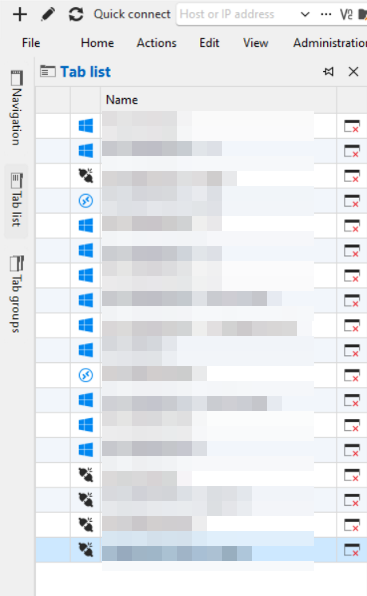
In my experience, having used side panels in other apps, it shouldn't disappear unless the mouse either move away from the panel, or if a click happens outside the panel.
But clicking anywhere in the panel, shouldn't make it disappear.
Is it something you can fix/enhance ?
This would be great and more consistent.
Thank you
0a0cf9f2-3b3d-4417-8db4-73b91ba975be.png
Recommended Answer
Hello,
I re-investigated the issue and it seems that something in our architectural changes broke it. I've applied a more robust fix and you can expect it with the upcomcing 2026.2.13 version.
I apologize for the inconvenience.
Regards,
Jafran Majeau
All Comments (12)
Hello megosu,
Thank you for your report and for the detailed explanation.
We can confirm the behavior on our side as well. We are currently reviewing it internally with our developers to determine whether we can improve the auto-hide Tab list so it stays open while you close tabs and only hides when you move away or click outside.
We will update you as soon as we have more information or a decision on next steps.
Best regards,
Eduard Sepulveda Lopez
Thank you, this is great news, I'll wait for news updates from you :)
Hello megosu,
Thank you for your patience.
Your post has been moved to the Feature Request section. Our developers will review it, and we will let you know as soon as we have any updates.
Best regards,
Eduard Sepulveda Lopez
Hello,
just to be sure this issue is not forgotten, do you have an ETA ?
Thank you
Hello,
No ETA at the moment but I will bump the priority with the dev team and see if we can investigate. At the moment we have to see if the UI framework we use is a limiting factor here or if we can properly address this.
Regards,
Hubert Mireault
Hello,
I've implemented a fix for this specific issue. You can expect this to take effect with the upcoming 2026.2.10
Regards,
Jafran Majeau
Hello,
great news, I'm looking forward to trying it.
Thank you
Hello,
Thank you for being so patient!
I'm pleased to inform you that a new version of RDM (2026.2.11.0) has been released, featuring the requested feature.
Latest Version: Download RDM
Please let us know if this works or if you encounter any issues.
Best regards,
Maxim Robert
Hello,
I was please to give it a try, but didn't see any difference unfortunately.
I'm running 2026.2.11.0 64-bit (JIT) and when I press the "Close" icon in the tab list, the tab list auto collapses and disappears.
I need to move my mouse over the tab list in order to access the list again and close another one.
Hello megosu,
Thank you for testing and for letting us know. I'm sorry the fix didn't have the expected effect on your end.
I've reported this back to our developer so they can investigate further. We'll follow up here as soon as we have more information.
Best regards,
Eduard Sepulveda Lopez
Hello,
I re-investigated the issue and it seems that something in our architectural changes broke it. I've applied a more robust fix and you can expect it with the upcomcing 2026.2.13 version.
I apologize for the inconvenience.
Regards,
Jafran Majeau
Hi,
no worries, I was just wondering if it was one of these bugs that I could reproduce easily but not other persons :)
At least you can confirm what I saw, I'll give it a try in the next release.
Thank you