some_random_username_1938
v2026.3.16.0 Some annoyances in the favorites menu
Regarding the startup, I realize the app will try to start wherever I left off. So I did some more testing
Start into a normal vault -> slow (RDM says 454 entries in the lower right corner)
Start into favorites menu -> slow (RDM still says 454 entries in the lower right corner. But when I mark all favorites and right click them, I have 52 entries selected)
Start into a smaller normal vault -> fast (RDM says 5 entries)
Start into favorites menu again -> fast (RDM says 5 entries)
I guess this means RDM loads my last vault, even if I start into the favorites menu. And if its a big vault, startup will be slow.
I can also add that switching to that big vault in the vaults menu is relatively fast considering the size, maybe 1-2 seconds.
No sessions were opened / reopened during those tests.
v2026.3.16.0 Some annoyances in the favorites menu
Hi again. Doesn't seem like this slowness is recorded in the startup logs. According to the progress bar at the bottom, its mostly on the "loading connections" step that takes time (it comes after doing the Azure login to the database).
=== Main Thread ===
Preload deps: BusinessManager : 315 ms
Load options...
Load options: wait for preload : 235 ms
Load options apply: set language : 5 ms
Load options apply: ApplyOptions : 29 ms
Load options : 296 ms
Load policies : 19 ms
Update manager init : 12 ms
Avalonia BuildAvaloniaApp : 385 ms
Avalonia SetupWithClassicDesktopLifetime...
AvaloniaApp: Initialization.Initialize : 115 ms
AvaloniaApp: AvaloniaXamlLoader.Load : 1488 ms
Avalonia SetupWithClassicDesktopLifetime : 2175 ms
FileManager.GetOfflineDataDirectory...
FileManager.GetLocalAppDataDataSourceDirectories : 1 ms
FileManager.GetOfflineDataDirectory : 1 ms
Initialize phase two...
Application tools init : 4 ms
Application communicator start : 366 ms
Now agent host init : 9 ms
Hook manager init : 1 ms
Desktop extension init : 2 ms
Initialize phase two : 698 ms
Create main form...
Main form constructor...
Apply styles : 1 ms
Menu tree (InitializeItems)...
Menu tree: main menu items : 108 ms
Menu tree: session action registry : 137 ms
Menu tree (InitializeItems) : 245 ms
Context menus : 2 ms
Decorators...
Decorators: Status bar host : 364 ms
Decorators: NavBar tree...
NavBar: new FreNavigationPanel...
NavBar panel: navigation bar : 56 ms
NavBar panel: connection tree ctor + LoadEngine...
BeginUpdate...
PreCreateGroups : 0 ms - Run count : 1
BeginUpdate : 1 ms
BeginUpdate...
PreCreateGroups : 0 ms - Run count : 1
BeginUpdate : 0 ms
NavBar panel: connection tree ctor + LoadEngine : 241 ms
NavBar panel: data source selector layout : 184 ms
NavBar: new FreNavigationPanel : 484 ms
Decorators: NavBar tree : 485 ms
Decorators: Status bar...
Status bar: create items : 4 ms
Status bar: context options : 1 ms
Status bar: subscribe manager events : 3 ms
Status bar: load options : 1 ms
Decorators: Status bar : 11 ms
Decorators: Dock menus : 6 ms
Decorators : 867 ms
Ribbon action wiring : 8 ms
Avalonia top section...
Top section: title bar view build : 69 ms
Top section: view build : 5 ms
Top section: apply ribbon visibility...
Top section: content build...
RibbonView InitializeComponent (tab headers) : 7 ms
Top section: content build : 10 ms
Top section: apply ribbon visibility : 10 ms
Avalonia top section : 85 ms
Main form constructor : 1398 ms
Create main form : 1398 ms
BeginUpdate...
PreCreateGroups : 0 ms - Run count : 1
BeginUpdate : 0 ms
BeginUpdate...
PreCreateGroups : 0 ms - Run count : 1
BeginUpdate : 0 ms
Docking host: view model : 88 ms
Docking host: view build : 21 ms
Docking host: tab group bar : 1 ms
Docking view: apply layout : 102 ms
Docking view: synchronize documents : 2 ms
OfflineManager.GetDataSourceSettings : 5 ms
BeginUpdate...
PreCreateGroups : 0 ms - Run count : 1
BeginUpdate : 0 ms
BeginUpdate...
PreCreateGroups : 0 ms - Run count : 1
BeginUpdate : 0 ms
FrmMainDocumentManager.SetControlStates...
Main...
SessionMenuManager.SetControlStates...
SetControlStatesCustomFolder : 1 ms
SetControlStatesExportMenu : 2 ms
SessionMenuManager.SetControlStates : 8 ms
EmbeddedMenuManager.SetControlStates : 5 ms
MainMenuManager.SetControlStates...
SetControlStatesFile : 7 ms
SetControlStatesReportReportsMenu : 2 ms
MainMenuManager.SetControlStates : 15 ms
Decorators : 29 ms
Main : 59 ms
Ribbon action states (fan-out) : 113 ms
FrmMainDocumentManager.SetControlStates : 183 ms
Top section: content build...
Ribbon action states (fan-out) : 2 ms
Top section: content build : 2 ms
RefreshDataSources : 1 ms
=== Thread 7 (MainUIThread) ===
Preload: MigrateFreeOptions : 1 ms
Preload: DoLoadOption...
DoLoadOption: deserialize : 949 ms
DoLoadOption: InitializeOptions : 5 ms
Preload: DoLoadOption : 954 ms
Preload: DoLoadOptionEncryption : 25 ms
=== Thread 9 (MainUIThread) ===
Preload: DoLoadOptionExtension : 755 ms
=== Thread 10 (MainUIThread) ===
Preload: DoLoadOptionAnalytics : 736 ms
v2026.3.16.0 Some annoyances in the favorites menu
I tested v2026.3.16.0 recently and there's some annoyances in the favorites menu (my old version was 2026.2.17.0). I have Azure Database datasource.
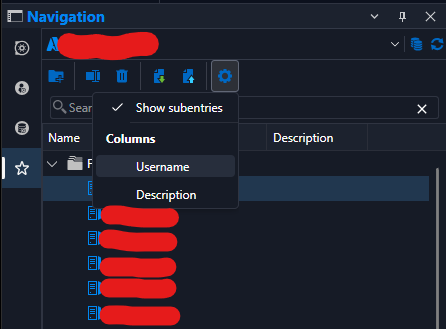
There's new Username and Description fields. By default, they take up space and cut off entry names.
a) Which is why I wanna turn them off. But even if I turn them off, they are still there (see picture).
b) The description field often shows up as empty, even if there is a description. Sometimes it shows.
c) Latency. When I single click favorite entries. there's a 1-2 second hang before it gets selected. In 2026.2.17 it happens instantly. (There's also a similar latency when opening the favorites menu by clicking the star icon, but this was also there in the old version). FYI I have around 50 favorites.
Also, when starting the app its often so slow that windows adds the "is not responding" message in the window.
I measured it to 34 seconds (including selecting datasource, and azure login (without writing the password, since it was already logged in). The same user flow took 24 seconds on the 2026.2.17.0, and it did not show a "not responding" message.
None of these are big issues but I thought I'd report them anyway, and I mainly wanted to report nr 1 cause that looks like a bug.
Your RDM is updated-message
Actually, the same page appears on the newest version also 2026.2.17.0.
Your RDM is updated-message
Hello. Our users are complaining about a "Your RDM is outdated" message on the "getting started" dashboard.
We upgraded to 2026.2.11.0 before we went on summer vacation and newest version now is 2026.2.17.0. That's not a huge difference? Has something changed in the release model, how long can we expect a version to be considered supported?
Also is there a registry key to disable the page, I cannot find one here: Apply policies (GPOs) | Devolutions RDM | Product guides & reference

After upgrading to 2026.2.11.0. Some users fail to login to RDM Azure SQL database (Cannot use 'Authentication=Active Directory Interactive' with 'Password' or 'PWD' connection string keywords)
Nice. Workaround seems to work. Thanks for quick response.
After upgrading to 2026.2.11.0. Some users fail to login to RDM Azure SQL database (Cannot use 'Authentication=Active Directory Interactive' with 'Password' or 'PWD' connection string keywords)
Some users are not able to use RDMs Azure SQL database after we pushed out version 2026.2.11.0 (old version: V2025.2.29.0). Error message from the "details" button:
System.ArgumentException: Cannot use 'Authentication=Active Directory Interactive' with 'Password' or 'PWD' connection string keywords.
at Microsoft.Data.SqlClient.SqlConnectionString..ctor(String connectionString)
at Microsoft.Data.SqlClient.SqlConnectionFactory.GetConnectionPoolGroup(DbConnectionPoolKey key, DbConnectionPoolGroupOptions poolOptions, DbConnectionOptions& userConnectionOptions)
at Microsoft.Data.SqlClient.SqlConnection.ConnectionString_Set(DbConnectionPoolKey key)
at Microsoft.Data.SqlClient.SqlConnection.set_ConnectionString(String value)
at Microsoft.Data.SqlClient.SqlConnection..ctor(String connectionString)
at Devolutions.RemoteDesktopManager.Business.DataSources.SQLServerConnectionDataSource.CreateDbConnection(String connectionString, Boolean openConnection)
at Devolutions.RemoteDesktopManager.Business.DataSources.SQLServerConnectionDataSource.TestConnection(String userName, String domain, String password)
I have tried:
Affected users on my computer = works.
Downlading binary / zip version of RDM on affected user. = Same problem there
Removing %localappdata%\Devolutions folder and uninstalling / reinstalling the program on affected user = Did not help
We are using login mode "Active Directory Interactive (with MFA support)".
Any advice what to look for from here?
OpenVPN - On Session Close problem
I have now tested with the portable Beta. Yes, the issue happens there as well.
OpenVPN - On Session Close problem
PS. Tried changing the VPN settings on an entry to: close "confirm disconnection". And the same thing happens (It doesn't ask for any confirmation either)
OpenVPN - On Session Close problem
Hello. We upgraded from 2025.1.something to 2025.2.29.0 and we have the same problem except we use VPN type SSH link. It's set to close "on connection close". After we close a connection, the logo in the navigation pane indicates that its still open, so opening it again doesn't work (nothing happens). As a workaround, we can right click the entry and click "close" or "reconnect" to be able to open it again.
I also just tried upgrading to 2025.2.30.0 and the problem still exists.
Azure Authetication gives ERR_CONNECTION_RESET when trying to Open RDM
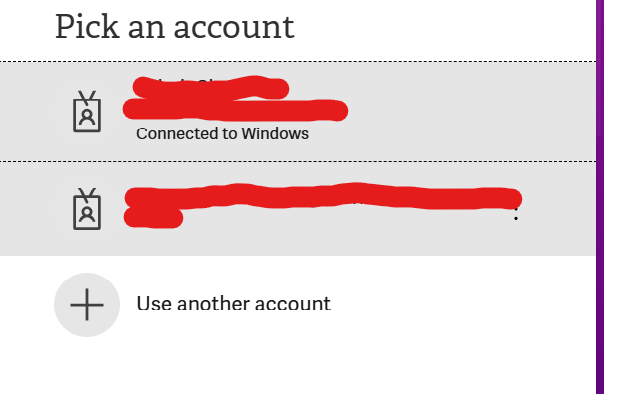
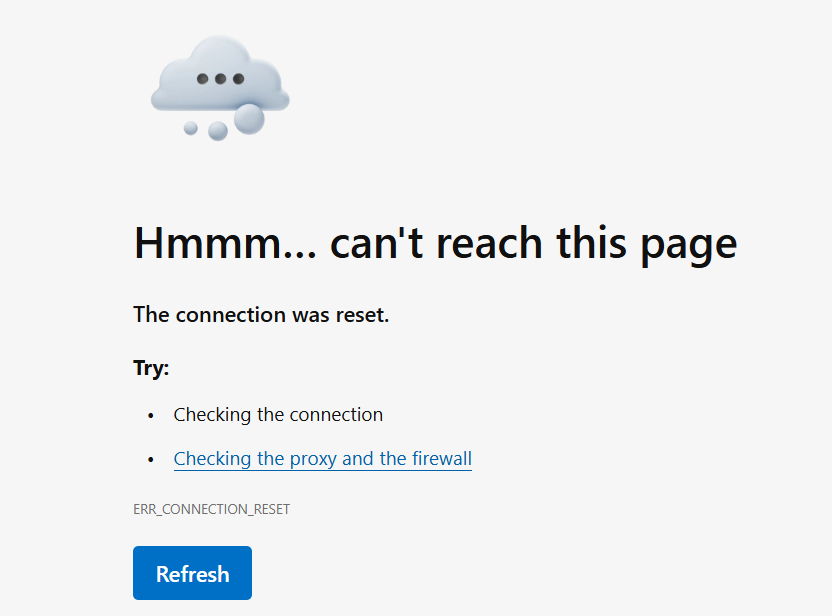
Hello. I have a user who aren't able to open the RDM application on his PC. We use Azure database so when we open the RDM app an Edge window pops up and asks for Microsoft login. When he has clicked on his user (that is already logged in since its the same user he uses to log on to windows) he gets redirected to localhost and some random port (I assume this is when Azure sends information back to the RDM client). However that leads to an "Hmm.. cant read this page. The connection was reset (ERR_CONNECTION_RESET)". Normally it says something like "authentication successful, you can close the window). Anyone have seen any such issues or have any troubleshooting tips? It works fine for the same user with another computer. RDM version 2025.1.41.0