
kevz
PostgreSQL as a Database for Devolutions Server (DVLS)
As the title suggests, it would be really good to see Devolutions introduce the ability to have the back-end database for a DVLS deployment be PostgreSQL instead of depending on Microsoft SQL Server.
You've already made some headway by providing a method for DVLS itself to be installed on Linux as per Install Devolutions Server for Linux | Devolutions Server | Devolutions Documentation and ScriptLibrary/DVLSForLinux at main · Devolutions/ScriptLibrary -- but it would be fantastic to see it taken a step further. For self-hosted infrastructure that is air gapped and does not have direct internet access (i.e., has no potential to leverage Devolutions Workspace/Hub, or other SaaS components which require internet access, etc), this would drastically reduce the compute requirements for running a highly available and fault tolerant DVLS deployment in such an environment without cumbersome MSSQL servers with costly licensing requirements.
Companies such as Veeam realized this a few years ago and have since transitioned to PostgreSQL being the preferred database type on greenfield deployments after more than two decades of Microsoft SQL Server Express (or Standard/Enterprise)~ being the defacto (and only) choice.
While I don't necessarily expect that Devolutions would go down the same path as Veeam and deliver an entire pre-hardened, vendor-managed (STIG compliance), secure-by-design appliance such as with the newer Veeam Software Appliance (Veeam Software Appliance: Fast, Secure, and Simplified) (though, I would love it if Devolutions were considering or working on something like this), simply adding PostgreSQL as a supported database type for hosting the Devolutions Server (DVLS) database would be a really big improvement that we would be excited to see.
Web Session Entry Template Ignores Host Custom Host Port Variable
Yes this is happening on several different machines I have tested with all on the same versions.
Uncertain as to when this specifically started as I hadn't been testing entry templates like this prior to 2025.2.30.0.
Using a SQLite solo data source.
Web Session Entry Template Ignores Host Custom Host Port Variable
As the title suggests, I am using Host Entries with linked (session) Entry templates from a data source's shared vault.
This is happening on Windows, Remote Desktop Manager 2025.2.30.0 (64bit). I haven't tested the issue in other versions.
Unlike a RDP or SSH session entry, where there is a bespoke port setting on the "Common > General > General" entry properties, a Web Session entry doesn't have this.
So there are two options to address this on a regular/non-templated Web Session entry, either define the website like https://mysite.example:1234, or https://mysite.example:$PORT$, where $PORT$ is pulled from "Advanced > Advanced > Advanced > Custom host port" entry properties in this scenario. Both of these methods work exactly as expected when launching an entry like this.
However, when using a Host Entry and linking a Web Session Entry Template to the Host, it appears that "Advanced > Advanced > Advanced > Custom host port" of the Host Entry properties is not respected. I have tried every combination I can think of when configuring both the Host Entry properties and the Web Session Entry Template properties and I can't seem to get it to properly apply/inherit the "Custom host port" from the Host Entry, and unless I set the "Custom host port" on the Web Session Entry Template, then $PORT$ always seems to return 80. The template is also using $NAME$ as part of the defined website URL, which is correctly pulling the $NAME$ variable of the Host Entry. So it looks like https://$NAME$:$PORT$.
When I use the Variables "browser" when editing the properties of the Host Entry, I see the correct custom port number reflected in $PORT$. This is the same for when I just have a regular Web Session Entry that is not templated or inheriting any other configurations, but yeah, the template launched from the Host Entry doesn't seem to pick this up.
In the "Common > General > General" settings of the Host Entry, I have tried setting/unsetting Use template information; the other two options here are using settings from the template.
In the "Common > Template settings > Usage" settings of the Web Session Entry Template, I have tried all three combinations of the Port usage in tandem with changing the Host Entry's Use template information setting, with no change. It always returns 80.
If I set the Host Entry to not inherit the host from the template and instead set $NAME$:$PORT$, then this kind of works for launching the Web Session Entry Template, but naturally breaks any other templates because example.host:22 naturally isn't a valid hostname.
Enhance/Expand "User Credentials"/"Local Credentials"
Hi Min,
User Vaults certainly seem to fit the bill, however, that is only the case when an advanced data source is being used.
In my particular scenario, a lot of endpoints where RDM is installed don't necessarily have direct access or line of sight to an advanced data source but rather are used to jump into multiple other environments where an advanced data source would then be accessible. Large Service Providers would likely also encounter similar limitations, though it's largely dependent on how the management infrastructure is managed/interconnected with customer tenants.
User Vaults really just seem like what "User Credentials"/"Local Credentials" should be, without the need for an advanced data source. We have licensing, but yeah, User Vaults being tied specifically to advanced data sources is problematic.
Enhance/Expand "User Credentials"/"Local Credentials"
Currently, in "File" > "My account settings" > "User credentials" (or "Local credentials"), exists a limited set of entries intended for the user's unique credentials. Right now there is:
My personal credentials
My privileged account
My personal SSH key
And, while "My personal SSH key" can only be a SSH key, the other two options can be:
API key
Certificate (X.509)
Custom
One-time password (OTP)
Password list
Secret
SSH key
Username and password
In environments where a user has multiple accounts (many reasons for this, such as separation of privileges, or regulatory requirements stating that certain user types cannot login to certain system types, etc), this is quite limiting. Not only could a user foreseeably require multiple different "personal credentials" as well as "privileged accounts", but each of those likely also have associated API keys, certificates, secrets, SSH keys, OTP entries, etc.
Existing documentation refers to the fact that these objects are stored in a Credentials.rdt file (https://docs.devolutions.net/rdm/commands/file/my-account-settings/my-personal-credentials/). Possibly, as a way to address this limitation, I think it would be good to see something like the User credentials section expanded to behave more like a typical vault, which is limited to Credential-type entries, and sessions in local datasources/advanced datasources (with local overrides)/etc, may perform an action such as setting the credentials to "Linked (Credential Vault)".
Something else I would like to see added (separately/independently of the above) is a check on-launch to see whether or not the user has got a "personal credential" and/or a "privileged account" set (ideally, there should be options to set the check for one or the other, or both). I imagine this check working a similar way to when the group policy for "Force login" is set -- if it is enabled without also configuring either "Force Windows credentials and currently logged on username and domain" or "Force application password", then on first launch, the user is prompted which of these two options they would like to use (and to set a password in the instance of application password).
SSH - Public key authentication with OpenSSH stopped working after update to 2025.2.13.1
Is there a timeline on when the fix is expected to be published for this? Running 2025.2.13.1, and the PPK is version 3, encountering the same issue.
RemoteDesktopManager.exe won't run - 2025.1.25.0 (64-bit)
Hi Richard,
I have synced the update and deployed the updated package to my fleet, and I am no longer seeing the same issues experienced with 2025.1.25.0. It looks like the problem is resolved.
RemoteDesktopManager.exe won't run - 2025.1.25.0 (64-bit)
Preinstall dotNet desktop runtime 8 and 9!!
Rename the File PatchMyPC-dotNet8Check.ps1 to PatchMyPC-dotNetCheck.ps1 (get the location from "Content Location" in the Application Entry in SCCM)
Redistribute the content and it should work, good luck :)
My RDM package created by PMP Publisher has both the signed scripts for PatchMyPC-dotNetCheck.ps1 and PatchMyPC-dotNet8Check.ps1, where PatchMyPC-dotNetCheck.ps1 is about a year newer than the other, and the new script receives its input as to what the correct .NET Runtime version is based on the parameters passed through via the Package.xml file -- which is correctly set to RecommendedPreScriptArgument=-Version 9 -- so I am not so certain that this is the issue here.
RDM introduced the .NET Runtime 9 requirement with version 2025.1.24.0 release -- prior to the one discussed in this thread. Yes, I was missing it then, and had to go and deploy it after RDM had updated and then couldn't launch because .NET Runtime 9 was missing, but there were no issues after that on that version, and this issue has only crept up with the second release requiring .NET Runtime 9.
RemoteDesktopManager.exe won't run - 2025.1.25.0 (64-bit)
Hi Richard,
It certainly seems possible that in my case PatchMyPC is getting hung at the same stage, however it is hard for me to know for certain since when I execute the installer to install/upgrade manually, it is working as expected -- though the installer is invoked by PatchMyPC's scriptrunner engine, the msiexec ultimately runs under the system context and is not visible to users or interactive, so I am unsure if this is yet another factor involved with this issue.
To answer your question regarding what version we used previously, we kept the application at version N, so we went from 2024.3.29.0 -> 2025.1.24.0 -> 2025.1.25.0, and so on.
The only other thing that I can think of that might be pertinent information here is that all of the systems involved in my scenario are running the latest versions 8 and 9 of the Microsoft .NET Desktop Runtime. I know RDM now requires .NET 9, which we installed on certain machines for the sake of using RDM, but at present we still have other application dependencies on version 8, so I am unsure if there is maybe some kind of issue pertaining to that.
Federated Identities for Amazon Entities
There are a couple of different entity types in RDM for AWS sessions; Amazon S3 Explorer, AWS Dashboard, and Amazon EC2 (Synchronizer).
Right now, it requires an Access Key and associated Secret Key in order to leverage.
This requires setting up a User in AWS' IAM and creating an associated pair, however, for environments that rely on federation with alternative identity providers, such as Okta, it is mostly Federated Identities that are assigned an IAM Role and are granted a temporary Access Key at the time of federation,
It would be good if we could somehow have something similar with the existing AWS entity types that would allow us to use these things by providing a login for a federated identity (perhaps it opens a browser so that it can handle authentication+MFA and then grabs the authorization token afterwards?) and then uses the temporary access key for the RDM entity function (like the EC2 synchronizer).
RemoteDesktopManager.exe won't run - 2025.1.25.0 (64-bit)
PatchMyPC invokes the installation package using their ScriptRunner engine, more info on that here: https://patchmypc.com/what-is-patch-my-pc-scriptrunner
When the package is synchronized from the catalog and enabled in the Publisher (which integrated into SCCM), the SCCM installation parameters basically just looks like "PatchMyPC-ScriptRunner.exe /InstallPackage".
In the package content directory is the script runner, the installation MSI, a package/content definition XML file, and some other bits and pieces (like DLLs and scripts they use). The installer is pulled from https://cdn.devolutions.net/download/Setup.RemoteDesktopManager.2025.1.25.0.msi. The Package.xml file parses flags that are specific to their scriptrunner as well as handling a bunch of their own parameters -- the only MSI-specific flag this setup passes through is the REBOOT=ReallySuppress flag. The other parameters all look like this:
The <CommandLine> attribute of the Package.xml file (invoked by scriptrunner) looks like:
/MainFile=Setup.RemoteDesktopManager.2025.1.25.0.msi
/MainArg=REBOOT=ReallySuppress
/RecommendedPreScriptPath=PatchMyPC-dotNetCheck.ps1
/RecommendedPreScriptArgument=-Version 9
/RecommendedPreScriptAbortOnFail
/BlockingProcessPolicy=Notify
/UserNotificationTimeout=300
/PreventConflictingProcessRestart
/NotificationPolicy=AutoClose
/FocusAssistPolicy=ShowNotification
/ApplicationName=Remote Desktop Manager (MSI-x64)
/ApplicationID=0d092413-39d9-4420-8a67-9ea0c418909a
/KillProcessList=RDMAgent.exe|RemoteDesktopManager.exe|RemoteDesktopManager64.exe
/registry=Update|SOFTWARE\Policies\Devolutions\RemoteDesktopManager|DisableAutoUpdate|True|DWORD|1
/SdpTitle=Remote Desktop Manager 2025.1.25.0 (MSI-x64)
/UpdateID=7dcb9862-5965-402b-b142-e18fc6442494
And, the PatchMyPC-dotNetCheck.ps1 script looks like:
param (
    [Parameter(Mandatory=$true)]
    [string]$Version
)

# Check to See if .NET Windows Desktop Runtime specified version is installed and if not return Exit Code 1

if ([IntPtr]::Size -eq 4) {
    $Key = 'HKLM:\Software\dotnet\Setup\InstalledVersions\x64\sharedfx\Microsoft.WindowsDesktop.App'
}
else {
    $Key = 'HKLM:\Software\Wow6432Node\dotnet\Setup\InstalledVersions\x64\sharedfx\Microsoft.WindowsDesktop.App'
}

if (!(Test-Path $Key)) {
    Exit 1
}

if ((Get-Item $Key).GetValueNames() -like "$Version.*") {
    Exit 0
}
else {
    Exit 1
}
By the time the scriptrunner invokes the installer, it basically looks as you expect with `msiexec /i C:\Windows\ccmcache\abc123\Setup.RemoteDesktopManager.2025.1.25.0.msi REBOOT=ReallySuppress /qn`. However with this version specifically, SCCM ends up erroring out due to the job timing out. You mention there were installer changes in 2025.1.25 -- this could be related, because if something is preventing the scriptrunner from finishing the processing of the installer (because of a new flag/missing option/something else that is waiting for input), then this would cause the scriptrunner to wait until the semaphore timeout period is reached and SCCM declares the installation as unsuccessful.
Depending on what was changed, this might require PatchMyPC to add in something to the scriptrunner to handle this properly, or maybe we just need to pass-through an additional MSI flag. Could you provide some more details on what changed in 2025.1.25's installer?
RemoteDesktopManager.exe won't run - 2025.1.25.0 (64-bit)
Hi Richard,
Thanks for finding that registry key and getting back to this thread. You appear to be right; furthermore, deleting the key from that registry location allows the application to be launched again.
For reference, attached below is a screenshot of what it looked like when trying to launch RDM either through the start menu shortcut or the .exe file directly.
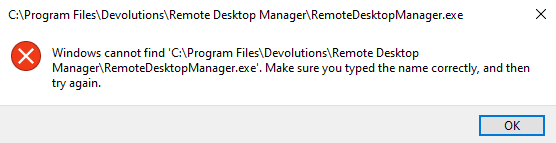
Normally though, there is a different window that displays stating that the executable can't be launched because an upgrade is in progress -- and, when looking at the task manager, it would point back to that patchmypc-preventstart.exe. That clearly hasn't happened here and the Debugger registry key has remained, even after manually installing the application and the SCCM application being detected as installed.
PatchMyPC do a lot of their detection logic via script which gets automatically configured in the SCCM package via the PatchMyPC Publisher agent, so something has possibly changed in that script. I'll raise a case with PatchMyPC support and have them investigate this issue from their side, thanks for your assistance.
RemoteDesktopManager.exe won't run - 2025.1.25.0 (64-bit)
Hey Support,
Encountering an issue with 2025.1.25.0 64-bit. When trying to execute/open C:\Program Files\Devolutions\Remote Desktop Manager\RemoteDesktopManager.exe, the start menu shortcut and the executable file itself both throw a windows path/resource error stating that C:\Program Files\Devolutions\Remote Desktop Manager\RemoteDesktopManager.exe cannot be found. "Make sure you typed the name correctly, and then try again.".
I use PatchMyPC to deploy/upgrade the package for RDM through SCCM, so the installer is based on the 64-bit MSI installation package.
This is happening on Windows 11 (24H2), Windows Server 2019 and Windows Server 2022. I've tried uninstalling the application entirely as well, and manually running the MSI installer -- but the issue remains the same.
Through PatchMyPC, the automatic setup/upgrade of the package is looking at RemoteDesktopManager.exe as one of its specific installation checks, which as a result, causes the upgrades to timeout/abort through SCCM. While the manual installation is working, I do find the same issue with the RemoteDesktopManager.exe -- however, I do find that running RemoteDesktopManager_x64.exehas no problems, and launches just fine. If I update the start menu shortcut created by the installer, and point the target to RemoteDesktopManager_x64.exe, then it works just as expected again.
There is a chance that this is an issue with PatchMyPC rather than RDM, but since I am observing the same behavior on manual installations, I figured I would mention both details.
RDM Client Setting Enforcement for Regulated Environments
Hi,
I am currently reviewing how some of the components of the application address certain industry regulations and security requirements that I need to abide by in my environment.
In Settings > Tools > SSH key agent, there are some options that we need to enforce/strictly set so that users cannot change these parameters. Specifically, we would need to enforce the state of Start agent on application start and Stop SSH key agent on lock. There may be a way to do this already, but I did not see any existing GPOs or registry values that indicate it can be strictly set. Also, could you please clarify if "on lock" refers to the application level lock, or when the Windows desktop session is locked? Or both?
In addition to the above, the following is more of a feature request: the actual regulatory requirement we are trying to meet is when an SSH-agent or similar key caching program is used, key caches that are set to expire within a certain period of time (in minutes or hours) of inactivity. Our concern is that while someone will usually be away from their computer long enough every couple of hours to cause a session lock (which would then stop the agent, thereby invalidating the key cache), there would be scenarios where someone is connected to a device but they are not actively interacting with that session if they are working across multiple machines or environments at once -- so while someone is 'active' at their computer and in the application, it is possible that an inactive session could be open longer than what the regulatory requirement would allow for.
I understand that in a perfect world, the server running sshd would certainly disconnect idle sessions before that happens, however, without an explicit way to configure and enforce this on both the client and the server side, it makes proving compliance to auditors difficult.
Anecdotally, for similar reasons we would also like to know if there is a way to force-disable the use of the mouse jiggler function for RDP Sessions.
Remote Desktop Manager - ADMX/ADML Template Issues
Hi,
I noticed some issues with the ADMX/ADML templates (en-US, unsure about fr-CA), policy files were pulled from RDM 2024.3.17.0 (64-bit) client. These issues appear to be the same for policies in both Computer Configuration > Policies > Administrative Templates > Devolutions > Remote Dekstop Manager and User Configuration > Policies > Administrative Templates > Devolutions > Remote Dekstop Manager:
General > SQLite Default Location: Enabling this and setting a value does not properly reflect in the MMC view for the group policy editor - you set a value, hit apply, and it looks saved (or hit OK to apply+close the frame), but the configuration in the MMC view still displays "Not Configured". If you open this configuration item again, it is set back to "Not Configured", and the "Folder Path" field appears blank -- HOWEVER, if you select "Enabled" again, it correctly displays the value you last applied in the field. Additionally, this issue appears to be cosmetic only, as clients that have this policy configured still seem to receive the relevant registry configuration.Security > Force Loc kOn Windows Lock: Typo in policy title (misplaced white-space).User Interface > Lock Navigation Pane: This setting appears twice. It appearsPOL_RDM_DROPBOX2FAMODEandPOL_RDM_DROPBOX2FAMODE_HELPhave mistakenly had their values copied fromPOL_RDM_LOCKNAVIGATIONPANEandPOL_RDM_LOCKNAVIGATIONPANE_HELPentries in the ADML file.This is more of a nit-pick (and a non-issue/cosmetic issue), but the capitalization of setting titles/names are inconsistent across the ADMX/ADML templates. For example,
Force Close on IdleandForce Lock On Standby-- this is a more direct example, where the capitalization on the O isn't the same across similarly named policies, but also consider other policies that are effectively sentences, where the first letter of every word is capitalized and others are not, such asDisable Mask Password In View Password, andDisable system vault in user vault. If someone is going to be looking at and fixing the previous issues I've mentioned, it is possibly also a chance to review these policy titles and provide a more polished experience by applying consistent grammar/capitalization.
RDP Session returns 0 for $DYNAMIC_PORT$ no matter what
Hey Hubert,
I had tried using $PORT$ variable previously and the result is the same. I will try to get a demonstration file to you guys some time this month, do you need the AWS SSM component of it working in a reproducible manner? That part is a little trickier, but I think I should be able to at least getting it launching the PowerShell session window and bombing/erroring out (due to lack of AWS config) but still showing the attempted port ($DYNAMIC_PORT$). To fully reproduce the use-case end-to-end, you guys would need to tweak what I provide and test it to your own AWS instance.
Data Sources are wiped/re-initialized every time the app is opened when using environment variables in database path
Great! Love your work guys.
Data Sources are wiped/re-initialized every time the app is opened when using environment variables in database path
Further to this, it appears to only happen when using SQLite data source type, as opposed to XML. Changes to the XML data source type persist through application relaunch(es) and do not trigger the database file to be initialized/overwritten.
RDP Session "Current work area size" not respected when set as default
Hi,
RDM version 2024.3.17.0 (64-bit), on Windows 11 24H2. The configurations for the most part are the default/out-of-the-box settings, except for what is described below:
In Settings > Entry types > Sessions > Remote Desktop (RDP), I am modifying the defaults for the following:
Screen sizing mode: Smart sizing
Display mode: Configured
Remote desktop size: Current work area size
Then, on my RDP Session entries, most things are default, with the Display set to Undocked/Default/Current desktop. When I launch these sessions, they do not start in "work area size". I can right-click the title-bar of the undocked window and select "Work area screen", and it then displays as expected.
Alternatively, if I go to the RDP Session Display properties, and change the following, it works as expected, and launches straight into the "Work area screen" sizing the same as right-clicking the title-bar of the undocked window above:
Remote desktop size: Default (Current work area size)
to:
Remote desktop size: Current work area size
This was working when set as default in RDM 2024.3.13.0 (64-bit) on Windows 11 22H2.
Data Sources are wiped/re-initialized every time the app is opened when using environment variables in database path
Hi Samuel,
Sorry, I re-wrote my initial post because it was appearing blank for me after submitting.
RDM version is 2024.3.17 64-bit -- I did notice this on at least 2024.1.x as well, though.
To clarify, the data sources in the file menu are still there as they were previously configured, but when the application is re-opened, it initializes the database again because it seems like it's not unfurling the path when an environment variable is being used -- and doesn't detect the database file for the data source as existing.
Data Sources are wiped/re-initialized every time the app is opened when using environment variables in database path
Hi,
As the title suggests, I have noticed that when using environment variables in the database path of a data source, the database is "initialized" every time the application is launched. As an example, if the database path is set to %USERPROFILE%\Documents\Connections.db, the database file is created and initialized as expected. It's initial size after initialization is 176kb. You can start making changes and adding entries/folders/etc to the database, and the size of the file will grow as expected.
When you close the application, the database size stays the size it was prior to the application being closed, after the modifications.
However, when re-opening the application, the configuration doesn't appear to read the environment variable correctly, and it will always attempt to initialize the data source as it's configured. This ends up wiping/re-initializing the data source you just created/modified, and you end up with a blank database, returned to its initial 176kb size.
RDP Session returns 0 for $DYNAMIC_PORT$ no matter what
I have done a little more testing today and have found that when using PowerShell Script (local), running as a linked Macro on Host entry's "Before open" event action, $DYNAMIC_PORT$actually working and getting passed through with a value when using aws ssm start-session seems to be the exception and not the norm.
This is with AWS Command Line Interface v2 and Session Manager Plugin applications installed, so aws would actually be calling aws.exe, though it's still within a PowerShell session. As previously mentioned, the PowerShell script/command is a one-liner that looks like:
aws ssm start-session --region {1} --profile {2} --target {3} --document-name AWS-StartPortForwardingSession --parameters portNumber="3389",localPortNumber="{4}"For whatever reason, $DYNAMIC_PORT$ has no issue populating an actual value when called by PowerShell using the AWS SSM command like this. But even in the same script, if I use Write-Host {4} , or even cmd.exe /C "echo {4}" it returns 0. Ultimately this is the same behavior that the RDP Session uses; even though AWS SSM seems to take the dynamic port and opens the redirect session, it doesn't seem like the host/session entry variable is useable anywhere else.
I know that the original/intended use of $DYNAMIC_PORT$ was for SSH VPN entries; is it possible that RDM is somehow identifying aws.exe as something that is allowed to call the $DYNAMIC_PORT$ variable and exposing the value to it, whilst also preventing it from being used directly by PowerShell / other session types?
I understand that all of this is a bit long winded and the use-case may be convoluted, but the ask is basically this: can $DYNAMIC_PORT$ please be updated and be made useable for any entry type and not just for SSH VPN entries? It works almost perfectly as it is, except for the fact that it doesn't seem to work for other entry types, perhaps by design.
RDP Session returns 0 for $DYNAMIC_PORT$ no matter what
When used outside of that context, such as with RDP sessions, it will always return 0.
That doesn't seem to be the case, though. When used on a Host entry, which has an Event configured to run a "Before Open" action linked to a PowerShell script (entry type of "PowerShell Script (local) (Macro/Script/Tool)", $DYNAMIC_PORT$ is passed-through to the script variables without issue.
So in the instance of using AWS SSM to open the localhost port redirect to an EC2 instance, $DYNAMIC_PORT$ being passed as a parameter to the script does work, and a random port gets used for the AWS SSM session. When the Host entry then launches its linked session template, which happens to be an RDP Session in this instance, RDP Session doesn't get or isn't able to read(?) the variable from $DYNAMIC_PORT$, and returns 0 instead.
If it helps, the Host entry's "Before open" action links to the aforementioned PowerShell script and has "Wait for exit" ticked. The Host entry can have $DYNAMIC_PORT$configured either as a Custom variable, or in the Advanced > Custom host port variable. The script is an Embedded script which inherits the Custom variables of the Host entry; so the parameters are $CUSTOM_FIELD1$, $CUSTOM_FIELD2$, etc. The resulting PowerShell script is a simple one-liner that looks like:
aws ssm start-session --region {1} --profile {2} --target {3} --document-name AWS-StartPortForwardingSession --parameters portNumber="3389",localPortNumber="{4}"The session window for this PowerShell script once executed actually stays open, because the port redirection exists until the PowerShell session exits. It's in this session window for PS that I can see the random port is actually being used and AWS SSM is waiting for a connection on that port. To tie things together, the RDP Session entry needs to connect to the port the AWS SSM command opened to the EC2 instance.
If $DYNAMIC_PORT$ can be passed-through to a PowerShell script, which I could also use to invoke mstsc and start an RDP Session manually (though not ideal since it wouldn't be an RDM session), I don't see why the RDP Session entry in RDM shouldn't also be able to interpret the value for $DYNAMIC_PORT$ if a PowerShell script can, even if it's supposed to be for an SSH VPN like you said. I get that there is no real purpose for an RDP Session entry on its own to be able to use a dynamic port on its own, but it at least should not ignore/return 0 when inheriting it from a linked Host entry.
I hope the use-case/scenario makes sense. If I can clarify anything else let me know.
RDP Session returns 0 for $DYNAMIC_PORT$ no matter what
I would need to set up a separate environment in order to be able to record footage of the specific use-case in action -- but, the explanation for the use-case was more to demonstrate that there's a legitimate reason for needing this to work.
You can easily/simply reproduce the behavior if you create a RDP Session entry and configured Advanced > Custom host port. $DYNAMIC_PORT$ always returns 0, and any other numeric value here works as expected.
A quick search of the forum shows a similar issue has been previously reported for SSH VPN (Tunnel) entries: https://forum.devolutions.net/topics/30488/dynamic-port--is-always-0
My approach of using $DYNAMIC_PORT$ for RDP Session more or less is an attempt to address a requirement where I need to allocate a random port for an RDP session dynamically, each time the session is launched. This is because of multiple users logged onto a Remote Desktop Session Host, and if we all attempted to use the AWS SSM module to open the localhost port redirect for RDPing to AWS EC2's, then there would be port conflicts.
RDP Session has the option to use the 'Default' port, a specific port, or pick a free port from the "port generator" interface; if it's simpler for Devolutions to implement a "dynamic port" option for RDP Session entries that allocates an available port at the time of session connect, which could then be used by Macros or Scripts by $PORT$ or $HOST_PORT$ on enry connection events (beofre/after open actions, etc), then this would also address the issue.
RDP Session returns 0 for $DYNAMIC_PORT$ no matter what
Hey, kind of a fringe use case here but the behavior does not seem intentional.
This particular setup is the result of me trying to get the AWS SSM Module localhost redirects for RDP working in tandem with the Okta AWS CLI Module in a streamlined way for my team (individual personal data sources). The structure of the entries of my data source are:
A "Custom VPN" (VPN/Tunnel/Gateway Entry). This points to the PowerShell executable and uses an in-line argument to start Okta AWS CLI and trigger the MFA session prompt.
A "Host" Subentry which references an "RDP Session" Template. The "VPN/Tunnel/Gateway" Configuration of the Host is set to "Always connect" and "Session". The Session settings are linked to the Custom VPN entry which is the parent of this Host entry.
A PowerShell Macro/Script which executes as a "Before Open" event on the Host entry.
A "RDP Session" Template in the Entry Templates Shared Vault. The Template Settings have "Port Usage" set to "Use entry's port".
This is the current allocation of variables/custom variables -- but I have tried multiple combinations and simply cannot get the invoked RDP Session to use the $DYNAMIC_PORT$ variable instantiated by the Host entry;
The Host entry has (as an example) "Custom #1" set to $DYNAMIC_PORT$.
Under Advanced, the Host entry has "Custom host port" set to $CUSTOM_FIELD1$.
On the PowerShell Macro that is executed as a "Before Open" action on the Host entry, $CUSTOM_FIELD1$ is passed-through as a Parameter. The value of the Parameter in the Macro works as expected -- it provides a free/open TCP port in the RPC Ephemeral-High range.
The RDP Session Template always returns the value of 0 for the port whenever it ultimately resolves to the use of $DYNAMIC_PORT$. If I set this to a static number, such as "49650" at any point in the hierarchy (have tested multiple levels of inheritance), it passes-through as expected to the RDP Session.
I've tried configuring the "Custom Host Port" value of the RDP Session Template to various things, as well as multiple permutations of where $DYNAMIC_PORT$ is being set and trying to inherit down to it with no luck. No matter what I do, if the variable at some point in the hierarchy is the result of $DYNAMIC_PORT$, RDP Session will return this as 0 -- whereas multiple Macros/Scripts/etc can be used in-between where it is defined and the RDP Session, and they correctly return the dynamic port defined as the Custom Host Port.