
pvansluisveld
SSH session log file append random white space between cmdlet lines in Juniper network devices
A engineer has the following logging settings in his ssh entry

Actual ssh session:

Log file of this ssh session:

SSH session log file append random white space between cmdlet lines in Juniper network devices.
Is this a known problem?
Devolutions Server: 2026.1.21.0
Devolutions Gateway: 2026.1.2
Remote Desktop Manager: 2026.1.23.0
After connecting with RDP session getting Windows Security pop-up
When connecting with a RDP session without filled in login credentials my RDM application is stuck at the connecting screen. In the background I'm getting a Windows Security pop-up as below:
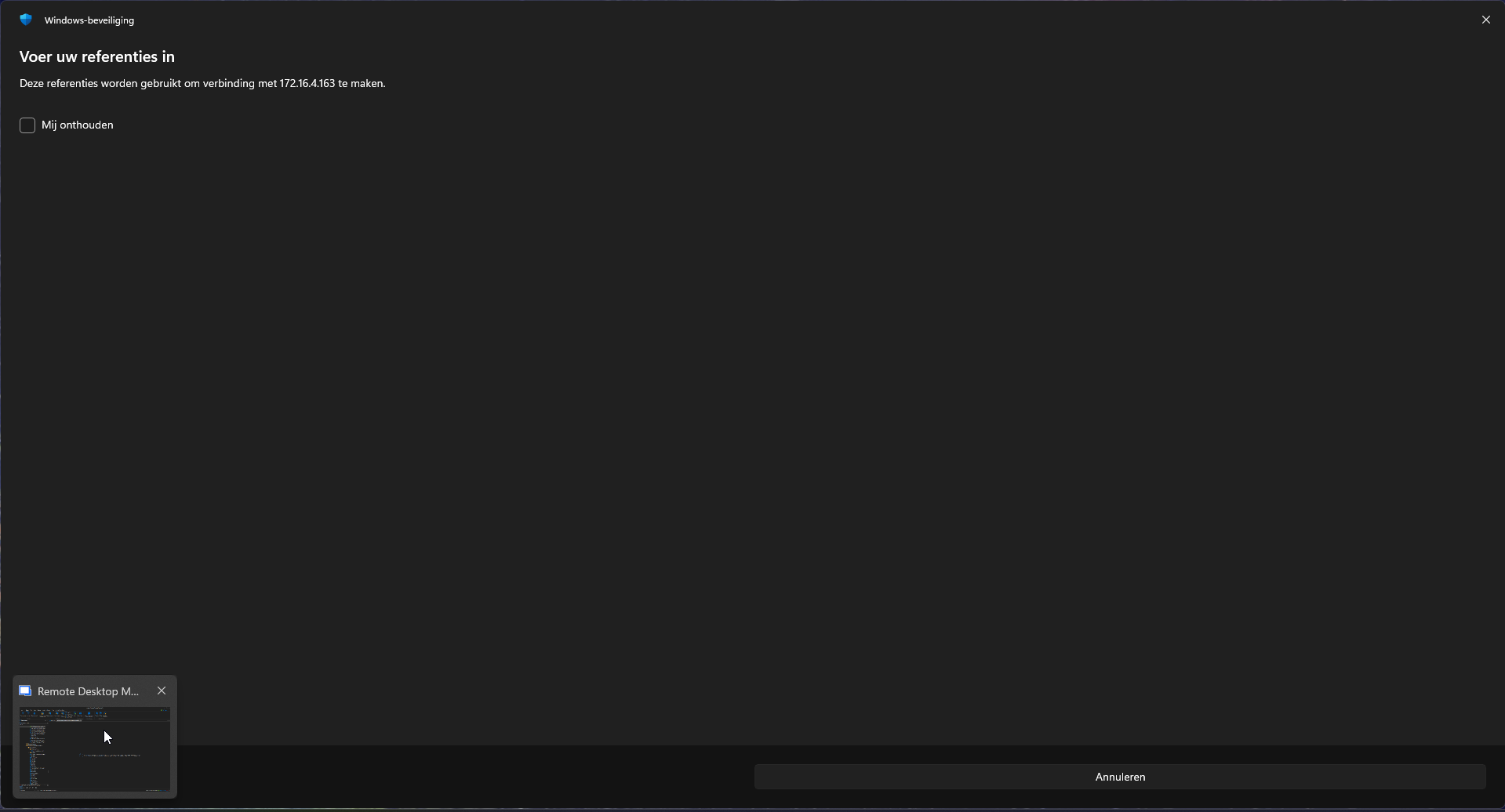
The problem is that I'm not able to click on "Annuleren" (In English: Cancel). Is this a known problem? and how to solve it?
If I fill in my credentials inside the RDP entry, im not getting the pop-up message.
Devolutions Server: 2026.1.21.0
Devolutions Gateway: 2026.1.2
Remote Desktop Manager: 2026.1.23.0
Automatically new web application are added in system dashboard
@pvansluisveld I sent you a private message with a method to assist you with the Web Application widget.
Kind regards,
Kelly
@Kelly Grant Fortin
Thank you very much, I can confirm that our problem is resolved. For the record, I had 30k+ instances in my SQL db.

Automatically new web application are added in system dashboard
@pvansluisveld We believe this issue with the web app widget has been corrected in the 2026.1.14.0 release. The web app widget was incorrectly displaying the existing instances.
@Kelly Grant Fortin
Hello, thank you for informing me. I've updated our Devolutions Servers in our test/acceptation environment to the latest version 2026.1.15.0. Is there a way to delete all Web Application widgets with status Last updated 2 hours ago or longer? At the moment we have a lot of widgets that we have to delete 1-by-1. If I have to do this manually it will take a longtime. My question: Is there a way to automate this so I can delete all inactieve Web App widgets?
Microsoft.Data.SqlClient is not supported on this platform.
Hello pvansluisveld,
Thank you for reaching out to the Devolutions support team.
This is a known issue with the PowerShell 2026.1 module.
Another customer has mentioned that it is working with the module on version 2025.3.
An internal ticket is open.
I'll keep you posted.
Best regards,
@Patrick Ouimet
FYI, error has been fixed in latest docker image of the Devolutions Server v2026.1.11.0
Automatically new web application are added in system dashboard
Hello. Thank you for reaching out with these questions.
At first glance, I do not know why the Web Application widget on the System Dashboard would show a duplicate of the DVLS instance every 5 minutes..?..
It looks like you have 2 DVLS instances. Am I reading this correctly?
Are there ever more than 2 listings for each instance, or do they keep cycling so there are always 2 listed for each instance? Never more than 2 listed?
Are you experiencing any functionality issues with accessing endpoints and the like? Is this solely an information display issue with our Web Application widget for now?
I will reach out to our QA and Dev groups for feedback. Thank you for your patience.
Elevate your learning - Join the Devolutions Academy !
Kind regards,
Kelly
@Kelly Grant Fortin
We are using 2 DVLS instances, 1 primary and 1 hot-spare backup if our primary is not reachable. Bove DVLS instances does have the same URL: dvls.<domain>. In our test environment we are running the latest DVLS version v2026.1.11.0. Unfortunately we still see the same issue within our "Administration dashboard" (name has changes in latest update.). There are not functional issues with this bug but it is kinda annoying.
Automatically new web application are added in system dashboard
In my Devolutions Server setup my devolutions server docker containers every 5 minutes automatically duplicating a new (same) docker container in the web application in system dashboard. Is there a way to stop automatically duplicating web application in system dashboard overview inside Devolutions Server?

Microsoft.Data.SqlClient is not supported on this platform.
When updating Devolutions Server docker image from 2026.1.6.0 to 2026.1.7.0 im getting follow error:
New-DPSInstallConfiguration: /usr/local/bin/entrypoint.ps1:163
Line |
 163 |  $Configuration = New-DPSInstallConfiguration @InstallParams
     |                   ~~~~~~~~~~~~~~~~~~~~~~~~~~~~~~~~~~~~~~~~~~
     | Microsoft.Data.SqlClient is not supported on this platform.
What have changed in the latest docker image? And can I fix it?
Automatically Publish Gateway Configuration for DVLS Gateway in DVLS Server within Docker architecture
Hello @pvansluisveld
There is currently no such option to automatically run "Publish Gateway Configuration" when the configuration is changed.
But the better answer is: you usually don’t need to automate “Publish Gateway configuration” at all.
What’s happening in your setup is almost certainly this:
When you recreate the Gateway container, it comes up “fresh” and has lost its local Gateway state (its gateway.json, provisioner key material, cert references, etc.).
DVLS then detects the gateway is out-of-sync and you use “Publish Gateway configuration” to push the required config back to the gateway so it can operate again (and in some cases you then also publish the revocation list).
The Docker-friendly fix I would recommend is to persist the Gateway config folder.
Instead of automating the UI configuration pushing, make sure the container does not lose its config/state when recreated.
On Linux, the Gateway config is stored in the Gateway configuration file (gateway.json) on disk.
So in Docker, mount a persistent volume/bind mount for the directory where gateway.json (and related files) live.
Example using Docker Compose:
services:
gateway:
image: devolutions/devolutions-gateway:<tag>
ports:
- "7171:7171"
- "8181:8181"
volumes:
# Persist gateway.json + keys/certs/etc
- gateway_config:/etc/devolutions-gateway
volumes:
gateway_config:
With that in place, updates become the standard safe pattern:
docker compose pull
docker compose up -d
Because the config is persisted, the recreated container comes back up already configured, and DVLS shouldn’t require you to “Publish Gateway configuration” again (unless you actually changed something DVLS needs to push).
If you still want "automatic configuration pushing", I can still evaluate this as a feature request.
Best regards,
@Benoit Cortier
Thank you for the long answer. The problem is that a persistent volume is not possible in the setup I would like to build. I would like to ask if you can make a feature request so automatic configuration pushing is possible without making a persistent volume in docker.
RDM error "Request failed on background thread."
Hi!
One of our users got the same error message today too. RDM 2025.2.30.0, DVLS 2025.2.22.0
"Request failed on background thread."
Let me know if you need any logs or if you have a solution :)
Thanks!
@Daniel Albrecht
This bug is fixed in the latest version of RDM 2025.3.32.0.
Filter by subType while using API
Is there a way to filter on "subType" for entries within a vault using API? We want to get all entries with subType "X.509" inside our vaults, without retrieving all entries within the vault.
For example:
https://<https://dvls-server>/api/v1/vault/42ee6ef3-2b83-4dd5-b5e5-6e6ba64dae56/entry?pageSize=100&pageNumber=0&subType=X509
Automatically Publish Gateway Configuration for DVLS Gateway in DVLS Server within Docker architecture
I'm running my Devolutions architecture in Docker. When I re-create my DVLS gateway docker container, for example when I'm updating the image version, I need to login to my DVLS server and manually browse to the specific DVLS gateway and click on the option "Publish Gateway Configuration". After this option my DVLS gateway is working again.
My question: Is it possible to automatically run "Publish Gateway Configuration" for my DVLS gateway when I re-create the Docker container?
Application identity get all vaults works but data inside a vault is empty
Hello,
Thank you for reaching out on this matter.
It appears that the application identity may not have sufficient permissions to view entries within the vault. I recommend assigning the application identity to a user group, then granting that group access to the specific entries in the target vault. You may also want to temporarily grant this group administrative rights to confirm whether the issue is permission-related.
Once the appropriate permissions are in place, you should be able to retrieve the entries successfully using the same API request as before.
Please let us know if you have any questions or if the issue persists.
Best regards,
@Jacob Lafrenière
Thank you for the quick reply. I created a Devolutions user group and assigned our application identity to this group. I configured the user group to all the vaults and made everything in the group administrator with the checkbox below

This did the job, thank you! Case can be closed.
Application identity get all vaults works but data inside a vault is empty
I created a application identity inside our Devolutions Server. With the application id/secret I'm able to get a TokenID. With this TokenID I'm also able to get a list of all our Vaults. When I try to get data inside one of our Vaults I'm getting no data back in our response. And yes there are entries inside this specific vault.
Application identity


Login

Get all vaults

Get all entries inside one of our vaults, but no data.

Getting randomly GATEWAY_OFFLINE messages
Last week I implemented a new DVLS gateway farm with 2 DVLS gateways on Debian 13.
My config:
{
  "Id": "d174211d-2e50-4d30-93cb-bc0dfec5a595",
  "Hostname": "off-dvls-gw02.linux.interconnect.services",
  "ProvisionerPublicKeyFile": "provisioner.pem",
  "ProvisionerPrivateKeyFile": null,
  "TlsCertificateFile": "server.crt",
  "TlsPrivateKeyFile": "server.key",
  "Listeners": [
    {
      "InternalUrl": "tcp://*:8181",
      "ExternalUrl": "tcp://*:8181"
    },
    {
      "InternalUrl": "https://*:7171",
      "ExternalUrl": "https://*"
    }
  ]
}
2 DVLS gateways are running without any issues and it its possible to connect with RDP and SSH.

For some reason I'm getting random GATEWAY_OFFLINE errors logs in my Devolutions Server.
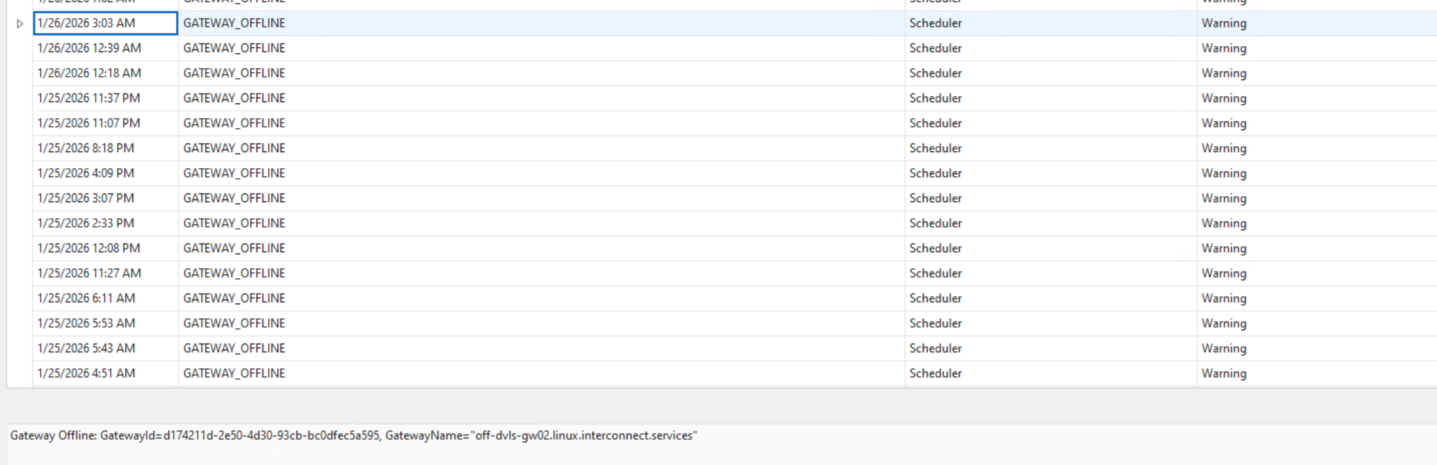
In de attachment I added my gateway logs. I cannot find the issue, is there something I can do?
Password file import
Hi Pepijn,
from DVLS you can do it on the Web interface by clicking on 'Add' and then selecting 'Import from KeePass (.xml):

Best regards,
@Sébastien Aubin
Thank you for the answer. It would be nice if this functionality would also be integrated in Devolutions Workspace, but for now this is fine.
Devolutions Password Manager automatically enforce default settings
Hi Pepijn,
We've recently reworked the pre-configuration system and added new features that will be available in an upcoming release.
In the meantime, you can deploy default settings by placing your Config.cfg file at the following location before the user opens Workspace for the first time:
%APPDATA%\net.devolutions\Workspace\Config.cfg
This will ensure your default configuration is applied when they first launch the application.
Best regards,
Marc-Olivier Lalonde
@Marc-Olivier Lalonde
Thank you this solution resolved our problem!
Install and configure MikroTik Winbox entry
Hello,
Thank you for the additional details and the error message.
At this time, I am not able to reproduce the issue on my end using the MikroTik Winbox entry in Remote Desktop Manager. The application launches and connects as expected in my environment.
To help us investigate further, could you please provide the following information:
The exact Winbox version you downloaded (version number and whether it was in a zip file or not ).
Confirmation that Winbox works correctly when launched directly, outside of Remote Desktop Manager, using the same exe configured in RDM.
Whether the issue also occurs if the Winbox entry is set to open externally (not embedded) in RDM.
This information will help us determine whether the behaviour is related to the Winbox executable itself or to an environment-specific factor.
Thank you for your cooperation, and we look forward to your reply.
Best regards,
@Carl Marien
Thank you for the reaction.
I was able to resolve our issue, it had something to do with our Applocker policy. Case closed.
Password file import
At the moment is it not possible to import for example a KeePass file into the User Vault using Devolutions Workspace. In my opinion this is a big missing for our business users, who want to migrate there password file(s).
Devolutions Password Manager automatically enforce default settings
Is there a option that I can force a default settings file for Devolutions Workspace? I found the option to create a default settings file in: Settings -> Custom installation -> Create configuration file. Here I created my personal config file named Config.cfg. Where do I need to place this file after the installation of the application, so for other users these default settings will be forced after installation?

RDM error "Request failed on background thread."
Hello All,
I appreciate your patience on this case.
Could you send us the X-forward logs from IIS?
After a session and exchanging with Jakub Vácha, I think this could only be related to RDM.
This is how you can enable these logs in IIS:
https://docs.devolutions.net/server/kb/how-to-articles/add-x-forwarded-for-column-iis/
You can share these logs by sending them to service@devolutions.net
Best regards,
@Patrick Ouimet
Long story short, we experienced the same error in RDM again yesterday. I shared our IIS logs with you on the e-mail: service@devolutions.net
Install and configure MikroTik Winbox entry
Hello,
You need to click on the three dots to the left of the first input bar and select the .exe file you're referring to.
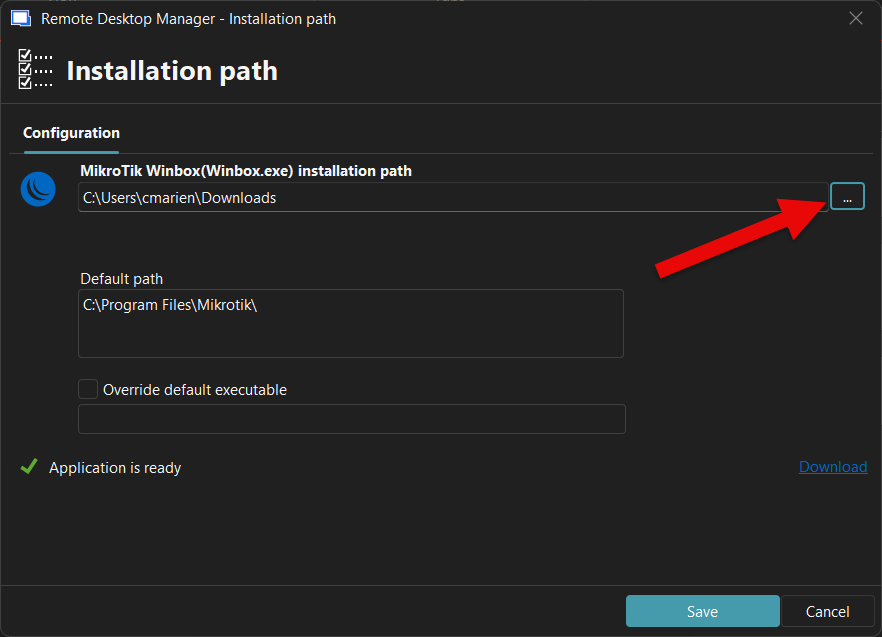
Best regards,
@Carl Marien
Thanks for your reply. I'd already gotten that far. When I define my installation path and then try to start a session with the Winbox entry, I get the following error message:
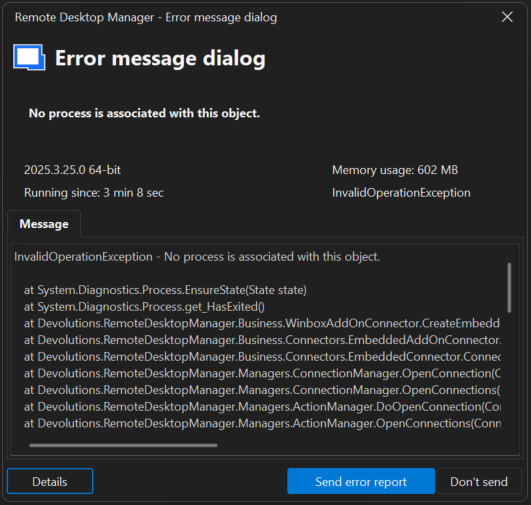
InvalidOperationException - No process is associated with this object.

   at System.Diagnostics.Process.EnsureState(State state)
   at System.Diagnostics.Process.get_HasExited()
   at Devolutions.RemoteDesktopManager.Business.WinboxAddOnConnector.CreateEmbeddedFrame(String parameters, Connection session)
   at Devolutions.RemoteDesktopManager.Business.Connectors.EmbeddedAddOnConnector.CreateFrame(EmbededConnectionResult connectionResult)
   at Devolutions.RemoteDesktopManager.Business.Connectors.EmbeddedConnector.Connect(Connection connection, OpenConnectionParameter parameter)
   at Devolutions.RemoteDesktopManager.Managers.ConnectionManager.OpenConnection(ConnectionEngine engine, Connection connection, OpenConnectionParameter parameter)
   at Devolutions.RemoteDesktopManager.Managers.ConnectionManager.OpenConnections(ConnectionCollection connections, OpenConnectionParameter parameter, Boolean isPlaylist)
   at Devolutions.RemoteDesktopManager.Managers.ActionManager.DoOpenConnection(ConnectionCollection connections, OpenConnectionParameter openConnectionParameter, IConnectionSource source)
   at Devolutions.RemoteDesktopManager.Managers.ActionManager.OpenConnections(ConnectionEngine engine, OpenConnectionMode openConnectionMode, IConnectionSource source, Boolean checkOpenedConnection)
   at Devolutions.RemoteDesktopManager.Managers.SessionMenuManager.MnuOpenConnection_Click(Object sender, EventArgs e)
   at DevExpress.XtraBars.Ribbon.Handler.GalleryControlHandlerBase.OnUnpress(DXMouseEventArgs e)
   at DevExpress.XtraBars.Ribbon.Handler.GalleryControlHandlerBase.OnMouseUp(DXMouseEventArgs e)
   at DevExpress.XtraBars.Ribbon.GalleryControl.OnMouseUp(MouseEventArgs e)
   at System.Windows.Forms.Control.WmMouseUp(Message& m, MouseButtons button, Int32 clicks)
   at System.Windows.Forms.Control.WndProc(Message& m)
   at DevExpress.Utils.Controls.ControlBase.BaseWndProc(Message& m)
   at DevExpress.XtraBars.Ribbon.GalleryControl.WndProc(Message& m)
   at System.Windows.Forms.NativeWindow.Callback(HWND hWnd, MessageId msg, WPARAM wparam, LPARAM lparam)
------------------------ extended stack ------------------------
   at Devolutions.RemoteDesktopManager.Forms.FrmErrorMessage.ShowErrorMessage(ConnectionEngine engine, Exception exception, String message, String title)
   at Devolutions.RemoteDesktopManager.Managers.LogManager.HandleException(Exception exception)
   at System.Windows.Forms.Application.ThreadContext.OnThreadException(Exception ex)
   at System.Windows.Forms.NativeWindow.Callback(HWND hWnd, MessageId msg, WPARAM wparam, LPARAM lparam)
   at DevExpress.Utils.Drawing.Helpers.NativeMethods.UnsafeNativeMethods.DefSubclassProc(IntPtr hWnd, IntPtr Msg, IntPtr wParam, IntPtr lParam)
   at DevExpress.Utils.Drawing.Helpers.NativeMethods.UnsafeNativeMethods.DefSubclassProc(IntPtr hWnd, IntPtr Msg, IntPtr wParam, IntPtr lParam)
   at DevExpress.Utils.Drawing.Helpers.Win32SubclasserFactory.Win32Subclasser.SubClassProcInner(IntPtr hWnd, IntPtr Msg, IntPtr wParam, IntPtr lParam, IntPtr uIdSubclass, IntPtr dwRefData)
   at Windows.Win32.PInvoke.DispatchMessage(MSG* lpMsg)
   at System.Windows.Forms.Application.LightThreadContext.FPushMessageLoop(msoloop uReason)
   at System.Windows.Forms.Application.LightThreadContext.RunMessageLoop(msoloop reason, Boolean fullModal)
   at System.Windows.Forms.Application.ThreadContext.RunMessageLoopInner(msoloop reason, ApplicationContext context)
   at System.Windows.Forms.Application.ThreadContext.RunMessageLoop(msoloop reason, ApplicationContext context)
   at Devolutions.RemoteDesktopManager.Program.Main(String[] args)
My installation folder and path:
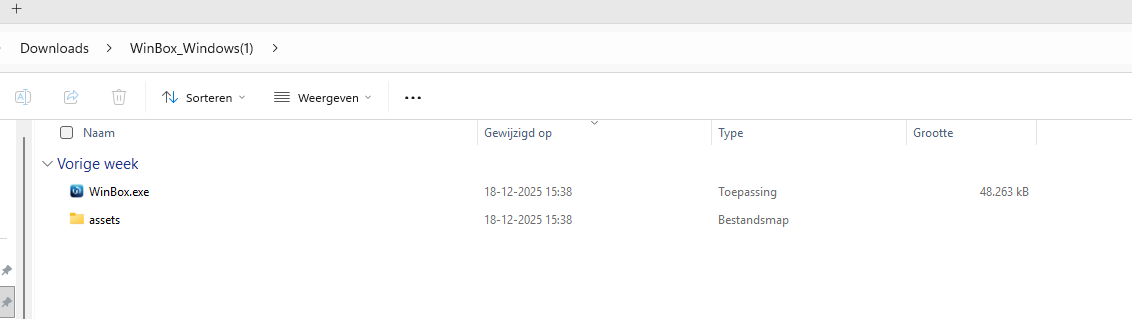
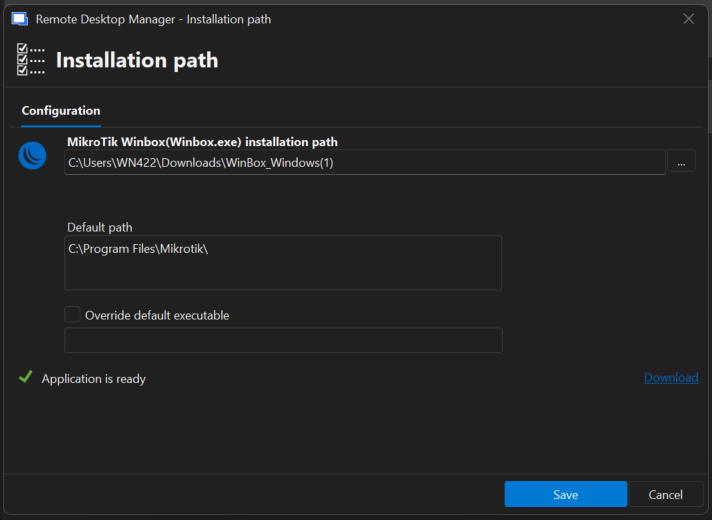
Install and configure MikroTik Winbox entry
Can someone tell me how to install MikroTik Winbox application and configure it so I can use it within RDM?
After creating a MikroTik Winbox entry, after clicking Open session I'm getting the pop-up to configure de Installation Path of the application.
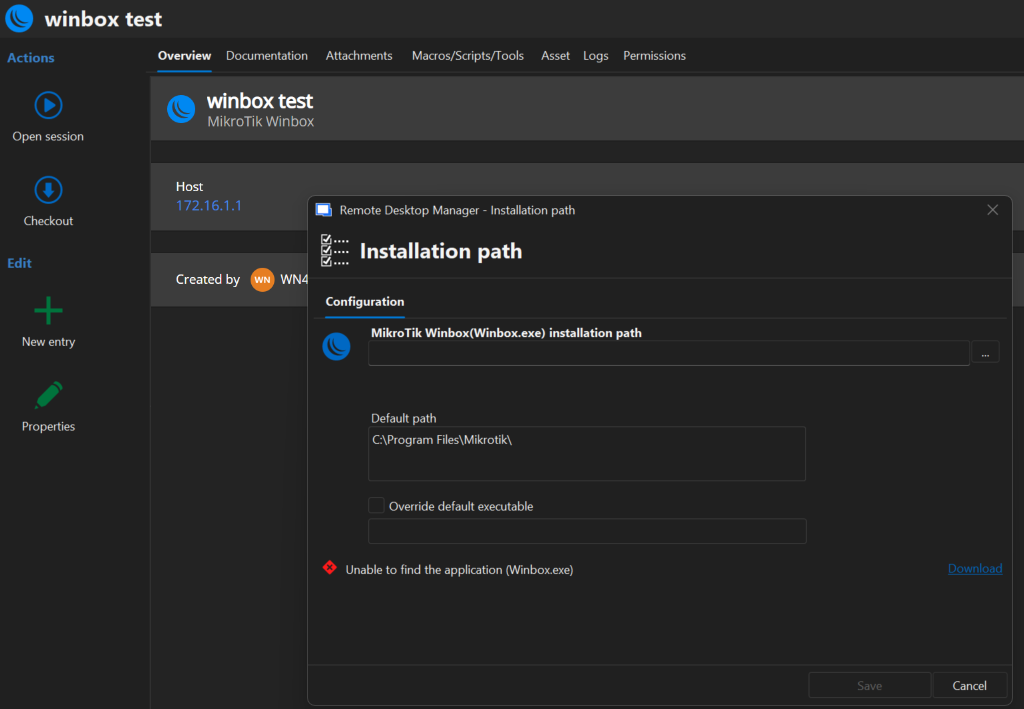
I am not able to install Winbox as a application, only executing the .exe file I download on
https://mikrotik.com/download/winbox
Can someone give me a short manual/tldr how to fix this?
RDM error "Request failed on background thread."
We configured 2 haproxy loadbalancers to loadbalance our 2 Devolutions Servers. After this change we did not experienced the issue anymore.
HAproxy config in /etc/haproxy/haproxy.cfg
global
        log /dev/log    local0
        log /dev/log    local1 notice
        chroot /var/lib/haproxy
        stats socket /run/haproxy/admin.sock mode 660 level admin
        stats timeout 30s
        user haproxy
        group haproxy
        daemon

        # Default SSL material locations
        ca-base /etc/ssl/certs
        crt-base /etc/ssl/private

        # See: https://ssl-config.mozilla.org/#server=haproxy&server-version=2.0.3&config=intermediate
        ssl-default-bind-ciphers ECDHE-ECDSA-AES128-GCM-SHA256:ECDHE-RSA-AES128-GCM-SHA256:ECDHE-ECDSA-AES256-GCM-SHA384:ECDHE-RSA-AES256-GCM-SHA384:ECDHE-ECDSA-CHACHA20-POLY1305:ECDHE-RSA-CHACHA20-POLY1305:DHE-RSA-AES128-GCM-SHA256:DHE-RSA-AES256-GCM-SHA384
        ssl-default-bind-ciphersuites TLS_AES_128_GCM_SHA256:TLS_AES_256_GCM_SHA384:TLS_CHACHA20_POLY1305_SHA256
        ssl-default-bind-options ssl-min-ver TLSv1.2 no-tls-tickets

defaults
        log     global
        mode    http
        option  httplog
        option  dontlognull
        timeout connect 5000
        timeout client  50000
        timeout server  50000
        errorfile 400 /etc/haproxy/errors/400.http
        errorfile 403 /etc/haproxy/errors/403.http
        errorfile 408 /etc/haproxy/errors/408.http
        errorfile 500 /etc/haproxy/errors/500.http
        errorfile 502 /etc/haproxy/errors/502.http
        errorfile 503 /etc/haproxy/errors/503.http
        errorfile 504 /etc/haproxy/errors/504.http

...

frontend devolutions-https
       mode tcp
       bind INTERNAL_LOADBALANCE_IP:443
       default_backend servers-devolutions-https

backend servers-devolutions-https
       mode tcp
       server off-dvls01 INTERNAL_IP_DVLS1:443 check
       server off-dvls02 INTERNAL_IP_DVLS2:443 check backup
       retries 5
       option redispatch
       retry-on conn-failure response-timeout
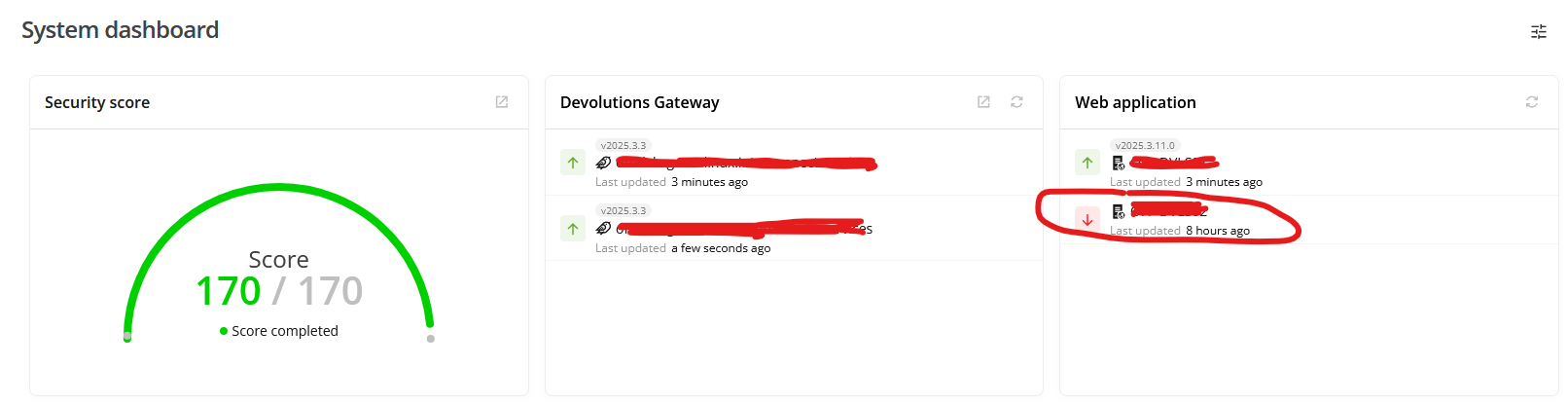
Our Devolutions Servers have not configured "Use X-Forwarded-For" header. This because we are using TCP loadbalancing, because we want to manage the SSL certificate on the IIS webserver of the Devolutions Servers. In our setup we are only using 1 Devolutions Server and if this server is not reachable anymore the HAproxy loadbalancer switches after 5 retries automatically to Devolutions Server 2.
Remember that in this setup one of the Devolutions Servers is not being used, and is commented as DOWN in the server dashboard.
RDM error "Request failed on background thread."
Hello pvansluisveld,
Could you also confirm that the MultiSubNet Failover is also set to True?
https://docs.devolutions.net/server/kb/how-to-articles/deploy-high-availability-load-balanced-env/
If you still have this issue, please send the DPS_Main logs to service@devolutions.net
https://docs.devolutions.net/server/kb/how-to-articles/enable-server-log4net-log/
Best regards,
@Patrick Ouimet
Yes we confgured True for MultiSubNet Failover. I dived into our setup and we are not using a load balancer for our Devolutions Servers, we have 2 single Devolutions Servers pointing to the same IIS URL:
https://dvls.office.interconnect.services
For DNS loadbalancing we configured A/PTR-record for these 2 Devolutions Servers in our domain.
Like below:
dvls1 ip address x.x.x.x = "dvls.office.interconnect.services"
dvls2 ip address x.x.x.x = "dvls.office.interconnect.services"