Install and configure MikroTik Winbox entry

Can someone tell me how to install MikroTik Winbox application and configure it so I can use it within RDM?
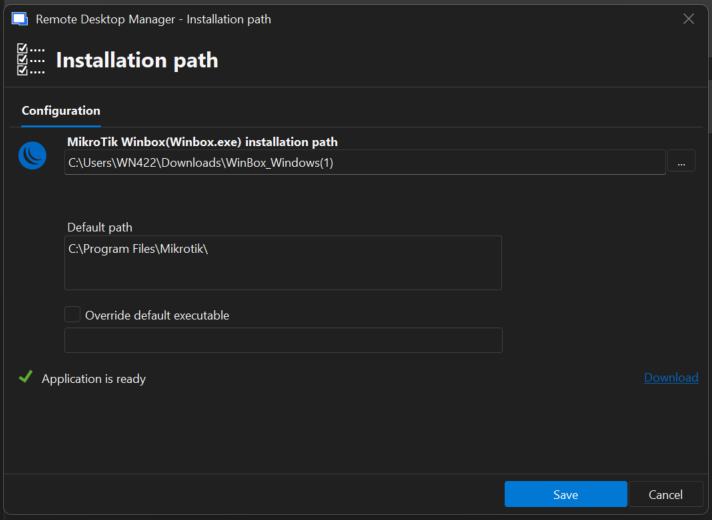
After creating a MikroTik Winbox entry, after clicking Open session I'm getting the pop-up to configure de Installation Path of the application.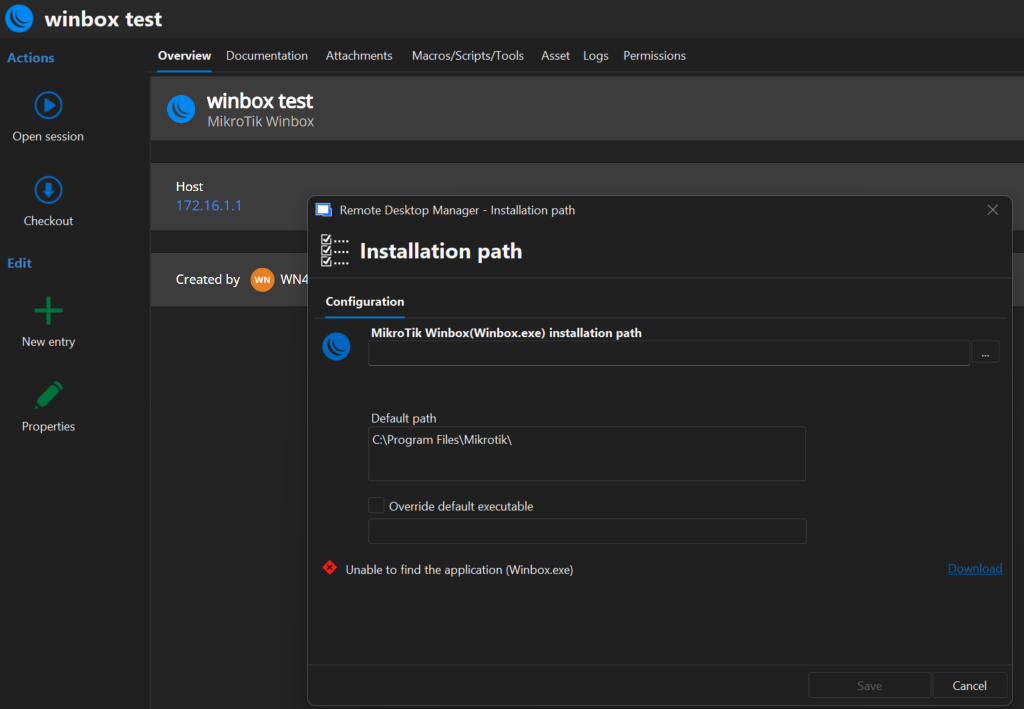
I am not able to install Winbox as a application, only executing the .exe file I download on
https://mikrotik.com/download/winbox
Can someone give me a short manual/tldr how to fix this?
50af516e-fa6b-40ca-912c-43086822f1be.png
All Comments (5)
Hello,
You need to click on the three dots to the left of the first input bar and select the .exe file you're referring to.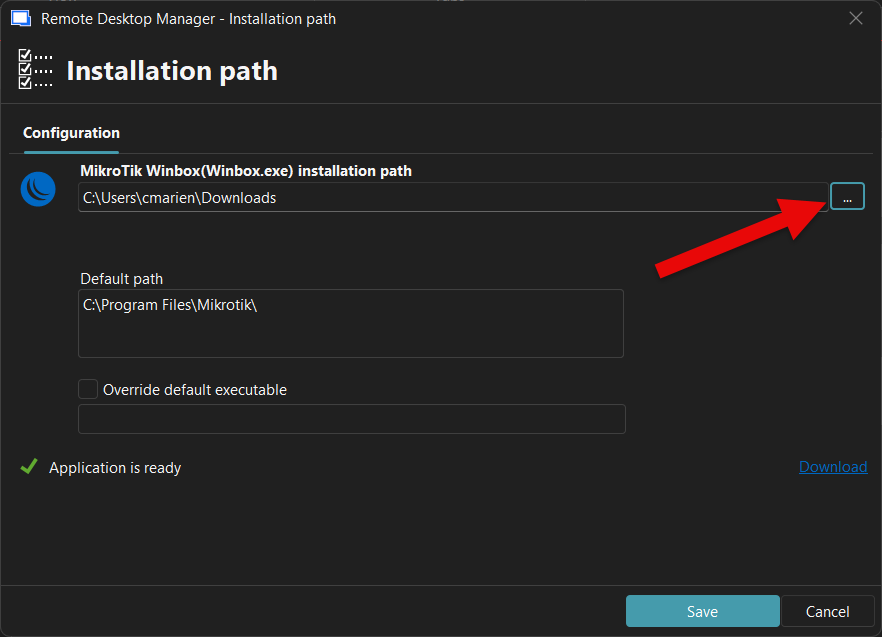
Best regards,
Carl Marien
screenshot.png
Hello,
You need to click on the three dots to the left of the first input bar and select the .exe file you're referring to.
Best regards,
@Carl Marien
Thanks for your reply. I'd already gotten that far. When I define my installation path and then try to start a session with the Winbox entry, I get the following error message: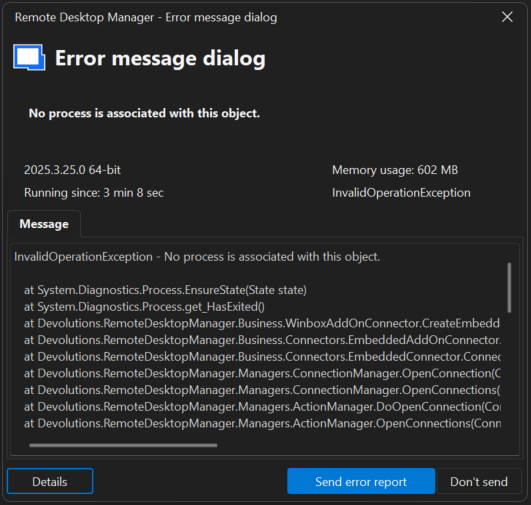
InvalidOperationException - No process is associated with this object.

   at System.Diagnostics.Process.EnsureState(State state)
   at System.Diagnostics.Process.get_HasExited()
   at Devolutions.RemoteDesktopManager.Business.WinboxAddOnConnector.CreateEmbeddedFrame(String parameters, Connection session)
   at Devolutions.RemoteDesktopManager.Business.Connectors.EmbeddedAddOnConnector.CreateFrame(EmbededConnectionResult connectionResult)
   at Devolutions.RemoteDesktopManager.Business.Connectors.EmbeddedConnector.Connect(Connection connection, OpenConnectionParameter parameter)
   at Devolutions.RemoteDesktopManager.Managers.ConnectionManager.OpenConnection(ConnectionEngine engine, Connection connection, OpenConnectionParameter parameter)
   at Devolutions.RemoteDesktopManager.Managers.ConnectionManager.OpenConnections(ConnectionCollection connections, OpenConnectionParameter parameter, Boolean isPlaylist)
   at Devolutions.RemoteDesktopManager.Managers.ActionManager.DoOpenConnection(ConnectionCollection connections, OpenConnectionParameter openConnectionParameter, IConnectionSource source)
   at Devolutions.RemoteDesktopManager.Managers.ActionManager.OpenConnections(ConnectionEngine engine, OpenConnectionMode openConnectionMode, IConnectionSource source, Boolean checkOpenedConnection)
   at Devolutions.RemoteDesktopManager.Managers.SessionMenuManager.MnuOpenConnection_Click(Object sender, EventArgs e)
   at DevExpress.XtraBars.Ribbon.Handler.GalleryControlHandlerBase.OnUnpress(DXMouseEventArgs e)
   at DevExpress.XtraBars.Ribbon.Handler.GalleryControlHandlerBase.OnMouseUp(DXMouseEventArgs e)
   at DevExpress.XtraBars.Ribbon.GalleryControl.OnMouseUp(MouseEventArgs e)
   at System.Windows.Forms.Control.WmMouseUp(Message& m, MouseButtons button, Int32 clicks)
   at System.Windows.Forms.Control.WndProc(Message& m)
   at DevExpress.Utils.Controls.ControlBase.BaseWndProc(Message& m)
   at DevExpress.XtraBars.Ribbon.GalleryControl.WndProc(Message& m)
   at System.Windows.Forms.NativeWindow.Callback(HWND hWnd, MessageId msg, WPARAM wparam, LPARAM lparam)
------------------------ extended stack ------------------------
   at Devolutions.RemoteDesktopManager.Forms.FrmErrorMessage.ShowErrorMessage(ConnectionEngine engine, Exception exception, String message, String title)
   at Devolutions.RemoteDesktopManager.Managers.LogManager.HandleException(Exception exception)
   at System.Windows.Forms.Application.ThreadContext.OnThreadException(Exception ex)
   at System.Windows.Forms.NativeWindow.Callback(HWND hWnd, MessageId msg, WPARAM wparam, LPARAM lparam)
   at DevExpress.Utils.Drawing.Helpers.NativeMethods.UnsafeNativeMethods.DefSubclassProc(IntPtr hWnd, IntPtr Msg, IntPtr wParam, IntPtr lParam)
   at DevExpress.Utils.Drawing.Helpers.NativeMethods.UnsafeNativeMethods.DefSubclassProc(IntPtr hWnd, IntPtr Msg, IntPtr wParam, IntPtr lParam)
   at DevExpress.Utils.Drawing.Helpers.Win32SubclasserFactory.Win32Subclasser.SubClassProcInner(IntPtr hWnd, IntPtr Msg, IntPtr wParam, IntPtr lParam, IntPtr uIdSubclass, IntPtr dwRefData)
   at Windows.Win32.PInvoke.DispatchMessage(MSG* lpMsg)
   at System.Windows.Forms.Application.LightThreadContext.FPushMessageLoop(msoloop uReason)
   at System.Windows.Forms.Application.LightThreadContext.RunMessageLoop(msoloop reason, Boolean fullModal)
   at System.Windows.Forms.Application.ThreadContext.RunMessageLoopInner(msoloop reason, ApplicationContext context)
   at System.Windows.Forms.Application.ThreadContext.RunMessageLoop(msoloop reason, ApplicationContext context)
   at Devolutions.RemoteDesktopManager.Program.Main(String[] args)
My installation folder and path: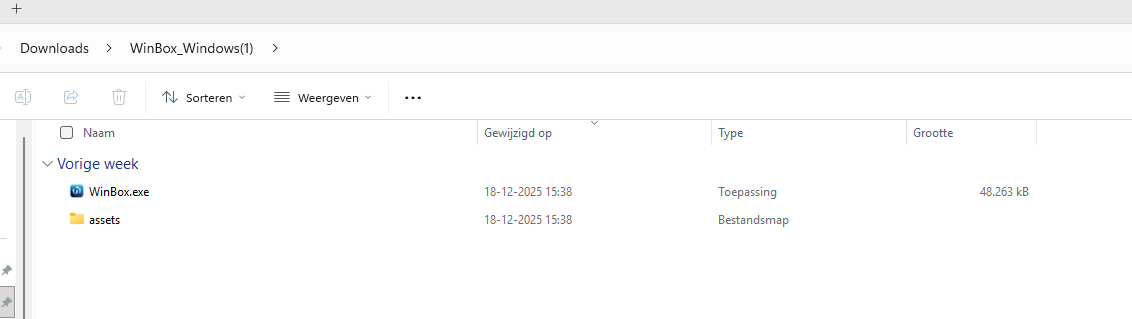
e1e1c2f6-f8ae-40a0-a873-c14bcd0980ef.png
31c6b02c-9b18-4824-874c-d8b7b6025e63.png
6c581b04-acbd-4eff-a4f7-25596e2a47ce.png
Hello,
Thank you for the additional details and the error message.
At this time, I am not able to reproduce the issue on my end using the MikroTik Winbox entry in Remote Desktop Manager. The application launches and connects as expected in my environment.
To help us investigate further, could you please provide the following information:
- The exact Winbox version you downloaded (version number and whether it was in a zip file or not ).
- Confirmation that Winbox works correctly when launched directly, outside of Remote Desktop Manager, using the same exe configured in RDM.
- Whether the issue also occurs if the Winbox entry is set to open externally (not embedded) in RDM.
This information will help us determine whether the behaviour is related to the Winbox executable itself or to an environment-specific factor.
Thank you for your cooperation, and we look forward to your reply.
Best regards,
Carl Marien
Hello,
Thank you for the additional details and the error message.
At this time, I am not able to reproduce the issue on my end using the MikroTik Winbox entry in Remote Desktop Manager. The application launches and connects as expected in my environment.
To help us investigate further, could you please provide the following information:
- The exact Winbox version you downloaded (version number and whether it was in a zip file or not ).
- Confirmation that Winbox works correctly when launched directly, outside of Remote Desktop Manager, using the same exe configured in RDM.
- Whether the issue also occurs if the Winbox entry is set to open externally (not embedded) in RDM.
This information will help us determine whether the behaviour is related to the Winbox executable itself or to an environment-specific factor.
Thank you for your cooperation, and we look forward to your reply.
Best regards,
@Carl Marien
Thank you for the reaction.
I was able to resolve our issue, it had something to do with our Applocker policy. Case closed.
Hello,
Perfect, thank you for the follow-up.
Best regards,
Carl Marien