
michaelcarson
CyberArk PSM/PVWA connection
Ok, we do not want to bypass PSM. Is there a fix in the works?
CyberArk PSM/PVWA connection
@Alexandre Bélisle Do you have an update on this issue?
CyberArk PSM/PVWA connection
No, the Connect button is not showing up when I select an account in a safe.
CyberArk PSM/PVWA connection
Hello, this is RDM on Mac. I tested a new instance of RDM on Windows and set up the CyberArk dashboard. I can confirm that this is not working on Windows either now. The same behavior exists. I can sign in to the CyberArk dashboard and see my safes. Upon selecting a credential and right clicking, there are no options to enter in a server name. A saved RDP session in the sidebar configured to connect using dashboard on double-click will try and connect to the server directly and not use the dashboard or PSM.
CyberArk PSM/PVWA connection
@William Alphonso Hi William, the user today contacted me and is not able to connect using the dashboard again. I verified the settings were the same and even deleted the dashboard and set it back up. The user can sign into Cyberark and his safe is loaded along with his accounts. When you right click on an account, the only menu option is to add to favorites. There were additional options there yesterday where I was able to type in a target server name and connect to it. Also, saved sessions were configured to connect using dashboard on double-click. That option is still set, but when you double-click, it tries to connect directly to the server instead of contacting the PSM first. We fully closed and re-opened the application multiple times, signed back in, but still have the same issue. We were running the latest version, no updates available.
CyberArk PSM/PVWA connection
Hi William, I was able to get with the user and reconfigure his setup to use the Dashboard, it is working properly now. Thank you!
CyberArk PSM/PVWA connection
We primarily use CyberArk integration on Windows, but we have some Mac users that are trying to set up the integration. When they set up either through CyberArk Dashboard or through PVWA, they are not going through the PSM and are not getting audited when connecting. Using the PVWA method, they can log in to CyberArk, choose the credential and access an RDP server, but the connection goes direct and not through the PSM.
Is PSM connection not supported on the Mac version?
CyberArk PSM Linked Vault no longer working properly
Ok, thank you for confirming.
CyberArk PSM Linked Vault no longer working properly
The issue seems to be resolved now? The version number has not changed, however, today I tried connecting to a saved session and it is re-directing to the PSM for the connection now whereas before, it was trying direct. Other users here are reporting it is working now. What changed?
CyberArk PSM Linked Vault no longer working properly
Hello, I was unable to run the beta due to Microsoft Smart Screen blocking it. We cannot bypass that on our corporate systems. I see that 2025.1.34 was available today, I installed it, but the issue remains.
CyberArk PSM Linked Vault no longer working properly
Ok, I can try the beta version. Thank you!
CyberArk PSM Linked Vault no longer working properly
Sent debug logs for both versions.
CyberArk PSM Linked Vault no longer working properly
On my machine, I downgraded to 2025.1.30.0 and the PVWA setup works without issue.
CyberArk PSM Linked Vault no longer working properly
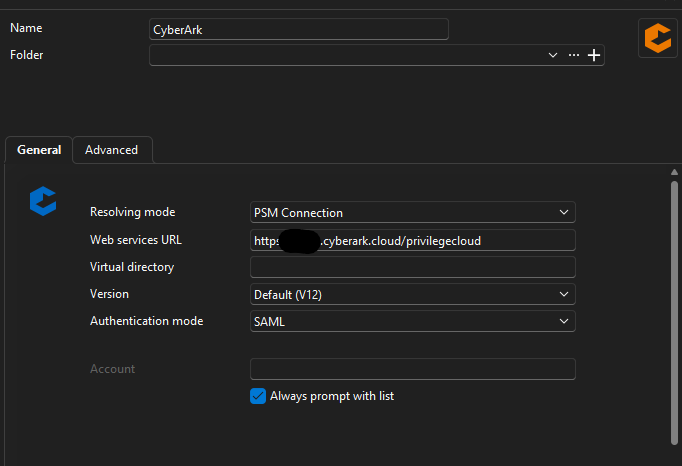
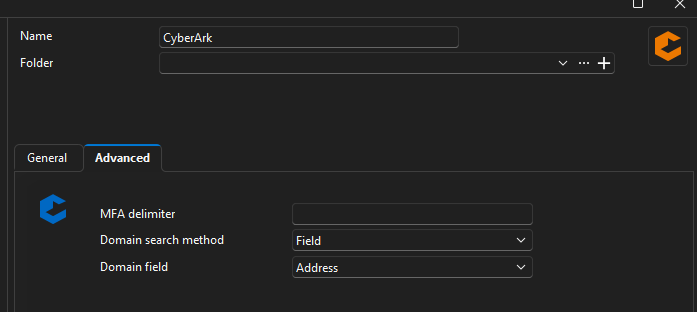
Here are my settings for PVWA. This has not changed in several weeks. The last version that it worked for me was 2025.1.30.0.
Users that have the CyberArk dashboard, some have doubleclick, some do not. Neither work, I had one user go direct to the dashboard and use the connect button, it pops up to ask for the component, but then does nothing after that.
CyberArk PSM Linked Vault no longer working properly
Another user reported using the CyberArk dashboard no longer works. Authenticating to CyberArk via the dashboard is successful, their safe accounts show up just fine, but when trying to connect to a session from the dashboard, the connection component popup comes up and the user chooses the appropriate component, but then nothing happens. No errors, no connection attempt made. I had the user turn on debug level 3 and try again, same issue and no application logs were generated.
CyberArk PSM Linked Vault no longer working properly
I upgraded to 2025.1.31.0, the CyberArk PSM PVWA linked vault configuration no longer works properly. Sessions that I have saved to connect to various servers will now attempt to connect directly to the target server without first contacting the PSM server associated with the 'preferred component' configured on the session. This fails to connect, prompting for a password despite having the PSM credential linked and connection component configured.
This worked before the latest update.
Add CyberArk dashboard account and connection component in session entry
Hi Xavier,
I was able to fix my issue. I mis-remembered my settings, I used 'smart reconnect' before and had inadvertently set it to 'smart sizing' in my testing. This is working as before, no issue here, all good. Thank you again!
Add CyberArk dashboard account and connection component in session entry
One other thing I noticed is that the RDP Display setting of 'Smart sizing' does not seem to work any longer. Previously, we could resize the RDM window and the RDP session would resize to fit the new RDM window size. Now, the RDP session size remains the same as the initial RDM window size.
Add CyberArk dashboard account and connection component in session entry
Xavier,
I found out my issue, the Preferred component entry needs the system name of the Connection Component, rather than the 'display name' of the component. The display name is what shows up in the dropdown if no preferred connection component is defined. I had to look up the back end name of the components, once I tried the system name rather than display name, it works as intended.
Add CyberArk dashboard account and connection component in session entry
I am entering the appropriate Connection Component name for the target as seen on the popup picker. Mostly the default of PSM-RDP is used, I have tried 'PSM-RDP' and just 'RDP'. However, we have some custom connection components too that do not seem to work. For instance, I have a PSM component named 'AWS', when I put 'AWS' in the Preferred component field, upon connection to this session/target, it will popup asking which connection component to use. After manually selecting AWS, it connections without issue.
Add CyberArk dashboard account and connection component in session entry
Hi Xavier,
I installed 2025.1.25.0 and am able to connect to targets using this method now. One issue I am having is that when I go into the Advanced menu and set a Preferred Component, it still will popup and ask which Connection Component to connect with.
Add CyberArk dashboard account and connection component in session entry
Ok, perfect. Yes, that appears to be the same issue. I will test again once the next minor release arrives. Thank you!
Add CyberArk dashboard account and connection component in session entry
Hi Xavier,
Thank you for the update! I have been trying this out and troubleshooting issues. I am not able to get an RDP connection to work using this method.
I setup a new credential entry using the CyberArk PVWA component. Added our web services URL, chose SAML as authentication, set the appropriate domain search options for our setup.
When creating a new RDP session entry, I followed your instructions and selected the newly created CyberArk PVWA linked vault. I was able to authenticate and list all of my accounts within CyberArk, I selected the appropriate account to access the RDP server.
I was able to see my selected account and linked vault in the session settings, saved the session component successfully.
When I go to connect to the RDP session component, it pops up to select the PSM connection component, I choose it. Then it hangs for a bit and generates a few errors. I do have debug logging turned on and attached the logs. This has happened on two different systems I tested.
Also, the previous configuration we are using via the CyberArk dashboard no longer works, it generates the same error, (0x80040111).
RDM locks up and has high CPU usage after every system wake up
Hello Jacob, I usually leave sessions open at the end of the day. I will perform the appdata rename test.
RDM locks up and has high CPU usage after every system wake up
I have an issue that has occurred between two different Windows 11 systems, that has occurred for at least the past 6 months. I leave RDM open at the end of the work day and let my computer sleep. When I wake it back up the next day, RDM is locked up and uses a constant 20% CPU. I always have to end the task in task manager and re-open it. I always keep my versions updated, the same behavior happens every day. I got a new computer back in November and restored my configuration, same behavior happens.