
cryorig
Set-RDMCurrentWorkspace: Unexpected exception
bit late but want to confirm that the issue was solved after the last update, thanks for your help
Set-RDMCurrentWorkspace: Unexpected exception
hi Michel,
i added the server logs to the previous comment.
About the IsOffline, thanks for the pointer, the interesting part is that i never switched to "offline" mode.
and RDM, which was open in the background while testing, was also not in offline mode.
Set-RDMCurrentWorkspace: Unexpected exception
Started New PWSH? YES
Import-Module Devolution.Powershell? NO
Get-RDMCurrentWorkspace: Fails
Sometimes it still shows the Details of the workspace and sometimes just the error, not clear whats the deciding factor here.
PS C:\Users\a2.simmerstatter>Get-RDMCurrentWorkspace: Unexpected exception

ID           : 735b67a3-1ac8-4080-8690-eafe6bf1ae96
IsConnected  : True
IsDefault    : True
IsOffline    : False
Name         : MACO
RepositoryID : 00000000-0000-0000-0000-000000000000
Type         : RDMS
Started New PWSH? YES via RDM "Powershell (RDM Cmdlet)"
Import-Module Devolution.Powershell? NO
Get-RDMCurrentWorkspace: Works
PS C:\Users\a2.simmerstatter> Get-RDMCurrentWorkspace

ID           : 735b67a3-1ac8-4080-8690-eafe6bf1ae96
IsConnected  : True
IsDefault    : True
IsOffline    : True
Name         : MACO
RepositoryID : 00000000-0000-0000-0000-000000000000
Type         : RDMS
Started New PWSH? YES
Import-Module Devolution.Powershell? NO but this preloads the Module anyway
Get-RDMCurrentWorkspace: Works
PS C:\Users\a2.simmerstatter> import-module devolutions.powershell
PS C:\Users\a2.simmerstatter> Get-RDMCurrentWorkspace

ID           : 735b67a3-1ac8-4080-8690-eafe6bf1ae96
IsConnected  : True
IsDefault    : True
IsOffline    : True
Name         : MACO
RepositoryID : 00000000-0000-0000-0000-000000000000
Type         : RDMS
Looks like it only fails when the Devolutions.Powershell module was not explicitely loaded before the command
Here is the full error message from $Error:
PS C:\Users\a2.simmerstatter> $Error.exception

Status         : UnknownError
Response       :
TargetSite     : T RunSynchronous[T](System.Threading.Tasks.Task`1[T])
Message        : Unexpected exception
Data           : {}
InnerException :
HelpLink       :
Source         : Devolutions.Server.ApiWrapper
HResult        : -2146233079
StackTrace     :    at Devolutions.Server.ApiWrapper.RDMSWebClient.RunSynchronous[T](Task`1 task)
                    at Devolutions.Server.ApiWrapper.RDMSWebClient.GetRoles()
                    at Devolutions.RemoteDesktopManager.Business.DataSources.RDMSWebApiClient.<GetRoles>b__308_0()
                    at Devolutions.RemoteDesktopManager.Business.DataSources.RDMSWebApiClient.RetryAction[T](ExecuteAct
                 ionDelegate`1 action, String label, Boolean failFastOnBackgroundThread)
                    at Devolutions.RemoteDesktopManager.Business.DataSources.RDMSWebApiClient.ExecuteAction[T](ExecuteA
                 ctionDelegate`1 action, ExecuteActionLogMode logMode, Boolean retryAction)
                    at Devolutions.RemoteDesktopManager.Business.DataSources.RDMSWebApiClient.ExecuteActionMultipleData
                 [T](ExecuteActionDelegate`1 action)
                    at Devolutions.RemoteDesktopManager.Business.DataSources.RDMSWebApiClient.GetRoles()
                    at Devolutions.RemoteDesktopManager.Business.DataSources.RDMSSecuritySubDataSource.GetRoles()
                    at Devolutions.RemoteDesktopManager.Business.DataSources.ContextSubDataSource.RoleContext.GetAllRol
                 es(Boolean getAllRoleInformation, Boolean useRecentCache)
                    at Devolutions.RemoteDesktopManager.Business.DataSources.ContextSubDataSource.UserContext.GetCurren
                 tLoggedInUserNotCached(ConnectionEngine engine)
                    at Devolutions.RemoteDesktopManager.Business.DataSources.ContextSubDataSource.UserContext.get_UserE
                 ntity()
                    at
                 Devolutions.RemoteDesktopManager.Business.DataSources.ContextSubDataSource.get_IsUserVaultSupported()
                    at Devolutions.RemoteDesktopManager.Managers.ConnectionEngine.FindConnectionEx(Nullable`1
                 connectionId, String groupMain, Boolean searchOnlyCurrentEngine)
                    at Devolutions.RemoteDesktopManager.Managers.ConnectionEngine.FindConnectionEx(String
                 connectionId, Boolean searchOnlyCurrentEngine)
                    at Devolutions.RemoteDesktopManager.Managers.FavoriteManager.UpdatePayloads(ConnectionEngine
                 engine)
                    at Devolutions.RemoteDesktopManager.Managers.FavoriteManager.LoadFolders(ConnectionEngine engine)
                    at Devolutions.RemoteDesktopManager.Managers.ConnectionManager.LoadConnections(ConnectionEngine&
                 engine, Boolean refreshSubVaults)
                    at Devolutions.RemoteDesktopManager.Managers.ConnectionManager.LoadConnections(ConnectionEngine&
                 engine, Boolean refreshSubVaults)
                    at
                 Devolutions.RemoteDesktopManager.Managers.ConnectionManager.LoadConnections(BaseConnectionDataSource
                 dataSource, ConnectionEngine& engine, Boolean refreshSubVaults)
                    at
                 Devolutions.RemoteDesktopManager.Managers.ConnectionManager.RefreshConnections(ConnectionEngine&
                 engine, Boolean refreshSubVaults)
                    at Devolutions.RemoteDesktopManager.Managers.ConnectionManager.RefreshConnections(ConnectionEngine
                 engine, Boolean refreshSubVaults)
                    at Devolutions.RemoteDesktopManager.Managers.PowerShellConnectionManager.RefreshConnections(Connect
                 ionEngine engine, Boolean refreshSubVaults)
                    at Devolutions.RemoteDesktopManager.Managers.PowerShellConnectionManager.RefreshConnections(Connect
                 ionEngine engine)
                    at RemoteDesktopManager.PowerShellModule.BaseCommand.RefreshConnectionEngine(ConnectionEngine
                 engine)
                    at RemoteDesktopManager.PowerShellModule.BaseCommand.BeginProcessing()
                    at System.Management.Automation.CommandProcessorBase.DoBegin()

PS C:\Users\a2.simmerstatter> $Error.exception.tostring()
System.Net.WebException: Unexpected exception
   at Devolutions.Server.ApiWrapper.RDMSWebClient.RunSynchronous[T](Task`1 task)
   at Devolutions.Server.ApiWrapper.RDMSWebClient.GetRoles()
   at Devolutions.RemoteDesktopManager.Business.DataSources.RDMSWebApiClient.<GetRoles>b__308_0()
   at Devolutions.RemoteDesktopManager.Business.DataSources.RDMSWebApiClient.RetryAction[T](ExecuteActionDelegate`1 action, String label, Boolean failFastOnBackgroundThread)
   at Devolutions.RemoteDesktopManager.Business.DataSources.RDMSWebApiClient.ExecuteAction[T](ExecuteActionDelegate`1 action, ExecuteActionLogMode logMode, Boolean retryAction)
   at Devolutions.RemoteDesktopManager.Business.DataSources.RDMSWebApiClient.ExecuteActionMultipleData[T](ExecuteActionDelegate`1 action)
   at Devolutions.RemoteDesktopManager.Business.DataSources.RDMSWebApiClient.GetRoles()
   at Devolutions.RemoteDesktopManager.Business.DataSources.RDMSSecuritySubDataSource.GetRoles()
   at Devolutions.RemoteDesktopManager.Business.DataSources.ContextSubDataSource.RoleContext.GetAllRoles(Boolean getAllRoleInformation, Boolean useRecentCache)
   at Devolutions.RemoteDesktopManager.Business.DataSources.ContextSubDataSource.UserContext.GetCurrentLoggedInUserNotCached(ConnectionEngine engine)
   at Devolutions.RemoteDesktopManager.Business.DataSources.ContextSubDataSource.UserContext.get_UserEntity()
   at Devolutions.RemoteDesktopManager.Business.DataSources.ContextSubDataSource.get_IsUserVaultSupported()
   at Devolutions.RemoteDesktopManager.Managers.ConnectionEngine.FindConnectionEx(Nullable`1 connectionId, String groupMain, Boolean searchOnlyCurrentEngine)
   at Devolutions.RemoteDesktopManager.Managers.ConnectionEngine.FindConnectionEx(String connectionId, Boolean searchOnlyCurrentEngine)
   at Devolutions.RemoteDesktopManager.Managers.FavoriteManager.UpdatePayloads(ConnectionEngine engine)
   at Devolutions.RemoteDesktopManager.Managers.FavoriteManager.LoadFolders(ConnectionEngine engine)
   at Devolutions.RemoteDesktopManager.Managers.ConnectionManager.LoadConnections(ConnectionEngine& engine, Boolean refreshSubVaults)
   at Devolutions.RemoteDesktopManager.Managers.ConnectionManager.LoadConnections(ConnectionEngine& engine, Boolean refreshSubVaults)
   at Devolutions.RemoteDesktopManager.Managers.ConnectionManager.LoadConnections(BaseConnectionDataSource dataSource, ConnectionEngine& engine, Boolean refreshSubVaults)
   at Devolutions.RemoteDesktopManager.Managers.ConnectionManager.RefreshConnections(ConnectionEngine& engine, Boolean refreshSubVaults)
   at Devolutions.RemoteDesktopManager.Managers.ConnectionManager.RefreshConnections(ConnectionEngine engine, Boolean refreshSubVaults)
   at Devolutions.RemoteDesktopManager.Managers.PowerShellConnectionManager.RefreshConnections(ConnectionEngine engine, Boolean refreshSubVaults)
   at Devolutions.RemoteDesktopManager.Managers.PowerShellConnectionManager.RefreshConnections(ConnectionEngine engine)
   at RemoteDesktopManager.PowerShellModule.BaseCommand.RefreshConnectionEngine(ConnectionEngine engine)
   at RemoteDesktopManager.PowerShellModule.BaseCommand.BeginProcessing()
   at System.Management.Automation.CommandProcessorBase.DoBegin()
PS C:\Users\a2.simmerstatter>
Serverlogs shows this message 4-5 times:
AccessDeniedException - Exception of type 'Devolutions.Server.V2.Domain.Exceptions.AccessDeniedException' was thrown.at Devolutions.Server.V2.Application.Common.GuardClause.IGuardExtensions.HasPermission[G](G guard, Func`1 predicate)at Devolutions.Server.Controllers.ControllerGuard.HasAdministrativePermission(AdministrativePermission permission)at Devolutions.Server.Controllers.APIControllers.V2.SecurityController.GetRoles()at lambda_method631(Closure, Object, Object[])at Microsoft.AspNetCore.Mvc.Infrastructure.ControllerActionInvoker.InvokeActionMethodAsync()at Microsoft.AspNetCore.Mvc.Infrastructure.ControllerActionInvoker.InvokeNextActionFilterAsync()--- End of stack trace from previous location ---at Microsoft.AspNetCore.Mvc.Infrastructure.ControllerActionInvoker.Rethrow(ActionExecutedContextSealed context)at Microsoft.AspNetCore.Mvc.Infrastructure.ControllerActionInvoker.InvokeInnerFilterAsync()--- End of stack trace from previous location ---at Microsoft.AspNetCore.Mvc.Infrastructure.ResourceInvoker.<InvokeNextExceptionFilterAsync>g__Awaited|26_0(ResourceInvoker invoker, Task lastTask, State next, Scope scope, Object state, Boolean isCompleted)Set-RDMCurrentWorkspace: Unexpected exception
we suddenly have an issue when starting Powershell scripts or just the integrated "Powershell (RDM CMDlet)" Tool
when the integrated Powershell opens this error appears:
Loading RDM CmdLet (Module)
Set-RDMCurrentWorkspace:
Line |
   6 |  Set-RDMCurrentDataSource -ID "735b67a3-1ac8-4080-8690-eafe6bf1ae96";
     |  ~~~~~~~~~~~~~~~~~~~~~~~~~~~~~~~~~~~~~~~~~~~~~~~~~~~~~~~~~~~~~~~~~~~
     | Unexpected exception
Set-RDMCurrentWorkspace:
Line |
   6 |  Set-RDMCurrentDataSource -ID "735b67a3-1ac8-4080-8690-eafe6bf1ae96";
     |  ~~~~~~~~~~~~~~~~~~~~~~~~~~~~~~~~~~~~~~~~~~~~~~~~~~~~~~~~~~~~~~~~~~~
     | Unexpected exception
Trying to manually set the Workspace has the same Issue (Real IDs swapped for random IDs):
PS C:\Users\a2.simmerstatter> get-rdmworkspace

ID           : 735b67a3-1ac8-4080-8690-eafe6e96bf1a
IsConnected  : False
IsDefault    : True
IsOffline    : False
Name         : WorkspaceName
RepositoryID : 00000000-0000-0000-0000-000000000000
Type         : RDMS

PS C:\Users\a2.simmerstatter> Set-RDMCurrentWorkspace -ID "735b67a3-1ac8-4080-8690-eafe6e96bf1a" -Verbose
VERBOSE: [Set-RDMCurrentWorkspace] Start
VERBOSE: Setting current workspace 'WorkspaceName' with repository '00000000-0000-0000-0000-000000000000'.
Set-RDMCurrentWorkspace: Unexpected exception
RDM: 2026.3.12.0
DVLS: 2026.3.7.0
Devolutions.Powershell: 2026.3.2
For now it apperas only cosmetically with no real effect on scripts, if this changes i wil update.
Powershell Synchronizer fails when triggerd by RDM UI, works via powershell
Just updated to 2026.1.16, and the issue seems to be gone / fixed
But i have not found anything related in the changelog ...
Anyway, thanks for your help
Powershell Synchronizer fails when triggerd by RDM UI, works via powershell
Hi
i made another Powershellsynchronizer which has no code in it (so it does nothing)
Same issue as above, used the same command just a different ID
Custom Powershell Synchronizer $RDM Object
hi Patrick,
thanks for the update and the custom variables, thats better than hardcoded credentials!
one last thing than, is there any plan or timeline when linked credentials will work with powershell synchronizers?
everything else is / was just a workaround, not a real solution...
Thanks for your help :)
Connection context menu no longer available on search items
Looks like this was fixed in 2026.1.15, thanks :)
Powershell Synchronizer fails when triggerd by RDM UI, works via powershell
RDM Version: 2026.1.15
Devolutions.Powershell Version: 2026.1.3
Datasource: SQLite
Issue:
Running the Powershell Synchronizer from RDM UI fails with:
Could not load type 'Devolutions.RemoteDesktopManager.Theme' from assembly 'RemoteDesktopManager.Core, Version=2026.1.15.0, Culture=neutral, PublicKeyToken=null'.
Running with Open-RDMSyncSession -ID <ENTRY_ID> works.
i attached an export of a testscript and a test credential which shows the issue nicely.
The file is a RDM Export inside of a zip, as rdm files are not allowed as uploads.
Just import into a clean RDM and run the synchronizer, this will generate a logfile in your temp (exact path is visible in the code)
This logfile has a bunch of extra data as i use it for my generell debugging, but one of the lines is the error from above.
Custom Powershell Synchronizer $RDM Object
I finally found time to test the new version (2026.1.15.0)(Datasource is SQLite but i also verified with a MSSQL 2019/2022)
first of: yes the synchronizer is now able to create entries.
second: looks like it is still not possible to use the linked credentials or the parameter variables with a powershell script?
third: i think i found another bug, but i will open another thread for this :)
now my Question:
what is the supported way to get credentials from the vault into the powershell script?
Via linked Credentials?
Via two of the five parameter? (one username, one password)
Use Get-RDMEntryPassword or similar command inside the synchronizer script?
And to make sure it was not simple user error:
The parameter names do not need the leading $? for example i rename Parameter 1 to CP1 and it should resolve as $CP1 inside the synchronizer, correct?
Connection context menu no longer available on search items
This is reproducable with a MSSQL and SQlite Datasource, other sources were not tested.
the videos are from a test install with no changes after install except a few different session entries.
one is with version 2025.3.32 (RDM_2025.3.32_Thread_52388_working.mp4), the other is after upgrade to 2026.1.12 and shows that the menu does not appear (RDM_2026.1.12_Thread_52388_NOT_working.mp4).
Videos are currently uploading. EDIT: Videos are uploaded.
To Reproduce yourself:
Install RDM 2025.3.32 (does not matter if DS is new or has existing entries)
If a new DS is used add some sessions (i tested SSH and RDP)
Close Navigation View completely and search for the session entry, than rightclick it
You will see the Connection Context Menu open
Now update to 2026.1.12 (or any 2026.1.X really...) and do the same
The Context menu does no longer open.
Here are the Filter settings, they are how devolutions installs them and where not changed by me.

Connection context menu no longer available on search items
when using the search instead of the navigation window and right clicks on a connection the connection menu is no longer shown.
in 2025.3.33 it looks like this:

with version 2026.1.10 and 2026.1.11 it does not show the connection menu, only a tooltip:

Custom Powershell Synchronizer $RDM Object
if you add me to your GIT / CICD infra i can do the merge :)
jokes aside, thanks for the update!
Custom Powershell Synchronizer $RDM Object
hi @Patrick Ouimet
Any news on this?
BR,
CryoRig
Custom Powershell Synchronizer $RDM Object
I think my first test was with version 2025.3.22.0 and later 2025.3.29.0., both did/do not work.
Havn't yet tested it with 2025.3.30.0, but reading the release notes i don't think it would make a difference.
Custom Powershell Synchronizer $RDM Object
Hi Patrick,
sorry about the radio silence. I had no time till today to work on this.
i got it to work with hard-coded credentials, but I can't seem to get it to work with linked credentials.
The credential is used to connect to the IMC API.
What i tried was setting the linked credential inside the synchroniser config, then add the $USERNAME$ and $PASSWORD$ variables as parameters called Username / Password.
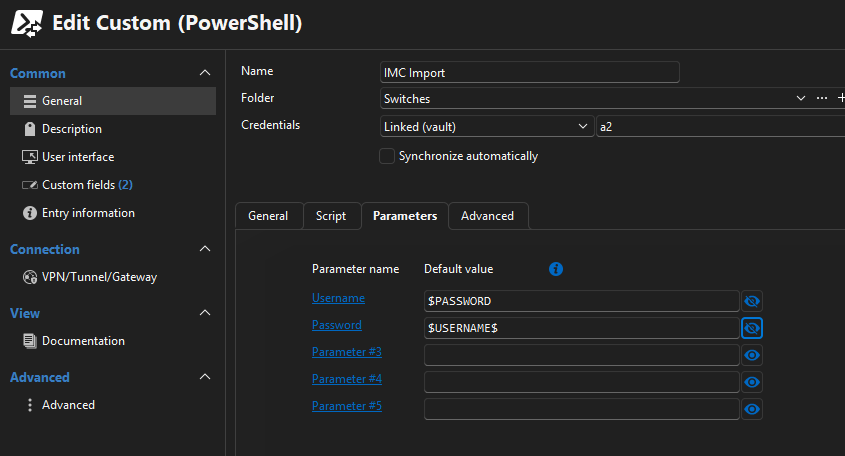
But when I run a get-variable inside the sync, the variables are not available.
What's the correct way to transfer a credential inside the sync job for use with the script?
PS:
Would Devolutions be interested in the api docs from HPE IMC? Maybe one day we could get native Sync support :)
Custom Powershell Synchronizer $RDM Object
Hi
currently trying to script a syncer for imports from HPe IMC.
I can get the information from IMC fine via their API, but i fail to get this to work as a synchronizer.
Can someone give me an example what the $RDM object (i guess the Synchronizer generates this each run?) looks like?
or maybe even a few lines on how to recreate it for testing outside of RDM...
The documentation about the powershell synchronizer is not (yet?) very helpful IMO.
Thanks,
CryoRig
Compatability Issue with MgGraph Module
Hi Patrick, sorry for the delay in response.
i don't think that this is the same problem / issue...
Your quote is about how one needs to use connect-mggraph before any other mggraph command, which makes sense.
I also read through the page you linked and there is no mention about a specific order how non Graph modules like AZ have to be loaded...
If you read my original post, my issue is when i load the Graph Module BEFORE Devolutions.Powershell, then the graph connection does not work! (see the error from my first post)
it works when i turn the module load order around, which is the opposite of what you stated and also what makes me think that we are not on the same page regarding my issue.
BR,
CryoRig
Compatability Issue with MgGraph Module
Hi Patrick,
oh ok good to know!
do you have a link where this is mentioned? a quick search didn't really give me anything "official" just multiple users with thze same or similar issue
BR,
Cryorig
Compatability Issue with MgGraph Module
Hi Devolution Team,
there is an issue when connecting to MgGraph, not sure that is something you have to fix or the Graph Module Team...
If the Microsoft.Graph.Authentication module is loaded (via require or import-module) before Devolutions.Powershell the connection to MgGraph fails with the following error:
Method not found: 'System.Threading.Tasks.Task`1<Azure.Identity.AuthenticationRecord> Azure.Identity.InteractiveBrowserCredential.AuthenticateAsync(Azure.Core.TokenRequestContext, System.Threading.CancellationToken)'
If you switch the order of module loading (Devolutions.Powershell before Microsoft.Graph.. then it works for some reason)
Tested with:
Powershell 7.5.3
Devolutions.Powershell 2025.3.0
Microsoft.Graph 2.31.0
a MSSQL Datasource
RDM Version 2025.3.16.0 (i don't think this has any effect)
How to reproduce:
Import-Module Microsoft.Graph.Authentication
Import-Module Devolutions.PowerShell
$Datasourcename = "XYXY" #Replace with your DS
$datasource = Get-RDMDataSource -Name $Datasourcename
Set-RDMCurrentDataSource -DataSource $datasource
Connect-MgGraph -NoWelcome
I also have attached a little script which outputs the loaded DLL's.
I think it has something to do with one of the Azure...dll's, but that could be a "red herring".
BR,
Stefan / CryoRig
Permission problems after Group rename
just sent the mail, thank you for your support till now!
The Casenumber is 00099572
Permission problems after Group rename
HI, thanks for the script.
just to clarify what exactly do i have to replace with the group name? the "Default"
every line of the export is like this:
"VaultName","Networking\Site","Default","","","","","","","","","","","","","","","","",""
EDIT:
the output of the export script is identical between the database which has the permission issues and an older backup of the database which does not have the issue.
Permission problems after Group rename
Hello,
any news or things i can try on our side?
This is quite the problem for us as it affects quite a few powershell scripts which my colleagues use for their daily operations!
Otherwise i will have to restore the database to an older state, which means troubleshooting with the current state would no longer be possible, or at least quite hard.
Permission problems after Group rename
Hi Erica,
thanks for the fast answer!
The datasource is a MSSQL 2022, and yes it is the same DS for RDM as well as Powershell.
We tested it with both PS5 (RemoteDesktopManager 2022.3.1.8) and PS7 (Devolutions.Powershell 2025.2.4.0).
Permission problems after Group rename
I recently renamed the Usergroups in RDM and now have issues with some users which get "access denied" when trying to access credentials via powershell (they can access the credentials in RDM...)
I disregarded the warning which gets shown when one renames a group (had a snapshot of the database, so i was not worried, first mistake!)
After a few days without issues i deleted the snapshot as everything worked for me (second mistake! i have admin rights, they don't, and i did not check in with the other users)
And now we have the issue that the other rdm users can no longer access credentials via powershell, is there a way to restore/fix the permissions?
I already tried to change the groupnames back to the original ones and renamed the groups with the script from this post Renaming a role and update permissions
BR,
Stefan Simmerstatter