Custom Powershell Synchronizer $RDM Object

Hi
currently trying to script a syncer for imports from HPe IMC.
I can get the information from IMC fine via their API, but i fail to get this to work as a synchronizer.
Can someone give me an example what the $RDM object (i guess the Synchronizer generates this each run?) looks like?
or maybe even a few lines on how to recreate it for testing outside of RDM...
The documentation about the powershell synchronizer is not (yet?) very helpful IMO.
Thanks,
CryoRig
All Comments (15)
Hello CryRig,
Thank you for reaching out to the Devolutions support team.
If you already have a synchronizer configured in RDM, I suggest using the command Open-RDMSyncSession.
https://docs.devolutions.net/powershell/powershell-commands/open-rdmsyncsession/
To automate the process, you can use the application identity to authenticate in RDM.
This requires the use of the Devolution Server or the Hub Business.
And the permission set on this account.
https://docs.devolutions.net/server/web-interface/administration/security-management/applications/
You can add this application identity to the RDM data source information under the PowerShell tab.
Best regards,
Patrick Ouimet
Hi Patrick,
sorry about the radio silence. I had no time till today to work on this.
i got it to work with hard-coded credentials, but I can't seem to get it to work with linked credentials.
The credential is used to connect to the IMC API.
What i tried was setting the linked credential inside the synchroniser config, then add the $USERNAME$ and $PASSWORD$ variables as parameters called Username / Password.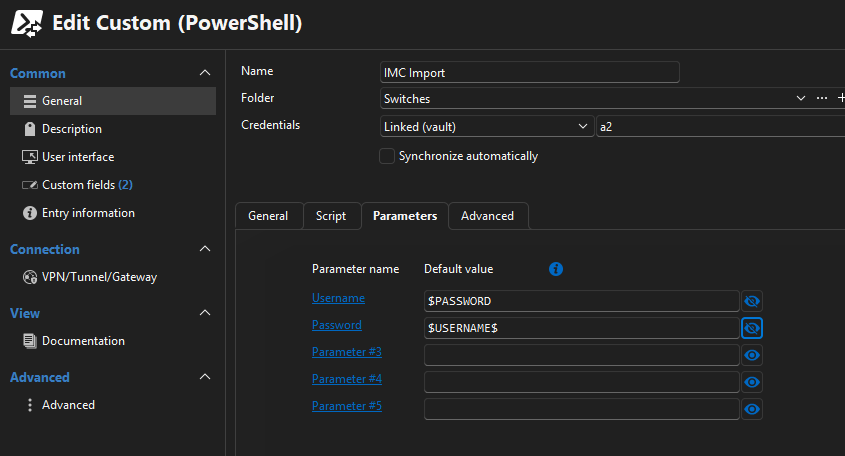
But when I run a get-variable inside the sync, the variables are not available.
What's the correct way to transfer a credential inside the sync job for use with the script?
PS:
Would Devolutions be interested in the api docs from HPE IMC? Maybe one day we could get native Sync support :)
d2a09fbc-c9b0-4856-8a92-ea804442896e.png
Hello cryorig,
Sorry as well for the radio silence.
I am still working on my script to reproduce this on my side.
I will let you know as soon as I have results.
Best regards,
Patrick Ouimet
Hello cryorig,
I appreciate your patience on this case.
After multiple tests, it looks like this entry cannot sync or create entries.
I tested it with an internal and external value, and got some errors.
I will open an internal ticket to go through all of them and let you know when it is fixed.
Could you tell me if this entry was working on an older version of RDM?
Best regards,
Patrick Ouimet
I think my first test was with version 2025.3.22.0 and later 2025.3.29.0., both did/do not work.
Havn't yet tested it with 2025.3.30.0, but reading the release notes i don't think it would make a difference.
Hello cryorig,
Thank you for this feedback.
An internal ticket is open regarding the issue that occurs with the custom PowerShell synchronizer.
We will let you know when the fixed version of RDM and the module will be available.
Best regards
Patrick Ouimet
hi @Patrick Ouimet
Any news on this?
BR,
CryoRig
Hello,
Regrettably, the Support Department cannot provide an exact release date as the full process (Build – Quality Assurance – Release) is out of our control.
The development team needs to implement a fix. After that a series of events must take place:
- A pull request must be approved, by a peer primarily, but sometimes also by a security specialist;
- A build must be generated;
- The whole build contains typically many fixes, which each must be validated by our QA department
- if need be, the build is rejected for a specific issue, or a combination thereof, which would trigger another build cycle
Best regards,
Patrick Ouimet
if you add me to your GIT / CICD infra i can do the merge :)
jokes aside, thanks for the update!
Hello cryorig,
This issue should be fixed in version 2026.1.9.0.
This version is not available yet, but it will be released soon.
Let us know if this version fixes your issue.
Best regards,
Patrick Ouimet
I finally found time to test the new version (2026.1.15.0)(Datasource is SQLite but i also verified with a MSSQL 2019/2022)
first of: yes the synchronizer is now able to create entries.
second: looks like it is still not possible to use the linked credentials or the parameter variables with a powershell script?
third: i think i found another bug, but i will open another thread for this :)
now my Question:
what is the supported way to get credentials from the vault into the powershell script?
Via linked Credentials?
Via two of the five parameter? (one username, one password)
Use Get-RDMEntryPassword or similar command inside the synchronizer script?
And to make sure it was not simple user error:
The parameter names do not need the leading $? for example i rename Parameter 1 to CP1 and it should resolve as $CP1 inside the synchronizer, correct?
Hello cryorig,
Sorry for the long wait.
Yes, parameters could be used for this script.
But I did mine with Custom Variables in RDM.
It's a nicer way to store information, and it can be used across multiple entries.
https://docs.devolutions.net/rdm/kb/knowledge-base/manage-custom-variables/
Here are the variables I created:
- SYNC_DOMAIN_FQDN: AD DNS name, for example, example.local
- SYNC_AD_USER: account used to query AD
- SYNC_AD_PASSWORD: password for that account
- SYNC_AD_SERVER: domain controller to query
- SYNC_AD_SEARCHBASE: LDAP search base, for example, DC=example,DC=local
- SYNC_ROOT_FOLDER: root folder created in RDM for imported sessions
And here is the AD script I used:
<#
Custom PowerShell Synchronizer
- Queries Active Directory for computers
- Creates synchronized sessions through the $RDM object
- Writes a log file to %TEMP%\RDMCustomAdSynchronizer.log
- Does not require the Devolutions.PowerShell module

You can configure it in one of two ways:
1) Edit the placeholder values in the CONFIGURATION section
2) Or create custom variables on the synchronizer entry in RDM

If custom variables are present, they override the placeholder values.

Suggested custom variables:
  SYNC_DOMAIN_FQDN
  SYNC_AD_USER
  SYNC_AD_PASSWORD
  SYNC_AD_SERVER
  SYNC_AD_SEARCHBASE
  SYNC_ROOT_FOLDER
#>

# -------------------------------------------------------------------
# Log initialization
# -------------------------------------------------------------------
$script:logPath = Join-Path ([System.IO.Path]::GetTempPath()) 'RDMCustomAdSynchronizer.log'

"[{0}] [INFO] Starting script" -f (Get-Date -Format 'yyyy-MM-dd HH:mm:ss') |
    Set-Content -Path $script:logPath -Encoding UTF8

function Write-Log {
    param(
        [Parameter(Mandatory)]
        [string]$Message,

        [ValidateSet('INFO','WARN','ERROR')]
        [string]$Level = 'INFO'
    )

    $line = "[{0}] [{1}] {2}" -f (Get-Date -Format 'yyyy-MM-dd HH:mm:ss'), $Level, $Message

    try {
        $line | Add-Content -Path $script:logPath -Encoding UTF8
    }
    catch {
        # Do not hide the real failure if logging itself fails
    }
}

function Normalize-RdmValue {
    param(
        [AllowNull()]
        [string]$Value,

        [switch]$PreserveSpaces
    )

    if ($null -eq $Value) {
        return ''
    }

    # Remove only the leading/trailing newline added by the here-string
    $normalized = $Value -replace "^\r?\n", '' -replace "\r?\n$", ''

    if (-not $PreserveSpaces) {
        $normalized = $normalized.Trim()
    }

    return $normalized
}

function Resolve-ConfiguredValue {
    param(
        [AllowNull()]
        [string]$Value,

        [Parameter(Mandatory)]
        [string]$Name,

        [string]$Fallback = $null,

        [switch]$Mandatory,

        [switch]$Secret
    )

    $resolved = Normalize-RdmValue -Value $Value -PreserveSpaces:$Secret
    $isPlaceholder = $resolved -match '^\$[A-Za-z0-9_]+\$$'

    if ([string]::IsNullOrWhiteSpace($resolved) -or $isPlaceholder) {
        if ($Mandatory -and [string]::IsNullOrWhiteSpace($Fallback)) {
            throw "Required value '$Name' was not provided."
        }

        return $Fallback
    }

    return $resolved
}

Write-Log "Log path resolved to '$script:logPath'"

try {
    $identity = [System.Security.Principal.WindowsIdentity]::GetCurrent().Name
    Write-Log "Running as '$identity'"
}
catch {
    Write-Log "Could not resolve Windows identity" 'WARN'
}

# -------------------------------------------------------------------
# Validate synchronizer context
# -------------------------------------------------------------------
if (-not (Get-Variable -Name RDM -ErrorAction SilentlyContinue) -or $null -eq $RDM) {
    Write-Log 'The $RDM object is not available. This script must run inside a Custom PowerShell Synchronizer entry.' 'ERROR'
    throw 'The $RDM object is not available. Run this script from a Custom PowerShell Synchronizer entry.'
}

Write-Log '$RDM synchronizer object detected'

# -------------------------------------------------------------------
# Load Active Directory module
# -------------------------------------------------------------------
try {
    Import-Module ActiveDirectory -ErrorAction Stop
    Write-Log 'ActiveDirectory module loaded successfully'
}
catch {
    Write-Log "Failed to load ActiveDirectory module: $($_.Exception.Message)" 'ERROR'
    throw
}

# -------------------------------------------------------------------
# CONFIGURATION
# Replace these placeholder values if you do not want to use custom variables
# -------------------------------------------------------------------
$configDomainFqdn   = 'example.local'
$configAdUser       = 'service.account@example.local'
$configAdPassword   = '<REPLACE-WITH-AD-PASSWORD>'
$configAdServer     = 'dc01.example.local'
$configAdSearchBase = 'DC=example,DC=local'
$configRootFolder   = 'Example'

# -------------------------------------------------------------------
# Optional RDM custom variables from the synchronizer entry
# If present, these values override the CONFIGURATION block above
# -------------------------------------------------------------------
$domainFqdnRaw = @'
$SYNC_DOMAIN_FQDN$
'@

$adUserRaw = @'
$SYNC_AD_USER$
'@

$adPasswordRaw = @'
$SYNC_AD_PASSWORD$
'@

$adServerRaw = @'
$SYNC_AD_SERVER$
'@

$adSearchBaseRaw = @'
$SYNC_AD_SEARCHBASE$
'@

$rootFolderRaw = @'
$SYNC_ROOT_FOLDER$
'@

# -------------------------------------------------------------------
# Resolve effective configuration
# -------------------------------------------------------------------
$domainFqdn = Resolve-ConfiguredValue `
    -Value $domainFqdnRaw `
    -Name 'SYNC_DOMAIN_FQDN' `
    -Fallback $configDomainFqdn `
    -Mandatory

$adUser = Resolve-ConfiguredValue `
    -Value $adUserRaw `
    -Name 'SYNC_AD_USER' `
    -Fallback $configAdUser `
    -Mandatory

$adPasswordPlain = Resolve-ConfiguredValue `
    -Value $adPasswordRaw `
    -Name 'SYNC_AD_PASSWORD' `
    -Fallback $configAdPassword `
    -Mandatory `
    -Secret

$adServer = Resolve-ConfiguredValue `
    -Value $adServerRaw `
    -Name 'SYNC_AD_SERVER' `
    -Fallback $configAdServer `
    -Mandatory

$adSearchBase = Resolve-ConfiguredValue `
    -Value $adSearchBaseRaw `
    -Name 'SYNC_AD_SEARCHBASE' `
    -Fallback $configAdSearchBase `
    -Mandatory

$rdmRootFolderName = Resolve-ConfiguredValue `
    -Value $rootFolderRaw `
    -Name 'SYNC_ROOT_FOLDER' `
    -Fallback $configRootFolder `
    -Mandatory

if ($adPasswordPlain -like '<REPLACE-*') {
    Write-Log 'The placeholder password was not replaced and no custom variable override was provided.' 'ERROR'
    throw 'Replace the placeholder password or configure the SYNC_AD_PASSWORD custom variable.'
}

# -------------------------------------------------------------------
# Other behavior
# -------------------------------------------------------------------
$includeRootFolderName = $true

# Keep these disabled for initial validation
$testPing = $false
$testRdp  = $false

$rdpPort      = 3389
$tcpTimeoutMs = 1000

Write-Log "Domain FQDN     = '$domainFqdn'"
Write-Log "AD Search Base  = '$adSearchBase'"
Write-Log "AD Server       = '$adServer'"
Write-Log "Root folder     = '$rdmRootFolderName'"
Write-Log "testPing        = $testPing"
Write-Log "testRdp         = $testRdp"

# -------------------------------------------------------------------
# Build AD credential
# -------------------------------------------------------------------
try {
    $secureAdPassword = ConvertTo-SecureString -String $adPasswordPlain -AsPlainText -Force
    $adCredential     = [System.Management.Automation.PSCredential]::new($adUser, $secureAdPassword)
    Write-Log "AD bind username = '$adUser'"
}
catch {
    Write-Log "Failed to build PSCredential: $($_.Exception.Message)" 'ERROR'
    throw
}
finally {
    Remove-Variable adPasswordPlain -ErrorAction SilentlyContinue
}

# -------------------------------------------------------------------
# Helper functions
# -------------------------------------------------------------------
function Test-RdpEndpoint {
    param(
        [Parameter(Mandatory)]
        [string]$ComputerNameOrAddress,

        [int]$Port = 3389,
        [int]$TimeoutMs = 1000
    )

    $client = $null
    try {
        $client = [System.Net.Sockets.TcpClient]::new()
        $async = $client.BeginConnect($ComputerNameOrAddress, $Port, $null, $null)

        if (-not $async.AsyncWaitHandle.WaitOne($TimeoutMs, $false)) {
            return $false
        }

        $null = $client.EndConnect($async)
        return $true
    }
    catch {
        return $false
    }
    finally {
        if ($client) {
            $client.Close()
            $client.Dispose()
        }
    }
}

function Get-RelativeRdmGroup {
    param(
        [string]$ComputerCanonicalName,
        [string]$DomainFqdn,
        [string]$RootFolderName,
        [bool]$IncludeRootFolderName = $true
    )

    if ([string]::IsNullOrWhiteSpace($ComputerCanonicalName)) {
        if ($IncludeRootFolderName -and -not [string]::IsNullOrWhiteSpace($RootFolderName)) {
            return $RootFolderName
        }

        return ''
    }

    $canonicalFolder = $ComputerCanonicalName -replace '/[^/]+$', ''
    $relativeFolder  = $canonicalFolder

    if ($canonicalFolder.StartsWith("$DomainFqdn/", [System.StringComparison]::OrdinalIgnoreCase)) {
        $relativeFolder = $canonicalFolder.Substring($DomainFqdn.Length + 1)
    }
    elseif ($canonicalFolder.Equals($DomainFqdn, [System.StringComparison]::OrdinalIgnoreCase)) {
        $relativeFolder = ''
    }

    $parts = New-Object 'System.Collections.Generic.List[string]'

    if ($IncludeRootFolderName -and -not [string]::IsNullOrWhiteSpace($RootFolderName)) {
        $parts.Add($RootFolderName)
    }

    if (-not [string]::IsNullOrWhiteSpace($relativeFolder)) {
        foreach ($segment in ($relativeFolder -split '/')) {
            if (-not [string]::IsNullOrWhiteSpace($segment)) {
                $parts.Add($segment)
            }
        }
    }

    return ($parts -join '\')
}

# -------------------------------------------------------------------
# Query Active Directory
# -------------------------------------------------------------------
try {
    $adComputerParams = @{
        Filter      = '*'
        SearchBase  = $adSearchBase
        SearchScope = 'Subtree'
        Properties  = @('Name', 'DNSHostName', 'CanonicalName', 'DistinguishedName')
        ErrorAction = 'Stop'
        Server      = $adServer
        Credential  = $adCredential
    }

    $adComputers = @(
        Get-ADComputer @adComputerParams |
        Where-Object { -not [string]::IsNullOrWhiteSpace($_.Name) } |
        Sort-Object CanonicalName, Name
    )

    Write-Log "AD returned $($adComputers.Count) computer(s)"
}
catch {
    Write-Log "Get-ADComputer failed: $($_.Exception.Message)" 'ERROR'
    throw
}

if ($adComputers.Count -eq 0) {
    Write-Log 'AD returned 0 computers' 'ERROR'
    throw 'AD returned 0 computers. Check SearchBase, credentials, permissions, and execution context.'
}

# -------------------------------------------------------------------
# Build synchronizer data
# -------------------------------------------------------------------
$data = @(
    foreach ($adComputer in $adComputers) {
        $name = $adComputer.Name

        if ([string]::IsNullOrWhiteSpace($name)) {
            Write-Log 'Skipped one computer object because Name was empty' 'WARN'
            continue
        }

        $targetHost = if (-not [string]::IsNullOrWhiteSpace($adComputer.DNSHostName)) {
            $adComputer.DNSHostName.ToLowerInvariant()
        }
        else {
            "$name.$domainFqdn".ToLowerInvariant()
        }

        $group = Get-RelativeRdmGroup `
            -ComputerCanonicalName $adComputer.CanonicalName `
            -DomainFqdn $domainFqdn `
            -RootFolderName $rdmRootFolderName `
            -IncludeRootFolderName $includeRootFolderName

        if ($testPing) {
            if (-not (Test-Connection -ComputerName $targetHost -Count 1 -Quiet -ErrorAction SilentlyContinue)) {
                Write-Log "Skipped '$name' because ping failed ($targetHost)" 'WARN'
                continue
            }
        }

        if ($testRdp) {
            if (-not (Test-RdpEndpoint -ComputerNameOrAddress $targetHost -Port $rdpPort -TimeoutMs $tcpTimeoutMs)) {
                Write-Log "Skipped '$name' because TCP $rdpPort failed ($targetHost)" 'WARN'
                continue
            }
        }

        Write-Log "Prepared row Name='$name' Host='$targetHost' Group='$group'"

        [pscustomobject]@{
            Name        = $name
            Host        = $targetHost
            Description = "Imported from Active Directory ($($adComputer.DistinguishedName))"
            Group       = $group
        }
    }
)

Write-Log "Prepared $($data.Count) synchronizer row(s)"

if ($data.Count -eq 0) {
    Write-Log 'All AD computers were filtered out before $RDM.Add()' 'ERROR'
    throw 'No synchronizer rows were prepared.'
}

# -------------------------------------------------------------------
# Emit sessions to RDM
# -------------------------------------------------------------------
foreach ($row in $data) {
    try {
        $session = $RDM.Add($row.Name)
        $session.Host = $row.Host
        $session.Description = $row.Description

        if (-not [string]::IsNullOrWhiteSpace($row.Group)) {
            $session.Group = $row.Group
        }

        Write-Log "Queued session '$($row.Name)' in group '$($row.Group)'"
    }
    catch {
        Write-Log "Failed while adding '$($row.Name)': $($_.Exception.Message)" 'ERROR'
        throw
    }
}

Write-Log "Completed successfully. Queued $($data.Count) session(s)."
Write-Host "Log file: $script:logPath"
If the question is more towards the entry created by the synchronizer, a template linked to your credentials entry should do the trick.
Best regards,
Patrick Ouimet
hi Patrick,
thanks for the update and the custom variables, thats better than hardcoded credentials!
one last thing than, is there any plan or timeline when linked credentials will work with powershell synchronizers?
everything else is / was just a workaround, not a real solution...
Thanks for your help :)
Hi,
I'm hitting what looks like the same underlying issue, but manifesting differently: instead of Add() silently failing to persist, calling any classic Devolutions.PowerShell cmdlet (e.g. Get-RDMSession) from inside a Custom (PowerShell) Synchronizer entry throws immediately:System.IO.FileLoadException: Could not load file or assembly 'Client, Version=2026.3.0.0, Culture=neutral, PublicKeyToken=null'. Could not find or load a type. (0x80131522)
Repro:
- RDM 2026.3.10 (Windows), Devolutions Server data source.
- New Entry → Synchronizer → Custom (PowerShell).
- Script body:
Import-Module Devolutions.PowerShell -ErrorAction StopGet-RDMSession -Name "<any existing entry name>" -ErrorAction Stop
4.Run now → the exception above is thrown immediately on Import-Module/Get-RDMSession.
This suggests the injected $RDM proxy context is loading its own copy of the Client assembly, and the classic Devolutions.PowerShell module's attempt to load its own copy of the same assembly (different load context/version) conflicts with it. As a result, inside a Custom PowerShell Synchronizer, only $RDM.Add(Name) is usable, none of the standard Get-RDMSession / Set-RDMSession / Remove-RDMSession cmdlets work, which makes it impossible to reliably update or clean up existing entries from within a synchronizer (only pure "create new" is possible).
Is this the same root cause as the ticket mentioned above, or a separate one? Happy to provide more logs/repro details if useful.
Hello,
Thank you for the detailed repro, it made this easy to place.
Yes, this is the same root cause as the module issue reported earlier in this thread.
It is not related to the entry creation issue that was fixed in 2026.1.9.0.
The Devolutions.PowerShell module ships its own copies of RDM libraries, such as Client and RemoteDesktopManager.Core.
RDM has already loaded its own build of these libraries before your script starts.
When the module loads inside the RDM process, .NET reuses the copies that RDM already loaded instead of the module's copies.
The two builds do not contain the same types, so the first module cmdlet fails with a type load error.
Our developers looked into it, and a fix would need a large rework of how the module loads its libraries (ticket RDMPS-917, for internal reference only).
This change is not planned for now, so the module cannot be used inside a Custom (PowerShell) synchronizer.
No extra logs are needed, your repro matches our analysis.
For updates and cleanup, the synchronizer is designed to manage the entries it creates without the module.
Your script only needs to return the current list of entries with $RDM.Add() on each run.
To remove entries that your script no longer returns, set Action on entry mismatch to Delete in the synchronizer's Advanced settings.
You can also choose Move to or Make expired if you prefer to keep a trace.
If you need logic that the synchronizer cannot handle, run your Devolutions.PowerShell script outside RDM, in its own PowerShell session.
Get-RDMEntry, Set-RDMEntry, and Remove-RDMEntry work normally there, and an application identity can sign the script in to Devolutions Server.
From that same script, Open-RDMSyncSession can also run your existing synchronizer.
Here are the related articles:
Custom (PowerShell) synchronizer: https://docs.devolutions.net/rdm/knowledge-base/knowledge-base-articles/entry-settings/custom-powershell-synchronizer/
Action on entry mismatch (Active Directory synchronizer example): https://docs.devolutions.net/rdm/knowledge-base/knowledge-base-articles/entry-settings/active-directory-synchronizer/
Open-RDMSyncSession: https://docs.devolutions.net/powershell/powershell-commands/open-rdmsyncsession/
Application identities: https://docs.devolutions.net/server/web-interface/administration/user-and-security-management/applications-identities/
Best regards,
Patrick Ouimet