
plyons
Recordings - download and play .TRP files?
Thanks Hubert & Team! We will change over to that method and check it out in our Test environment. Thank you!
Recordings - download and play .TRP files?
Good afternoon Devolutions folks!
We have now upgraded our development environment to 2024.2.3 and RDM to 2024.2.28.
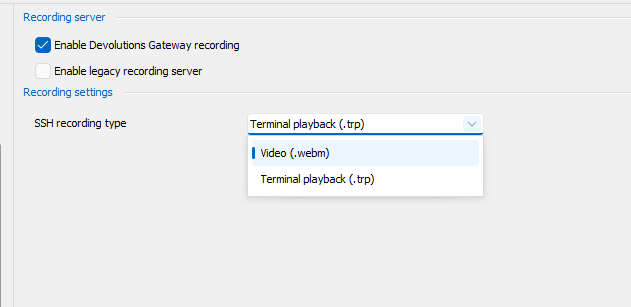
I'm checking here (screenshot) for the asciicast solution in RDM (System Settings > Session Recording), but only seeing the legacy options. Am I looking in the wrong place for asciicast?
Thank you!, Phil
Recordings Display in RDM - "Session Name" ; request for same level of detail as in the "Connection" field in RDM Activity Log
Thank you Francois,
I do apologize for not responding earlier. and thank you for your extra research. Your colleague was I'm sure correct. We have the issue at the root level. Device level looks fine. But at the device level we do not have a need to know which device is being recorded as of course, we are already bringing up the device/session specific information at that point. :)
It is mainly at the root level where we seem to be having issues w/ regard to information being shown from other Vaults, and needing more detail as described in this case. Root level is also where we would get the greatest benefit in trying to find information about an incident for a customer/Vault, without knowing specifics of exactly which device. And these are usually the type of security requests we would receive.
Please let me know if I may provide more information, and I will watch this thread more closely.
With best regards, Phil
Recordings Display in RDM - "Session Name" ; request for same level of detail as in the "Connection" field in RDM Activity Log
Good evening all!,
We are using basically what I think is called Devolutions Template groups, where there is a hierarchy between, for example, an SSH device, and a Web device which use the same password. So the child inherits the PW from the parent. Unfortunately in our case we have large numbers of these devices in our Vaults, and the children do not have detailed names, but just "WEB" for example, as they are all listed under the parent which is given the descriptive name.
This is working fine for reporting - Activity Log and other areas, but is almost no value in the "Recordings" tab within each vault, as there may be dozens of identical names within the Vaults. e.g., you will see for example WEB repeated, with no indication as to which parent it is tied to.
If we could get the same information for those children Sessions in the Recordings tab as we have over in the Activity Log, that would provide great benefit. It looks like it is the same source data in both areas of RDM, but the Activity Log also aggregates the parent data to make a very useful field display for "Connection".
With regards, Phil Lyons


Devoutions Gateways / Recording services / Configured and status checks, alerts
Thank you for that clarification François,
We are working on building a more extensive dev/test environment to include multiple vaults w/gateways such that we can test the 2024.X codebase prior to upgrading our 2023.3.16 in production. And will indeed explore the email notification.
With regards, Phil
Recordings - download and play .TRP files?
Thank you Hubert!
Very helpful. Sounds like the right thing for us to do is to cut back to the .TRP format for the terminal sessions for now, at least will be able to see the recordings in the application. When we can move to the 2024 platform & the subsequent next major update we can give Asciicast a try.
With regards, Phil
Recordings - download and play .TRP files?
Thank you Hubert!,
The security team does not have access to the Devolutions / RDM service. So we are looking at Webm mode, which doesn't have high resolution. Unless there's a setting we can adjust the resolution (?). Are there TRP players available? And yes, the recordings play w/o issue w/in the system. Seeing the download button, we were hopeful we could use to support audit/post mortem reviews by different teams, but the blurry webm playback makes that problematic. The option of setting up other teams with access to the password vault so they can audit wouldn't be the first choice.
With best regards, Phil
Devoutions Gateways / Recording services / Configured and status checks, alerts
Thank you Marc-André!,
We shall continue to add feature requests as we determine need. Thank you. And we will fire up the net/health browser based check & point it at the Gateway, returning those results to Support when the gateway stops processing recording (can't record and so it kills the Session after about a second or two of the Terminal activity). Session recording is where we’ve noticed the problems.
Re: are you enforcing recording for all connections, or only some of them?
We configure Session recording at the top level of the Vault. Every Session in the individual Vault inherits that enforced recording setting. Those recordings land in subfolders on a per-Vault basis based on the gateway.json file . We have a node in the Vault hierarchy for internal device Sessions where “Connect” is “Not enabled” (they don’t require a Gateway to reach the endpoint device). Those sessions are handled by the Default Gateway for recording purposes.
Re: open to suggestions for what you think would make scalability easier.
This is easy for me to suggest as I’m not writing the checks to pay for the setup :) , but since you asked:
Centralized deployment of the recording feature. It’s easy to manually configure with only a dozen or so Gateways, but several dozen + gateways, and mistakes, oversights can happen. We could Ansible or such, but as Devolutions has the infrastructure, that would be easier for us. The gateway.json file only holds a single line to configure recording. So for centralized configuration, a couple of lines, checkbox and a couple of dropdowns menus could be included in the UI such as local recording or remote, and if remote what is the file share and subfolder. I would suggest variables be available such as $hostname, to be selectable as subfolder name candidates for storing the recording files. Once the “checkbox” was selected for recording and saved, the Devolutions process could reach out to that Gateway and restart the “Devolutions Gateway Service”. Healthcheck kicks in at this point to verify all is working. Red/yellow/green stoplight or whatever.
For scalable monitoring it would be helpful to have ways to sort-by-pain-point stats. Extend the “Devolutions Gateway” page, columnar layout. Then we could click to sort by gateway version, gateway status, response time, etc.. Scrolling through dozens & dozens of gateways looking for a rogue version, or down status is very tedious. Along the same lines for scalable monitoring, would SNMP be an option? Or other active alerting where the admin team could be notified by SMS/email or app if a gateway is down, or recording is not responding? What is happening in our environment is that generally the users notify us if something is down w/ regard to the gateways. Users are the active monitors which isn’t optimal.
It would be helpful to know re: disk space, directory writable, as you mentioned. My vote would be -phase 2- (just because you asked!). Knowing that systems are unavailable, and quickly knowing overall status would be immediately useful.
Stopping for now – thank you for asking!
Phil
Devoutions Gateways / Recording services / Configured and status checks, alerts
Good morning all!,
As the devolutions gateway deployment gets larger, say the 150-200 range, it becomes more challenging to tell at a glance which gateways are running w/o lots of scrolling, and beyond that, which gateways are also running the recording services. And beyond that, we've also had a couple of the recording services which seemed to stop responding (and so block session connects) and we had to restart the gateway process, which showed healthy, to fix.
Are there tools or resources to share which are available for these purposes? We're scripting some solutions but if there is software or screens we're missing please let me know! Or - whether I should be opening feature requests.
The overall question/concern is that we're expecting to be running full on audit & recording, but it may not be there when called for. So looking for ways to be alerted and determine what Develoutions "thinks" is properly configured and running, and what is not.
Suggestions welcome!
With best regards, Phil
Devolution Gateway Update
Thank you Marc-André for producing this code, it is appreciated.
It looks like this would be distributed and run at each gateway host. Am I correct? Or are there plans to run this centrally, which could be a timesaver.
Looking at the current releases out there, we are at 2023.3.16 DSRVR. Do I understand that if we run this updated it would pick up the 2024 code base? Something like 2024.1.3. Would this be a conflict with the 2023.3.16 schema? We have to watch our RDM upgrades so as to not have schema issues, especially between the 2023 and 2024 releases. If so, could we restrict the Devolutions Gateway Updater to certain releases?
With best regards and thank you again for this project.
Phil
Recordings - download and play .TRP files?
Good morning all!,
In the case where we need to send off a recording file to another team for analysis, we need to be able to download the recording files from RDM.
However, we have not been able to play any TRP files that we have been downloaded. We've tried w/ Linux and Windows and used multiple programs. Tried w/ Windows Media Player & VLC. Is there a specific CODEC we can bring in or a process to follow to install the codec such that we can view the video file outside of RDM.
We have changed recording type to webm but those files seem to lack the resolution provided by SSH sessions recorded by TRP.
Best Regards, Phil
Permissions detail in the RDM UI and Audit needs for Vault permissions reporting
We are called on to summarize Vault permissions from time to time. When that happens we need to be able to either 1) go to a screen which
summarizes permissions which are applied to the subject Vault, as in the case of a tech manager holding discussions w/ vault admins, or for an Audit request, 2) a PDF/CSV/XLSX report which is easily understood by the internal or external audit team. As I see the product, we don’t have either of those with the current UI or Reporting. We have less than 200 vaults but the number is growing and we need to be able to better review manage and audit permissions in a streamlined fashion.
Re: case 1), we can "kind of" get a view of the data from an administrator type view by using the Security > Inherited Permissions view, then mouseover each area, going through each tab for each area of permissions (General, Security, Attachments, etc). A single summary pane-of-glass dialog would be easier to assess. (We make heavy use of inheritance which in the dialog boils down to a single line in the UI). From that point we need to work backwards to assess. For example a summary grid with permissions listed would help. I do appreciate the level of detail afforded by the 5 tabs, but discussing and quickly grasping permissions doesn’t happen with this screen layout. The new permissions descriptions in the 2024.x releases do help with understanding permissions, but with inheritance the underlying detail is left out.
Re: case 2), we have been required to produce reports such as; what do users/groups have access to in Vault XYZ, or with a vault by vault report – to audit teams. Auditors require a very concise listing. I don’t see that as available. If I had to prioritize the request, I would choose audit first.
Could these be considered for feature requests? Thank you,
Phil
Bulk configure recording across Vaults
Our request is for a method to either inherit, or configure recording across all, or all selected Vaults. In an environment where there may be a couple hundred vaults and more being added, enabling recording initially, and on an ongoing basis is a tedious undertaking. Especially when the recordings are remoted to a central file location. The process basically includes touching every Vault, and at the top level in the Web UI setting the various Remote options, then getting out to the file system, editing the JSON file, and in our case, setting the path up to reflect the source gateway host so as to be able to manage the customer / vault recording files, and trimming when necessary.
Central configuration for the recording setup via menu possibly involving inheritance would ease the initial and ongoing work required, and diminish the chance of recording setup omissions and mistakes.
Thank you for your consideration,
Phil
RDM Password Audit : MSP-Friendly Audit query
Thank you for the update Hubert,
As we are new to the Devolutions world - could you please give an idea of roughly how long these processes take? Just so we can set our internal expectations. We're getting close to going live and it would help if I could share where on our timeline this may follow. I understand these types of estimates are not exact.
With best regards, Phil
RDM Password Audit : MSP-Friendly Audit query
Thank you Hubert for your consideration. I've attached a screenshot.
Kind regards, Phil

RDM Password Audit : MSP-Friendly Audit query
Good afternoon Devolutions Team and Forum members,
It would be helpful to us as an MSP, to be able to run audits for our customers on a per Vault basis. Our structure is such that we'll have hundreds of customer Vaults initially, and the per-vault approach is much cleaner, and less error prone in our workflow. We're coming from an environment, CyberArk, where we found that type of feature to be of benefit to our security and audit processes. Vs. the current process which looks like more of a query and filter approach. We regularly handle multiple such password reports p/ month.
Possibly it could look like an extra drop-down with the vaults populating the list?
Kind Regards,
Phil