Devoutions Gateways / Recording services / Configured and status checks, alerts
Devoutions Gateways / Recording services / Configured and status checks, alerts

Good morning all!,
As the devolutions gateway deployment gets larger, say the 150-200 range, it becomes more challenging to tell at a glance which gateways are running w/o lots of scrolling, and beyond that, which gateways are also running the recording services. And beyond that, we've also had a couple of the recording services which seemed to stop responding (and so block session connects) and we had to restart the gateway process, which showed healthy, to fix.
Are there tools or resources to share which are available for these purposes? We're scripting some solutions but if there is software or screens we're missing please let me know! Or - whether I should be opening feature requests.
The overall question/concern is that we're expecting to be running full on audit & recording, but it may not be there when called for. So looking for ways to be alerted and determine what Develoutions "thinks" is properly configured and running, and what is not.
Suggestions welcome!
With best regards, Phil
All Comments (5)
Hi Phil,
The best way to monitor the health of Devolutions Gateway is through Devolutions Server, so I think the best approach would be to proceed by feature request based on the specific pain points you encountered. Even if you made a custom script to check the HTTP status on /jet/health, it won't go very far in the kind of tests it does. The health checks done from Devolutions Server are authenticated and go a little bit further by checking for key pair mismatch and clock synchronization issues. I don't recall the default health check interval in Devolutions Server but the next time it is reported healthy when it isn't, can you load /jet/health in a browser for that same Devolutions Gateway? Another potential issue would be the polling interval for the health checks made by Devolutions Server.
What I would really like to figure out is how Devolutions Gateway ended up in a bad state, because if it still reports a healthy status, the only way to properly address the problem would be to identify the faulty condition and improve the checks to also check for it. My understanding is that the problems are all related to session recording, but not necessarily to connections, unless a specific Gateway has become unstable due to session recording. In your case, are you enforcing recording for all connections, or only some of them?
There are some conditions checks we could improve, such as a check that the recording output directory is writable, and that sufficient space is available on disk. This is something we've though about but haven't worked on yet. We were thinking of sending the amount of free disk space back to Devolutions Server alongside the rest of the elaborate health check done at regular intervals. I'm open to suggestions for what you think would make scalability easier.
Best regards,
Marc-André Moreau
Thank you Marc-André!,
We shall continue to add feature requests as we determine need. Thank you. And we will fire up the net/health browser based check & point it at the Gateway, returning those results to Support when the gateway stops processing recording (can't record and so it kills the Session after about a second or two of the Terminal activity). Session recording is where we’ve noticed the problems.
Re: are you enforcing recording for all connections, or only some of them?
We configure Session recording at the top level of the Vault. Every Session in the individual Vault inherits that enforced recording setting. Those recordings land in subfolders on a per-Vault basis based on the gateway.json file . We have a node in the Vault hierarchy for internal device Sessions where “Connect” is “Not enabled” (they don’t require a Gateway to reach the endpoint device). Those sessions are handled by the Default Gateway for recording purposes.
Re: open to suggestions for what you think would make scalability easier.
This is easy for me to suggest as I’m not writing the checks to pay for the setup :) , but since you asked:
Centralized deployment of the recording feature. It’s easy to manually configure with only a dozen or so Gateways, but several dozen + gateways, and mistakes, oversights can happen. We could Ansible or such, but as Devolutions has the infrastructure, that would be easier for us. The gateway.json file only holds a single line to configure recording. So for centralized configuration, a couple of lines, checkbox and a couple of dropdowns menus could be included in the UI such as local recording or remote, and if remote what is the file share and subfolder. I would suggest variables be available such as $hostname, to be selectable as subfolder name candidates for storing the recording files. Once the “checkbox” was selected for recording and saved, the Devolutions process could reach out to that Gateway and restart the “Devolutions Gateway Service”. Healthcheck kicks in at this point to verify all is working. Red/yellow/green stoplight or whatever.
For scalable monitoring it would be helpful to have ways to sort-by-pain-point stats. Extend the “Devolutions Gateway” page, columnar layout. Then we could click to sort by gateway version, gateway status, response time, etc.. Scrolling through dozens & dozens of gateways looking for a rogue version, or down status is very tedious. Along the same lines for scalable monitoring, would SNMP be an option? Or other active alerting where the admin team could be notified by SMS/email or app if a gateway is down, or recording is not responding? What is happening in our environment is that generally the users notify us if something is down w/ regard to the gateways. Users are the active monitors which isn’t optimal.
It would be helpful to know re: disk space, directory writable, as you mentioned. My vote would be -phase 2- (just because you asked!). Knowing that systems are unavailable, and quickly knowing overall status would be immediately useful.
Stopping for now – thank you for asking!
Phil
Hello Phil,
Thank you for your detailed message. I wanted to clarify one thing. You wrote
Or other active alerting where the admin team could be notified by SMS/email or app if a gateway is down, or recording is not responding?
With version 2024.1, we improved notifications to users. It is now possible to receive notifications (email + notification in DVLS Web Interface) for different warnings/errors and a Devolutions Gateway down is supported. I assume it is what you are looking for. All administrators and Gateway manager should receive email when a gateway is down. We would like to improve that later to send an SMS or a push notification to our mobile application Workspace, but for now, at least, you should receive an email to let you know that a gateway is down.
Don't hesitate if you have any questions/comments
Best regards,
François Dubois
Thank you for that clarification François,
We are working on building a more extensive dev/test environment to include multiple vaults w/gateways such that we can test the 2024.X codebase prior to upgrading our 2023.3.16 in production. And will indeed explore the email notification.
With regards, Phil
Hello Phil,
Since version 2025.1, it is now possible to be notified when the Devolutions Gateway storage is almost full. Notifications will be sent, and you will be able to see the storage available on each Devolutions Gateway.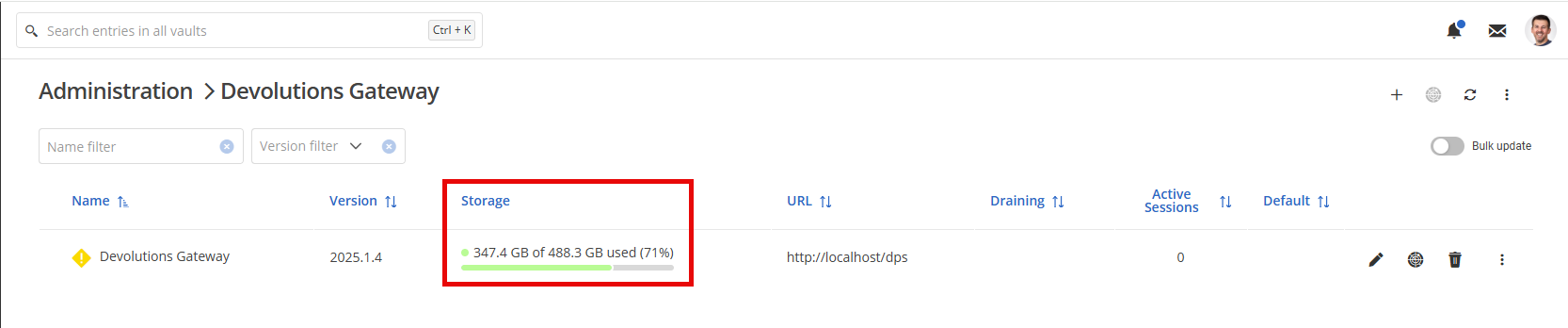
Let us know if that helps and if it fulfills your needs.
Best regards,
François Dubois
b00c5ff9-78ac-446a-b126-5c7297eadc04.png