Recordings - download and play .TRP files?

Good morning all!,
In the case where we need to send off a recording file to another team for analysis, we need to be able to download the recording files from RDM.
However, we have not been able to play any TRP files that we have been downloaded. We've tried w/ Linux and Windows and used multiple programs. Tried w/ Windows Media Player & VLC. Is there a specific CODEC we can bring in or a process to follow to install the codec such that we can view the video file outside of RDM.
We have changed recording type to webm but those files seem to lack the resolution provided by SSH sessions recorded by TRP.
Best Regards, Phil
All Comments (10)
Hello Phil,
Thank you for contacting the support team.
As I mentioned, we are investigating this.
I'll keep you posted.
Best regards,
Patrick Ouimet
Hello,
TRP is our own format, and it is playable within RDM. You can go in Tools > More Tools > Terminal Playback to open the player: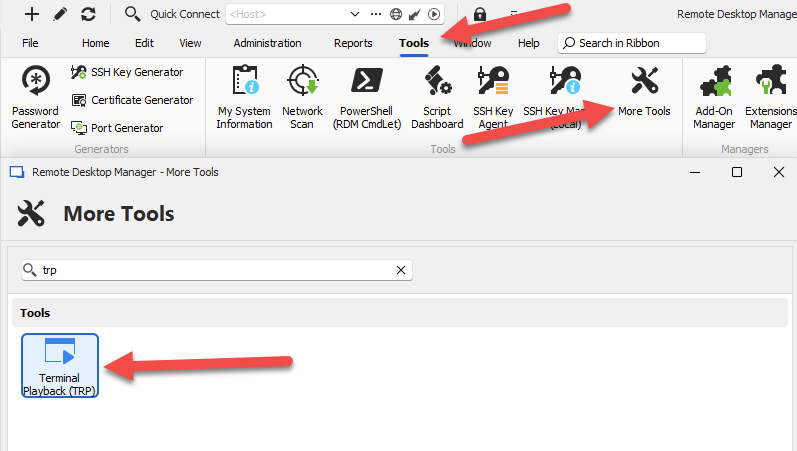
If you're using Devolutions Server and are performing remote recordings through the gateway, this is made much simpler by simply going in the "recordings" tab of your dashboard and pressing the play button.
If you'd like to play recordings outside of RDM, I recommend either the Webm mode, or the new Asciicast mode (not yet available through remote recording), the latter being readable through asciinema https://asciinema.org/
Let us know if that helps.
Regards,
Hubert Mireault
e5623018-8c29-4f87-8380-d15da263aef8.png
Thank you Hubert!,
The security team does not have access to the Devolutions / RDM service. So we are looking at Webm mode, which doesn't have high resolution. Unless there's a setting we can adjust the resolution (?). Are there TRP players available? And yes, the recordings play w/o issue w/in the system. Seeing the download button, we were hopeful we could use to support audit/post mortem reviews by different teams, but the blurry webm playback makes that problematic. The option of setting up other teams with access to the password vault so they can audit wouldn't be the first choice.
With best regards, Phil
For TRP as I mentioned, it's our own format so it's only readable within RDM, unfortunately.
For the quality/resolution of the Webm mode, you can change this on your machine by going in File > Settings > Application > Session Recording: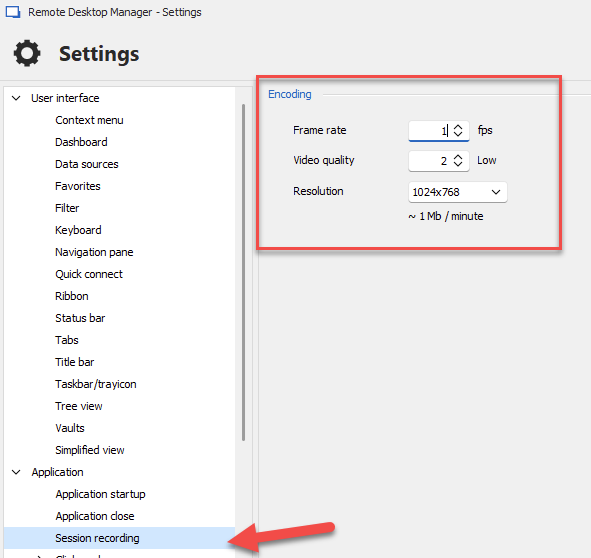
Please keep in mind that raising these settings will impact the performance of the application, especially the framerate.
As an additional note, the Asciicast recording should be available on DVLS through our Gateway starting with our next major update, 2024.2.
Regards,
Hubert Mireault
8b42c6dd-e5ab-4e30-a051-8a069d5e946e.png
Thank you Hubert!
Very helpful. Sounds like the right thing for us to do is to cut back to the .TRP format for the terminal sessions for now, at least will be able to see the recordings in the application. When we can move to the 2024 platform & the subsequent next major update we can give Asciicast a try.
With regards, Phil
Hello,
No problem, glad I could be of help. Let us know when 2024.2 is released if the asciicast solution works well for you.
Regards,
Hubert Mireault
Good afternoon Devolutions folks!
We have now upgraded our development environment to 2024.2.3 and RDM to 2024.2.28.
I'm checking here (screenshot) for the asciicast solution in RDM (System Settings > Session Recording), but only seeing the legacy options. Am I looking in the wrong place for asciicast?
Thank you!, Phil 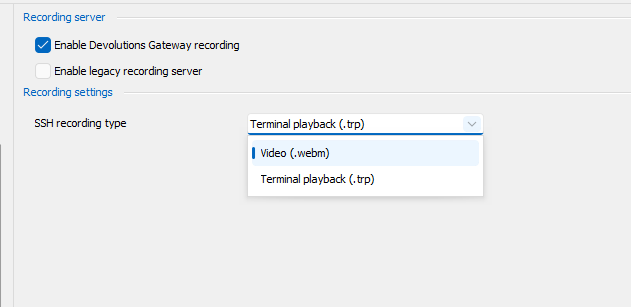
7e662e60-2a19-4c83-91b2-b98e4e670b9a.png
Hello,
You're looking at the right place. We will investigate to see if this is normal or if there is an issue.
Regards,
Hubert Mireault
Hello,
We've made some minor changes that should make the Asciicast choice available in this dropdown, as well as making the recording player in RDM able to play the asciicast recordings. This will be available starting with 2024.2.12.0.
Regards,
Hubert Mireault
Thanks Hubert & Team! We will change over to that method and check it out in our Test environment. Thank you!