
benseroussi
Allow to clean up\delete deleted users via powershell
Thanks, will it work with DVLS 2025.2.21 or DVLs must be upgraded to 2025.3 first?
Allow to clean up\delete deleted users via powershell
Hi, in devolutions servers since 2025 when a user is deleted it goes to the deleted users section.
Currently it's not possible to delete users from there using the powershell module which prevents certain automations.
Please add this.
Ben
Import OKTA users via powershell
Hello Ben,
As of version 2025.1.1 of the module, it is now possible to import Okta users. This can be done using the following two cmdlets:
Get-DSOktaUser – Retrieves all Okta users.
Import-DSOktaUser – Imports the users retrieved with Get-DSOktaUser.
Please let us know if you have any questions or if this meets your needs.
Best regards,
Maxime
Thanks for the update, do I need to update DVLS to 2025 as well? If yes it make take a while to test it.
Ben
enfore specific browser for login
Instead of specific browser I think there should just be an embedded browser and the window should auto close after the authentication, it will also save a lot of confusion with users when they authenticated but RDM is still at the background.
Import OKTA users via powershell
Hi, currently I have a script that creates PRV users and grants exclusive rights to the correct user, the issue is if it's a new user I first need to import it from okta and it can only be done manually.
It would be great if I could import specific users from OKTA as part of the script.
Ben
change default for 2024.3 automatic checking after entry close
Hi, as it works today a user gets PAM privileges for a set amount of hours that covers the workday, after getting the PAM privilieges they can use as many entries as they want.
We implemneted it just recently without approvals so the users will get the hang of it and plan to add approvals soon.
What will happens after every entry that uses PAM is close the messege will pop up and they will select the first option which is to check in, thye wont mark the set this for everything because users don't usually do that (from experience).
Then they will need need to check back out every time they want to use a new entry, currently it's only stating a reason and later on it will require approval.
Eventually some may mark the checkbox but will still choose the first option and it will check them in multiple times a day.
The setting is per user on the DVLS side some I'm guessing there is not even a registry to fix it for now.
I think the option to control it should be priority for next version as I'm probably no the only one that this setting will cause chaos for.
Thanks,
Ben
change default for 2024.3 automatic checking after entry close
Hi, I just updated to 3.6, and this option pops up on entry close.
I know how to disable it per user but I want to do it globaly as it will cause some chaose and I'm user users will pick the wrong value.
I couldn't find anything in the administration settings.
Thanks,
Ben
Allow pinning of favorite vaults
As an admin I have access to all the vaults, but I have my own vaults I use regulary.
I know I can add them as favorites but they will just be moved up and I will need to scroll up whenever I need to use them.
Is it possible to add the ability to pin the favorite vaults so that they will always be shown, just like freezing a row in excel.
This is how it currently looks:

Thanks,
Ben
Devo Academy first impression
Hello Ben,
2) Side scrolling is always bad, most computer mice don't have that option, in my opinion 2 columns with normal scrolling should be more convenient.
We could opt for a tabloid view that prioritizes the most recent activity, along with a compact display of other activities. Would you prefer this layout, or do you have other specific suggestions?
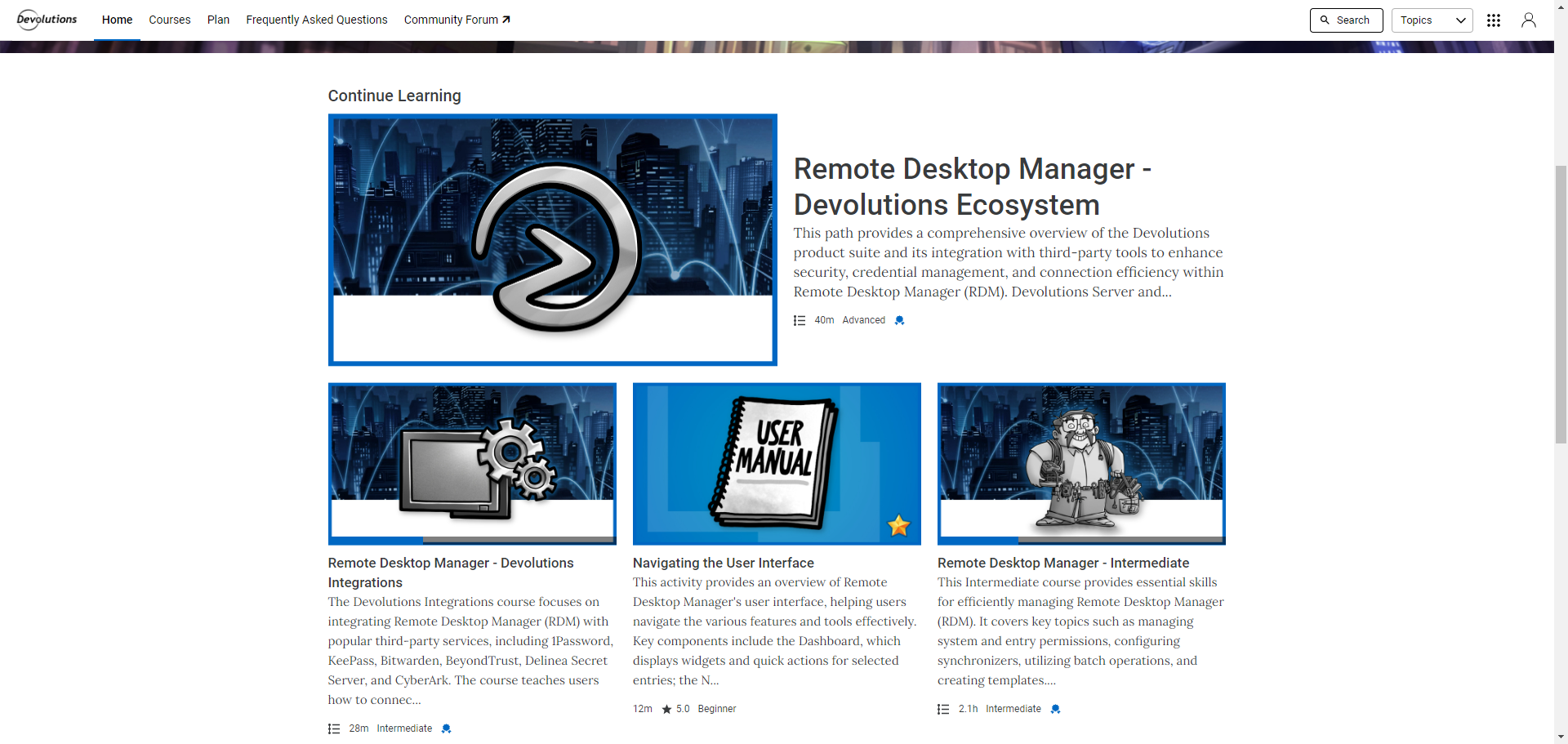
3) The community forum banner on top should have the little icon that tells you it will open a new tab on another site. Although it may be more convenient to embed it in the academy.
This is excellent feedback! We have just implemented an icon to indicate that the community forum link will open in a new tab. Let us know what you think!

4) In the view all section there should be filters to better find what you need even when you don't know what to search for, at the moment it's just an endless list with 3 pages (which will go up). Add filtering by difficulty, subject maybe even add a suggested "flow" for courses that go together in a specific order.
To help with navigating our content, we recommend following the structured courses. These courses are designed to group together related topics, activities, and difficulty levels. The "view all" section currently shows all activities tied to a specific topic. In the current phase, the one found under the "Remote Desktop Manager" section regroup every activities tied to this product. That being said, we recognize that better filtering options could improve your experience, especially as more content is added. We are actively exploring ways to make it easier for learners to filter content by difficulty, topic, and more, so you can quickly find what you need.
5) Videos should have better resolution, it's no sharp and because of it a bit unpleasant to watch.
We fully understand the importance of high-quality video resolution for an optimal learning experience. We are currently exploring solutions that would allow learners to choose the video quality that best suits their needs. One option we're considering is YouTube integration, but we want to ensure any solution we implement fits seamlessly into the platform and doesn't impact overall performance. Rest assured, we will keep you updated as we work towards a suitable resolution.
6) In each course add in the side bar the suggested related courses. For example "Managing Entry Permissions" should link to course about devolutions permissions sets.
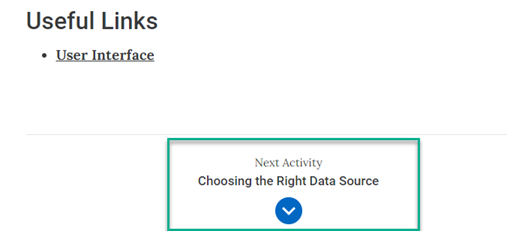
While the platform has the capability to suggest related courses via a prompt after completing an activity, we've decided not to enable this feature for now. The "Next Activity" section within each course path already fulfills this need by guiding learners to the next relevant activity. Enabling additional prompts would duplicate this functionality and could create unnecessary redundancy, potentially confusing the learner or disrupting the structured flow we’ve designed for a seamless learning experience.
When following the learning path within a course, you will find the "Next Activity" section at the bottom of each completed activity, as shown in the screenshot below. This section guides you to the next relevant activity in the path, ensuring a seamless progression. You can use this link to view the course I referred to in my example.
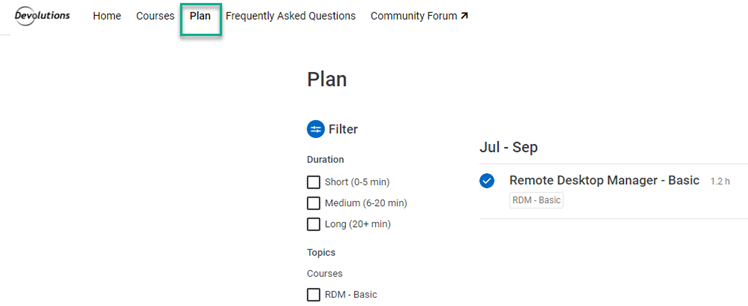
7) Add the ability to create a list of courses the user wants to do so they can choose them ahead and can find them without having to look through everything again.
We are happy to inform you that this feature already exists under the "Plan" section of the ribbon. This section allows you to create a custom learning plan with your preferred activities. As you add activities to your plan, additional filtering options will also become available to help you organize your learning journey.
Best regards,
2) This seems better.
3) Looks good!
4) The courses are pretty vague RDM - basic, intermidate and advanced doesn't say much until you click on and it scroll. Lets say I'm Implementing a whole RDM-DVLS-PAM solution and I currently want to set up the permissions, being able to find all those articles at once will be faster than going in each course to find it. I'm guessing it will be easier to think about the best way to set it up once there are courses for more products.
5) I will wait to see how it ends up.
6) Sometimes you don't want to go in a linear path, you want to learn about a specific subject like my previous example - permissions, so having it linked as related subject can make sense.
7) I tested the plan section, the minor issue by what I saw you can only add something to the plan from the page itself, you should add a button from the course list so a user could scroll and mark a few courses which he wants right now.
Edit:
I just thought on another thing, you should add comments or some way for users to respond on courses, I found some things that are incorrect in the permission course for example. Or maybe in some other courses I'll have useful tips or subjects that I think should be added. It should be easy to pass these things on to make the courses better for others.
Ben
Devo Academy first impression
Continuing:
5) Videos should have better resolution, it's no sharp and because of it a bit unpleasnt to watch.
6) In each course add in the side bar the suggested related courses. For example "Managing Entry Permissions" should link to course about devolutions permissions sets.
7) Add the ability to create a list of courses the user wants to do so they can choose them ahead and can find them without having to look through everything again.
Devo Academy first impression
Hi, so I got invited to the beta and only opened the page so here are the first few thoughts:
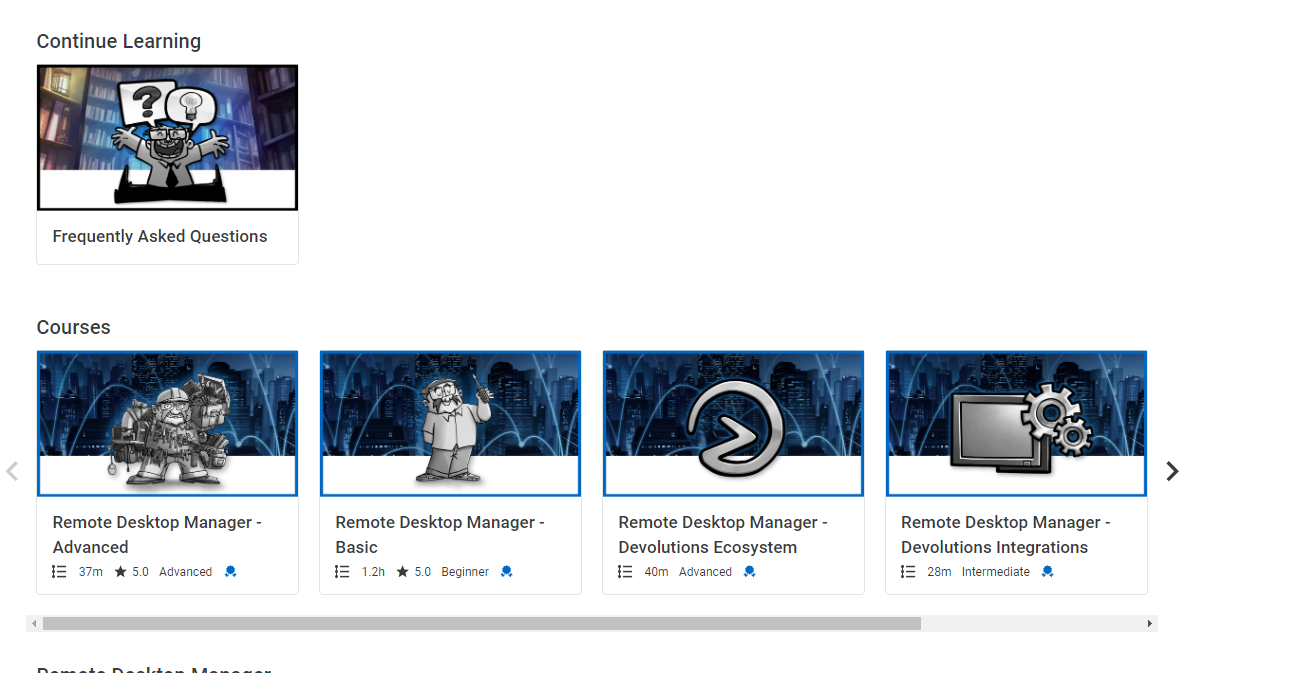
1) FAQ shouldn't go into continue learning (see image below)
2) Side scrolling is always bad, most computer mice don't have that option, in my opinion 2 columns with normal scrolling should be more convinient.
3) The community forum banner on top should have the little icon that tells you it will open a new tab on another site. Although it may be more convinient to embbed it in the academy.
4) In the view all section there should be filters to better find what you need even when you don't know what to search for, at the moment it's just an endless list with 3 pages (which will go up). Add filetring by difficulty, subject maybe even add a suggested "flow" for courses that go together in a specific order.
That's all for now, once I'll have time I'll view some of the courses and add more thoughts.
Ben
PAM Vault folders permissions
Thanks, I'll be waiting.
PAM Vault folders permissions
Currently when creating a folders under a PAM vault permissions are unable to be set on the folder.
If I want to create an approval tree with a major approver for all PAM vault users and then sperate users for different groups I need to either do it manually for each user or create a different PAM vault for each group which is what I'm currently doing and it creates uneeded clutter.
Ben
Sync from AD through RDM duplicate issue
Lately we run into an issue of duplicate entries, when I got to the buttom of it I found out it happens when 2 team members perform a sync in a short timespan.
The issue is the AD sync compares with the current state of RDM and not the DVLS data, so if 2 team members sync the same server and later on both of them sync it back to DVLS it will cause a duplicate.
In my opinion it can be sorted in 2 ways:
1) Force DVLS refresh before the sync starts.
2) Give any AD synced object unique value equals to the SID, it should prevent duplicated as it will able to identify it on the DVLS refresh. Currently every entry gets a random ID.
Ben
Allow read only users on Administration
Hi, I did check the reports and it seems to be perfect for our needs so for now it should be enough until something else pops up!
Thanks,
Ben
Better control of RDM updates from DVLS
Thanks! I'll wait for an update on the subject.
Ben
Allow read only users on Administration
I know about the reports buy they are not helpful for this matter.
The audit requires screenshots of the users console (I know it's dumb as hell) so for example I would like to grant read only access to there.
As we are diving deeper with the PAM and implementing it for everyone I guess some other requirements will pop up.
Thanks,
Ben
Better control of RDM updates from DVLS
Hi, yes but I think it should be done with a checkbox so if anyone is still using it they can choose to continue using it.
Also the Don't update option should be changed to "Dont update - Read Only" in my opinion to make it clearer of the consequences.
Thanks,
Ben
Allow read only users on Administration
Hi, for audit purposes we need to grant certian people access to specific section in the administration area and currently there is no way to do it as read only, even if the user is read-only role.
Can the permissions for administration be a bit more fluid?
Thanks,
Ben
SSMS devolutions gateway natvie support
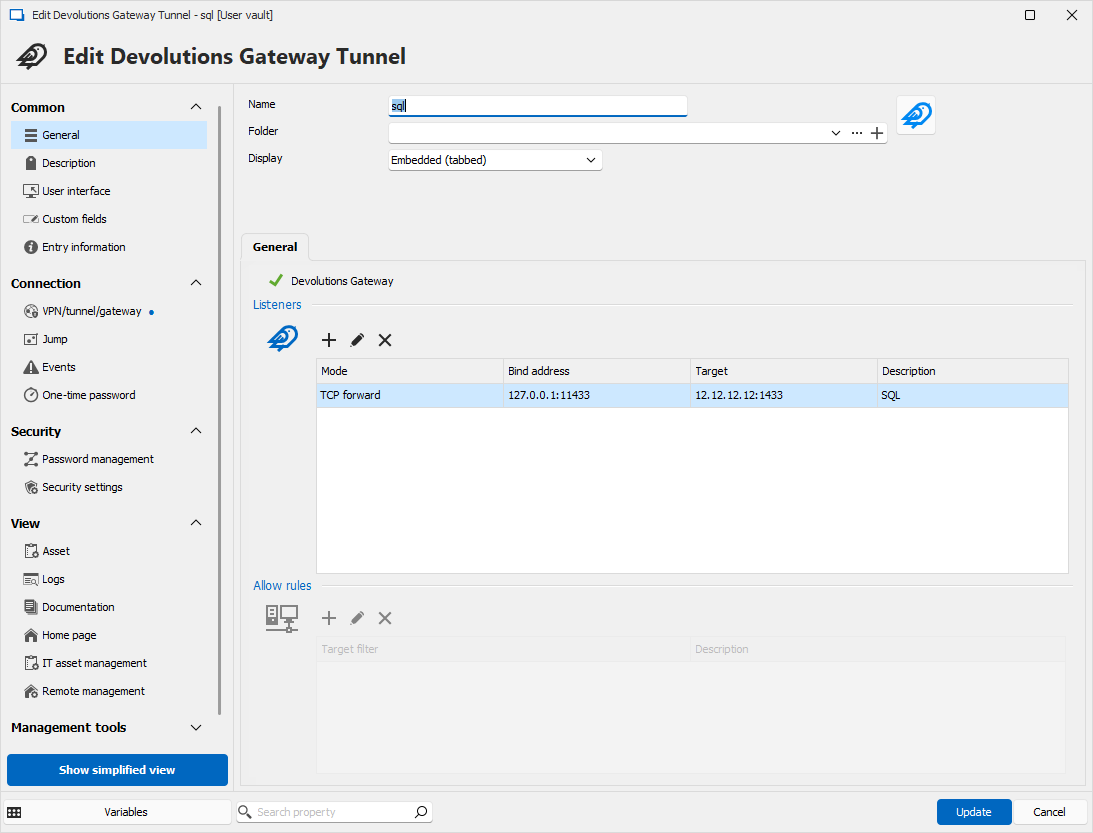
Because of the current complexity of the tunnel solution we decided to go for a terminal server through the gateway and open SSMS there, it's not the best solution as we need to set up server for each team and keep it updated.
so I don't have any RDM file example but here is a picture - this is the setting for one connection, now if I have 20 I would have to create 20 of those with different ports.
Also in the ssms itself you only see 127.0.0.0:xxxxx as the instance description so it's harder to know which DB you are working on if you have multiple opened.
Better control of RDM updates from DVLS
Not exactly, they can't do it manually, but I created some workflow with the download URL:
1) It runs a script that enables a pre set GPO
2) The GPO runs with system user but users have access to run it.
3) The GPO closes RDM and updates it.
so I want to be able to enfroce just the custom download URL.
Thanks,
Ben
Allow checked out PAM users access while offline
Thanks, waiting for an update.
Hello,
Thank you for your request. I understand your needs. We are currently working to move our PAM account to something similar to entries in a shared vault. We will be closer to a solution that you would like. I'm taking note of your request and will see later what can be done about that.
Best regards,
SSMS devolutions gateway natvie support
Hi, we are trying to migrate most of our traffic to go through Devolutions gateway.
The current solution for SSMS is to create a tunnel and use it.
The issue is we need to configure a local port for each database server and it's tedious when you have tens of them.
Can it be implemented to work just like RDP?
On side note also enabling recording will be useful.
Ben
Better control of RDM updates from DVLS
Currently when setting min and max version in DVLS there are 2 types of behaviours:
1) When the RDM version is outside the range defined there 3 options: Download and Install locally (url defined in dvls), open browser or later.
2) If recommended version is configured: DVLS-updater or later.
I want to be able to prevent anything related to the internet or anything that uses the users permissions because they don't have permission to update RDM.
It would be great if I could force the DVLS configured link only.
Allow checked out PAM users access while offline
Hi, in the early days of the PAM module after checking out a user it could be used even while going offline.
Since some updates ago RDM verfies with DVLS every time PAM account is used and because of that when going offline or the DVLS is down it can not be used.
I would like it to behave the old way, or at least an option to activate it so we won't lose access when doing maintenance.