SSMS devolutions gateway natvie support
0 vote

Hi, we are trying to migrate most of our traffic to go through Devolutions gateway.
The current solution for SSMS is to create a tunnel and use it.
The issue is we need to configure a local port for each database server and it's tedious when you have tens of them.
Can it be implemented to work just like RDP?
On side note also enabling recording will be useful.
Ben
All Comments (2)
Hi,
Can you describe the current way you handle tens of SSMS entries going through a Devolutions Gateway tunnel? Ideally, create a sample structure of RDM connection entries and export the entire directory as an .RDM file, just so we can get a good grasp of your current workflow. Hopefully, we may find a way to streamline part of the manual steps.
We can't offer an SSMS integration similar to what we do with RDP, as this would require either reimplementing SSMS, or hooking ourselves deep within SSMS to extend it. Do you currently launch one SSMS process per database connection going through a Devolutions Gateway tunnel, or do you use a single SSMS instance to connect to all of your databases?
As for session recording, I'm not sure how we could do it, I guess you would like to record the SMSS application window?
Best regards,
Marc-André Moreau
Because of the current complexity of the tunnel solution we decided to go for a terminal server through the gateway and open SSMS there, it's not the best solution as we need to set up server for each team and keep it updated.
so I don't have any RDM file example but here is a picture - this is the setting for one connection, now if I have 20 I would have to create 20 of those with different ports.
Also in the ssms itself you only see 127.0.0.0:xxxxx as the instance description so it's harder to know which DB you are working on if you have multiple opened.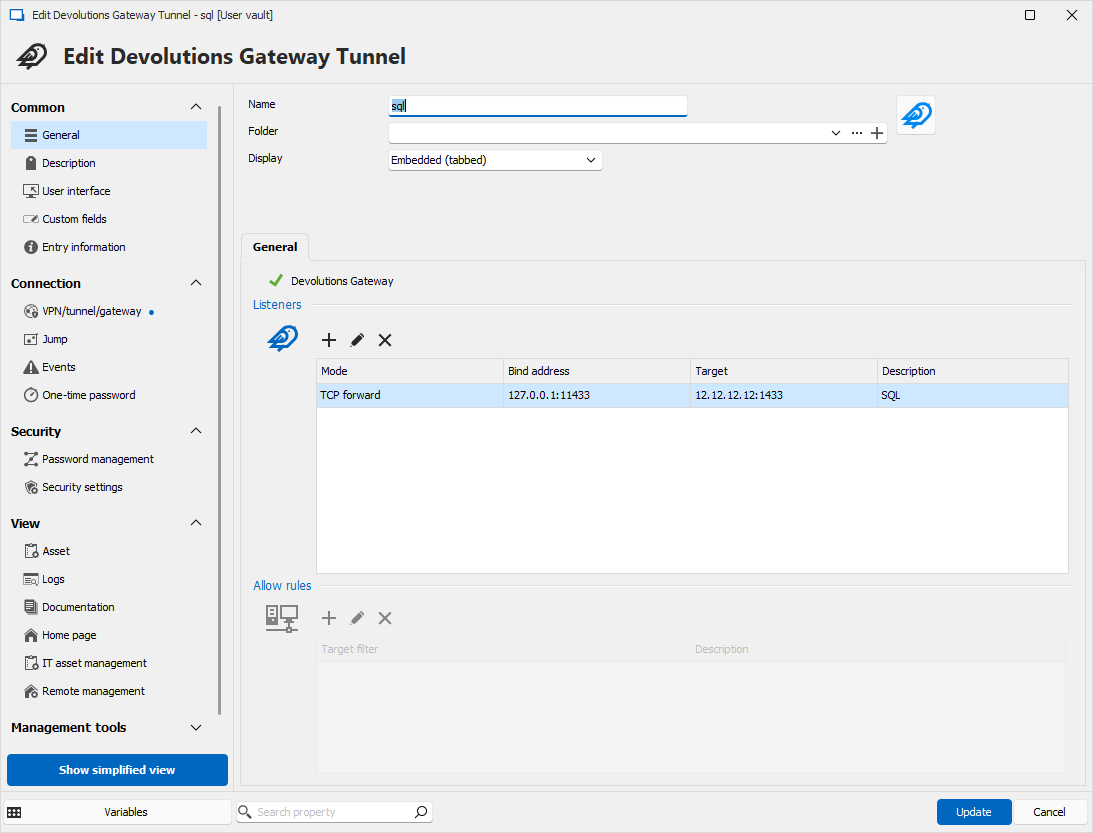
43c62a87-937d-47dc-b01a-659f335f85d6.png