
Nicholas Lachapelle
IPad OS Crash
Hi @josephp,
A new version is available with the crash fix. Please let us know if you experience any further issues.
Best regards,
IPad OS Crash
Hello @josephp,
The issue has been reproduced, and a fix is currently being tested internally.
A new version should be available within the next couple of days and we'll notify you once the release is available to everyone.
Best regards,
Favorites in app menu
Quick Actions, this is the right term.
Yes, the Startup Screen is a known feature, but 99% of my daily usage is launching connections, which takes a bit longer than it could :)
@mond-luecken6s
Thank you for the quick reply. I will add these details to the ticket, and we will make sure to keep you informed of any progress.
Favorites in app menu
Hello,
Thank you for your feedback. I will create a ticket so we can look into this further, though we cannot provide a timeline at this time.
Just to make sure there is no misunderstanding, are you referring to the Quick Actions menu that opens when you long-press the app icon on the Home Screen, as shown in the following screenshot?
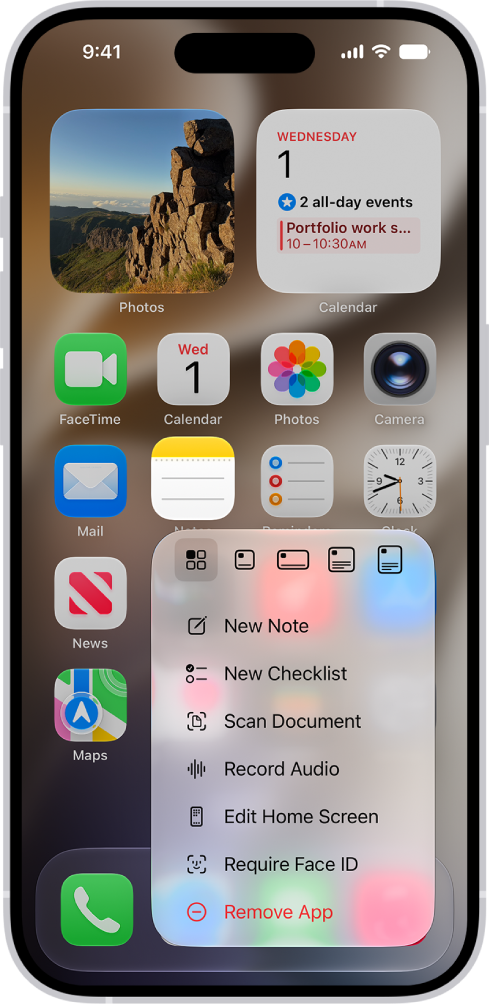
In the meantime, RDM already has a setting that allows you to change the application's default startup screen. You can achieve what you are looking for by going to the application settings, selecting General, and then Startup screen. From there, you can select the Favorites tab.
Best regards,
2026.1.0.22 - Session Launching Issue
Hello @Jimmy P,
As mentioned by @Frederick Simard, could you please try adjusting the “Entry touch action” setting to “View or Open” and let us know if this resolves the issue?
You can find this option under Application Settings > Entries. From there, tap on Entry touch action and select “View or Open.” This should allow the session to open directly.
Please let us know if this resolves the issue.
Best regards,
VNC "always trust” button does not work
Hello @avonblyth,
Thank you for reporting this issue.
A ticket has been opened, and the matter is currently under investigation. We will keep you updated on our progress; however, we are unable to provide a precise timeline at this time.
Best regards,
2025.1.0.0: Autofill Login Not Working
Hello @Jimmy P,
A new version is currently being rolled out and should be available to you shortly.
Please let us know if the issue persists.
Best regards,
2025.1.0.0: RDM Settings with DVLS “Loading information” Delay
Hello @Jimmy P,
We would like to inform you that a new version, including the previously discussed fix, is currently being rolled out and should be available to you shortly.
Please let us know if you encounter any further issues.
Best regards,
No command key shortcuts on ARD or VNC
Hello @Ugo,
Thank you for the screenshots.
To better scope my research, could you please confirm whether this issue persists when using a different keyboard, as it may be hardware-related? Additionally, does the issue occur in the Microsoft app as well? I have replicated the same configuration as shown in your screenshots and was unable to reproduce the behaviour you described.
If the keyboard is not the cause and the issue can only be reproduced in RDM, I suggest exporting the entry (please ensure that any sensitive data is removed beforehand) and sending it to me privately by clicking on my name so we can review it further.
Best regards,
No command key shortcuts on ARD or VNC
Hello @Ugo,
I am not certain if something has been overlooked, but the RDP issue related to accents appears to be a false alarm on our end. We were unable to reproduce the behaviour you described on Ubuntu 24.04.3 with GNOME Remote Desktop version 46.3. Could you please confirm which version you are currently running?
Kindly verify that the Spanish keyboard is added to your Ubuntu keyboard input sources, ensure that the special character entry is set to default, and then select the Spanish keyboard from the top-right menu. We also recommend double-checking your iPad language settings. Could you please confirm the Preferred Language selected in the Language & Region section?
Please note that this may be related to the keyboard itself, as some models have their own quirks which might conflict with iPadOS. I recommend trying on different keyboards just in case.
Thank you for your patience.
Best regards,
2025.1.0.0: RDM Settings with DVLS “Loading information” Delay
Hi @Jimmy P,
A fix has been implemented and is currently undergoing internal testing. While I cannot provide a specific release date at this time, it is expected to be available in the coming weeks.
Best regards,
Add entry button missing
Hi @pawelm,
A new version (2025.3.3.4) is currently being rolled out and should be available to you later this week. This update includes a hotfix for the “open session” buttons. Please do not hesitate to let us know if you encounter any issues.
Regarding the various UI bugs and inconsistencies, internal tickets have been opened; however, we are unable to provide a timeline at this time.
Thank you for your cooperation and patience.
Best regards,
Add entry button missing
Hi @pawelm,
Thank you for the clear step-by-step guide. The issue with the Entry Overview being emptied after accessing the application settings is a known bug and is expected to be resolved in the coming weeks.
Regarding the button issues, we were unable to reproduce either the malfunctioning "Open Session" option or the missing action buttons in the Entry Overview. We recommend performing a clean installation of the application, attempting to reproduce the issues, and sending us the application logs. You can retrieve them by navigating to the main menu > Help and Support > Application Logs, and sharing them either here or privately via direct message, which you can access by hovering your mouse over my profile picture.
Out of curiosity, which tablet are you currently using? It’s possible the issue is device-specific, so if you can, please try using a different model to see if the issue persists.
Best regards,
iPad + Tailscale Issues
Hi,
Unfortunately, we were unable to reproduce the issue on our end. However, I did find something that might be worth checking in your Tailscale configuration. Based on discussions in the Tailscale GitHub, please double-check your "VPN On Demand" settings in Tailscale. Since you're using a hotspot to connect from your iPad to your remote desktop, also ensure that Tailscale is properly connected on the iPad while using the hotspot.
At this point, as we cannot reproduce the behaviour and it appears to be related to your VPN or cellular network environment, there is nothing further we can realistically adjust on the RDM side. If you are eventually able to identify a specific Tailscale or carrier configuration that consistently causes this issue with RDM while other apps continue to work, please feel free to share the details and we will gladly review them.
Best regards,
iPad + Tailscale Issues
Hi,
We appreciate the detailed answer and taking the time to send your logs.
From your logs, we can clearly see the connection failing from the beginning. Considering you can connect using other apps, I tend to believe the issue isn't Tailscale. Here's a quick list of things I would double-check:
In your iOS settings, make sure you see RDM in Privacy & Security > Local Network and that it is enabled.
Confirm the port is correct in your connection settings.
Confirm the connection details are the same as the ones you used in other apps.
Is your Tailscale IP IPv4 or IPv6?
You mentioned you tried connecting to the same connection on a Windows box.
Do you mean you tried the same entry on RDM Windows? If so, was it a virtual machine?
Did you use the same data source to connect through the same entry?
If you created the SSH entry on an iPad, I would try creating a new one on Windows (or any other RDM platform) and check if the issue is resolved when connecting from both devices.
Have you tried other mobile devices? If you have access to another iPad or cellphone (Android included), we might find a pattern or a different outcome.
In your original post, you mentioned the behaviour is the same on RDP. Could you repeat the process of sending us the logs with RDP included? You can enable RDP logging beforehand by opening the RDM settings, then Sessions > RDP > Enable logging.
If you wish, we can schedule a live session with the support team at a time that is best for you.
Thank you again for your cooperation.
Best regards,
iPad + Tailscale Issues
Hi,
After configuring a Tailscale environment on our end, we were unable to reproduce the issue you are encountering.
To assist further, could you please provide the following information:
Your iPad model
The exact version of Tailscale installed
Whether your iPad is managed via MDM and if any per-app VPN profile is configured
Whether you are using an exit node in Tailscale
The result of testing a brand-new SSH entry in RDM that points directly to the Tailscale IP (same IP/port as used in Termius, with no gateway or additional options)
Whether the issue occurs on different networks (e.g., LTE vs Wi-Fi)
Whether the issue occurs on other devices as well
It may also be helpful to try a brand-new setup with minimal configuration changes.
The fact that you are able to ping the Tailscale IP from RDM but cannot connect to it is unusual. Could you please reproduce the issue and send us your application logs?
To do so, open the main menu > Help and Support > Application Logs > Clear Logs. Then attempt to open your RDP and/or SSH entry and go to Help and Support > Submit a Support Ticket to send us the logs.
Thank you in advance for your cooperation.
Best regards,
Impossible to use key file
Hi @superben84,
We would like to inform you that the issue has been resolved, and we are currently working on releasing a new version in the coming weeks.
Best regards,
Two issues with Ipad pro IpadOS (18.4) and RDM(2025.1.3.0) (mouse drag not working with asstive touch) and left ctrl not working on keyboard
@Nicholas Lachapelle you are correct. If I hold the arrow key during ssh it does not repeat, just does a single input. So if you are trying to go back and edit a command you cannot hold the left arrow, you have to tap it. It is the same for all keys including delete.
I am on an iPad A16 with the Apple Folio Keyboard.
Hi @jake1,
Thank you for your prompt response. I have submitted a feature request on your behalf. While we are unable to provide a specific timeframe, we will ensure you are notified as soon as there are any updates.
Best regards,
Two issues with Ipad pro IpadOS (18.4) and RDM(2025.1.3.0) (mouse drag not working with asstive touch) and left ctrl not working on keyboard
Just wanted to add my +1 to the repeating keys. Not being able to hold the arrow keys to navigate around makes it difficult to use this app on an iPad with a keyboard.
@jake1
Hello,
Could you please clarify what you mean by "navigating around"? Is the issue you are experiencing preventing you from holding down the arrow keys to move the cursor while typing, or is it something else?
Thank you in advance.
Best regards,
Cannot connect anymore and FaceID is grayed out
Hi,
The issue you're encountering with FaceID is related to the fact that you do not seem to have an Application Password set in your Security and Privacy settings. Once the application password is set, biometric authentication (including FaceID) will then be available.
As for the missing option, it is unusual that the "Open" option is not visible, and I believe this may be a bug. Since we are unable to reproduce the issue on our end, additional information about your setup would greatly help us identify the underlying issue.
Could you please answer the following questions:
What iPhone model are you using with this data source?
Do you recall which RDM version you were using prior to updating to the latest?
If you create a new RDP connection, is the "Open" option available?
Does editing and saving your current entries resolve the issue?
Thank you in advance for your cooperation.
Best regards,
Full-Screen Display on iPadOS
Hi,
Thank you for your feedback. You can achieve this by tapping the screen with three fingers simultaneously while connected to your RDP session. This will hide both the tab bar at the bottom of the screen and the session toolbar. Tapping with three fingers again will make them reappear.
For a full list of supported gestures within sessions, open the toolbar menu and navigate to: Session Settings > Interactive Method > View Gesture Legend. Please note that gesture behavior may vary depending on the input mode selected at the top.
Please let us know if we can be of further assistance.
Best regards,
Keyboard and mouse connected to iOs that RDMs my headless Mac mini.
Hi,
Could you please ensure that AssistiveTouch is enabled on your iPhone? Without it, the mouse will not be able to connect.
If the default behavior does not meet your expectations, we recommend disabling "Perform Touch Gestures" in your device settings under Accessibility > Touch > AssistiveTouch > Perform Touch Gestures.
Regarding the keyboard issues you mentioned, we were unable to reproduce them on our end, except for the CMD + Space shortcut. This shortcut is enforced by the operating system and cannot be overridden. The only workaround is to remap the Spotlight shortcut (e.g., to Shift + CMD + Space) on your Mac Mini by going to System Settings > Keyboard > Keyboard Shortcuts > Spotlight.
Please let us know if we can be of further assistance.
Best regards,
Modification Keys not working on Drag and Drop in MacOS remote screen
Hi,
Thank you for your prompt response.
We’re glad to hear that the issue has been resolved. Don't hesitate to reach out if we can assist you further.
Have a nice rest of your day.
Best regards,
Modification Keys not working on Drag and Drop in MacOS remote screen
Hi,
We identified the issue and a fix will be available in the 2025.1.6.0 update. Please let us know if the problem persists.
Best regards,
Modification Keys not working on Drag and Drop in MacOS remote screen
Hi,
Thank you for the precision.
We would like to inform you that progress has been made toward resolving the issue. Our team is actively working on it, and extensive testing is expected to begin within the next couple of days.
As always, we will keep you informed of any updates on the matter.
Best regards,