
(user deleted)
Remote Desktop Manager Version 2022.1.23.0 - Strange Navigation Pane display issue
Hi Alexandre,
My coworkers confirmed that this also happens with the "Default - Dark" theme when Windows is running in dark mode. If you then manually switch to "Dark", the issue is gone.
So there is definitely something with the "Default" in RDM.
Cheers!
Karl
Remote Desktop Manager Version 2022.1.23.0 - Strange Navigation Pane display issue
Hello Alexandre,
Maybe I can deliver an update on this case. With some trial end error, and I don't have a clue how my coworkers and I stumbled across this, we've found out that this display issue may be related to the theme used by Remote Desktop Manager.
I'm running Windows 10 with two external displays, with 2560x1440 pixels each, and on 100% scaling, to answer your question. I deleted the Devolutions folder in both %appdata% and %localappdata% directories and reinstalled RDM multiple times but to no avail.
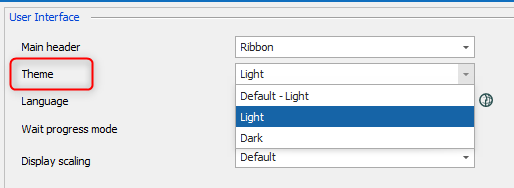
Back to the track, it seems that the "Default - Light" is broken. I switch to "Light" and restarted Remote Desktop Manager, and the problem was solved.
Best regards,
Karl
Remote Desktop Manager Version 2022.1.23.0 - Strange Navigation Pane display issue
Hello,
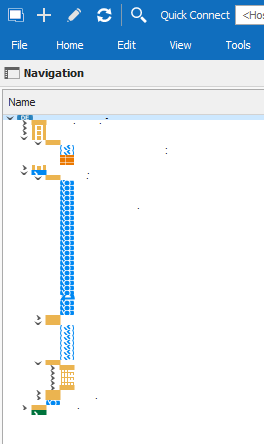
Since last Friday (April 1st, 2022 / no joke), when I've updated to Remote Desktop Manager Version 2022.1.23.0, the navigation pane only shows tiny little items:
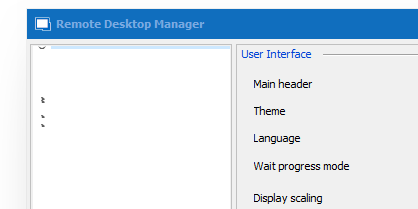
The same counts for the File => Options dialog:
No matter what I try, I can't fix it. It doesn't seem to be a graphics driver issue, as the rest of the tool seems to work fine and is looking correct.
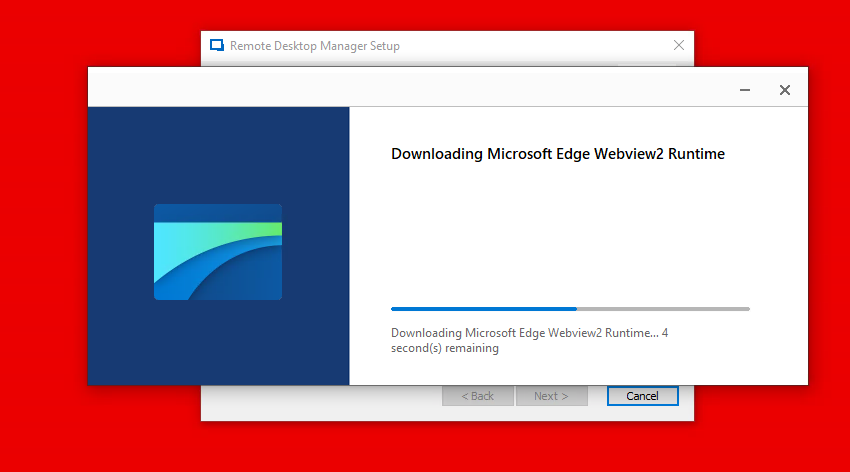
During one test, I stumbled across the "Microsoft Edge Webview2 Runtime" that is required with the above-mentioned RDM version. Or at least seems to be required. But it doesn't matter if it is installed or not, the issue with that tiny little navigation pane or settings persists.
Does anyone have an idea?
Thank you!
Best regards,
Karl
Unable to retrieve 1Password Credentials
Hi all,
I can confirm, the bug is gone on version 2021.2.29.0. I just updated to this version right now and RDM seems to get the 1Password credentials again without problems.
Thank you!
Best regards,
Karl
Unable to retrieve 1Password Credentials
Hello,
Yes indeed, it's broken again. I was able to use RDM yesterday afternoon (CET time) without issues as far as I can remember. But I just tested it now, and it's again with the "Unable to retrieve 1Password credentials".
Best regards,
Karl
Unable to retrieve 1Password Credentials
Hi Hubert,
Thank you for mentioning RDM 2021.2.28.0. I just downloaded and installed this version (without uninstalling the previous version before) and it is working. RDM successfully grabs the 1Password credentials now again.
Thank you!
Best regards,
Karl
Unable to retrieve 1Password Credentials
Hello,
I can confirm that I've got the same issue as well, even it has been fixed a few weeks ago with version 2021.2.27.0. Now the problem reappeared.

Thank you!
Best regards,
Karl
1password Personal credentials connection no longer working after update
Hello Gabriel,
It seems to work! I uninstalled the previous v2021.2.26.0 and installed v2021.2.27.0 (using Enterprise edition). My 1Password credentials are being pulled now again.
Thank you very much!
Best regards,
Karl
1password Personal credentials connection no longer working after update
Hello,
Thank you for investigating this. I've got the same problem since last week. I had version v2021.1.44.0 installed, and thought that updating RDM might be a solution (updated to v2021.2.26.0). Unfortunately, it didn't help as it seems that 1Password did something on their side.
I'm watching this thread here.
Best regards,
Karl