
davidl
OTP copy not working
On a Website (Legacy) entry, it lives under More Settings
when I click the 'More settings' button, nothing happens ('Security questions' triggers a dialog, 'More settings' does nothing
on this entry, I get the warning that the entry type is deprecated; following the information page; no 'Edit special' to be found :(
will migrate manually
Workspace 2026.1.3 was released on April 30 and includes OTP-related fixes; updating and retrying are recommended.
extension is version 2026.1.4.5 MV3
After manual migration to a Website session, and providing the "One-time password ID" code, the extension is capable of filling in the OTP.
Issue can be closed.
(not going to create a separate ticket for the following bug:
create Website session
provide URL without http:// or https://
save -> warning missing http:// or https:// -> click 'Add'
URL is not updated, hence the warning will pop-up again on every future edit )
Passkeys not working
Logged in on this forum. Visiting my Profile's Sign-in & Security page.
As suggested, create recovery codes, and save them in my 'devolutions-forum' credentials entry in my Personal Vault.
'Add a key' -> Devolutions Workspace extension pops up to store the new passkey. Picking a different name ("devolutions forum passkey"), folder ("Passkeys"), for my User vault. Click Save.
The passkey is successfully saved.
Select "use for passwordless login" (not encryption key storage).
Log out. (actually, closing the incognito window i was using)
There is a new entry in my Passkeys folder, but it seems empty: "Nothing to copy to clipboard" for any of 'username', 'password', 'domain'.
Start a new session, Login.
Fill in username, with selected entry in Devolutions Workspace extension. Continue.
Next page, I'm asked to provide the passkey; Devolutions Workspace plugin comes up with a 'Select passkey' , but can't find any.
Have to "Use another way to log in"
Same issue with other sites (passkeys-demo.appspot.com for example)
Running version 2026.1.1.1 64-bit on Ubuntu Linux 24.04
OTP copy not working
I have 2FA enabled for this very site (forum.devolutions.net)
On the login page, my Username is asked. Click the Devolutions Workspace extension, select the entry for this site: my username gets filled in. Click continue.
Next, my password is asked. Click the Devolutions Workspace extension, select the entry for this site: my password gets filled in. Click continue.
Next, my 6 digits code is asked. Click the Devolutions Workspace extension, select the entry for this site: nothing happens.
I need to open RDM, personal vault, folder Devolutions Web Login, select the 'devolutions forum' credential entry, click 'Copy one-time password', and paste it in the form. No need to click the Continue buttonLogin is fine.
I would expect for the OTP to be filled in automatically; especially on the forum of the product!
Running version 2026.1.1.1 64-bit on Ubuntu Linux 24.04
Option to only show tray icon without the full name
indeed, fixed in 2024.2.1.1
thank you
Option to only show tray icon without the full name
What's happening here is that RDM doesn't seem to be able to find (or correctly read) the image file for the tray icon and so it falls back to the application name... This is actually the first we're hearing about an issue like this. This is what it's supposed to look like:

Well, it looks like this on my system:

To help us pin point the cause of this issue, would you mind verifying that the tray icon image file is present? Its path should be: ~/.rdm/ApplicationTray.ico
It is present:
$ ls -l ~/.rdm/ApplicationTray.ico
-rw-r--r-- 1 david domain users 5430 jan 11  2022 /home/david/.rdm/ApplicationTray.ico
And what is your installation method? Did you install one of the system packages (DEB, RPM, AUR) or via Flatpak?
Installed with the DEB package, on Ubuntu 22.04.
Also, your system info from the diagnostics window would be a great help. (Either via a screenshot or the "copy to clipboard" button)
Here your are:
========== DIAGNOSTIC ==========
Ubuntu 22.04
Kernel version [6.2.0.1009]
Desktop environment [ubuntu:GNOME]
Display server [x11]
Architecture [X64]
Support local password saving [Ok]
Is administrator [No]
Is system administrator [No]
Is database administrator [No]
Is elevated privilege [No]
Workspace size [1292 / 634]
Is Internet connected [Ok]
Allow multiple instances [No]
Allow drag-and-drop [Ok]
Auto refresh [No]
Debug level [0]
Running since [Running since: 12 days 18 hours 36 min 26 sec]
========== DATA SOURCE ==========
Data source ID: 59a7364d-f487-4415-a04c-64ba3d0aab7e
Repositories (count): 18
Data source type: Microsoft SQL Server
Data source settings size: 7.2 KB
User specific settings size: 0 Bytes
Connection protocol: TCP - Secured
Caching/Offline: Cache (File, OpenMCDFv2)
Allow connection states: True
Repository (ID): Technical(a6335b5e-0c19-401c-94ba-72b22abdd2d0)
Repository size: 10.4 MB
Entries/Items: 19044/19044
Sessions: 3088
Data entries: 1187
Credentials: 6278
Sub entries: 0
Documents: 63
Contacts: 0
-->Sub total: 10616
Session tools: 2
Folders: 8426
--> Total: 19044
Entries with variables: 20
Virtual folders: 4
Custom images: 2
Custom images (legacy): 720
RTF notes: 0
Variables:
%3A% 3
$PASSWORD$ 2
$USERNAME$ 2
%20profile% 1
%252F% 1
%252Fo% 1
%26login% 1
%26RpsCsrfState% 1
%2cflname% 1
%2Faccount% 1
%2Fauth% 1
%2Fcallback% 1
%2fowa% 1
%2Fstat% 1
%3a% 1
%3afederation% 1
%3D% 1
%3Dhttp% 1
%3FfinalizeSSOAuth% 1
%3fnlp% 1
%3Ftab% 1
%5Bobject% 1
%password% 1
%user% 1
$G$ 1
Connection client version: 0x00000000000792A9
Connection server version: 0x0000000000079360
Connection history version: 0x0000000000079360
========== REPOSITORIES ==========
Repository Name: Organizational
Repository ID: c65fa04e-2744-4cd1-8183-0fe630de20b6
Repository Name: Archive
Repository ID: b4754fb7-8608-4d69-96f4-2d1c68f6572f
Repository Name: Demo
Repository ID: 4881fd9b-eaa5-49d5-b559-01a57c70dd39
Repository Name: Keepass Archive
Repository ID: 7243682e-0fc6-4dda-8c74-3bb589d436c9
Repository Name: Technical
Repository ID: a6335b5e-0c19-401c-94ba-72b22abdd2d0
Cache mode: File
Cache type: IntelligentCaching
Option to only show tray icon without the full name
version: 2024.2.0.9
There are different options to show/hide the tray icon:
When not minimized
Always visible
Never visible
When not closed
But, when visible, it takes too much screen estate. Other applications only show an icon,not the full application name.
Please provide an option to show/hide the application name.
bug: 'move' dialog for private vault shows name of shared vault as destination
correcton: I have access to 4 Shared vaults
bug: 'move' dialog for private vault shows name of shared vault as destination
When I select an entry in my Personal vault, right-click, and choose 'Move', the move dialog shows the name of the (only) Shared vault I have access to.
I would expect it to show 'My User Vault' as the top destination.
version: 2023.3.0.8
Team Edition
Ubuntu Linux 22.04
SSH terminal input broken when using Alt-Tab
in order to pinpoint the issue: 2023.2.0.5 on Linux does not suffer from this problem
how to use TOTP with RDM for forums.devolutions.net ?
That 'solved' it for me; but I encountered some serious UX issues.
how to use TOTP with RDM for forums.devolutions.net ?
Looks like I'm still logged in.
After clicking 'Remove', I am presented with:
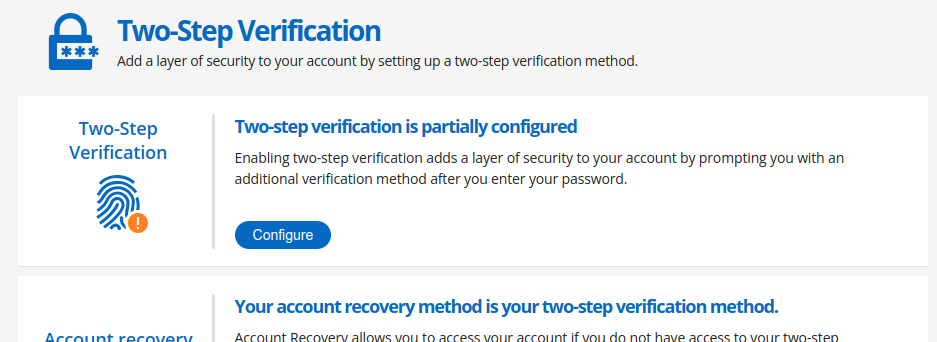
Not very reassuring, but there is only 1 thing I can do right now: 'Configure'.
(Logging out, and back in at this stage: verification code is sent to my account recovery e-mail address.)
Using the 'Configure' option, I can continue to set up TOTP. But ...
I use the 'copy' button to copy the 'Key'
I paste the key in the 'Key' field in RDM
I save the changes
I try a generated OTP sequence => ERROR (something about the code not being valid)
It turns out that the 'Key' has spaces in it. When I remove those spaces, the generated codes work.
how to use TOTP with RDM for forums.devolutions.net ?
well, well
There are two different pages for 'Two-Step Verification':
Page 1:
go to the 'Manage Account' page
click 'Sign-In & Security' in the left menu
click 'Manage' in the 'Two-Step Verification' panel
you get a page asking you to download the 'Devolutions Workspace' app
the 'Two-Step Verification' button in the left menu is highlighted
Alternative page:
go to the 'Manage Account' page
click the 'Two-Step Verification' link in the left menu
now I get to see a page that looks more like the one you were referring to, but it is not (see below)
the same 'Two-Step Verification' button in the left menu is highlighted
But here too, I can not choose 'Authenticator App':
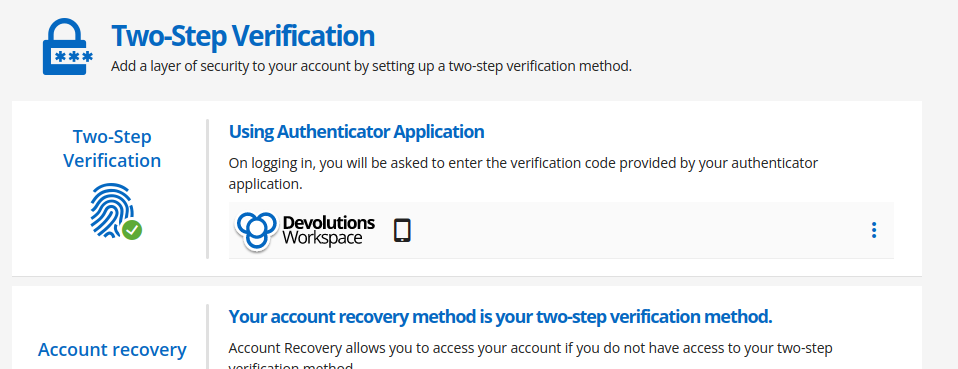
The 'hamburger menu' shows:
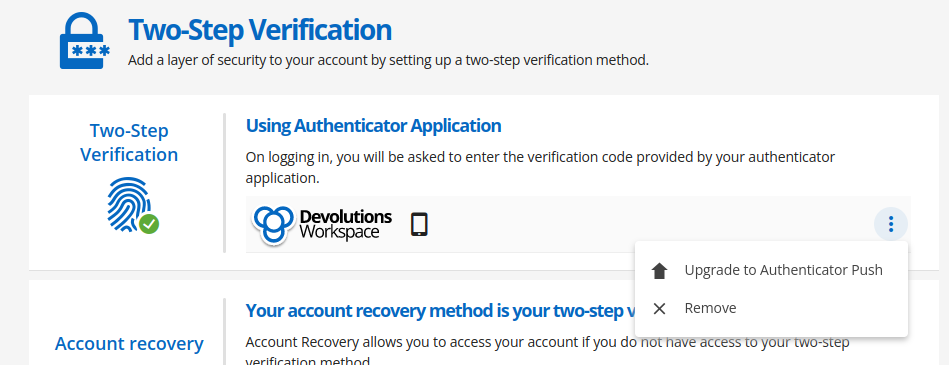
Trying the 'Remove' option...
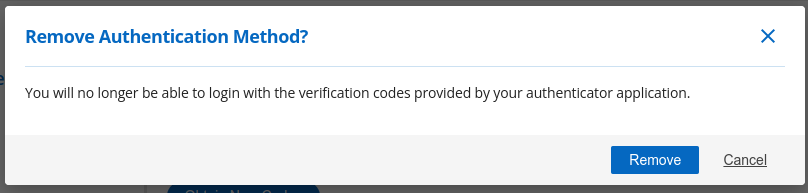
I hope it only means I am disabling 2FA, and not that I will no longer be able to login.
Committing this post, before clicking 'Remove'.
Fingers crossed...
how to use TOTP with RDM for forums.devolutions.net ?
I would, but I can't.
When I click the 'Two-Step Verification' link in the 'Sign-In & Security' section of my Profile management page, I get:
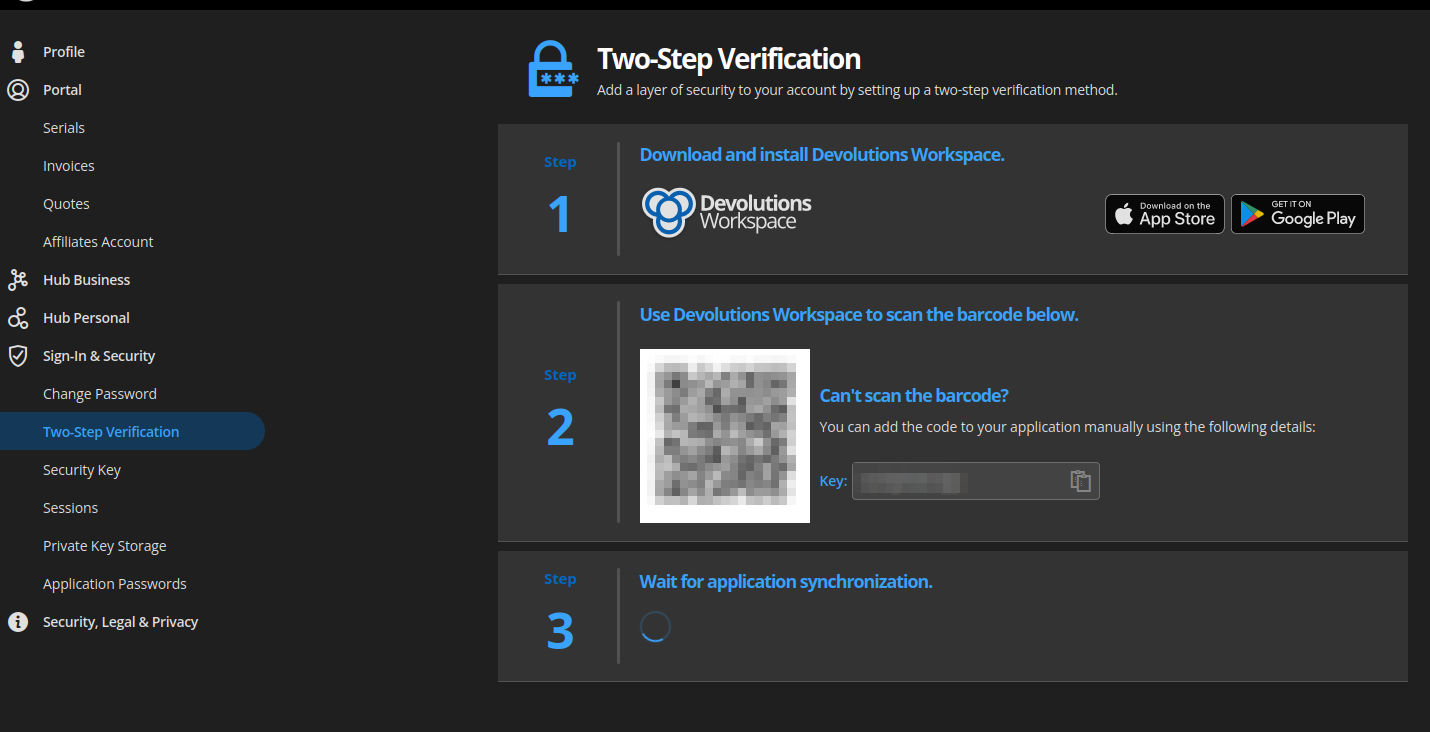
Using Brave Browser Version 1.49.132 Chromium: 111.0.5563.147, or Firefox 102.10.0esr (64-bit), on Ubuntu 22.04.
how to use TOTP with RDM for forums.devolutions.net ?
My entry for forum.devolutions.net:
type: Website (legacy)
Website:
Credentials: Linked (User Vault)
On my account, I have OTP set up, using Authy.
I want RDM to handle the OTP part, so I can remove the key from Authy.
I'm logged in on this forum
click on my avatar at the top right corner
click 'Manage Account'
click 'Sign-In & Security'
click 'Manage' next to 'Two-Step Verification'
I already have Authy installed, I don't need/want the 'Devolutions Workspace' app
I copy the key (next to the barcode) into the OTP 'Key' field in RDM (Source: 'Custom')
the 'Wait for application synchronization.' times out
How can I use TOTP from within RDM on this very forum without installing yet another app?
RDM crashes after 2FA key entry (Ubuntu 22.04)
most probably, the CIS playbook is based on https://github.com/florianutz/ubuntu2004_cis
RDM crashes after 2FA key entry (Ubuntu 22.04)
update: because of stability issues with my display, I have been switching back and forth between the xorg and wayland X-server, and I've been trying different video card drivers (nouveau, nvidia)
I did not even realize I was still on Wayland. Switched back to Xorg this morning. And, surprise: RDM plays nice :-) (still very slow, but that's another issue).
So, this issue's title should be 'RDM crashes at 2FA dialog when run on Wayland'.
RDM crashes after 2FA key entry (Ubuntu 22.04)
video, see attachment
RDM crashes after 2FA key entry (Ubuntu 22.04)
$ remotedesktopmanager

(RemoteDesktopManager:29378): Gtk-CRITICAL **: 10:24:59.006: gtk_widget_grab_default: assertion 'gtk_widget_get_can_default (widget)' failed

(RemoteDesktopManager:29378): GLib-GObject-CRITICAL **: 10:25:00.893: g_object_remove_toggle_ref: assertion 'G_IS_OBJECT (object)' failed
Segmentation fault (core dumped)
Scenario:
RDM starts up
shows me a dialog 'You need to configure a 2-factor authentication to get access to this data source'
click 'Cancel'
same dialog pops up again, but RDM crashes before I get the chance to click the 'Cancel' button again
Before this issue, I have seen Gtk and Glib-GObject messages in the past. Not sure if those were the same, however.
EDIT:
the first message (gtk) appears on startup
the second message (glib) appears at the moment I click the 'Cancel' button in the mentioned dialog
RDM crashes after 2FA key entry (Ubuntu 22.04)
> I am currently investigating your issue and I would like to know if you
> could share with me your logs and/or the core dump ?
Where can I find the logs?
> Also, are you using the flatpack version or the .deb version of RDM ?
I am using the .deb version.
RDM crashes after 2FA key entry (Ubuntu 22.04)
My laptop has been setup to be compliant with CIS specifications (to some degree). That might have an impact on file/folder access, for example. I have sent a DM with an strace trace of accessed files. Not sure if it can help.
RDM crashes after 2FA key entry (Ubuntu 22.04)
The RDM application starts up without issue, and asks for the 2FA key.
The key is accepted, data is being loaded, then crashes with a core dump.
But the data fetching is not the cause: when I provide a wrong 2FA key, the application also crashes.
Then, on startup, it requests to (re-)configure 2FA
-> 'Configure'
-> 'Type None' -> click Change
-> choose TOTP -> click Apply
-> scan code
-> provide correct key -> click Validate
-> accepted -> click Close
-> asks for key -> provide invalid code -> click OK
-> "Invalid Authenticator code" -> click OK
-> "Invalid username or password, please verify your credentials" -> click OK
-> briefly shows the popup where it asks for the 2FA key again
crash with core dump
running on Ubuntu 22.04 LTS, kernel 5.19.0-32-generic
data source: SQL Server
SSH terminal input broken when using Alt-Tab
Feedback: issue no longer appears (running 2022.2.1.5)
excessive DNS requests
Feedback: I haven't seen any DNS issues anymore since the beta version you have sent me.
excessive DNS requests
Last week, we upgraded to version 2022.2.0.6.
I'm working from home today, and suddenly, DNS queries no longer get resolved.
On my home network, I run a PiHole appliance, and it shows me that my workstation has been rate-limited.
A close look at the numbers:

Some interesting detail:

I have had DNS issues in the past, and only on my workstation, but it never occurred to me to check my PiHole server. I've blamed the VPN, and the network setup at the office.
But it looks like RDM does not behave nicely.
(As I have had DNS resolve issues in the past, chances are that it is not a regression in the latest version.)
External RDP session does not open in selected monitor
Version 2022.2.0.3 seems to behave as advertised.
Keep up the good work!