
ThePelado
Auto-type typing the wrong credentials when using the "Home" tab button
I've just installed RDM 2026.3.18, it seems to have been fixed.
RDM v2026.3.5 - Open Tabs Moving and Undocking on single mouse click
I have the problem with the accidental undocking as well. I'm currently on version 2026.3.16 and use it in a VDI environment with Windows 11.
@bgoedhart
Hello,
Thank you for the details.
Would you be able to reproduce it and send us a video of the issue occuring?
You can send it to my DMs.
Let me know if you also can't reproduce when screen recording.
Best regards,
@Alexis Beauparlant
Same here, version 2026.3.16, Windows 11 VDI. It's hard to reproduce because it's erratic, at some times it works perfectly and others the click sticks when switching tabs. I've seen no real difference wither the tab is an RDP session, a webpage or a SSH session.
Besides the recording (I'll try to get it) is there any log or anything else I can provide?
Auto-type typing the wrong credentials when using the "Home" tab button
May be related to https://forum.devolutions.net/topics/56972/rdm-type-functions-type-password-type-clipboard-not-working?message=246918#246918
Since the update to 2026.3.15 (running 2026.3.16 now) the auto-type function on the Home ribbon chooses the wrong credentials for the session in focus:

If I right-click on the session's tab and use the auto-typing function there, it uses the correct credentials.
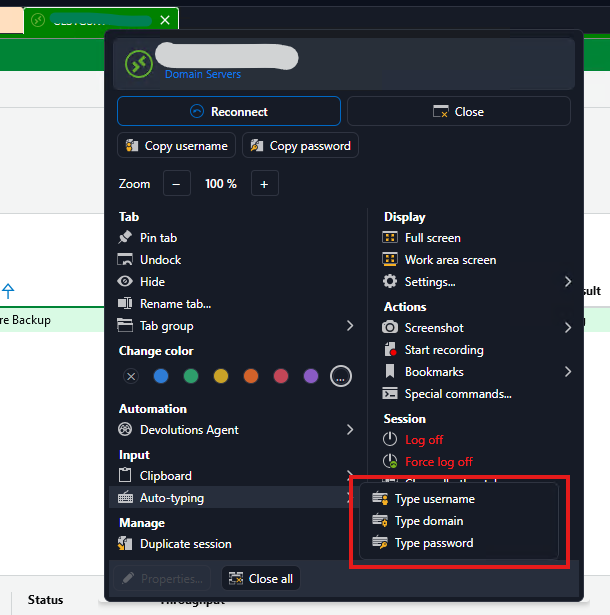
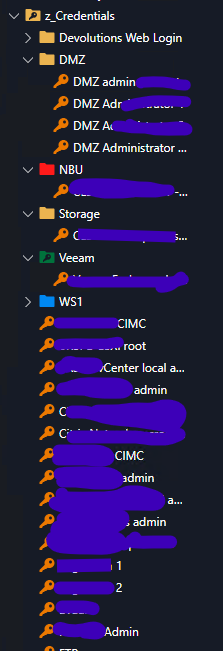
As a note, I keep my credentials as entries on the Navigation tree and the session has the credentials either linked or inherited. The "wrong credentials" RDM types is another of those saved.
This used to work flawlessly up until around the 2026.3.1x update.
Alternate Credentials
The creds are saved in the following format ./localaccountexample.
Hi Iain,
What happens if you store the credential as ".\localaccountexample" (using backslash, not forward slash)? This is the format Windows takes to determine local accounts.
It may be a silly suggestion, but out of curiosity... :-)
Automatically Bypass Logon Message Screen
Fiddling with it I saw that the Accept button in the banner is not in focus when the session is first established. I ended up changing the macro to {TAB}{ENTER} to make it work.