
simten
Database Optimization dbo.UserInfoHistory
Hi Stefane,
i can confirm the fixed worked for us. I installed the fix 2 or 3 weeks ago and the db didn't grow as much as before
thanks
simon
Database Optimization dbo.UserInfoHistory
Hi @Stéfane Lavergne
I saw the Version 2026.1.10.0 is now available, can you confirm that this version fixes the db growing issue?
Database Optimization dbo.UserInfoHistory
thank you Stefane for you support. I think I prefer to wait for the official release of the v2026.1 to solve this issue.Until then, I will continue to do the cleanup manually.
Database Optimization dbo.UserInfoHistory
Hi Stefane,
in the last 3 months i had to manually delete the [UserInfoHistory] and shrink the db cause the db growed over the 10gb limit. Clean up manager didn't work for us.
Database Optimization dbo.UserInfoHistory
Thanks Stefane, I already shrinked the db after troncating the history. But I have a reminder in some months and i will use the clean up manager the next time
Database Optimization dbo.UserInfoHistory
Hi,
We are also getting this error once a year. I solved it deleting the table content with
DELETE FROM [RDM].[dbo].[UserInfoHistory] where ModifiedUserName like '%'
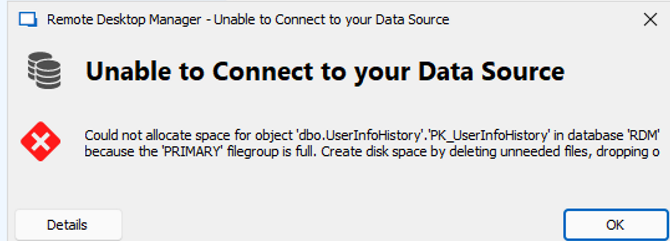
Is there maybe in the latest version we installed last week an option to limit the table size or another workaround to avoid this?
The possibility to use the license auto assign function by AD group.
Hi, we have the same feature request, do you maybe have an update for this request?
deploy datasource config file for terminalserver users
Hi Garbiel,
yes it seams to work. Thanks a lot
Simon
deploy datasource config file for terminalserver users
Hi Gabriel,
thanks for the response. I did the steps you mentioned. I saved the export as default.cfg and saved it in the Installation Folder. I also set the gpo setting ForceDefaultConfigurationLoading, but when i new user logged on the Terminalserver and started the RDM he got a an empty db loaded and not connected to the sql db.
Where should the default.cfg be copied in the profile so i can try to copy it with a gpo setting or logonscript, but i can't find it neither in my userprofile folder.
Can i maybe deploy the %AppData%\Devolutions\RemoteDesktopManager\RemoteDesktopManager.cfg i found in my profile to the user profiles?
Thanks
Simon
deploy datasource config file for terminalserver users
Hi
we are migratig our RDM to a new domain. I already prepared the db on the destination domain and changed the username with a script the support gave me. I configured the RDM with my user and exported the configuration to a default.cfg and copied it in the installationfolder.
Should a user that logs on on the terminalserver get the datasource connection from this file?
Some users loged on but have a trial version without Servers and vault.
what is the best way to deploy the datasource connection for all users, i have about 100 users that need to access rdm
thanks
Simon
change CredSSP setting for all RDP sessions
Hi Etienne,
sure it can be handeled also outside of RDM, but RDM is one of our maintools that we are using for our daily work, so it would be perfect to implement also this.
RDM has implemented a lot of features that are normally done outside of a remote desktop tool so this would be another very usefull feature.
best regards,
Simon
change CredSSP setting for all RDP sessions
Thanks Etienne. It worked but no i'm getting on some servers this error. so i had to rollback.
I need to find another solution to get the admins the possiblity to change their expired password over RDP. I can't change the security setting HKEY_LOCAL_MACHINE\SYSTEM\CurrentControlSet\Control\TerminalServer\WinStations\RDP-Tcp on all servers.
Do you have any idea?
Maybe with a customized script integrated in the context menu of RDM, where i have to enter only a new password. Do you think that could be possible?
Simon
change CredSSP setting for all RDP sessions
Hi,
i need to configure on all RDP session (we have mor then 1000) this two settings
enable CredSSP support = false
Activate NLA (SSO) = false
to give our admins the possibility to change a expired password.
Where can i change the config to set this 2 settings for all connections ?
thanks
simon